
1. Introduction
This manual provides essential information for the safe and effective operation, assembly, and maintenance of your DEWALT DCST972B 60V MAX* Attachment Capable String Trimmer. Please read this manual thoroughly before using the product and retain it for future reference.
The DEWALT DCST972B String Trimmer offers versatility and power for various trimming tasks. Its high-efficiency brushless motor is designed to optimize runtime and product longevity, handling tough overgrowth. The universal attachment capability allows for conversion into other outdoor tools by connecting compatible add-ons.

Figure 1: DEWALT DCST972B 60V MAX* Attachment Capable String Trimmer.
2. Safety Information
WARNING: This product can produce flying debris and sharp cut hazards. Always wear protective safety gear, including safety glasses and sturdy footwear, when operating. Ensure proper handling and storage when not in use.
- Always wear eye protection that complies with ANSI Z87.1.
- Wear heavy-duty gloves, long pants, and sturdy footwear.
- Keep bystanders, children, and pets at a safe distance (at least 50 feet/15 meters) from the operating area.
- Inspect the work area for objects that could be thrown or entangled in the cutting line.
- Do not operate the trimmer in wet conditions or rain.
- Ensure the battery is removed before performing any adjustments, cleaning, or maintenance.
3. Components and Features
Familiarize yourself with the main components and features of your string trimmer:

Figure 2: Key features of the DEWALT DCST972B String Trimmer, including the 2-speed variable speed trigger, universal attachment capability, Quick-Load Spool, high-efficiency brushless motor, and adjustable swath.
- High-Efficiency Brushless Motor: Maximizes runtime and product life.
- 2-Speed Variable Speed Trigger: Allows for optimization of power and runtime.
- Universal Attachment Capability: Enables connection of additional outdoor tool attachments.
- Quick-Load Spool: Designed for convenient and efficient line re-spooling.
- Adjustable Swath: Offers 15-inch or 17-inch cutting width with 0.080-inch dual line (compatible with 0.095-inch line).
4. Setup and Assembly
The DEWALT DCST972B String Trimmer requires some assembly before first use. Follow these steps carefully:
- Unpack Components: Carefully remove all parts from the packaging. Ensure all components listed in the packing list are present.
- Assemble Shaft: Connect the upper and lower shaft sections. Ensure the locking mechanism engages securely. Refer to the markings on the shaft for proper alignment.
- Attach Guard: Secure the debris guard to the trimmer head using the provided fasteners. Ensure it is firmly attached to prevent debris from being thrown towards the operator.
- Install Auxiliary Handle: Position the auxiliary handle on the shaft for comfortable operation and tighten it securely.
- Battery Installation: Insert a fully charged DEWALT 60V MAX* battery into the battery port until it clicks into place. Ensure the battery is seated firmly.
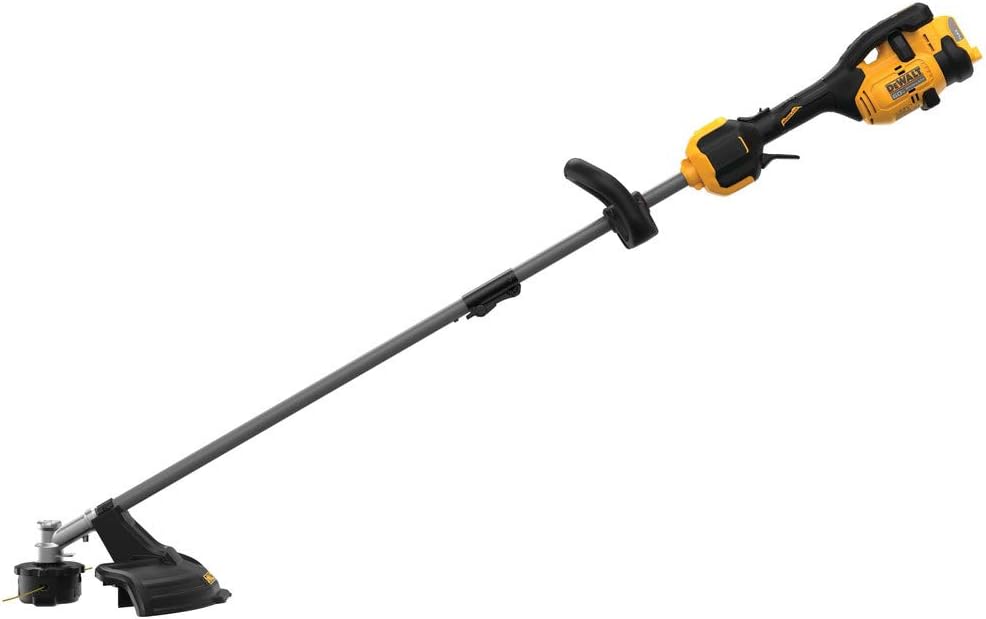
Figure 3: An assembled view of the DEWALT DCST972B String Trimmer, illustrating the general configuration after initial setup.
5. Operating Instructions
Before operating, ensure you have read and understood all safety warnings.
5.1 Starting and Stopping
- To Start: Press the trigger lock-off button, then squeeze the variable speed trigger.
- To Stop: Release the variable speed trigger.
5.2 Speed Control
The trimmer features a 2-speed variable speed trigger. Use the HI/LO speed selector switch to choose between high and low speed settings. The variable speed trigger allows for precise control over the cutting speed within the selected range.

Figure 4: Close-up view of the trimmer's handle, showing the variable speed trigger and the HI/LO speed selector switch for optimizing power and runtime.
5.3 Trimming Techniques
- Sweeping Motion: Use a side-to-side sweeping motion to cut grass and weeds.
- Edging: For edging, tilt the trimmer head to a 90-degree angle and walk along the edge of the pavement.
- Cutting Swath: The trimmer offers an adjustable 15-inch or 17-inch cutting swath. Adjust as needed for your task.

Figure 5: The DEWALT DCST972B String Trimmer ready for use, demonstrating its ergonomic design for effective trimming.
5.4 Line Feeding (Quick-Load Spool)
The Quick-Load Spool allows for easy line advancement. To advance the line, tap the trimmer head gently on the ground while the trimmer is running at full speed. If the line does not advance, the spool may need to be re-spooled or replaced.
5.5 Universal Attachment Capability
This trimmer is designed to accept various universal attachments. To attach an accessory, align the attachment shaft with the trimmer's powerhead and secure it according to the attachment's instructions. Always ensure the battery is removed before changing attachments.

Figure 6: Examples of universal attachments compatible with the DEWALT DCST972B, showcasing its versatility.
6. Maintenance
Regular maintenance ensures optimal performance and extends the life of your trimmer. Always remove the battery before performing any maintenance.
6.1 Cleaning
- Clean the trimmer after each use.
- Remove grass, dirt, and debris from the motor housing, guard, and trimmer head using a dry cloth or soft brush.
- Do not use water, solvents, or abrasive cleaners.
6.2 Line Replacement
The Quick-Load Spool simplifies line replacement. Refer to the instructions provided with your replacement line or consult the DEWALT website for detailed steps on how to re-spool the trimmer head.
6.3 Storage
- Store the trimmer in a dry, secure location out of reach of children.
- Remove the battery before storing for extended periods.
- Protect the trimmer from direct sunlight and extreme temperatures.
7. Troubleshooting
This section addresses common issues you might encounter with your string trimmer.
| Problem | Possible Cause | Solution |
|---|---|---|
| Trimmer does not start | Battery not charged or improperly installed; Trigger lock-off not engaged. | Ensure battery is fully charged and properly seated. Press trigger lock-off before squeezing trigger. |
| Cutting line does not advance | Line tangled or empty spool; Line fused together. | Tap trimmer head on ground while running. If unsuccessful, remove battery, open spool, untangle/replace line. |
| Reduced cutting performance | Dull or short cutting line; Heavy overgrowth. | Advance cutting line. Use a sweeping motion for heavy growth. Ensure line is correct diameter. |
| Excessive vibration | Damaged cutting line or head; Loose components. | Inspect cutting line and head for damage. Ensure all fasteners are tight. |
If you encounter issues not listed here or if solutions do not resolve the problem, contact DEWALT customer support.
8. Specifications
Technical specifications for the DEWALT DCST972B String Trimmer:
| Specification | Value |
|---|---|
| Brand | DEWALT |
| Model Name | DCST972B |
| Power Source | Battery Powered (60V MAX*) |
| Item Weight | 9.6 Pounds |
| Cutting Width | 15 / 17 Inches (Adjustable) |
| Product Dimensions (LxW) | 40"L x 10"W |
| Speed | Up to 5800 RPM |
| Assembly Required | Yes |
| UPC | 885911716246 |
| Material | Blend |
| Manufacturer | Stanley Black and Decker |
| Included Components | DW 60V STRING TRIMMER ATTCH CAPABLE BARE (Battery and charger not included) |
*Maximum initial battery voltage (measured without a workload) is 60 volts. Nominal voltage is 54 volts.
9. Warranty and Support
For warranty information, product registration, or technical support, please visit the official DEWALT website or contact DEWALT customer service directly. Keep your purchase receipt as proof of purchase.
DEWALT Official Website: www.dewalt.com


