
1. Introduction
Thank you for choosing the SCS Sentinel HCN0016 Remote-Controlled Sockets Kit. This product is designed to provide convenient remote control over your electrical appliances, helping you save energy by easily cutting power to devices and preventing standby consumption. This manual provides essential information for the safe and efficient use of your new remote-controlled sockets.
The kit includes:
- 3 x Remote-Controlled Sockets
- 1 x Remote Control
- 1 x LR23-A-12V Battery (for remote control)
- 1 x User Manual (this document)

This image displays the complete SCS Sentinel HCN0016 kit, featuring three white remote-controlled power sockets, each numbered 1, 2, and 3, alongside a white remote control with corresponding numbered buttons and ON/OFF controls.
2. Safety Warnings
WARNING: This product is not a toy. Keep out of reach of children.
- For indoor use only. Do not expose to moisture or extreme temperatures.
- Do not exceed the maximum load capacity of 10 A or 2300W. Overloading can cause damage to the device and pose a fire hazard.
- Do not disassemble or attempt to repair the device. Refer all servicing to qualified personnel.
- Ensure the sockets are properly inserted into wall outlets.
- Do not connect multiple power strips or extension cords in series to the remote-controlled sockets.
3. Product Overview
The SCS Sentinel HCN0016 kit consists of three compact remote-controlled sockets and a single remote control. Each socket is designed to be plugged into a standard wall outlet, allowing you to connect an electrical appliance to it. The remote control enables you to switch these appliances ON or OFF wirelessly.

A close-up view of one of the SCS Sentinel remote-controlled sockets, labeled '3', securely plugged into a standard wall outlet, demonstrating its compact design.
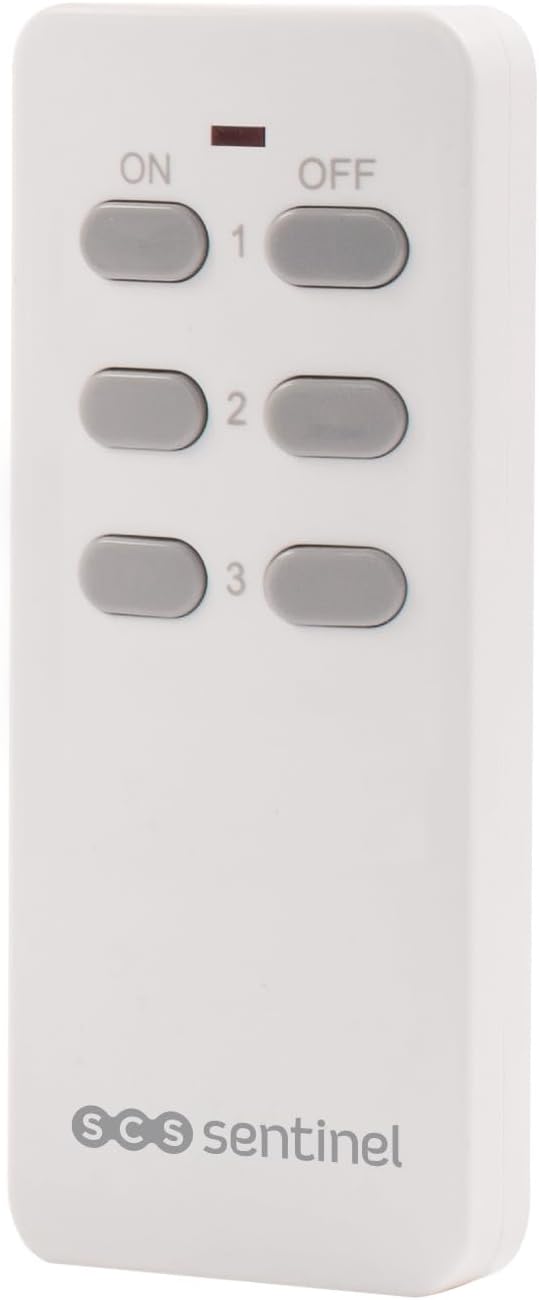
A detailed view of the white SCS Sentinel remote control, highlighting its 'ON' and 'OFF' buttons at the top, and three numbered buttons (1, 2, 3) for controlling individual sockets.
4. Specifications
| Feature | Specification |
|---|---|
| Model Name | Controlpower |
| Manufacturer Reference | HCN0016 |
| Product Dimensions (L x W x H) | 7.8 x 5.5 x 5.5 cm |
| Weight | 440 grams |
| Main Material | Plastic |
| Color | White |
| Socket Power Supply | 220-240 V ~ 50 Hz |
| Maximum Load Capacity | 10 A or 2300W |
| Remote Control Power Supply | 1 x LR23-A-12V Battery (included) |
| Frequency | 433.92 MHz |
| Maximum Emission Power | <1mW |
| Range (Open Field) | Up to 30 meters |
| Operating Mode | Automatic |
| Special Feature | Energy Saving |
| Usage Environment | Indoor use only |
5. Setup
The SCS Sentinel HCN0016 kit is designed for simple, ready-to-use installation and requires no programming. The sockets and remote control are pre-paired from the factory.
- Insert Battery into Remote Control: The LR23-A-12V battery is supplied with the kit. Open the battery compartment on the back of the remote control and insert the battery, observing the correct polarity (+/-).
- Plug in the Sockets: Plug each remote-controlled socket into a standard wall outlet. Ensure the wall outlet is easily accessible and not obstructed.
- Connect Appliances: Plug the electrical appliances you wish to control into the remote-controlled sockets. Ensure the total power consumption of the connected appliance does not exceed 2300W (10A).

The product packaging for the SCS Sentinel ControlPower 2300W x3 kit, showing the three sockets, remote control, and battery neatly arranged within the blister pack, along with product information.
6. Operating Instructions
Once the sockets are plugged in and appliances are connected, you can control them using the remote control.
- Identify Socket Numbers: Each remote-controlled socket is typically numbered (1, 2, 3). Match these numbers to the corresponding buttons on your remote control.
- Turn ON an Appliance: Press the 'ON' button on the remote control, followed by the numbered button (1, 2, or 3) corresponding to the socket you wish to activate. The appliance connected to that socket should turn on.
- Turn OFF an Appliance: Press the 'OFF' button on the remote control, followed by the numbered button (1, 2, or 3) corresponding to the socket you wish to deactivate. The appliance connected to that socket should turn off.
- Energy Saving: By turning off appliances directly from the remote control, you cut their power supply completely, preventing them from drawing power in standby mode. This contributes to energy savings.
- Range: The remote control has an open-field range of up to 30 meters. Obstacles such as walls or furniture may reduce this range.

A lifestyle image showing a person working on a laptop, with an illustration of the SCS Sentinel socket and the remote control in the foreground, suggesting ease of use in a home or office environment.
7. Maintenance
The SCS Sentinel remote-controlled sockets require minimal maintenance.
- Cleaning: Clean the devices with a soft, dry cloth. Do not use abrasive cleaners or solvents. Ensure the devices are unplugged before cleaning.
- Battery Replacement: If the remote control's range decreases or it stops responding, the LR23-A-12V battery may need to be replaced. Follow the instructions in Section 5.1 to replace the battery. Dispose of old batteries responsibly according to local regulations.
- Storage: If storing the devices for an extended period, unplug the sockets from the wall and remove the battery from the remote control. Store in a cool, dry place.
8. Troubleshooting
If you encounter issues with your SCS Sentinel remote-controlled sockets, try the following troubleshooting steps:
- Socket Not Responding:
- Ensure the socket is firmly plugged into the wall outlet and the wall outlet has power.
- Check if the appliance connected to the socket is properly plugged in and functioning correctly when plugged directly into a wall outlet.
- Verify the remote control battery is not depleted. Replace if necessary.
- Ensure you are within the 30-meter operating range and there are no significant obstacles (e.g., thick walls) between the remote and the socket.
- Remote Control Not Working:
- Check and replace the LR23-A-12V battery.
- Ensure there are no obstructions blocking the signal path from the remote control to the sockets.
- Overload Protection: If an appliance connected to the socket suddenly turns off and cannot be turned back on, it might be due to an overload. Unplug the appliance, reduce the load, and try again. Do not exceed 2300W.
If these steps do not resolve the issue, please contact SCS Sentinel technical support for further assistance.
9. Warranty and Support
SCS Sentinel guarantees the reliability of its innovative technical products, which are easy to install and use, combining comfort and safety. Your satisfaction is our priority.
Our technical assistance team, based in France, is available to help you with the installation and use of your product. Our technicians will provide informed and personalized advice.
For technical support or warranty inquiries, please refer to the contact information provided on the product packaging or the official SCS Sentinel website. Keep your proof of purchase for warranty claims.