Introduction
This manual provides essential information for setting up, operating, maintaining, and troubleshooting your ASUS ZenBook Duo 14 UX482 laptop. Please read this guide thoroughly to ensure proper use and to maximize the performance and longevity of your device.
What's in the Box
Upon unboxing your ASUS ZenBook Duo 14 UX482, verify that all the following items are included:
- ASUS ZenBook Duo 14 UX482EA-DS71T Laptop
- Laptop Sleeve
- Laptop Stand
- Stylus
- Power Adapter & Cord
- User Guide (this document)
- Warranty Card

Image: Front view of the ASUS ZenBook Duo 14 UX482 laptop, showcasing its dual-screen design with the main 14-inch display and the secondary ScreenPad Plus.
Setup
1. Initial Power-On
- Connect the power adapter to the laptop's power port and then to a wall outlet.
- Open the laptop lid. The ScreenPad Plus will automatically tilt for ergonomic viewing.
- Press the power button, typically located on the keyboard deck, to turn on the laptop.
- Follow the on-screen instructions to complete the Windows 10 Home setup process.

Image: Side view of the ASUS ZenBook Duo 14 UX482, illustrating the tilted ScreenPad Plus for improved ergonomics and airflow.
2. Connecting Peripherals
Your ZenBook Duo 14 UX482 features various ports for connecting external devices:
- USB 3.0 Port: For standard USB devices.
- USB-C (Thunderbolt) Ports: For high-speed data transfer, display output, and charging.
- HDMI Port: For connecting to external displays or projectors.
- Audio Jack: For headphones or external speakers.

Image: Left side of the ASUS ZenBook Duo 14 UX482, displaying the various input/output ports available for connectivity.
Operating Your ZenBook Duo 14
Main Display and ScreenPad Plus
The ZenBook Duo 14 features a 14-inch Full HD NanoEdge touchscreen as its main display and a 12.6-inch tilting matte touchscreen, the ScreenPad Plus, as a secondary display. These two screens work together to enhance multitasking and productivity.
- Extending Display: Drag windows or applications between the main display and ScreenPad Plus.
- App Switcher: Use the built-in ScreenPad Plus controls to quickly move applications between screens.
- Task Group: Create groups of applications to launch simultaneously across both displays for specific workflows.
- Handwriting: Utilize the ScreenPad Plus for intuitive text input with the included stylus.
- Quick Key: Automate complex keyboard sequences with a single tap on the ScreenPad Plus.
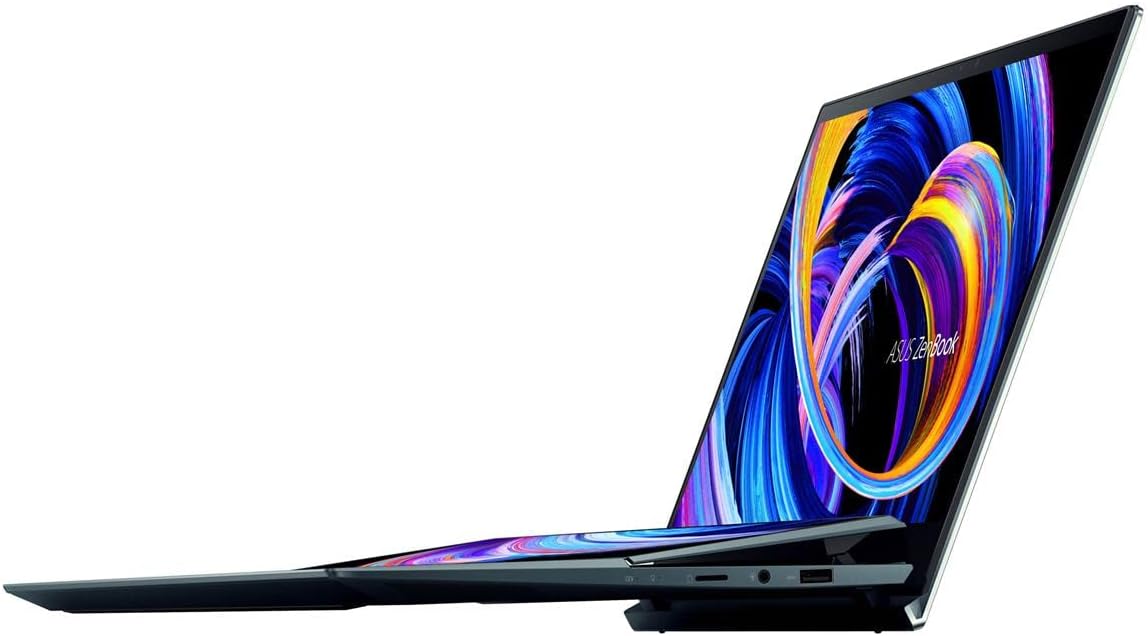
Image: The ASUS ZenBook Duo 14 UX482 with its ScreenPad Plus displaying multiple applications, demonstrating its multitasking capabilities.
Keyboard and Trackpad
The laptop features a full-size backlit keyboard and a precision trackpad located on the right side of the keyboard deck. The unique placement of the trackpad is designed to accommodate the ScreenPad Plus. An included stylus can be used for precise input on both touchscreens.
Intel Evo Platform Features
Your ZenBook Duo 14 is built on the Intel Evo Platform, offering a balance of performance, responsiveness, and battery life. Key benefits include:
- Fast wake from sleep.
- Long-lasting battery life (up to 10.5 hours average).
- Responsive performance with the 11th Gen Intel Core i7 processor and Intel Iris Xe graphics.
- Advanced connectivity with 802.11ax (Wi-Fi 6) and Bluetooth.
Maintenance
Cleaning and Care
- Use a soft, lint-free cloth to clean the screens and chassis. Avoid abrasive materials.
- For stubborn smudges, lightly dampen the cloth with water or a screen-safe cleaning solution.
- Do not spray cleaners directly onto the laptop.
- Keep the laptop away from extreme temperatures, direct sunlight, and liquids.
Battery Management
- To prolong battery life, avoid fully discharging the battery frequently.
- Store the laptop in a cool, dry place if not used for extended periods.
- Use only the original ASUS power adapter.
Software Updates
Regularly update your Windows operating system and ASUS drivers to ensure optimal performance, security, and compatibility. Windows updates can be managed through the Windows Settings, and ASUS updates can be found via the MyASUS application or the official ASUS support website.
Troubleshooting
This section addresses common issues you might encounter. For more complex problems, refer to the ASUS support website or contact customer service.
- Laptop does not power on: Ensure the power adapter is securely connected and the battery has sufficient charge. Try a different power outlet.
- ScreenPad Plus not responding: Check if the ScreenPad Plus is enabled in the ASUS ScreenXpert software. Restart the laptop.
- Trackpad issues: If the trackpad is unresponsive, ensure drivers are up to date. A system restart can often resolve temporary glitches.
- External display not detected: Verify the cable connection (HDMI or USB-C). Ensure the external display is powered on and set to the correct input source. Use Windows display settings to detect and configure the display.
- Slow performance: Close unnecessary applications. Check for background processes consuming high resources. Ensure sufficient free storage space.
Specifications
| Feature | Detail |
|---|---|
| Model Name | ZenBook Duo UX482EA-DS71T |
| Main Display | 14-inch FHD (1920 x 1080) NanoEdge Touch Display |
| Secondary Display | 12.6-inch Tilting ScreenPad Plus Matte Touchscreen |
| Processor | Intel Core i7-1165G7 (Up to 4.7 GHz, 4 Cores) |
| Graphics | Intel Iris Xe Graphics (Integrated) |
| RAM | 8 GB LPDDR4X |
| Storage | 512 GB PCIe NVMe M.2 SSD |
| Operating System | Windows 10 Home (Free upgrade to Windows 11 when available) |
| Wireless Connectivity | 802.11ax (Wi-Fi 6), Bluetooth |
| Ports | 1x USB 3.0, USB-C (Thunderbolt), HDMI, Audio-out |
| Battery Life | Approximately 10.5 Hours (Average) |
| Weight | 3.46 pounds |
| Dimensions (LxWxH) | 12.76 x 8.74 x 0.68 inches |
| Color | Celestial Blue |
Warranty and Support
Warranty Information
Your ASUS ZenBook Duo 14 UX482 comes with a limited warranty. Please refer to the included Warranty Card for detailed terms and conditions, including coverage period and service procedures. Keep your proof of purchase for warranty claims.
Customer Support
For technical assistance, driver downloads, or further product information, please visit the official ASUS support website:
Important Legal Disclaimer
The Windows 11 upgrade will be delivered to qualifying devices late 2021 into 2022. Timing varies by device. Certain features require additional hardware (see aka.ms/windows11-spec).
Product Videos
No official seller-created product videos were found with specific URLs and metadata for embedding in this manual. Please refer to the manufacturer's official website for any available video resources.


