
1. Important Safety Instructions
Please read all instructions carefully before using the Steba KB E300 Digital Air Fry Oven. Retain this manual for future reference.
- Always ensure the appliance is placed on a stable, heat-resistant surface, away from walls and other appliances to allow for proper ventilation.
- Do not touch hot surfaces. Use oven mitts or gloves when handling hot components or food.
- To protect against electrical shock, do not immerse the cord, plug, or the appliance itself in water or other liquids.
- Close supervision is necessary when any appliance is used by or near children.
- Unplug from outlet when not in use and before cleaning. Allow to cool before putting on or taking off parts.
- Do not operate any appliance with a damaged cord or plug, or after the appliance malfunctions or has been damaged in any manner.
- Do not use attachments not recommended by the appliance manufacturer, as this may cause injuries.
- Do not place on or near a hot gas or electric burner, or in a heated oven.
- Extreme caution must be used when moving an appliance containing hot oil or other hot liquids.
- Do not use the appliance for other than intended household use.
- Oversized foods or metal utensils must not be inserted in a toaster oven as they may create a fire or risk of electric shock.
- A fire may occur if the oven is covered or touching flammable material, including curtains, draperies, walls, and the like, when in operation.
- Do not store any materials, other than manufacturer's recommended accessories, in this oven when not in use.
- Do not place any of the following materials in the oven: paper, cardboard, plastic, and the like.
- Do not cover the crumb tray or any part of the oven with metal foil. This will cause overheating of the oven.
2. Product Overview
The Steba KB E300 is a versatile digital air fry oven with a 30-liter capacity, designed for various cooking tasks including air frying, baking, broiling, and rotisserie. It features a digital display, intuitive controls, and efficient insulation.

Image 2.1: Front view of the Steba KB E300 Digital Air Fry Oven, showcasing its sleek black design and digital control panel.
Key Features:
- Digital display for clear settings and monitoring.
- 8 automatic programs, including Air Fry, Toast, Bake, Broil, Chicken, Pizza, Dehy (Dehydration), and Rotiss (Rotisserie).
- Efficient housing insulation for low surface temperature and energy savings.
- Rotisserie spit for cooking up to two chickens simultaneously.
- Non-stick interior for easy cleaning.
- Adjustable top and bottom heating elements.
- Includes a non-stick baking tray and a dehydration rack.
- Interior lighting for visibility during cooking.
- Approximately 30-liter interior capacity, suitable for large pizzas or round baking molds up to 30 cm in diameter.
Included Components:
- Steba KB E300 Digital Air Fry Oven unit
- Drip tray
- 3 adjustable racks
- Rotisserie spit
- Drying rack (dehydration rack)
- Non-stick baking tray

Image 2.2: The Steba KB E300 oven with its door open, revealing the spacious interior and multiple racks, including one with food items.
3. Setup and First Use
3.1 Unpacking
- Carefully remove the oven and all accessories from the packaging.
- Remove any protective films, stickers, or packaging materials from the oven and its accessories.
- Inspect the oven for any damage. Do not use if damaged.
3.2 Placement
- Place the oven on a flat, stable, and heat-resistant surface.
- Ensure there is adequate clearance (at least 10-15 cm) on all sides and above the oven for proper ventilation. Do not place it directly against a wall or under cabinets.
- Keep the oven away from flammable materials such as curtains, tablecloths, and paper.
- Ensure the power cord is not pinched or in contact with hot surfaces.
3.3 Initial Cleaning
- Wipe the exterior of the oven with a damp cloth.
- Wash all removable accessories (racks, trays, rotisserie spit) in warm, soapy water. Rinse thoroughly and dry completely.
- Wipe the interior of the oven with a damp cloth.
3.4 First Use (Burn-in)
Before cooking food, it is recommended to run the oven empty to burn off any manufacturing residues and odors.
- Plug the oven into a grounded electrical outlet.
- Set the oven to a high temperature (e.g., 200°C / 400°F) and run it for approximately 15-20 minutes.
- Ensure the area is well-ventilated during this process, as some smoke or odor may be emitted. This is normal and will dissipate.
- After the burn-in cycle, turn off the oven, unplug it, and allow it to cool completely before wiping the interior again.
4. Operating Instructions
The Steba KB E300 features a digital control panel with rotary knobs for easy operation.

Image 4.1: Detailed view of the digital control panel, showing the display, program selection buttons, and rotary knobs for temperature/time adjustment.
4.1 Control Panel Overview
- Digital Display: Shows time, temperature, and selected program.
- Program Selection Knob (PROG): Rotate to cycle through the 8 automatic programs.
- Temperature/Time Knob (TEMP/TIME): Rotate to adjust temperature or cooking time. Press to switch between temperature and time adjustment.
- Start/Pause Button: Initiates or pauses the cooking process.
- Function Buttons: May include buttons for fan (convection), rotisserie rotation, and interior light.
4.2 Using Automatic Programs
The oven offers 8 pre-set programs for common cooking tasks:
- Place food inside the oven on the appropriate rack or accessory.
- Turn the PROG knob to select one of the following programs:
- Air Fry: Ideal for crispy foods like fries and chicken wings.
- Toast: For toasting bread.
- Bake: For general baking, such as cakes and casseroles.
- Broil: For grilling and browning.
- Chicken: Optimized for cooking chicken.
- Pizza: For baking pizzas.
- Dehy (Dehydration): For drying fruits, vegetables, and herbs.
- Rotiss (Rotisserie): For roasting whole chickens or roasts.
- The display will show the default time and temperature for the selected program.
- If desired, use the TEMP/TIME knob to adjust the temperature or time. Press the knob to toggle between adjusting temperature and time.
- Press the Start/Pause button to begin cooking.
4.3 Manual Operation
For custom cooking, you can manually set the temperature and time:
- Place food inside the oven.
- Select a basic cooking mode (e.g., Bake or Broil) or simply adjust the settings directly.
- Use the TEMP/TIME knob to set the desired temperature.
- Press the TEMP/TIME knob to switch to time adjustment, then rotate to set the desired cooking duration.
- Press the Start/Pause button to begin cooking.
4.4 Specific Functions
4.4.1 Air Fry Function
The Air Fry function utilizes rapid hot air circulation for crispy results with less oil.
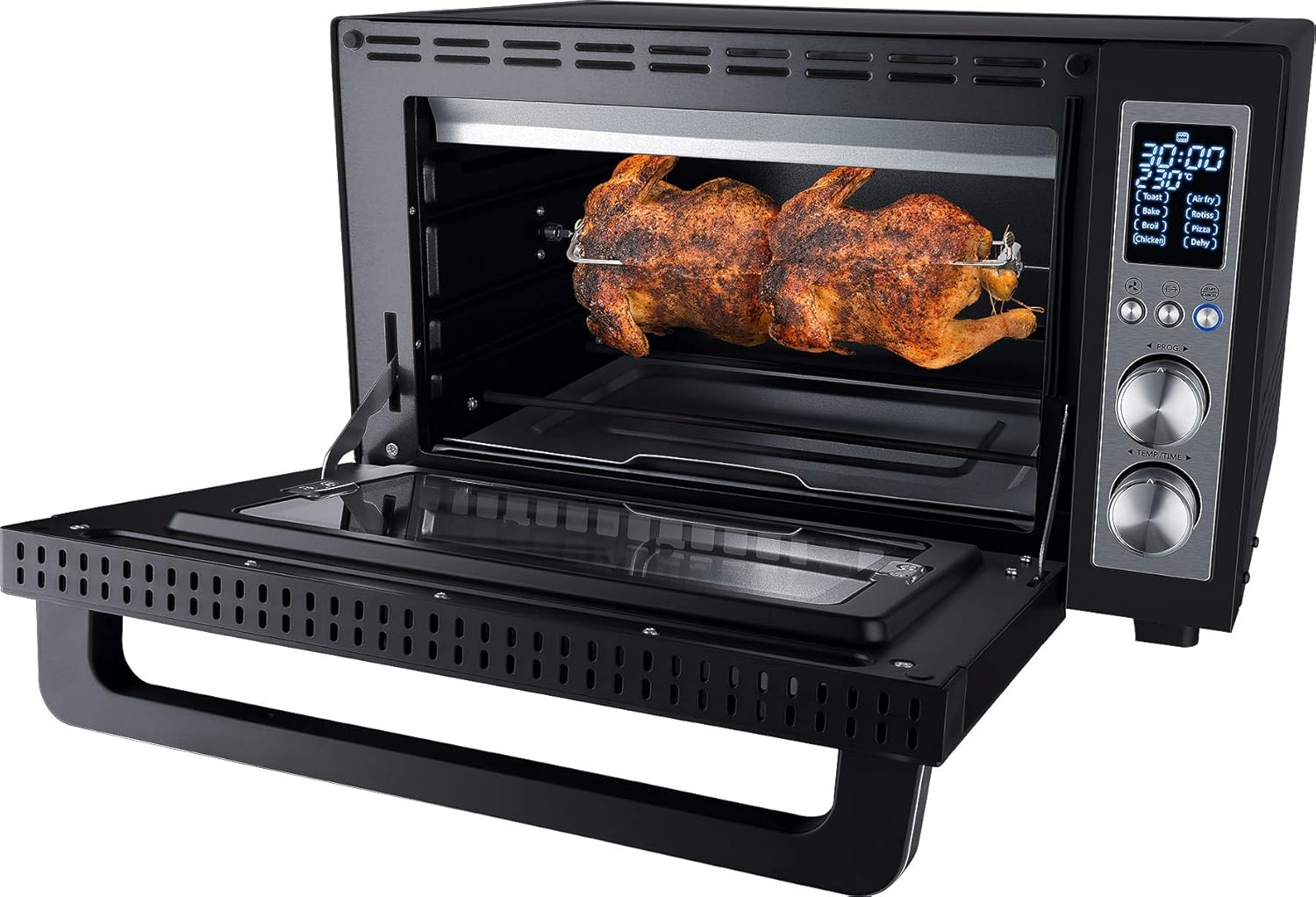
Image 4.2: An internal diagram showing the hot air circulation pattern within the oven, indicating how the Air Fry function works.
- Select the 'Air Fry' program.
- Use the mesh basket or a perforated tray for best air circulation.
- Preheat the oven if recommended by the recipe.
- Shake or flip food halfway through cooking for even crisping.
4.4.2 Rotisserie Function
The rotisserie spit allows for even roasting of whole poultry or roasts.

Image 4.3: A whole chicken being roasted on the rotisserie spit inside the Steba KB E300 oven.
- Securely attach the food (e.g., chicken) to the rotisserie spit.
- Insert the rotisserie spit into the designated slots inside the oven.
- Place the drip tray underneath to catch any drippings.
- Select the 'Rotiss' program or set desired temperature and time manually.
- Activate the rotisserie rotation function (if a dedicated button is available).
4.4.3 Dehydration Function
The dehydration rack and program allow for healthy drying of various foods.

Image 4.4: The oven interior showing multiple racks loaded with fruits and vegetables for dehydration.

Image 4.5: A close-up of the metal mesh dehydration rack, an accessory for the oven.
- Prepare food by slicing it thinly and evenly.
- Arrange food in a single layer on the dehydration rack, ensuring good airflow.
- Insert the rack into the oven.
- Select the 'Dehy' program and adjust time/temperature as needed for the specific food.
5. Maintenance and Cleaning
Regular cleaning ensures optimal performance and extends the life of your Steba KB E300 oven.
5.1 General Cleaning
- Always unplug the oven and allow it to cool completely before cleaning.
- Wipe the exterior with a soft, damp cloth. Do not use abrasive cleaners or scouring pads.
- The non-stick interior can be wiped with a damp cloth and mild detergent. For stubborn stains, a non-abrasive sponge can be used. Avoid metal scouring pads.
- Clean the glass door with a glass cleaner or a damp cloth.
5.2 Cleaning Accessories
- All removable accessories (racks, trays, rotisserie spit, drip tray) can be washed in warm, soapy water. Rinse thoroughly and dry completely before storing or reusing.
- The drip tray should be emptied and cleaned after each use to prevent grease buildup and potential fire hazards.
5.3 Storage
Ensure the oven is clean and dry before storing. Store in a cool, dry place.
6. Troubleshooting
If you encounter issues with your Steba KB E300 oven, refer to the following common problems and solutions.
| Problem | Possible Cause | Solution |
|---|---|---|
| Oven does not turn on. | Not plugged in; power outage; faulty outlet. | Ensure the oven is securely plugged into a working outlet. Check circuit breaker. |
| Food not cooking evenly. | Overcrowding; incorrect rack position; uneven food placement. | Avoid overcrowding the oven. Use the recommended rack position. Rotate food halfway through cooking. |
| Excessive smoke during cooking. | Food drippings on heating elements; grease buildup; high-fat foods. | Ensure the drip tray is in place and clean. Clean the oven interior regularly. Reduce cooking temperature for high-fat foods. |
| Digital display not working. | Power issue; internal malfunction. | Unplug the oven for a few minutes, then plug it back in. If the problem persists, contact customer support. |
| Rotisserie spit not rotating. | Food too heavy or unbalanced; motor issue. | Ensure food is balanced on the spit and not exceeding weight limits. Check if the rotisserie function is activated. |
If the problem persists after attempting these solutions, please contact Steba customer support.
7. Specifications
Detailed technical specifications for the Steba KB E300 Digital Air Fry Oven.

Image 7.1: Side view of the Steba KB E300 oven, illustrating its physical dimensions.
| Specification | Value |
|---|---|
| Brand | Steba |
| Model Number | KB E300 |
| Color | Black |
| Product Dimensions (L x W x H) | 53.5 x 43 x 31.5 cm |
| Capacity | 30 Liters |
| Power | 1500 Watts |
| Voltage | 230 Volts |
| Material | Stainless Steel |
| Item Weight | 11 Kilograms |
| Control Type | Button Control (Digital Display with Rotary Knobs) |
| Door Style | Side Opening |
| Country of Origin | China |
| Date First Available on Amazon.com.be | 27 September 2022 |
For more detailed energy efficiency information, please refer to the EPREL database: https://eprel.ec.europa.eu/qr/1926246
8. Warranty and Support
Steba products are manufactured with quality and reliability in mind. For warranty claims or technical support, please refer to the information below.
8.1 Warranty Information
- The general warranty period offered by the manufacturer is 3 years.
- Minimum guaranteed availability of spare parts: 7 years.
- Minimum guaranteed product support: 7 years.
Please retain your proof of purchase for any warranty claims.
8.2 Customer Support
For assistance, please contact the manufacturer directly:
- Manufacturer: Steba
- Contact Information: Refer to the official Steba website or your purchase documentation for the most up-to-date support details.


