
1. Product Overview
The Lumos Ultra Bike Helmet is designed to enhance cyclist visibility and safety with integrated LED lighting and turn signals. This helmet is CPSC-certified, ensuring it meets safety standards for bicycle helmets.
- TÜV-Certified 360° Visibility: Integrated front and rear LED lights provide comprehensive visibility for day and night riding.
- Smart Lighting System: Rear turn signals are activated via the included wireless Remote Lite. The helmet can also be paired with the Lumos Remote (sold separately) for automatic brake lights and synchronized flashing with other compatible Lumos lights.
- Versatile Design: Suitable for various cycling activities, including daily commutes, road cycling, and recreational rides.
- Rechargeable: Features a USB-C rechargeable lighting system with up to 10 hours of battery life, depending on the lighting mode and usage.
- CPSC-Certified Protection: Meets U.S. CPSC Safety Standard for Bicycle Helmets.

Image 1.1: Lumos Ultra Helmet showcasing 360° visibility with front and rear LED lights.
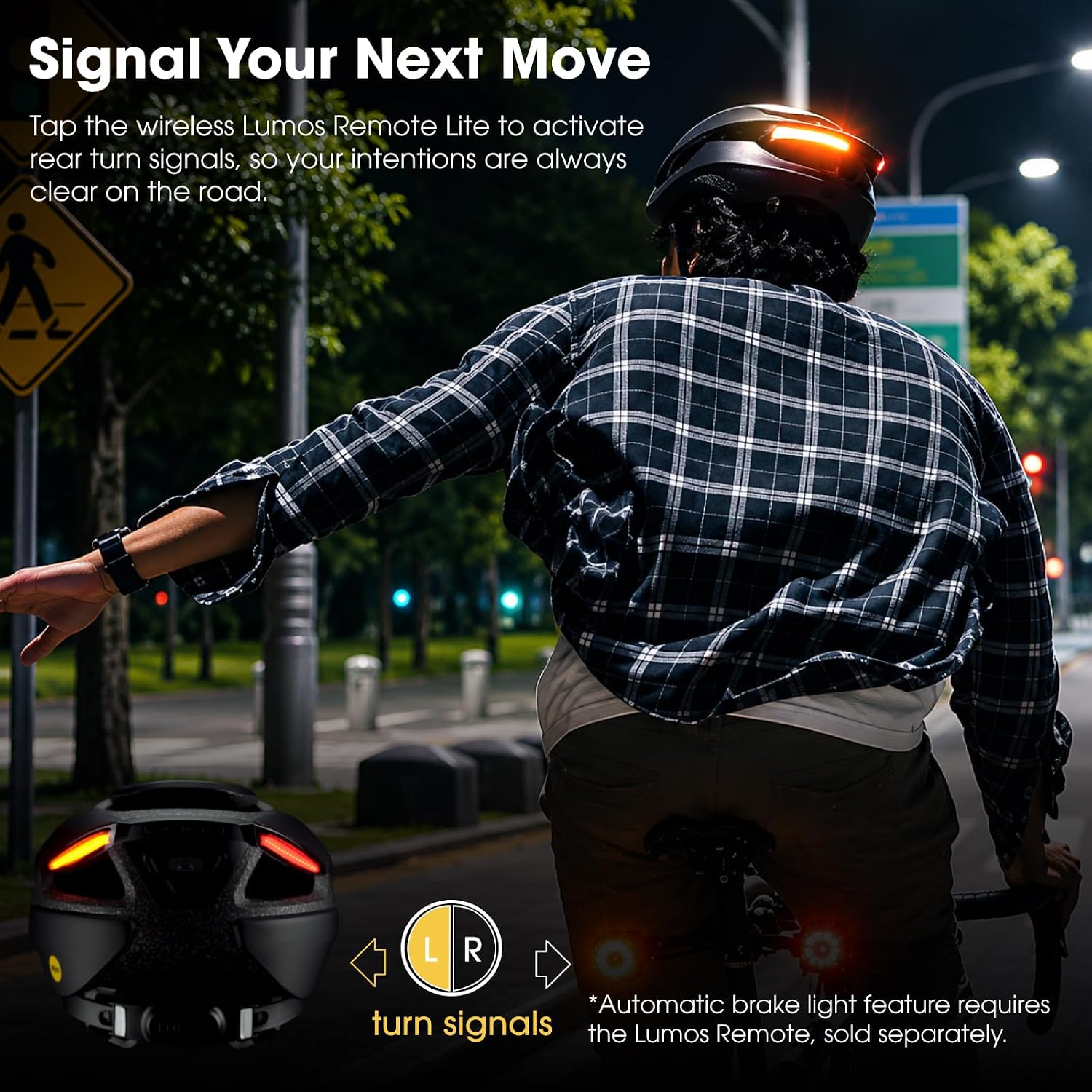
Image 1.2: A cyclist using the Lumos Ultra Helmet's rear turn signals, activated by the Remote Lite.
2. Setup
2.1 What's in the Box
Before starting, ensure all components are present:
- Lumos Ultra Helmet
- Charging Cable (USB-C)
- Lumos RemoteLite
- Siliconte Bande (x2)
- User Guide (Quick-start Guide)

Image 2.1: The complete contents of the Lumos Ultra Helmet package.
2.2 Initial Charging
Charge your Lumos Ultra Helmet fully before first use. Connect the provided USB-C charging cable to the helmet's charging port and a suitable USB power source. The charging indicator will show the status.
2.3 Fitting the Helmet
For optimal safety and comfort, the helmet must fit correctly. Use the adjustable dial fit system to secure the helmet snugly around your head. The straps should be adjusted so the helmet sits level on your head and does not move excessively.

Image 2.2: Close-up of the easy-adjust dial fit system on the Lumos Ultra Helmet.

Image 2.3: Guide for measuring head size and ensuring proper helmet fit.
2.4 Pairing the RemoteLite
Follow the instructions in the Quick-start Guide to pair the wireless RemoteLite with your helmet. This enables activation of the rear turn signals.
2.5 App Integration
Download the Lumos app to adjust brightness, select light modes, and sync with compatible Lumos lights. The app provides seamless control over your helmet's lighting system.

Image 2.4: The Lumos app interface displaying connected devices, including the Ultra helmet.
Video 2.1: Official Lumos helmet video demonstrating the Lumos Ultra Smart Bike Helmet, including aspects of its setup and features.
3. Operating Instructions
3.1 Powering On/Off
Press and hold the power button on the helmet to turn the lights on or off. Refer to the Quick-start Guide for exact button location.
3.2 Activating Turn Signals
Use the paired Lumos RemoteLite to activate the left or right turn signals. Press the corresponding button on the remote to indicate your intended direction. The signals will flash for a set duration or until manually cancelled.
3.3 Adjusting Light Modes and Brightness
Connect your helmet to the Lumos app on your smartphone to customize light patterns, adjust brightness levels, and check battery status. Different modes are available for various riding conditions.

Image 3.1: A cyclist wearing the Lumos Ultra Helmet at night, demonstrating its illuminated features.
Video 3.1: Official Lumos helmet video showcasing the Lumos Ultra Helmet's lights and turn signals in operation.
4. Maintenance
4.1 Cleaning
Clean the helmet exterior with a soft, damp cloth and mild soap. Avoid harsh chemicals or abrasive materials that could damage the helmet's finish or electronic components. The internal padding can be removed and hand-washed with mild soap and water, then air-dried.
4.2 Charging
Regularly charge the helmet using the provided USB-C cable to maintain optimal battery performance. Avoid overcharging by disconnecting once fully charged. Battery life is up to 10 hours and varies by lighting mode and usage.
4.3 Storage
Store the helmet in a cool, dry place away from direct sunlight and extreme temperatures. Ensure the helmet is clean and dry before storage.
4.4 Water Resistance
The Lumos Ultra Helmet is rated IP6X for water resistance, meaning it is protected against dust ingress and can withstand splashes and light rain. It is not designed for submersion.
5. Troubleshooting
5.1 Lights Not Turning On
- Ensure the helmet is fully charged.
- Press and hold the power button firmly for a few seconds.
- Check for any physical damage to the lights or power button.
5.2 Turn Signals Not Responding
- Verify that the RemoteLite is paired with the helmet. If not, re-pair according to the Quick-start Guide.
- Check the battery in the RemoteLite and replace if necessary.
- Ensure there are no obstructions between the remote and the helmet.
5.3 App Connectivity Issues
- Ensure Bluetooth is enabled on your smartphone.
- Restart both the helmet and the Lumos app.
- Make sure your app is updated to the latest version.
If issues persist, please refer to the support section for contact information.
6. Specifications
| Feature | Detail |
|---|---|
| Brand | Lumos |
| Model Name | Ultra |
| Model Number | LHEUT5-A0-BK |
| Color | Charcoal Black without MIPS |
| Size | M-L (21-1/4" to 24" / 54 to 61cm) |
| Weight | 390 g |
| Outer Material | Polycarbonate (PC) |
| Inner Material | Expanded Polystyrene |
| Special Feature | Rear Light, Rechargeable |
| Battery | 3.7V 1100mAh Lithium Polymer rechargeable battery |
| Charging Time | 3 hours |
| Battery Life | 4-10 hours (dependent on settings) |
| Certifications | CPSC, ASTM F1447, EN 1078, TÜV Verified |
| Water Resistance | IP6X |
7. Warranty and Accident Replacement Policy
Lumos offers an Accident Replacement Policy. If your Lumos helmet is impacted in an accident, you may be eligible for a 30% discount on a replacement helmet. This policy is designed to help cyclists get back on the road safely.
7.1 How to Get Your Helmet Replaced in 3 Steps:
- Contact the Lumos customer support team.
- Share details of what happened. Proof of damaged helmet will be required.
- Receive a discount code to repurchase a new helmet.
Note: This policy is typically valid for orders sold by "Lumos helmet". For full details and terms, please contact customer support.

Image 7.1: Information regarding the Lumos Accident Replacement Policy.
8. Support
For further assistance, technical support, or inquiries regarding your Lumos Ultra Helmet, please use the following resources:
- Email Support: You can contact the after-sales support team anytime at support@lumoshelmet.co.
- Lumos App: Download the "Ride Lumos" app from the iOS App Store or Google Play Store for free. The app provides additional features, settings, and potentially in-app support.

Image 8.1: Lumos support contact details and links to download the companion app.