
Introduction
Thank you for purchasing the Studebaker Sound Station Portable Stereo Boombox, Model SB2140R. This versatile audio system combines classic design with modern functionality, offering multiple ways to enjoy your music. Please read this manual thoroughly before operating the unit to ensure proper use and to maximize your listening experience.

Figure 1: Front view of the Studebaker Sound Station Portable Stereo Boombox.
Important Safety Information
To reduce the risk of electric shock, fire, or injury, always follow basic safety precautions when using this product. Keep these instructions for future reference.
- Do not expose this appliance to rain or moisture.
- Do not block any ventilation openings.
- Do not install near any heat sources such as radiators, heat registers, stoves, or other apparatus (including amplifiers) that produce heat.
- Protect the power cord from being walked on or pinched.
- Only use attachments/accessories specified by the manufacturer.
- Unplug this apparatus during lightning storms or when unused for long periods of time.
Key Features
- Bluetooth Connectivity: Stream audio wirelessly from compatible devices or transmit to Bluetooth headphones.
- CD Player: Front-loading CD/MP3 player for your compact disc collection.
- Cassette Recorder: Play and record cassette tapes from various sources including built-in microphone, radio, CD, USB, or auxiliary input.
- AM/FM Stereo Radio: Enjoy your favorite radio stations with clear reception.
- USB Port: For playback of audio files from a flash drive.
- Auxiliary Input Jack: Connect external audio devices.
- Headphone Jack: For private listening.
- Built-in Stereo Speakers: Delivers 5W x 2 RMS output power.
- VU Meters: Two functional VU meters for visual audio level indication.
- Light Effect: Speaker and tweeter lights synchronize with music.
- Power Options: AC/DC power with a built-in rechargeable battery for portability.
Setup
Powering the Unit
The Sound Station can be powered by either AC power or its built-in rechargeable battery.
- AC Power: Connect the supplied AC adapter to the DC IN jack on the back of the unit and plug the other end into a standard AC wall outlet.
- Rechargeable Battery: The unit features a built-in rechargeable battery. To charge, connect the AC adapter as described above. The CHARGE indicator will illuminate. A full charge typically takes several hours. Once charged, the unit can be operated portably.
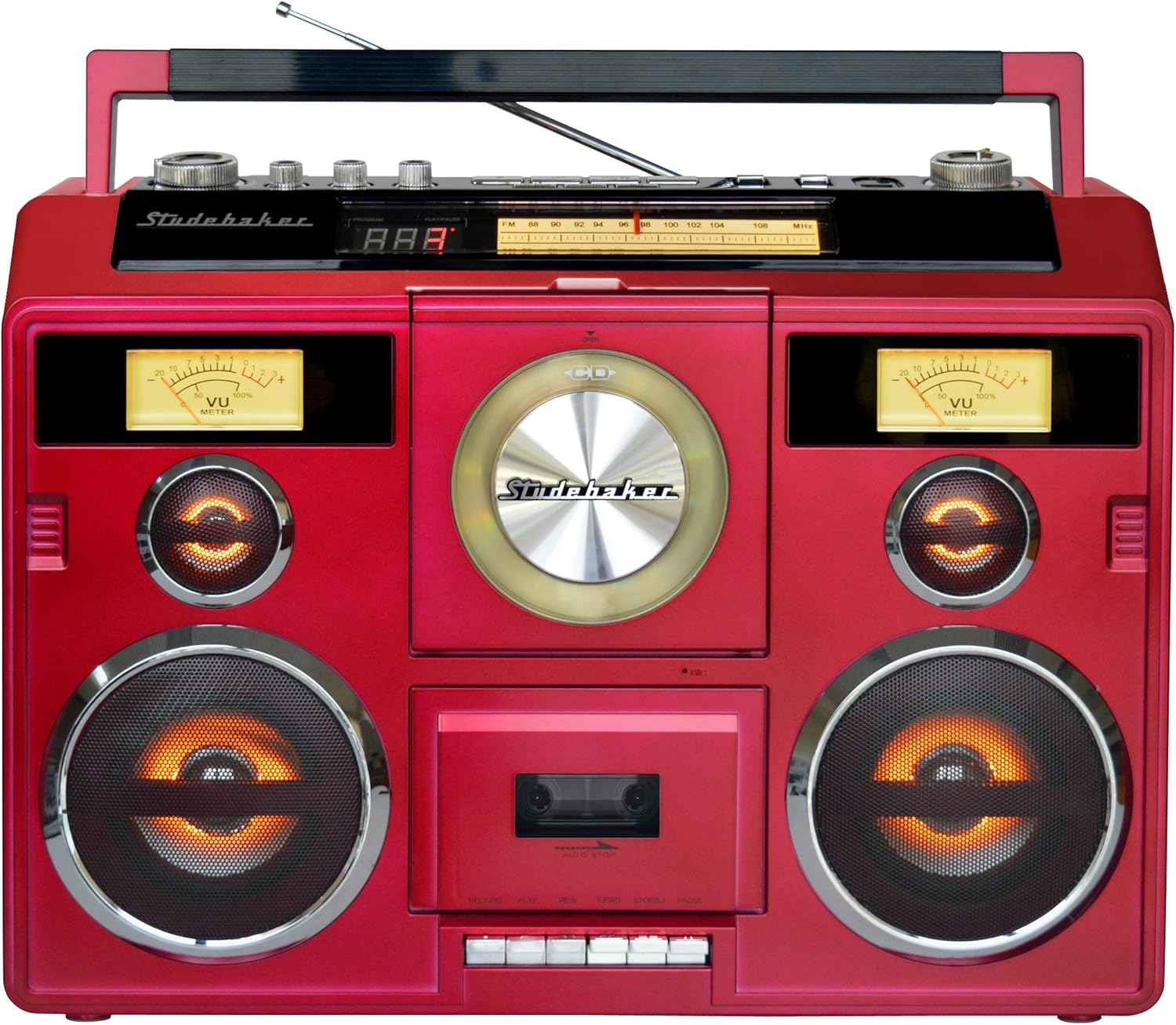
Figure 2: Angled view of the boombox, highlighting the portable design.
Antenna Setup for Radio
For optimal FM reception, extend the telescopic antenna fully. For AM reception, the unit has a built-in ferrite bar antenna, which is directional. You may need to rotate the unit for the best AM signal.
Operating Instructions
General Controls
- Master Volume: Rotate the MASTER VOLUME knob to adjust the overall sound level.
- Treble/Bass/Balance: Use the TREBLE, BASS, and BALANCE knobs to fine-tune the audio output to your preference.
- Function Switch: Use the FUNCTION switch to select between POWER OFF, TAPE, CD/USB/AUX, and RADIO modes.
- Light Show: Press the LIGHT SHOW button to activate or deactivate the speaker and tweeter light effects.
Video 1: An overview of the Sound Station Boombox features, including CD, cassette, radio, and Bluetooth functionality.
CD Player Operation
- Set the FUNCTION switch to CD/USB/AUX.
- Open the CD compartment door by pressing the OPEN/CLOSE button.
- Place a CD with the label side facing up onto the center spindle.
- Close the CD compartment door. The display will show the total number of tracks.
- Press the PLAY/PAUSE button to start playback.
- Use the SKIP FORWARD/BACKWARD buttons to navigate tracks.
- Press the STOP button to stop playback.
Cassette Recorder Operation
- Set the FUNCTION switch to TAPE.
- Open the cassette compartment door.
- Insert a cassette tape with the exposed tape facing downwards.
- Close the cassette compartment door.
- Playback: Press the PLAY button to start playback.
- Recording: To record from the radio, CD, USB, or AUX, select the desired source first. Then, press the RECORD button on the cassette deck. To record from the built-in microphone, simply press the RECORD button in TAPE mode.
- Use the FAST FORWARD (FFWD) and REWIND (REW) buttons to navigate the tape.
- Press the STOP/EJECT button to stop playback/recording and eject the tape.
AM/FM Radio Operation
- Set the FUNCTION switch to RADIO.
- Select the desired band (AM, FM, or FM ST) using the BAND switch.
- Rotate the TUNING knob to find your desired radio station.
- Adjust the telescopic antenna for FM or reposition the unit for AM to improve reception.
Bluetooth Connectivity
The unit supports both Bluetooth Receive (in) and Transmit (out).
- Bluetooth Receive (Streaming to Boombox):
- Set the FUNCTION switch to CD/USB/AUX.
- Press the BLUETOOTH PAIR button. The Bluetooth indicator will flash.
- On your Bluetooth-enabled device (e.g., smartphone), search for "SB2140R" and pair.
- Once paired, the indicator will glow solid, and you can stream audio to the boombox.
- Bluetooth Transmit (Streaming from Boombox to Headphones):
- Ensure your Bluetooth headphones are in pairing mode.
- Press the BLUETOOTH OUT button on the boombox. The indicator will flash.
- The boombox will search for and connect to your headphones. Once connected, audio from the boombox (CD, Tape, Radio, USB, AUX) will play through your headphones.
Video 2: A detailed demonstration of the portable stereo boombox, highlighting its various functions and connectivity options.
USB Playback
- Set the FUNCTION switch to CD/USB/AUX.
- Insert a USB flash drive into the USB port.
- The unit will automatically detect and begin playing compatible audio files (e.g., MP3).
- Use the playback control buttons (PLAY/PAUSE, SKIP FORWARD/BACKWARD, STOP) to manage your music.
Auxiliary Input
- Set the FUNCTION switch to CD/USB/AUX.
- Connect an external audio device (e.g., smartphone, MP3 player) to the AUX IN jack using a 3.5mm audio cable (not supplied).
- Control playback from your external device.
Maintenance
Cleaning the Unit
Wipe the exterior of the unit with a soft, damp cloth. Do not use abrasive cleaners or solvents. For the CD lens, use a specialized CD lens cleaner. For the cassette deck, regularly clean the tape heads and pinch rollers with a cotton swab lightly dampened with isopropyl alcohol.
Battery Care
To prolong the life of the built-in rechargeable battery, avoid fully discharging it frequently. Recharge the unit regularly, even if not in constant use. If storing the unit for an extended period, ensure the battery is partially charged (around 50%) and recharge every few months.
Troubleshooting
- No Power: Ensure the AC adapter is securely connected or the internal battery is charged.
- No Sound: Check the volume level. Ensure the correct function mode (CD, TAPE, RADIO, USB, AUX, Bluetooth) is selected. If using headphones, ensure they are properly connected or paired.
- CD Not Playing: Ensure the CD is clean and free of scratches. Make sure the CD is inserted correctly with the label side up.
- Poor Radio Reception: Extend the FM telescopic antenna fully. For AM, rotate the unit for better signal. Try moving the unit to a different location.
- Bluetooth Pairing Issues: Ensure the unit is in Bluetooth pairing mode (indicator flashing). Make sure your external device's Bluetooth is enabled and within range. Try unpairing and re-pairing the device.
- Cassette Playback/Recording Issues: Ensure the tape is inserted correctly. Clean the tape heads. Check if the tape is tangled or damaged.
- Speaker Lights Buzzing: Some users have reported a slight buzzing when speaker lights are active. If this is disruptive, you may choose to deactivate the light show feature.
Specifications
| Model Number | SB2140R |
| Product Dimensions (L x W x H) | 19.3 x 6.26 x 13.8 inches |
| Item Weight | 11.79 pounds |
| Power Source | AC/DC (Built-in rechargeable battery) |
| Speaker Output Power | 5W x 2 RMS |
| Connectivity | Bluetooth, Auxiliary, USB |
| Radio Bands | AM/FM Stereo |
Warranty and Support
For warranty information or technical support, please refer to the documentation included with your purchase or visit the official Studebaker website. Keep your proof of purchase for any warranty claims.
