
1. Product Overview
This manual provides comprehensive guidance for the Hieha 7-inch Double Din Car Stereo, designed to enhance your in-car entertainment and connectivity. It covers essential information for setup, operation, maintenance, and troubleshooting to ensure optimal performance and a seamless user experience.
Key features of your Hieha Car Stereo include:
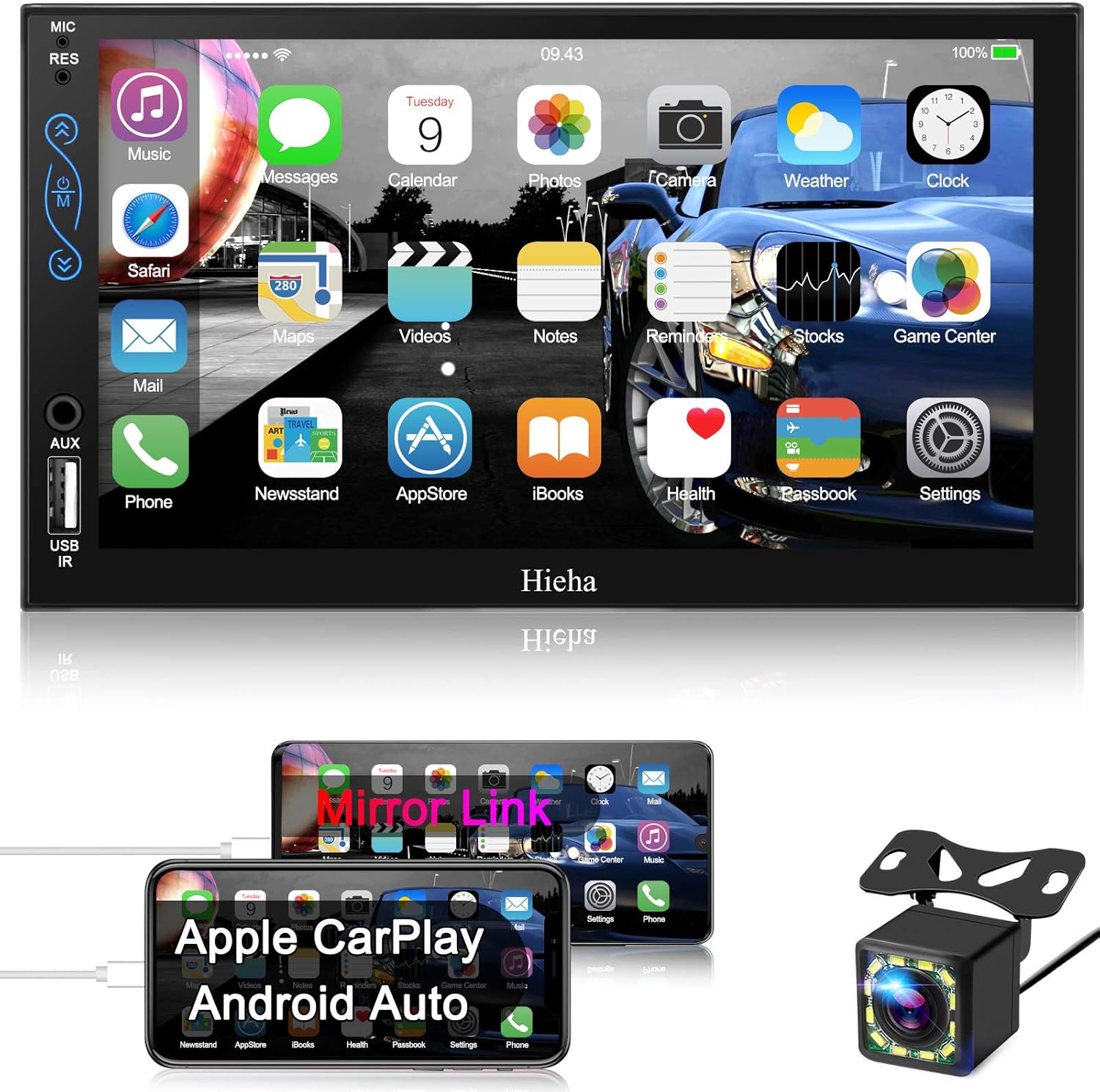
- Apple CarPlay and Android Auto Compatibility: Seamlessly integrate your smartphone for navigation, calls, messages, and music using voice control.
- Bluetooth 5.2: Enjoy hands-free calling and high-quality audio streaming.
- 7-Inch Full HD Capacitive Touch Screen: Responsive and accurate touch control with 1080P video playback support.
- Phone Mirror Link Function: Display your smartphone's content directly on the stereo screen (supports Android 10.1 and below, iOS 13.4 and below).
- HD Night Vision Backup Camera: Automatic display of rear view with 170° viewing angle and 12 LED lights for enhanced night vision.
- Multiple Functions: Includes AM/FM Radio, steering wheel control support, built-in microphone, EQ audio settings, AUX-IN, USB charging, and 7-color LED buttons.
2. Setup and Installation
Proper installation is crucial for the optimal performance of your Hieha Car Stereo. This unit is designed as a standard double din size (7.01 x 3.94 inches) and includes an extra frame (7.32 x 4.57 inches) for adjustment. Before beginning installation, please confirm that your car's dashboard opening size, factory wiring harness, and radio antenna adapter are suitable. Additional aftermarket accessories may be required for certain vehicle models.
2.1 Package Contents
Verify that all components are present in the package:
- Hieha Car Stereo Unit
- User Manual
- Mounting Bracket Set
- Camera Wire A & B
- Wire Harness A/B
- Rear-view Camera

2.2 Important Installation Notes
Please adhere to the following guidelines during installation:
- The car stereo has a memory function. Ensure the ACC line (Red wire) and the B+ line (Yellow wire) are correctly connected. Reversing these wires will result in loss of memory function after power-off.
- The unit's dimensions are 7.01 inches (width) x 3.94 inches (height) x 2.56 inches (depth). Verify compatibility with your vehicle's center console.
- If the included universal mounting bracket set does not fit perfectly, you may need to acquire additional aftermarket accessories specific to your vehicle's year, make, and model.
2.3 Product Overview Video
Watch this official product overview video for a visual guide to the Hieha Car Stereo:
3. Operating Your Car Stereo
3.1 Touch Screen Interface
The 7-inch high-definition capacitive touch screen offers sensitive and accurate control. It supports 1024x600p resolution and 1080P video playback, providing a clear and vibrant display.

3.2 Apple CarPlay and Android Auto
Connect your smartphone via USB to access Apple CarPlay or Android Auto. This allows you to use navigation, make calls, send messages, and play music directly from your phone's interface displayed on the stereo screen. This feature is designed to keep you focused on the road while accessing essential smartphone functions.

3.3 Voice Control
Utilize the latest voice control technology (Siri/Google Assistant) by connecting your smartphone. This enables hands-free operation for navigation, phone contacts, email, notifications, and music playback, enhancing driving safety.

3.4 Bluetooth Connectivity
The integrated Bluetooth 5.2 allows you to answer or make calls with a single button press and stream audio wirelessly. Enjoy clear and stable music even in noisy environments.
3.5 Mirror Link Function
The mirror link function supports most Android (10.1 and below) and iOS (13.4 and below) phones, including iPhone XR, iPhone 11, and iPhone 8 series. Easily connect and sync your phone's content to the large screen. Software updates are available to support a wider range of smartphones.

3.6 Backup Camera Operation
The included HD and 170° viewing angle waterproof backup camera with 12 LED lights provides improved night vision. When reversing your car, the image automatically displays on the unit's screen, assisting with safe and easier parking. The camera wires connect to the reversing lights for simple installation.

3.7 Radio and Audio Settings
The stereo system supports AM/FM radio tuning. You can also customize your audio experience using the EQ audio settings. Additional features include AUX-IN and USB ports for charging and playing music and videos.
4. Maintenance
To ensure the longevity and optimal performance of your Hieha Car Stereo, follow these maintenance tips:
- Cleaning: Use a soft, dry cloth to clean the screen and exterior. Avoid abrasive cleaners or solvents that could damage the surface.
- Software Updates: Periodically check the Hieha official website or contact customer support for any available software updates. Keeping the firmware updated can improve performance and add new features.
- Temperature Control: Avoid exposing the unit to extreme temperatures for prolonged periods, as this can affect electronic components.
- Cable Connections: Ensure all cables are securely connected and free from damage. Loose connections can lead to intermittent issues.
5. Troubleshooting
If you encounter issues with your Hieha Car Stereo, refer to the following common troubleshooting steps:
| Problem | Possible Cause | Solution |
|---|---|---|
| No Power | Incorrect wiring (ACC/B+ reversed), blown fuse, loose power connection. | Check wiring connections (Red and Yellow wires), inspect vehicle's fuse box and stereo's fuse, ensure power cables are secure. |
| No Sound | Volume too low, mute activated, incorrect audio source, speaker wiring issues. | Increase volume, check mute setting, select correct audio input (e.g., FM, Bluetooth, AUX), verify speaker connections. |
| Touch Screen Unresponsive/Laggy | Temporary software glitch, excessive heat, outdated firmware. | Restart the unit, allow unit to cool down if overheated, check for and install latest software updates. |
| CarPlay/Android Auto Not Connecting | Faulty USB cable, phone compatibility issues, software glitch. | Use original or certified USB cable, ensure phone OS is within supported range, restart phone and stereo. |
| Backup Camera Not Displaying | Incorrect camera wiring, faulty camera, video input not selected. | Verify camera power and video signal connections, ensure reverse trigger wire is correctly installed, check camera functionality. |
If the problem persists after attempting these solutions, please contact Hieha customer support for further assistance.
6. Technical Specifications
Detailed specifications for the Hieha 7-Inch Double Din Car Stereo (Model 7023B):
| Feature | Specification |
|---|---|
| Brand | Hieha |
| Model | 7023B |
| Item Weight | 2.44 pounds |
| Product Dimensions | 2.56 x 7.01 x 3.94 inches |
| Special Features | Touchscreen, Equalizer |
| Connectivity Technology | Bluetooth, Auxiliary, USB |
| Controller Type | Google Assistant, iOS, Android |
| Compatible Devices | Speaker, Smartphone |
| Connector Type | USB, 3.5mm Jack |
| Audio Encoding | Stereo |
| Audio Output Mode | Stereo |
| Surround Sound Channel Configuration | 2 |
| Video Encoding | H.264 or H.265 |
7. Warranty and Customer Support
For warranty information, technical support, or any inquiries regarding your Hieha Car Stereo, please refer to the contact details provided in your product packaging or visit the official Hieha website. Customer support is available to assist with installation, operation, and troubleshooting.


