Introduction
Thank you for choosing the Naviforce NF9187 Men's Luxury Stainless Steel Analog Quartz Watch. This manual provides essential information for the proper setup, operation, and maintenance of your timepiece. Please read it carefully to ensure optimal performance and longevity of your watch.
Product Overview
The Naviforce NF9187 is a sophisticated analog quartz watch designed for men, featuring a durable stainless steel construction, luminous hands for visibility in low light, and a date display. Its elegant design is complemented by practical features, making it suitable for various occasions.

Image: Front view of the Naviforce NF9187 watch, showcasing its design and features.
Setup
Setting the Time
- Gently pull the crown (the knob on the side of the watch) out to the second click position.
- Rotate the crown to move the hands clockwise or counter-clockwise until the desired time is set.
- Once the time is set, push the crown back into its normal position to start the watch.
Setting the Date
- Gently pull the crown out to the first click position.
- Rotate the crown to adjust the date. Avoid setting the date between 9 PM and 3 AM, as this may interfere with the automatic date change mechanism.
- Once the date is set, push the crown back into its normal position.
Bracelet Adjustment
The stainless steel bracelet may require adjustment to fit your wrist comfortably. It is recommended to have this done by a professional watchmaker or jeweler to avoid damaging the links or clasp.

Image: The Naviforce NF9187 watch worn on a wrist, illustrating the bracelet's appearance.
Operating Instructions
Reading the Time
The watch features a traditional analog display with hour, minute, and second hands. The luminous coating on the hands and hour markers allows for easy time reading in low-light conditions.
Reading the Date
The date is displayed in a window on the dial. It automatically advances once every 24 hours. If the watch stops or is not worn for an extended period, you may need to manually reset the date as described in the 'Setting the Date' section.
Care and Maintenance
Cleaning
To maintain the appearance of your watch, wipe the case and bracelet regularly with a soft, dry cloth. For stubborn dirt, a slightly damp cloth can be used, followed by a dry cloth. Avoid using chemical cleaners or abrasive materials.
Water Resistance
This watch is water resistant up to 30 meters (3 ATM). This means it is suitable for daily use and can withstand splashes or brief immersion in water. However, it is not suitable for swimming, showering, diving, or any water sports. Ensure the crown is fully pushed in before any contact with water.
Battery Replacement
The quartz movement is powered by a battery. When the watch stops running, it indicates that the battery needs to be replaced. It is recommended to have the battery replaced by a qualified watch technician to ensure the water resistance seal is properly maintained.
Storage
When not wearing your watch, store it in a cool, dry place, away from direct sunlight and extreme temperatures. Keeping it in its original box or a watch case can help protect it from dust and scratches.
Troubleshooting
- Watch not running: Check if the crown is fully pushed in. If it is, the battery may need replacement.
- Date not changing: Ensure the time is set correctly, passing midnight. If the date is stuck, manually adjust it as per the 'Setting the Date' instructions.
- Condensation inside the watch: This indicates a potential breach in the water resistance. Avoid further contact with water and seek professional service immediately.
Specifications
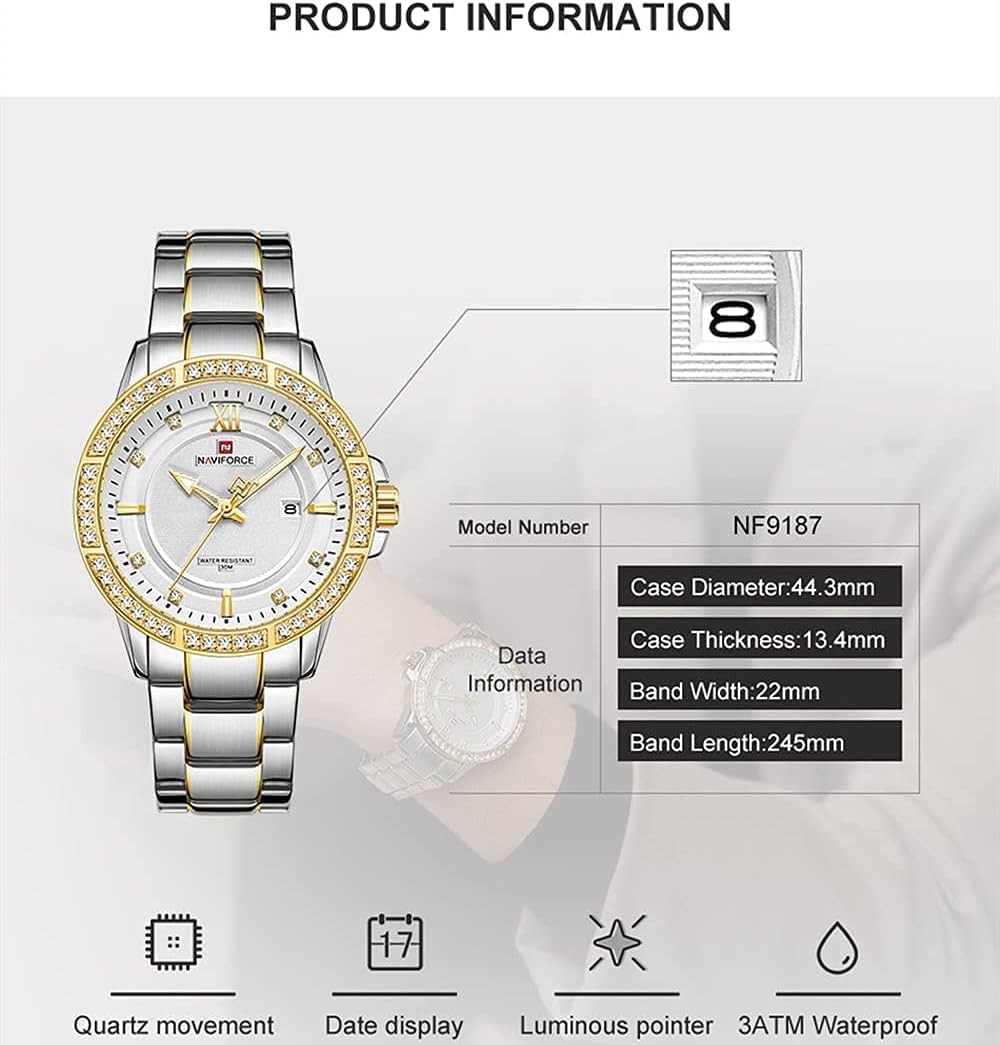
Image: Diagram illustrating the model number and key dimensions of the Naviforce NF9187 watch.
| Feature | Detail |
|---|---|
| Model Number | NF9187 |
| Brand | Naviforce |
| Movement | Quartz |
| Display Type | Analog |
| Case Material | Metal |
| Case Diameter | 44.3 mm |
| Case Thickness | 13.4 mm |
| Band Material | Stainless Steel |
| Band Width | 22 mm |
| Dial Color | Gold |
| Band Color | Silver |
| Clasp Type | Buckle |
| Water Resistance Depth | 30 Meters (3 ATM) |
| Features | Luminous Hands, Date Display, Crystal Decoration |
Warranty and Support
Your Naviforce watch is manufactured to high-quality standards. For specific warranty details, please refer to the warranty card included with your purchase. In case of any issues or for technical support, please contact the retailer or authorized service center where you purchased the watch.
Always ensure that any repairs or battery replacements are carried out by qualified professionals to maintain the integrity and warranty of your watch.


