
1. Introduction
Thank you for choosing the Pullman R7000 Mobile Air Conditioner. This 3-in-1 unit is designed to provide cooling, ventilation, and dehumidification for your indoor spaces. To ensure safe operation and optimal performance, please read this manual thoroughly before use and retain it for future reference.
Important Safety Information
- Always connect the unit to a properly grounded power outlet.
- Do not operate the unit with a damaged power cord or plug.
- Keep the unit at least 50 cm away from walls or other objects to ensure proper airflow.
- Do not block the air inlets or outlets.
- Ensure the water tank is emptied regularly to prevent overflow.
- This appliance is not intended for use by persons (including children) with reduced physical, sensory or mental capabilities, or lack of experience and knowledge, unless they have been given supervision or instruction concerning use of the appliance by a person responsible for their safety.
2. Product Overview
The Pullman R7000 is a versatile mobile air conditioner offering three primary functions: cooling, fan, and dehumidifier. It features a compact design with a handle and four wheels for easy portability.
Key Features:
- 3-in-1 Functionality: Cooling, Ventilation, Dehumidification.
- Cooling Capacity: 2.05 kW / 7000 BTU, suitable for rooms up to 20 m².
- Energy Efficient: Class A energy rating with an EER of 2.6.
- Eco-friendly Refrigerant: Uses R290A natural hydrocarbon gas.
- User-Friendly Controls: LED display and included remote control.
- Adjustable Settings: Temperature range from 16°C to 31°C, 1-24 hour timer.
- Air Purification: Removable and washable nylon dust filter.
- Easy Installation: Includes a 1.5m exhaust hose and window kit.
- Mobility: Equipped with 4 wheels and a handle for convenient movement.
Product Components:
Familiarize yourself with the main components of your R7000 unit.

Image: Front view of the Pullman R7000 Mobile Air Conditioner, showcasing its compact design and air vents.

Image: The Pullman R7000 Mobile Air Conditioner in operation, with visual indicators of cool air being expelled from the front grille.
3. Setup and Installation
Proper installation is crucial for the efficient operation of your mobile air conditioner. Follow these steps to set up your R7000 unit.
Unpacking and Placement:
- Carefully remove the unit from its packaging.
- Place the unit on a flat, stable surface, ensuring there is at least 50 cm of clear space around it for adequate airflow.
- Ensure the unit is near a window or opening for the exhaust hose.
Exhaust Hose and Window Kit Installation:
The exhaust hose expels hot air from the room, which is essential for effective cooling. The window kit helps seal the opening to prevent hot air from re-entering.

Image: Various components of the window kit, including the exhaust hose, window panel, and adapters, laid out on a wooden floor.

Image: Another perspective of the window kit components, showing the flexible exhaust hose and window sealing accessories.
- Attach one end of the exhaust hose to the air outlet on the back of the air conditioner. Twist clockwise until secure.
- Assemble the window sealing kit according to your window type (sliding or hinged). The kit typically includes adjustable panels and an adapter for the exhaust hose.
- Insert the other end of the exhaust hose into the adapter on the window kit.
- Extend the window kit to fit your window opening and secure it. Ensure the window is closed as much as possible around the kit to minimize air leakage.
- Direct the exhaust hose outdoors through the sealed window opening. Ensure the hose is as straight and short as possible to maximize efficiency. Avoid sharp bends or kinks.

Image: The Pullman R7000 unit positioned next to a window, with the exhaust hose correctly installed and venting hot air outside.
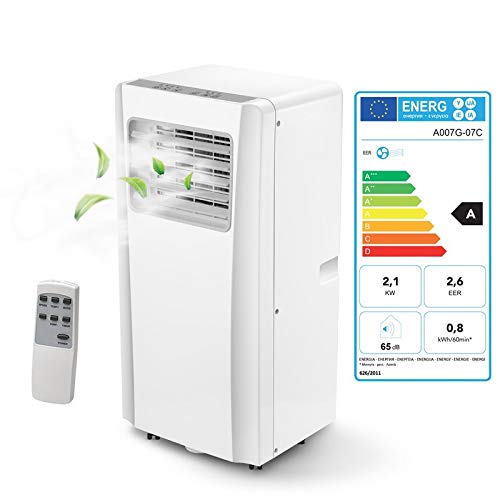
Image: A close-up view of a window kit installed in a roof window, showing the exhaust hose securely fitted to vent air.
4. Operating Instructions
The Pullman R7000 can be controlled via the LED control panel on top of the unit or with the included remote control.

Image: Top-down view of the control panel with LED display and various buttons for power, temperature, mode, speed, and timer.
Control Panel and Remote Functions:
- Power Button: Turns the unit ON or OFF.
- Mode Button: Cycles through Cooling, Fan, and Dehumidifier modes.
- Temperature Buttons (Up/Down): Adjusts the desired temperature (16°C - 31°C) in Cooling mode.
- Speed Button: Selects fan speed (Low/High) in Cooling or Fan mode.
- Timer Button: Sets the auto-on or auto-off timer (1-24 hours).
Operating Modes:
- Cooling Mode: Press the Mode button until the cooling indicator lights up. Use the temperature buttons to set your desired room temperature. The unit will cool the room to this temperature.
- Fan Mode: Press the Mode button until the fan indicator lights up. The unit will circulate air without cooling. Use the speed button to adjust fan intensity.
- Dehumidifier Mode: Press the Mode button until the dehumidifier indicator lights up. The unit will remove excess moisture from the air. In this mode, the fan speed is typically fixed to low. Ensure the water tank is regularly emptied.
Setting the Timer:
The timer function allows you to program the unit to turn ON or OFF automatically.
- To set Auto-Off: With the unit running, press the Timer button. Use the temperature buttons to select the desired number of hours (1-24) before the unit turns off.
- To set Auto-On: With the unit OFF, press the Timer button. Use the temperature buttons to select the desired number of hours (1-24) before the unit turns on.
5. Maintenance
Regular maintenance ensures the longevity and efficiency of your Pullman R7000 air conditioner.
Cleaning the Air Filter:
The R7000 is equipped with a removable and washable nylon dust filter that helps purify the air. Clean the filter every two weeks or more frequently if the unit is used in a dusty environment.
- Turn off and unplug the unit before cleaning.
- Locate the air filter compartment (usually at the back or side of the unit).
- Carefully remove the filter.
- Wash the filter under running water (warm, not hot) or use a vacuum cleaner to remove dust.
- Allow the filter to air dry completely before reinserting it into the unit. Do not expose it to direct sunlight.
Emptying the Water Tank:
In Dehumidifier mode or high humidity conditions, water will collect in the internal tank (0.8L capacity). The unit may stop operating when the tank is full, and an indicator light may illuminate.
- Turn off and unplug the unit.
- Locate the drainage port, usually at the bottom rear of the unit.
- Place a shallow pan or container under the drainage port.
- Remove the drain plug to allow water to flow out.
- Once the tank is empty, securely replace the drain plug.
Cleaning the Unit Exterior:
- Wipe the exterior with a soft, damp cloth.
- Do not use harsh chemicals, abrasives, or solvents, as these can damage the surface.
6. Troubleshooting
If you encounter issues with your Pullman R7000, refer to the following common problems and solutions before contacting support.
| Problem | Possible Cause | Solution |
|---|---|---|
| Unit does not turn on | No power supply; Power cord not plugged in; Circuit breaker tripped. | Check power outlet; Ensure cord is securely plugged in; Reset circuit breaker. |
| Unit cools poorly | Air filter is dirty; Exhaust hose not properly installed or blocked; Room too large; Doors/windows open. | Clean air filter; Check exhaust hose for kinks or blockages and ensure proper window seal; Close doors and windows; Consider unit capacity for room size. |
| Unit is noisy | Unit not on a flat surface; Obstruction in fan. | Place unit on a level surface; Check for and remove any obstructions. |
| Water leakage | Drain plug not securely closed; Water tank full (in dehumidifier mode). | Ensure drain plug is tightly closed; Empty the water tank. |
7. Specifications
Detailed technical specifications for the Pullman R7000 Mobile Air Conditioner.
| Specification | Value |
|---|---|
| Brand | Pullman |
| Model Name/Number | R7000 |
| Cooling Capacity | 7000 BTU (2.05 kW) |
| Wattage | 785 Watts |
| Energy Efficiency Class | A |
| EER (Energy Efficiency Ratio) | 2.6 |
| Product Dimensions (D x W x H) | 28 x 33 x 68 cm |
| Item Weight | 22.35 Kilograms |
| Noise Level | 65 Decibels |
| Refrigerant Type | R290A |
| Water Tank Capacity | 0.8 Liters |
| Control Method | Remote Control, Control Panel |
| Filter Type | Removable and Washable Nylon Filter |
| Power Source | Electric Cable |
| Compressor Type | Rotary Scroll |
| Application Area | Bedroom, Apartment, Home, Office |
8. Warranty and Support
The Pullman R7000 Mobile Air Conditioner comes with a limited warranty. Please refer to the warranty card included in your product packaging for specific terms and conditions.
For technical support, spare parts, or warranty claims, please contact Pullman customer service through the contact information provided with your purchase or on the official Pullman website.