
ADVWIN 111800200
Advwin Dehumidifier User Manual
Model: 111800200
Introduction
The Advwin Dehumidifier is designed to efficiently remove excess moisture from your indoor environment, creating a healthier and more comfortable living space. This appliance is capable of extracting up to 25 liters of water per day, protecting your home from issues such as mold, mildew, and musty odors. Its advanced features, including a digital control panel and automatic shut-off, ensure ease of use and reliable performance.

Image: Front view of the Advwin Dehumidifier, showcasing its sleek white design and central indicator light.

Image: The Advwin Dehumidifier positioned in a modern living room, illustrating its compact size and how it blends into a home environment.
Safety Information
Please read all safety instructions carefully before operating the dehumidifier to prevent injury or damage. Keep this manual for future reference.
- Ensure the dehumidifier is placed on a stable, level surface.
- Do not block air inlets or outlets. Maintain at least 20 cm clearance around the unit.
- Do not operate the unit with a damaged power cord or plug.
- Always unplug the unit before cleaning or performing any maintenance.
- Do not immerse the unit, power cord, or plug in water or other liquids.
- This appliance is not intended for use by persons (including children) with reduced physical, sensory or mental capabilities, or lack of experience and knowledge, unless they have been given supervision or instruction concerning use of the appliance by a person responsible for their safety.
- The unit features an automatic shut-off function when the water tank is full. Do not override this safety feature.

Image: Illustration demonstrating the automatic shut-off function when the water tank is full, emphasizing safety, particularly around children.
Product Overview
Familiarize yourself with the main components and features of your Advwin Dehumidifier.
- Control Panel: Digital display for settings and indicators.
- Air Inlet/Outlet: Where air enters and exits the unit.
- Water Tank: Removable tank for collected moisture.
- Drain Hose Connection: For continuous drainage.
- Wheels and Handle: For easy portability.
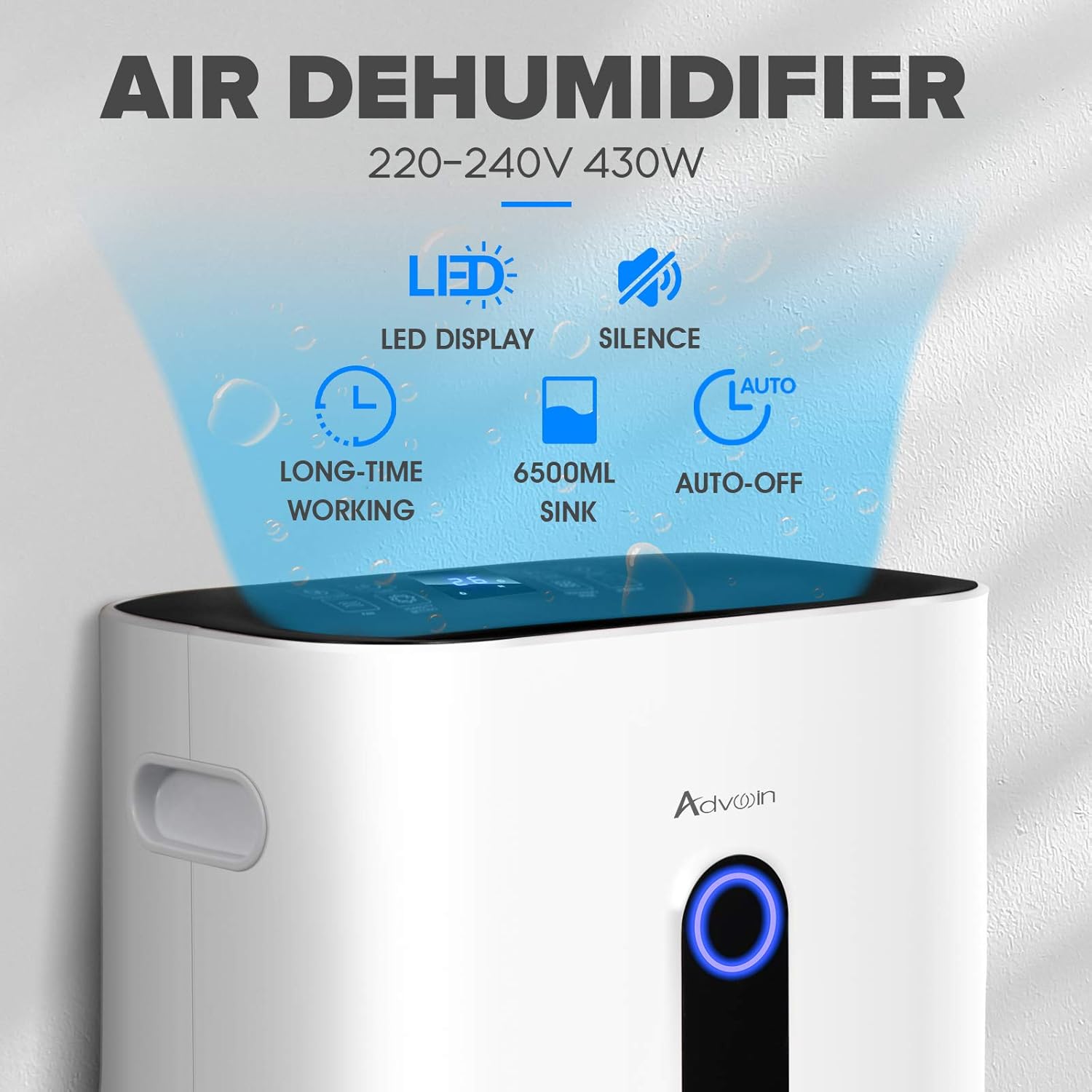
Image: Diagram highlighting key features of the dehumidifier, including LED display, quiet operation, long-time working capability, 6500ml water tank, and auto-off function.

Image: Close-up view of the dehumidifier's integrated handle and rotatable wheels, illustrating its design for easy movement.
Setup
Follow these steps to set up your dehumidifier for the first time.
- Unpacking: Carefully remove the dehumidifier from its packaging. Retain packaging materials for future storage or transport.
- Placement: Place the unit upright on a firm, level surface in the desired location. Ensure there is at least 20 cm of space around all sides for proper airflow.
- Power Connection: Plug the power cord into a grounded electrical outlet.
- Water Tank: Ensure the water tank is correctly inserted into the unit.
- Continuous Drainage (Optional): For continuous operation without emptying the water tank, connect the provided drain hose to the drainage port and direct the other end to a suitable drain.
Operating Instructions
Learn how to use the various functions of your Advwin Dehumidifier.

Image: Close-up of the dehumidifier's digital control panel, displaying icons for various modes and settings such as Child Lock, Timer, Fan Speed, Sleep, Fan, Humidity Setting, Dehumidify Mode, and Stand-by.

Image: An illustration of the multi-function control panel, highlighting features like Auto Defrost, 5 Modes, Timer, Sleep, and Child Lock for effortless humidity management.
Control Panel Functions:
- Power Button: Press to turn the unit ON or OFF.
- Humidity Setting: Adjust the desired humidity level (30%-80%). The unit will operate until the set humidity is reached.
- Fan Speed: Select between low and high fan speeds.
- Timer: Set a timer for automatic shut-off (up to 24 hours).
- Sleep Mode: Reduces fan speed and dims display lights for quiet operation during sleep.
- Child Lock: Locks the control panel to prevent accidental changes.
- Dehumidify Mode: Select specific dehumidification modes if available (e.g., continuous, auto).
Humidity Indicator Light:
The dehumidifier features a three-color indicator light to show the current humidity level:
- Blue: Humidity < 50%
- Green: Humidity 50%-70%
- Red: Humidity > 70%
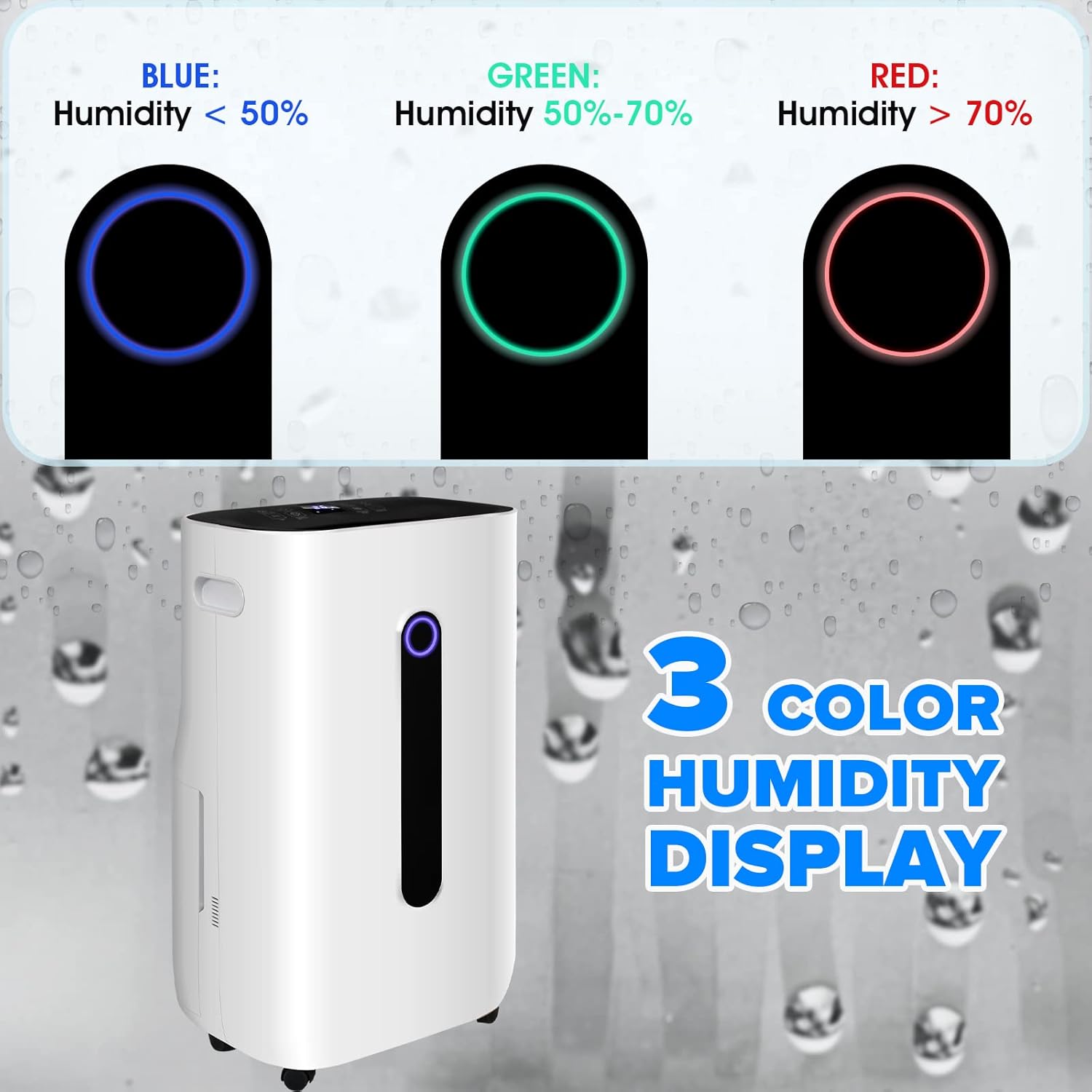
Image: Visual representation of the dehumidifier's three-color humidity display, showing blue for humidity below 50%, green for 50-70%, and red for above 70%.
Laundry Dry Mode:
This specialized mode is designed to assist in drying laundry indoors by continuously operating at a high fan speed to remove moisture from the air around drying clothes.

Image: The dehumidifier positioned in a wardrobe area, demonstrating its use in the unique laundry dry mode to help dry clothes.
Maintenance
Regular maintenance ensures optimal performance and extends the lifespan of your dehumidifier.
Emptying the Water Tank:
When the water tank is full, the unit will automatically shut off and an indicator light will illuminate. Carefully remove the tank and empty the collected water.

Image: Detailed view of the 6.5L water tank, highlighting its convenient handle and ease of draining water.

Image: Step-by-step illustration of how to remove the water tank from the dehumidifier and empty it, showing the tank being pulled out and water being poured from it.
Cleaning the Air Filter:
The air filter should be cleaned regularly (e.g., every two weeks or as needed) to maintain efficiency. A dirty filter can reduce performance and increase energy consumption.
- Turn off and unplug the dehumidifier.
- Locate and remove the air filter (typically on the back or side of the unit).
- Clean the filter with a vacuum cleaner or wash it with warm, soapy water. Rinse thoroughly.
- Allow the filter to air dry completely before reinserting it into the unit.

Image: Illustration showing the removal of the washable air filter from the back of the dehumidifier for cleaning.
General Cleaning:
Wipe the exterior of the unit with a soft, damp cloth. Do not use harsh chemicals or abrasive cleaners.
Troubleshooting
Refer to this section for common issues and their solutions.
| Problem | Possible Cause | Solution |
|---|---|---|
| Dehumidifier does not turn on. | No power; Water tank full or incorrectly inserted. | Check power connection; Empty and reinsert water tank correctly. |
| No water collected or low dehumidification. | Humidity level already low; Air filter clogged; Room too large; Temperature too low. | Adjust humidity setting; Clean air filter; Ensure unit is suitable for room size; Dehumidifiers are less effective in cold temperatures. |
| Unit is noisy. | Unit not on a level surface; Air filter clogged; Normal compressor noise. | Place on a level surface; Clean air filter; Some operating noise is normal. |
| Error code displayed. | Specific internal issue. | Refer to the specific error code in the full manual or contact customer support. |
Specifications
Technical specifications for the Advwin Dehumidifier (Model: 111800200).
- Brand: ADVWIN
- Model Number: 111800200
- Colour: White (6.5L Water Tank 25L/Day variant)
- Product Dimensions: 34 x 24 x 57 cm
- Item Weight: 14 kg
- Capacity (Water Tank): 6500 Millilitres (6.5L)
- Dehumidification Capacity: Up to 25 Liters/Day
- Power/Wattage: 430 watts
- Voltage: 240 Volts
- Material: Acrylonitrile Butadiene Styrene (ABS)
- Number of Speeds: 2 (Fan Speeds)
- Noise Level: 48 Sones
- Runtime: 24 hours (continuous operation)
- Special Features: Wheels, Auto Shut-Off, Digital Control Panel, Drain Hose Connection
- Suitable Area: Up to 30m²

Image: Diagram illustrating the dimensions of the Advwin Dehumidifier: 34cm width, 24cm depth, and 57cm height.
Warranty and Support
The Advwin Dehumidifier comes with a 1-Year Warranty. For warranty claims, technical support, or any inquiries, please contact Advwin customer service through your purchase platform or the official Advwin website.
Please have your model number (111800200) and proof of purchase ready when contacting support.
Related documents111800200

Ask a question about this manual
Ask about setup, troubleshooting, compatibility, parts, safety, or missing instructions. Manuals+ will review the question and use this page’s manual context to help answer it.