
Ginour TPKPT0040US
Contents
Ginour Metal Detector User Manual
Model: TPKPT0040US
1. Introduction
This manual provides comprehensive instructions for the assembly, operation, maintenance, and troubleshooting of your Ginour Lightweight Metal Detector. Please read this manual thoroughly before using the device to ensure safe and effective operation.
Product Overview
The Ginour Metal Detector is designed for detecting various metals, including iron, aluminum, tin, copper, silver, and gold. It features a large waterproof search coil, a backlit LCD display, and adjustable height, making it suitable for both adults and children in diverse environments.
Package Contents
Upon unpacking, verify that all components listed below are present:
- 1 x Ginour Metal Detector unit
- 1 x Multi-purpose Folding Shovel (with storage bag and compass)
- 1 x Carrying Bag
- 1 x Earphones
- 1 x Handbag
- Note: 2 x 9V batteries are required and not included.

Figure 1.1: Ginour Metal Detector complete kit, including the main unit, multi-purpose shovel, carrying bag, earphones, and handbag.
2. Setup and Assembly
Follow these steps to assemble your metal detector and prepare it for use.
2.1 Assembly
- Carefully unpack all components from the packaging.
- Attach the search coil to the lower stem. Ensure it is securely fastened.
- Connect the lower stem to the middle stem, and then connect the middle stem to the control box assembly. Align the locking pins and tighten any collars or nuts to secure the connections.
- Route the search coil cable along the stem and wrap it around the stem to prevent tangling. Plug the cable into the designated port on the control box.
- Adjust the armrest for comfortable use.

Figure 2.1: Fully assembled Ginour Metal Detector, ready for operation.
2.2 Battery Installation
The metal detector requires two 9V batteries (not included). Ensure correct polarity when inserting.
- Locate the battery compartment on the control box.
- Open the battery compartment cover.
- Insert two 9V batteries, observing the positive (+) and negative (-) markings.
- Close the battery compartment cover securely.
2.3 Adjusting Height
The detector's height is adjustable from 100cm to 130cm to accommodate different users. Loosen the locking collar on the stem, extend or retract the stem to the desired length, and then tighten the collar to secure it.
3. Operating Instructions
Familiarize yourself with the control panel and operating modes for optimal detection.
3.1 Control Panel and LCD Display
The 3.4-inch backlit LCD display provides essential information, including detection mode, target indication, sensitivity level, and battery status. The backlight can be adjusted from 0-9 levels for visibility in various lighting conditions.
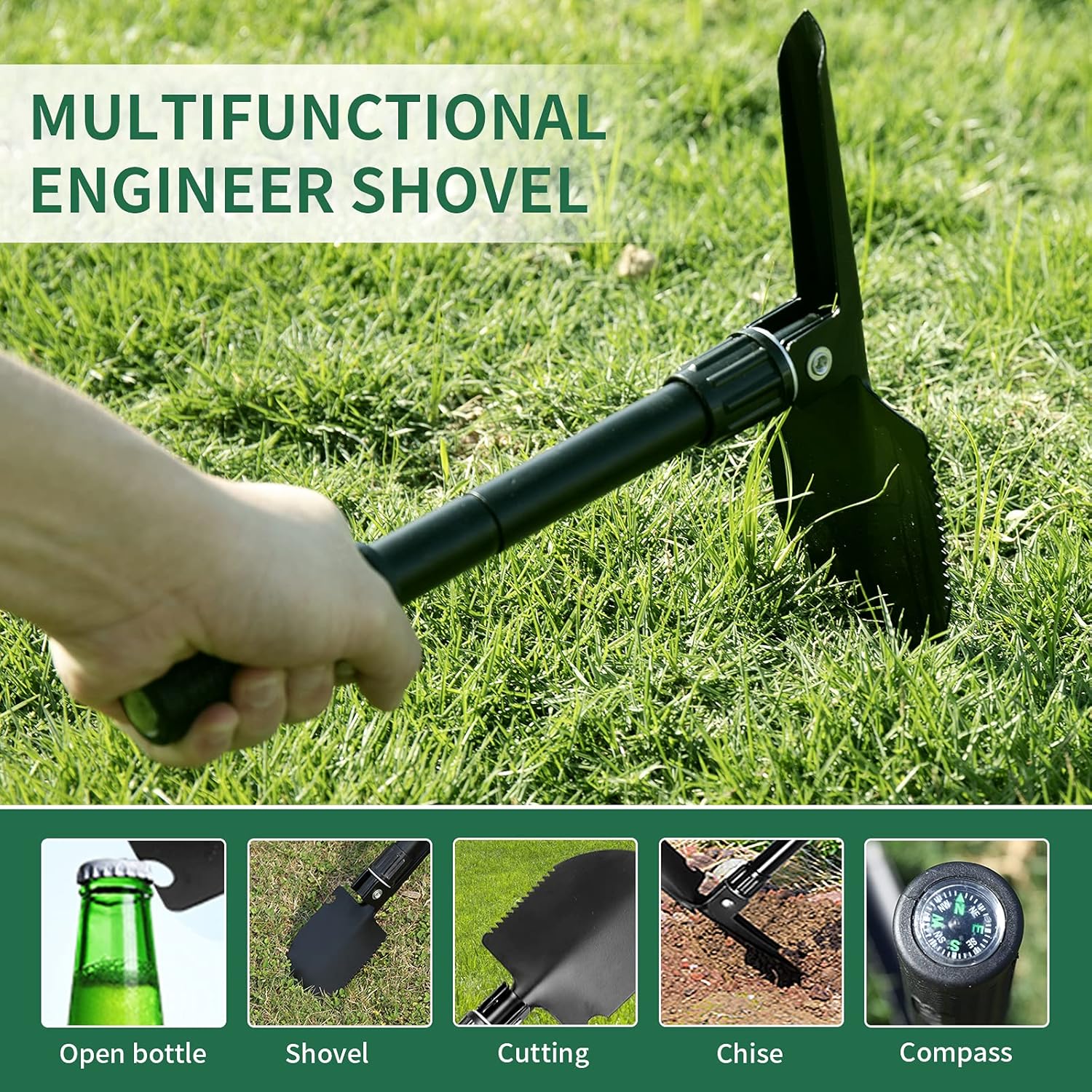
Figure 3.1: Close-up view of the backlit LCD display and control buttons.
3.2 Operating Modes
The detector offers three primary detection modes:
- PinPoint (PP) Mode: Used for precise localization of a detected target. The closer you are to the target, the stronger the signal indicated on the display.
- DISC (Discrimination) Mode: Allows the user to filter out unwanted metals. The display will show a value corresponding to the detected metal, enabling you to ignore specific types.
- NOTCH Mode: Similar to DISC, but allows for the exclusion of specific metal symbols or ranges. This mode is useful for focusing on particular target types while ignoring others. The detector also features a memory function for NOTCH settings.
3.3 Sensitivity Adjustment
The detector features 8 levels of sensitivity adjustment. Adjusting sensitivity is crucial for different environments. In areas with high mineralization or electrical interference, reducing sensitivity can help minimize false signals. In open, clear areas, higher sensitivity can increase detection depth.
3.4 Search Coil Operation
The 10-inch large-diameter search coil is waterproof, allowing for detection in shallow water. Note: The LCD control box is not waterproof and must not be submerged. The optimal detection depth ranges from 18cm to 30cm, depending on the target size and ground conditions.

Figure 3.2: The 10-inch waterproof search coil submerged in water, demonstrating its capability for underwater exploration.
3.5 Using the Multi-purpose Shovel
The included multi-purpose folding shovel is a versatile tool for excavation and other tasks. It can function as a shovel, saw, hammer, and includes a compass for navigation.

Figure 3.3: The multi-purpose folding shovel demonstrating its various functions, including shoveling, sawing, and use as a hammer, along with an integrated compass.
3.6 Detection Environments
The metal detector is suitable for various outdoor environments, including forests, sandy beaches, lawns, and general sandy ground. Always be aware of your surroundings and local regulations regarding metal detecting.

Figure 3.4: Examples of suitable environments for metal detecting, including forests, sandy beaches, lawns, and sandy ground.
4. Maintenance
Proper maintenance will extend the life and performance of your metal detector.
4.1 Cleaning
- After each use, especially in dirty or wet conditions, wipe down the search coil and stem with a damp cloth.
- Do not use abrasive cleaners or solvents, as these can damage the finish or electronic components.
- Ensure the control box is kept dry. If it gets wet, wipe it immediately with a dry cloth.
4.2 Storage
- When not in use for extended periods, remove the batteries from the control box to prevent leakage and corrosion.
- Store the metal detector in a cool, dry place, away from direct sunlight and extreme temperatures.
- Use the provided carrying bag for protection during storage and transport.
4.3 Battery Care
- Always use fresh, high-quality 9V batteries.
- When the battery indicator on the LCD display shows low power, replace both batteries promptly to ensure consistent performance.
- Dispose of used batteries according to local regulations.
5. Troubleshooting
This section addresses common issues you might encounter and their potential solutions.
| Problem | Possible Cause | Solution |
|---|---|---|
| No power or display |
|
|
| Erratic signals or false positives |
|
|
| No detection or weak signal |
|
|
6. Specifications
| Feature | Detail |
|---|---|
| Model Number | TPKPT0040US |
| Product Dimensions | 44 x 28 x 15.52 cm |
| Item Weight | 2.78 kg |
| Material Type | Metal |
| Power Source | Battery Powered (2 x 9V batteries required) |
| Search Coil Diameter | 25.4 cm (10 inches) |
| Search Coil Waterproof Rating | IPX7 (Coil only, control box is not waterproof) |
| Detection Depth | 18-30 cm |
| Adjustable Height | 100-130 cm |
| Display Type | Backlit LCD |
| Detection Modes | PinPoint, DISC, NOTCH |
7. Warranty and Support
7.1 Product Warranty
Ginour provides a 24-month warranty for this metal detector from the date of purchase. This warranty covers manufacturing defects and material faults under normal use. It does not cover damage caused by misuse, accidents, unauthorized modifications, or failure to follow the instructions in this manual.
7.2 Customer Support
For technical assistance, warranty claims, or any questions regarding your Ginour Metal Detector, please contact Ginour customer support. Refer to the product packaging or the official Ginour website for the most current contact information.
When contacting support, please have your product model number (TPKPT0040US) and purchase date available.
Ask a question about this manual
Ask about setup, troubleshooting, compatibility, parts, safety, or missing instructions. Manuals+ will review the question and use this page’s manual context to help answer it.