
Accutime TMR4093AZ
Teenage Mutant Ninja Turtles Kids Smart Watch User Manual
Model: TMR4093AZ | Brand: Accutime
Introduction
This manual provides essential information for the safe and effective use of your Teenage Mutant Ninja Turtles Kids Smart Watch. Please read it thoroughly before operating the device and retain it for future reference.
The Accutime Teenage Mutant Ninja Turtles Kids Smart Watch is an interactive device designed for young users, featuring a range of entertainment and practical functions. It includes customizable watch faces, built-in games, a selfie camera, a voice recorder, and tools such as an alarm, timer, stopwatch, calculator, step tracker, and calorie counter.
Package Contents
- Teenage Mutant Ninja Turtles Kids Smart Watch
- USB Charging Cable
- User Manual
Setup
Charging the Smart Watch
Before first use, fully charge the smart watch. Connect the included USB charging cable to the watch's charging port and plug the other end into a standard USB power adapter (not included) or a computer's USB port. The charging indicator will show the battery status. A full charge typically takes approximately 2-3 hours.

Figure 1: Front view of the Teenage Mutant Ninja Turtles Kids Smart Watch, showing the display with a time and date interface.
Powering On/Off
- To power on: Press and hold the power button located on the side of the watch until the screen illuminates.
- To power off: Press and hold the power button until the power-off prompt appears on the screen, then confirm.
Initial Setup
Upon first power-on or after a factory reset, you may be prompted to set the date and time. Follow the on-screen instructions to adjust these settings. The watch features a touch screen for easy navigation.
Operating the Smart Watch
The smart watch features a touchscreen interface. Swipe left or right to navigate between applications and tap an icon to open it.
Main Features Overview
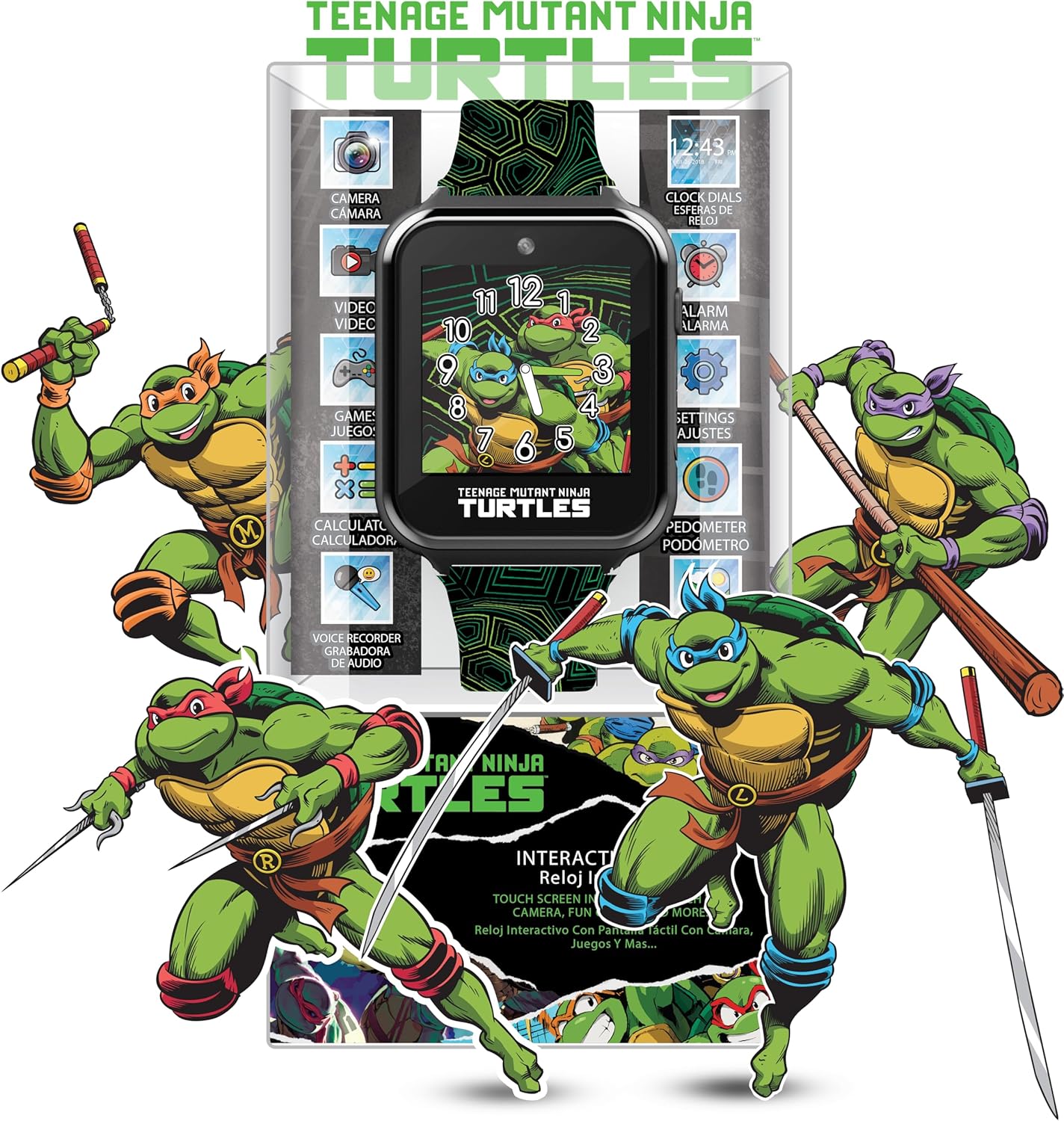
Figure 2: Packaging view highlighting various features of the smart watch, including camera, video, games, calculator, voice recorder, clock dials, alarm, settings, and pedometer.
- Watch Faces: Customize the watch display with 10 different Teenage Mutant Ninja Turtles themed watch faces. Access this feature from the main screen by tapping the "Clock Dials" icon or by long-pressing the watch face.
- Selfie Camera: Open the camera application to take photos. Images are saved directly to the watch's internal memory.
- Video Recorder: Record short video clips. Videos are also stored on the watch.
- Games: The watch includes three interactive games for entertainment. Select the "Games" icon to access them.
- Stopwatch: Use the stopwatch function for timing activities.
- Alarm: Set multiple alarms for reminders or wake-up calls.
- Calculator: Perform basic arithmetic calculations.
- Voice Recorder: Record short audio messages.
- Step Tracker (Pedometer): Monitors daily steps taken.
- Calorie Counter: Estimates calories burned based on activity.

Figure 3: A visual representation of the 10 changeable watch faces available on the smart watch, featuring different TMNT characters and designs.
Video Demonstration
Video 1: An official product video demonstrating the Nickelodeon Touchscreen Smart Watch, model TMR4093AZ, showcasing its features and interface.
Maintenance
Cleaning
Wipe the watch clean with a soft, dry cloth. Do not use abrasive cleaners or solvents. The watch is not waterproof; avoid submerging it in water or exposing it to excessive moisture.
Battery Care
The watch contains a non-removable Lithium Polymer battery. To prolong battery life, avoid extreme temperatures and store the watch in a cool, dry place when not in use for extended periods. Recharge the battery regularly, even if the watch is not used frequently.
Troubleshooting
| Problem | Possible Cause | Solution |
|---|---|---|
| Watch does not turn on. | Battery is depleted. | Charge the watch for at least 30 minutes using the provided USB cable. |
| Screen is unresponsive. | Temporary software glitch. | Perform a soft reset by holding the power button for 10-15 seconds until the watch restarts. |
| Cannot save photos/videos. | Internal memory is full. | Delete some existing photos or videos to free up space. |
| Date/Time is incorrect. | Settings need adjustment. | Go to "Settings" on the watch and manually adjust the date and time. |
Specifications
| Feature | Detail |
|---|---|
| Model Number | TMR4093AZ |
| Brand | Accutime |
| Battery Type | 1 Lithium Polymer battery (included) |
| Wrist Fit Range | 5.5" to 8" |
| Dimensions | 5.79 x 3.58 x 3.31 inches |
| Weight | 1.4 ounces |
| Manufacturer | Accutime Watch Corp. |
Warranty and Support
For warranty information, technical support, or service inquiries, please contact Accutime Watch Corp. directly. Refer to the product packaging or the manufacturer's official website for the most current contact details.
Keep your purchase receipt as proof of purchase for any warranty claims.
Related documentsTMR4093AZ

Ask a question about this manual
Ask about setup, troubleshooting, compatibility, parts, safety, or missing instructions. Manuals+ will review the question and use this page’s manual context to help answer it.