1. Introduction
This manual provides essential information for the safe and efficient use of your Bosch SPV4EMX21E fully integrated dishwasher. This appliance is designed for residential use, offering a capacity of 10 place settings and advanced features for optimal cleaning.
Key features include Home Connect for remote control via a mobile device, TimeLight for floor projection of remaining cycle time, and an EcoSilence motor for quiet operation. The dishwasher also features an optimized filtering system and efficient water distribution for environmental friendliness and effective cleaning.

Image: Bosch SPV4EMX21E dishwasher integrated into a modern kitchen.
2. Setup and Installation
Proper installation is crucial for the performance and longevity of your dishwasher. The Bosch SPV4EMX21E is a fully integrated model, meaning it is designed to be concealed behind a cabinet door matching your kitchen cabinetry. The cabinet door is not included with the appliance.
2.1 Unpacking
Carefully unpack the dishwasher. The package includes one dishwasher unit. Inspect for any damage during transit.
2.2 Dimensions and Placement
The dishwasher dimensions are approximately 55 cm (depth) x 44.8 cm (width) x 81.5 cm (height). Ensure your cabinet opening meets these requirements for a proper fit. Refer to the detailed installation diagram for precise measurements and connection points.

Image: Detailed diagram showing the installation dimensions in millimeters for the Bosch SPV4EMX21E dishwasher, including water and electrical connections.
2.3 Water and Electrical Connections
Connect the dishwasher to a 220 Volt power supply. Ensure water inlet and drain hoses are securely connected according to the installation guide. It is recommended to have a qualified technician perform the installation.
2.4 Initial Setup
After installation, you may need to set the water hardness level. This can often be done through the Home Connect app for optimized washing results.

Image: The Bosch SPV4EMX21E dishwasher installed, demonstrating how it integrates into kitchen cabinetry. Note that the decorative cabinet door is not supplied with the appliance.
3. Operating Instructions
Your Bosch SPV4EMX21E dishwasher offers various programs and features for efficient dishwashing.
3.1 Loading the Dishwasher
Arrange dishes, cutlery, and glassware in the baskets to ensure proper water circulation and cleaning. The dishwasher features a dedicated cutlery drawer and adjustable baskets for flexibility.

Image: The dedicated cutlery drawer, designed for organized placement of forks, knives, and spoons.

Image: The upper basket, suitable for glasses, cups, and smaller plates.

Image: The lower basket, ideal for larger plates, bowls, and pots.

Image: The lower basket configured to hold pots and pans.
3.2 Program Selection
Select the desired washing program using the touch controls on the panel. Available programs include an Eco program for energy-efficient washing. You can also customize and save a 'Favorite' program for quick access.

Image: The dishwasher control panel with program selection options and digital timer display.

Image: Close-up of the control panel, showing the 'Favourite' program button.
3.3 Home Connect Features
Utilize the Home Connect app to control and monitor your dishwasher remotely. You can start or stop cycles, check the remaining time, and monitor the status of salt and rinse aid levels from your mobile device.

Image: A smartphone displaying the Home Connect app, demonstrating remote control capabilities for the dishwasher.
3.4 TimeLight Projection
The TimeLight feature projects the remaining cycle time onto the floor in front of the dishwasher, providing a clear visual indication of its operational status without needing to open the door.

Image: The TimeLight feature projecting the remaining wash time onto the floor.

Image: A close-up view of the TimeLight projection displaying '0:27' on the floor.
3.5 End of Cycle
At the end of a cycle, the dishwasher door may automatically open to assist with drying, ensuring dishes are ready for unloading.
4. Maintenance
Regular maintenance ensures the optimal performance and longevity of your Bosch dishwasher.
4.1 Cleaning the Filters
Periodically check and clean the dishwasher filters to prevent blockages and ensure efficient water drainage. Refer to the full manual for detailed instructions on filter removal and cleaning.
4.2 Checking Salt and Rinse Aid
Monitor the levels of dishwasher salt and rinse aid. The Home Connect app can provide status updates for these consumables. Refill as necessary to maintain wash quality and prevent water spots.
4.3 Exterior and Interior Cleaning
Wipe down the exterior with a soft, damp cloth. For the interior, run a dishwasher cleaning cycle periodically or use a specialized dishwasher cleaner.
5. Troubleshooting
If you encounter issues with your dishwasher, consult the full user manual for detailed troubleshooting steps. Here are some general tips:
- No Power: Check the power connection and circuit breaker.
- Dishes Not Clean: Ensure proper loading, check detergent dispenser, and clean filters. Verify salt and rinse aid levels.
- Water Not Draining: Check for blockages in the drain hose or filter system.
- Unusual Noises: Ensure no items are obstructing the spray arms or pump.
For more complex issues, the Home Connect app may offer diagnostic capabilities, allowing you to send information to a service center.
6. Specifications
| Feature | Specification |
|---|---|
| Model Number | SPV4EMX21E |
| Brand | Bosch |
| Form Factor | Fully Integrated |
| Dimensions (H x W x D) | 81.5 x 44.8 x 55 cm |
| Weight | 29.9 kg |
| Voltage | 220 Volts |
| Capacity | 10 Place Settings |
| Water Consumption (Eco) | 9.5 Liters/cycle |
| Energy Consumption (Eco) | 0.674 kWh/cycle |
| Noise Level | 45 Decibels |
| Energy Efficiency Class | D |
| Interior Material | Stainless Steel |
| Special Function | Home Connect |
| Controls Type | Touch |
| Included Components | 1 Dishwasher |
| Eco Program Duration | 3:30 hours |

Image: The EU Energy Label for the Bosch SPV4EMX21E, detailing its energy consumption, water usage, noise level, and program duration. For more details, visit the EPREL database.
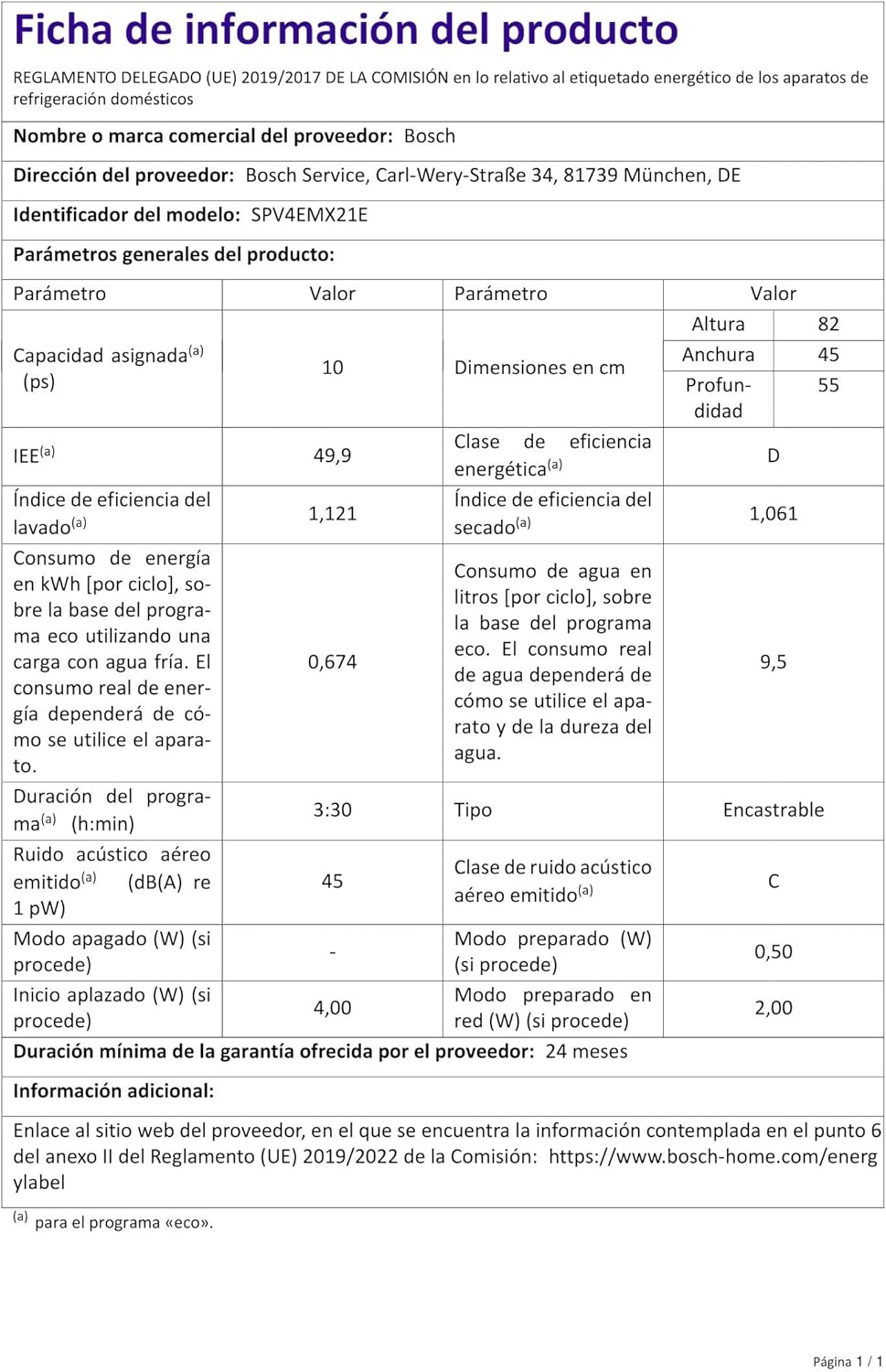
Image: Official product information sheet with detailed technical specifications.
7. Warranty and Support
7.1 Warranty Information
The Bosch SPV4EMX21E dishwasher comes with a minimum manufacturer's warranty of 24 months. Please retain your proof of purchase for warranty claims.
7.2 Customer Support
For further assistance, technical support, or service requests, please contact Bosch customer service. You can also find additional resources and support through the Home Connect app or on the official Bosch website.