
Tyrell Chenergy HH744
Tyrell Chenergy 1800 Amp Battery Jumper with Air Compressor User Manual
Model: HH744
Introduction
This user manual provides detailed instructions for the safe and effective operation and maintenance of your Tyrell Chenergy 1800 Amp Battery Jumper with 260 PSI Air Compressor. Please read this manual thoroughly before using the device and keep it for future reference.
Safety Instructions
WARNING: Read and understand all safety information before operating this unit.
- Always wear eye protection when working with batteries.
- Ensure the work area is well-ventilated.
- Do not smoke or allow sparks or flames near the battery or jump starter.
- Do not connect the positive (+) clamp to the negative (-) terminal, or vice versa. This can cause sparks and damage the unit or vehicle.
- Keep the unit away from moisture and extreme temperatures.
- Do not attempt to jump start a frozen battery.
- Keep out of reach of children.
- If battery acid comes into contact with skin or eyes, flush immediately with water and seek medical attention.
Product Overview
The Tyrell Chenergy HH744 is a versatile portable power station designed for vehicle jump starting, tire inflation, and powering electronic devices. Familiarize yourself with its components:
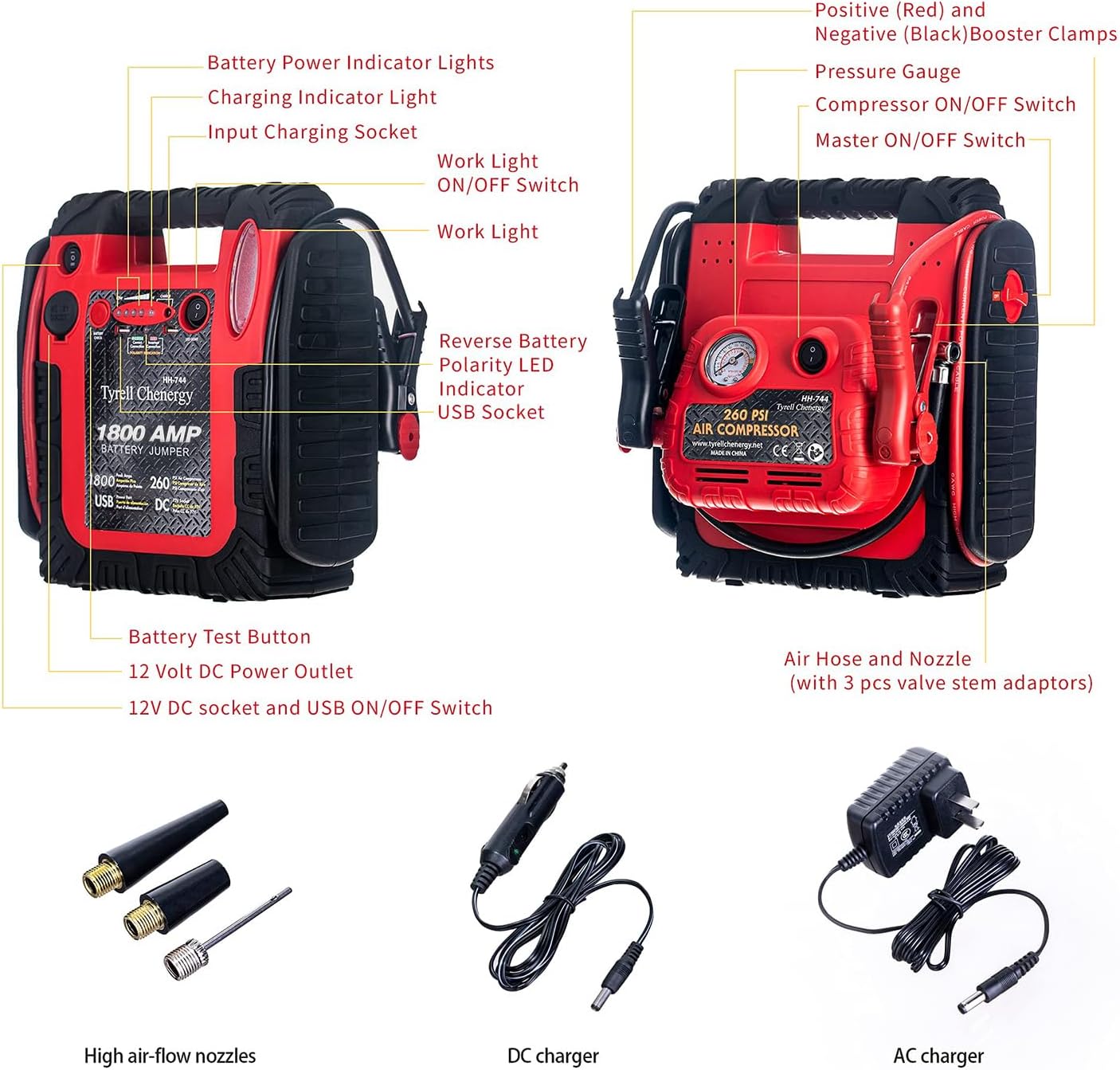
This diagram illustrates the various parts of the Tyrell Chenergy HH744, including the battery power indicator lights, charging indicator light, input charging socket, work light, reverse battery polarity LED indicator, USB socket, battery test button, 12V DC power outlet, 12V DC socket and USB ON/OFF switch, positive (red) and negative (black) booster clamps, pressure gauge, compressor ON/OFF switch, master ON/OFF switch, air hose and nozzle, high air-flow nozzles, DC charger, and AC charger.
- Battery Power Indicator Lights: Show the current charge level of the internal battery.
- Charging Indicator Light: Illuminates during charging.
- Input Charging Socket: For connecting the AC or DC charger.
- Work Light: Integrated LED light for illumination.
- Reverse Battery Polarity LED Indicator: Warns if clamps are connected incorrectly.
- USB Socket (5V 2.1A): For charging mobile devices.
- Battery Test Button: Checks the internal battery status.
- 12V DC Power Outlet: For powering 12V accessories.
- Booster Clamps: Heavy-duty clamps for jump starting.
- Pressure Gauge: Displays air pressure during inflation.
- Air Compressor: For inflating tires and other inflatables.
Setup and Charging
Initial Charging
Before first use, fully charge the unit for at least 12-15 hours. For optimal performance, it is recommended to fully charge the unit after each use and at least every 3 months if not in frequent use.
- Connect the AC charger to the unit's input charging socket.
- Plug the AC charger into a standard wall outlet.
- The charging indicator light will illuminate. Once fully charged, the light may change color or turn off depending on the model.
Connecting to Vehicle Battery (for Jump Starting)
Ensure the vehicle's ignition is off and all accessories are unplugged. The unit should be placed on a flat, stable surface.

This image shows the Tyrell Chenergy HH744 Battery Jumper positioned near a car engine, with its red positive clamp connected to the positive terminal of the car battery and the black negative clamp connected to a metal part of the engine block, away from the battery.
- Connect the RED positive (+) clamp to the positive (+) terminal of the vehicle's battery.
- Connect the BLACK negative (-) clamp to a non-moving metal part of the vehicle's engine block or chassis, away from the battery. Do not connect directly to the negative battery terminal.
- If the reverse polarity indicator lights up, immediately disconnect the clamps and re-connect them correctly.
Operating Instructions
Jump Starting a Vehicle
The Tyrell Chenergy HH744 is designed to jump start 12V vehicles with up to 6L gas or 6L diesel engines, including cars, SUVs, vans, pickups, and motorcycles.

This image illustrates the wide range of vehicles compatible with the Tyrell Chenergy HH744 for jump starting, from passenger cars and SUVs to commercial vans and even lawnmowers.
- Ensure the unit is fully charged and the clamps are correctly connected to the vehicle battery (as per "Connecting to Vehicle Battery" section).
- Turn on the Master ON/OFF switch on the unit.
- Attempt to start the vehicle. If it does not start within 5 seconds, wait at least 3 minutes before trying again.
- Once the vehicle starts, immediately turn off the Master ON/OFF switch on the unit.
- Disconnect the BLACK negative (-) clamp first, then the RED positive (+) clamp.
Using the Air Compressor
The built-in 260 PSI air compressor can inflate tires, sports equipment, and other inflatables.
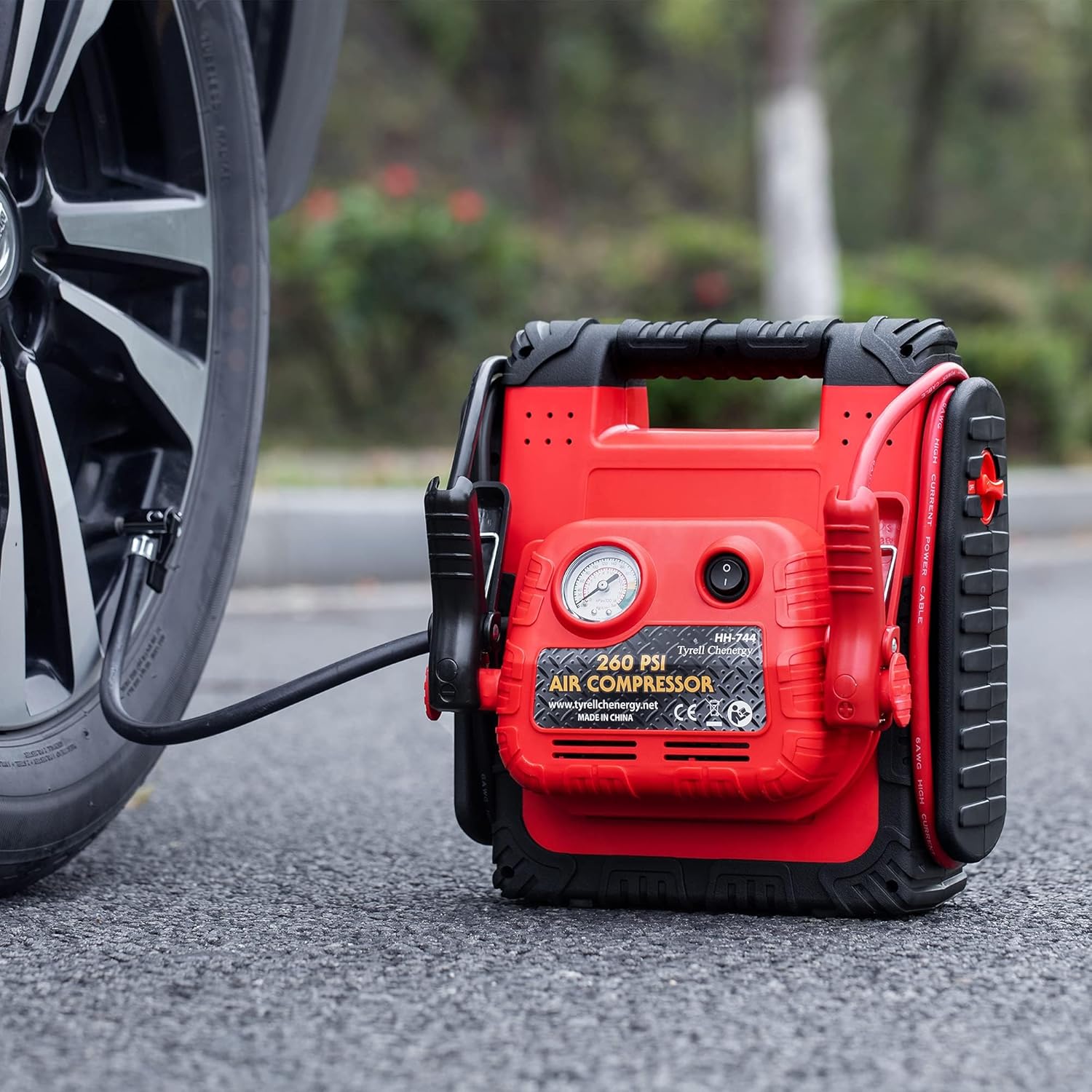
This image shows the Tyrell Chenergy HH744 unit on the ground next to a car tire, with its air hose connected to the tire valve for inflation. The pressure gauge is visible on the unit.
- Ensure the unit is fully charged.
- Attach the air hose nozzle securely to the item you wish to inflate (e.g., tire valve stem). Use appropriate adapters if necessary.
- Turn on the Compressor ON/OFF switch.
- Monitor the pressure gauge and turn off the compressor once the desired pressure is reached.
- Disconnect the air hose.
Using USB Ports and DC Outlet
The unit features dual 5V 2.1A USB ports and a 12V DC outlet to power and charge various electronic devices.

This image displays the Tyrell Chenergy HH744 unit with a tablet and a smartphone connected to its USB ports, both devices showing charging indicators. A lunchbox is also visible, suggesting the unit's portability for various uses.
- Connect your USB-powered device to one of the USB ports.
- For 12V devices, plug them into the 12V DC outlet.
- Turn on the 12V DC socket and USB ON/OFF switch.
- The unit will begin charging/powering the connected devices.
Using the LED Light
The integrated super bright LED work light provides illumination in low-light conditions, offering normal/constant mode for various needs.

This image shows the Tyrell Chenergy HH744 unit with its powerful LED light activated, casting a bright beam towards a tent in a dark environment, highlighting its utility as an emergency or work light.
- Locate the Work Light ON/OFF switch.
- Press the switch to turn the light on or off.
Maintenance
- Recharge Regularly: To prolong battery life, recharge the unit after each use. If not used, recharge every 3 months.
- Clean the Unit: Wipe the exterior with a soft, damp cloth. Do not use harsh chemicals or abrasives.
- Store Properly: Store the unit in a cool, dry place, away from direct sunlight and extreme temperatures.
- Check Cables and Clamps: Periodically inspect the booster cables and clamps for any damage, fraying, or corrosion.
Troubleshooting
| Problem | Possible Cause | Solution |
|---|---|---|
| Unit does not turn on/no power. | Internal battery is discharged. | Recharge the unit fully. |
| Vehicle does not jump start. | Incorrect clamp connection; vehicle battery severely discharged; unit not fully charged; vehicle issue. | Check clamp polarity; ensure unit is fully charged; consult vehicle manual or professional. |
| Air compressor not inflating. | Hose not securely attached; unit not turned on; internal battery low. | Ensure hose is tight; turn on compressor switch; recharge unit. |
| USB ports not charging devices. | USB/DC switch off; unit battery low; device not compatible. | Turn on USB/DC switch; recharge unit; check device compatibility. |
Specifications
| Brand | Tyrell Chenergy |
| Model | HH744 |
| Peak Amps | 1800 A |
| Voltage | 12 Volts |
| Battery Capacity | 20 Amp-hours |
| Air Compressor Pressure | 260 PSI |
| USB Output | 5V 2.1A (Dual Ports) |
| DC Output | 12V |
| Product Dimensions (L x W x H) | 17.78 x 25.15 x 28.45 cm |
| Item Weight | 7.62 Kilograms |
| UPC | 616430163033 |
Warranty and Support
Tyrell Chenergy offers a 12-month warranty for this product from the date of purchase. This warranty covers manufacturing defects and issues arising from normal use.
For warranty claims, technical support, or any inquiries regarding your Tyrell Chenergy HH744, please contact our customer service. Refer to your purchase documentation for specific contact details or visit the official Tyrell Chenergy website.
Please note that a delivery signature may be required for product service or returns.
Ask a question about this manual
Ask about setup, troubleshooting, compatibility, parts, safety, or missing instructions. Manuals+ will review the question and use this page’s manual context to help answer it.