
SENTRY 37098500006
Sentry Micro True Wireless Pro Earbuds User Manual
Model: 37098500006 | Brand: SENTRY
Introduction
Thank you for choosing the Sentry Micro True Wireless Pro Earbuds. This manual provides essential information for setting up, operating, and maintaining your new earbuds. Designed for premium sound and ultimate portability, these earbuds offer a seamless audio experience with advanced features like inductive charging and auto-pairing. Please read this manual thoroughly before use to ensure optimal performance and longevity of your device.
Safety Information
Please observe the following safety guidelines to prevent damage to your device or injury to yourself:
- Do not expose the earbuds or charging case to extreme temperatures, direct sunlight, or high humidity.
- Avoid dropping, impacting, or disassembling the device. This may void the warranty.
- Keep out of reach of children and pets.
- Use only the provided USB charging cable.
- Do not use the earbuds at excessively high volumes for prolonged periods, as this may cause hearing damage.
- WARNING: This product can expose you to chemicals including lead, which is known to the State of California to cause cancer and birth defects or other reproductive harm. For more information go to www.P65Warnings.ca.gov.
Package Contents
Verify that all items are present in your package:
- Sentry Micro True Wireless Pro Earbuds (Left and Right)
- Portable Charging Case
- USB Charging Cable
- User Manual (this document)

Image: Retail packaging of the Sentry Micro True Wireless Pro Earbuds, showing the earbuds and charging case.
Product Overview
Familiarize yourself with the components of your earbuds and charging case.

Image: The Sentry Micro True Wireless Pro Earbuds charging case in a closed position, showing its compact, white design.

Image: The Sentry Micro True Wireless Pro Earbuds resting inside their open charging case, ready for use or charging.
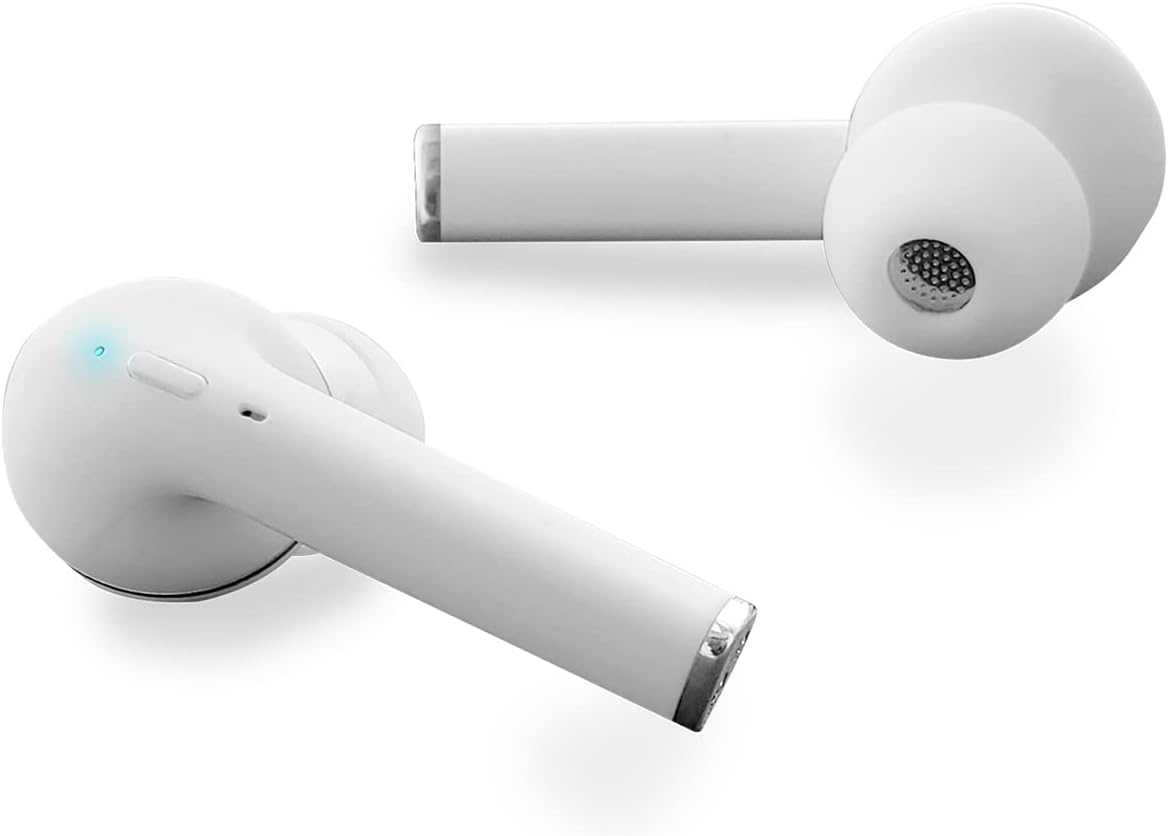
Image: Both Sentry Micro True Wireless Pro Earbuds displayed outside of their charging case, highlighting their individual design and ear tips.
Setup
Initial Charging
Before first use, fully charge both the earbuds and the charging case.
- Place the earbuds into the charging case, ensuring they are properly seated.
- Connect the provided USB charging cable to the charging port on the case and plug the other end into a USB power source (e.g., computer, wall adapter).
- The indicator lights on the case will show charging status. Allow approximately 1-2 hours for a full charge.
Pairing with Your Device
The earbuds feature Auto Pair & Auto On functionality.
- Ensure the earbuds are charged.
- Open the charging case. The earbuds will automatically power on and enter pairing mode.
- On your Bluetooth-enabled device (smartphone, tablet, etc.), go to the Bluetooth settings.
- Search for available devices and select "Sentry Earbuds" (or similar name) from the list.
- Once connected, you will hear a confirmation tone, and the earbuds' indicator lights will change.
- After initial pairing, the earbuds will automatically connect to the last paired device when removed from the case.
Operating Instructions
The Sentry Micro True Wireless Pro Earbuds feature intuitive controls for media playback and calls.
Music Playback
- Play/Pause: Tap the control button on either earbud once.
- Next Track: Double-tap the control button on the right earbud.
- Previous Track: Double-tap the control button on the left earbud.
- Volume Control: (If supported by model) Triple-tap the right earbud to increase volume, triple-tap the left earbud to decrease volume. Refer to your device's manual for specific volume control methods if not directly on earbuds.
Phone Calls
- Answer/End Call: Tap the control button on either earbud once.
- Reject Call: Press and hold the control button on either earbud for 2 seconds.
- Activate Voice Assistant: Press and hold the control button on either earbud for 3 seconds (e.g., Siri, Google Assistant).
Charging
Your Sentry Micro True Wireless Pro Earbuds offer extended playtime with their portable charging case.
Charging the Earbuds
- Place the earbuds into the charging case. They will automatically begin charging if the case has power.
- A full charge provides approximately 4 hours of playback at 50% volume.
Charging the Case
- Connect the USB charging cable to the case's charging port and a USB power source.
- The charging case provides approximately 3 additional full charges for the earbuds, totaling up to 20 hours of playtime.
- The case features inductive charging capabilities. Place the case on a compatible wireless charging pad (not included) for convenient charging.
Maintenance
Proper care ensures the longevity of your earbuds.
- Cleaning: Use a soft, dry, lint-free cloth to clean the earbuds and charging case. Do not use abrasive cleaners or solvents.
- Storage: When not in use, store the earbuds in their charging case to protect them and keep them charged. Store in a cool, dry place.
- Battery Care: To preserve battery life, avoid fully discharging the earbuds and case frequently. Charge them regularly, even if not in constant use.
Troubleshooting
If you encounter issues, try the following solutions:
| Problem | Solution |
|---|---|
| Earbuds won't turn on. | Ensure the earbuds and charging case are fully charged. Place earbuds in case, close, then open again. |
| Earbuds won't pair with device. |
|
| Only one earbud is working. |
|
| Poor sound quality or disconnections. |
|
Specifications
| Feature | Detail |
|---|---|
| Model Number | 37098500006 |
| Driver Unit | 10mm |
| Impedance | 32 ohms |
| Sensitivity | 103dB+/-3dB |
| Frequency Response | 20Hz-20KHz |
| Bluetooth Version | 5.0 |
| Bluetooth Range | 30FT / 10M |
| Earbud Battery | 35 MAH Lithium-ion |
| Case Battery | 400 MAH |
| Playback Time | 4 hours (at 50% volume) |
| Total Playtime (with case) | Up to 20 hours |
| Power | 3MW |
| Microphone Sensitivity | 36DB |
| Charging Cable | USB (included) |
| Manufacturer | SENTRY INDUSTRIES |
| UPC | 080068549574 |
Note: Actual playback times may vary. Battery performance may be affected by multiple factors including but not limited to ambient temperature, listening volume, and/or distance from source audio device.
Warranty and Support
For warranty information, technical support, or further inquiries, please visit the manufacturer's official website:
Please retain your proof of purchase for warranty claims.
Related documents37098500006

Ask a question about this manual
Ask about setup, troubleshooting, compatibility, parts, safety, or missing instructions. Manuals+ will review the question and use this page’s manual context to help answer it.