
1. Introduction and Overview
This manual provides essential instructions for the safe and efficient use of your Giosolar 240W Flexible Solar Panel Kit. This kit is designed for portable power solutions, ideal for RVs, boats, cabins, and other off-grid applications. It features flexible monocrystalline solar panels and a 20A PWM LCD charge controller for 12V/24V battery charging.
The flexible solar panels are engineered for durability and adaptability, capable of bending up to a 30-degree arc, allowing for installation on various curved surfaces. Their lightweight and ultra-thin design facilitates easy transport and mounting.
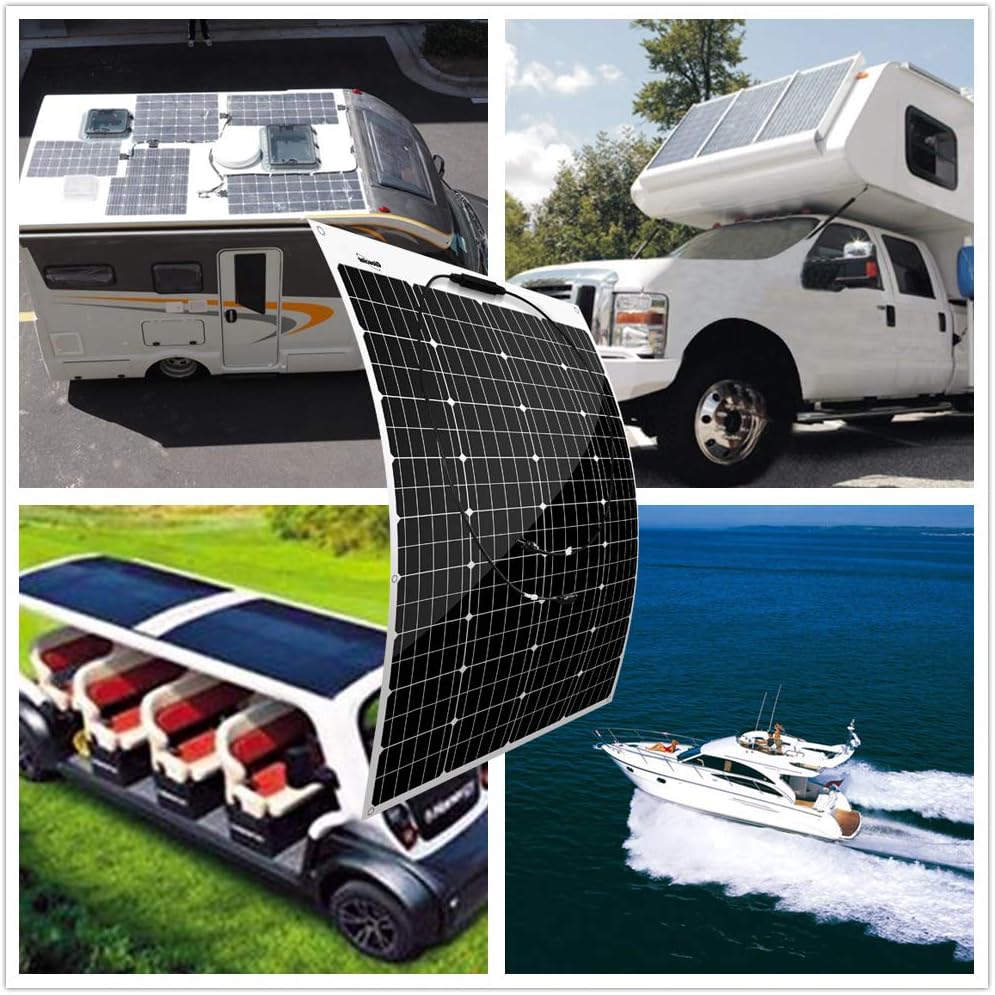
Figure 1: Giosolar flexible solar panels in various application settings, including RVs, truck campers, golf carts, and boats, demonstrating their versatility.
2. What's in the Box
Your Giosolar 240W Flexible Solar Panel Kit includes the following components:
- Two (2) 120W Flexible Monocrystalline Solar Panels: Each panel comes with 90mm of specialized solar cable and waterproof connectors.
- One (1) 20A PWM LCD Charge Controller: For managing battery charging.
- One (1) 5-meter Solar Cable with Connectors: Approximately 2.5 meters red and 2.5 meters black.
- One (1) Pair of Y Branch Connectors: For parallel connection of solar panels.
3. Specifications
3.1. 120W Flexible Solar Panel (Each)
- Maximum Power (Pmax): 120W
- Optimum Operating Voltage (Vmp): 18 V
- Open-Circuit Voltage (Voc): 21.6 V
- Optimum Operating Current (Imp): 6.67 A
- Short-Circuit Current (Isc): 7.23 A
- Dimensions: 1015 x 670 x 2.5 mm (39.96 x 26.38 x 0.1 inches)
- Weight: 2.2 kg (4.4 lbs)
- Cable Length: 90mm with connectors
- Material: Monocrystalline silicon
- Bendability: Up to 30-degree arc

Figure 2: Physical dimensions and key features of the Giosolar flexible solar panel, highlighting its lightweight, ultra-thin, and bendable design.
3.2. 20A PWM LCD Charge Controller
- Rated Charge Current: 20A
- System Voltage: 12V/24V Auto-sensing
- Display: LCD for battery voltage and charging current
- USB Ports: 2 (for charging small devices)
- Protections: Battery reversed, overloading, short-circuit, over charging/discharging
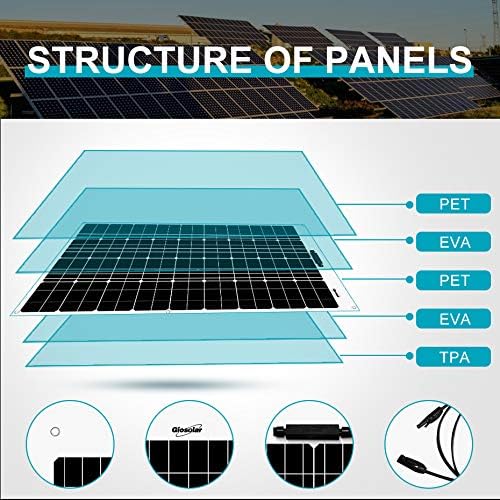
Figure 3: Exploded view of the solar panel's construction, detailing the protective and conductive layers (PET, EVA, TPA) that contribute to its flexibility and durability.
4. Setup and Installation
Proper installation is crucial for optimal performance and safety. Follow these steps carefully.
4.1. Mounting the Solar Panels
- Choose a Location: Select a location that receives maximum direct sunlight throughout the day and is suitable for the panel's flexibility.
- Secure the Panels: The panels feature 6 stainless eyelets along the edges for secure mounting. They can be affixed using adhesives, silicone glues, double-sided tapes, zip ties, or Velcro. Ensure the mounting method is appropriate for your surface and environmental conditions.
- Orientation: Orient the panels to face the sun for maximum energy harvest. For stationary installations, consider the optimal angle for your latitude.

Figure 4: Detail of the stainless steel eyelets on the solar panel, designed for various mounting options.
4.2. Wiring Connections
Important: Always connect the charge controller to the battery first, then connect the solar panels. Disconnect in the reverse order (solar panels first, then battery).
- Connect to Battery: Connect the positive and negative terminals of the 20A PWM LCD charge controller to your 12V/24V battery using appropriate battery cables (not included). Ensure correct polarity. The controller will auto-sense the battery voltage.
- Connect Solar Panels: Use the provided 5-meter solar cable and Y branch connectors to connect the two 120W solar panels in parallel to the charge controller's solar input terminals. Ensure all connections are secure and waterproof.
- Verify Connections: Double-check all wiring for correct polarity and secure connections before exposing the panels to sunlight.

Figure 5: Example of waterproof solar connectors, ensuring secure and weather-resistant electrical connections.
5. Operating Instructions
Once properly installed, the Giosolar 240W Flexible Solar Panel Kit operates automatically to charge your battery.
- Charge Controller Display: The LCD on the 20A PWM charge controller will display the battery voltage and charging current. Monitor these readings to ensure proper operation.
- USB Charging: The controller includes two USB ports for charging small electronic devices.
- Battery Type: The controller is compatible with various 12V/24V lead-acid batteries (GEL, Sealed, Flooded). Refer to the controller's specific manual for battery type settings if applicable.
- Protection Features: The controller is equipped with built-in protections against battery reversed polarity, overloading, short-circuiting, and over-charging/discharging.
6. Maintenance
Regular maintenance ensures the longevity and efficiency of your solar panel kit.
- Panel Cleaning: Periodically clean the surface of the solar panels with a soft, damp cloth to remove dust, dirt, and debris. Avoid abrasive materials or harsh chemicals.
- Connection Checks: Annually inspect all electrical connections for tightness and corrosion. Ensure waterproof connectors are sealed properly.
- Cable Inspection: Check solar cables for any signs of wear, damage, or degradation. Replace damaged cables immediately.
- Battery Health: Monitor your battery's health and charge level regularly.
7. Troubleshooting
If you encounter issues with your solar panel kit, refer to the following common troubleshooting steps:
- No Power Output from Panels:
- Ensure panels are exposed to direct sunlight and not shaded.
- Check all connections from the panels to the charge controller for security and correct polarity.
- Inspect cables for damage.
- Battery Not Charging:
- Verify the charge controller is correctly connected to the battery (battery first, then solar).
- Check battery voltage on the controller's LCD. If the battery is severely discharged, the controller may not initiate charging.
- Ensure the solar panels are producing power (check solar input voltage if possible).
- Charge Controller Error Codes: Refer to the specific manual for the 20A PWM LCD charge controller for detailed explanations of any error codes displayed.
- Low Charging Current:
- Clean solar panels to remove dirt or debris.
- Ensure panels are optimally angled towards the sun.
- Check for partial shading on the panels.
8. Warranty Information
The Giosolar 240W Flexible Solar Panel Kit comes with the following warranty:
- Power Output Warranty: 25 years transferable.
- Efficiency Rate: 5 years for 95% efficiency, 10 years for 90% efficiency, 25 years for 80% efficiency.
- Material and Workmanship Warranty: 5 years.
Please retain your proof of purchase for warranty claims.
9. Support
For further assistance, technical support, or warranty inquiries, please contact Giosolar customer service through the retailer where the product was purchased or visit the official Giosolar website.
Online Resources: For additional information and FAQs, please visit the Giosolar Store on Amazon.