1. Introduction
Thank you for choosing the RECYKO Speed Charger USB Charger (M451) with 4 AA 2600mAh Batteries. This manual provides essential information for the safe and efficient operation of your new charger and batteries. This versatile charger is designed to work via USB or with compatible ReCyko GP charger docks (B421, M451, P461 models). The package includes the charger and four 2600mAh rechargeable AA batteries, providing a complete charging solution.

Figure 1.1: RECYKO Speed Charger and included batteries in their retail packaging.
2. Important Safety Information
Please read all safety instructions carefully before using the charger. Failure to follow these instructions may result in electric shock, fire, or damage to the charger or batteries.
- Use only with specified rechargeable NiMH AA or AAA batteries. Do not attempt to charge non-rechargeable batteries.
- Do not expose the charger to rain or moisture.
- Do not disassemble or modify the charger.
- Ensure proper ventilation during charging. Do not cover the charger.
- The charger features negative delta V automatic shut-off, temperature cut-off, and safety timer protection to prevent overcharge, over-voltage, and short circuit. These features help protect battery life.
- Keep out of reach of children.
3. Setup
Follow these steps to prepare your charger for use:
- Unpack the Contents: Carefully remove the charger and batteries from the packaging.
- Insert Batteries: Open the charger lid. Insert up to four AA or AAA NiMH rechargeable batteries into the charging slots, ensuring correct polarity (+ and - ends match the markings inside the charger).
- Connect Power: Connect the charger to a USB power source (e.g., computer USB port, USB wall adapter, or compatible ReCyko GP charger dock) using a USB cable.

Figure 3.1: Proper insertion of AA batteries into the charger slots.
4. Operating Instructions
The RECYKO Speed Charger is designed for efficient and safe battery charging.
4.1 Charging Process
- Once batteries are inserted and the charger is connected to a power source, the charging process will begin automatically.
- The two-color LED display will indicate the charging status for each pair of batteries.
- The charger can fully charge two batteries in approximately 2 hours or four batteries in approximately 4 hours via USB connection.
4.2 LED Indicators
The LED indicators provide visual feedback on the charging status:
- Solid Green: Batteries are fully charged.
- Flashing Green: Charging in progress.
- Red/Orange: Indicates an error, such as a disposable battery inserted, a bad battery, or incorrect battery insertion. Remove the battery and re-insert or replace if necessary.
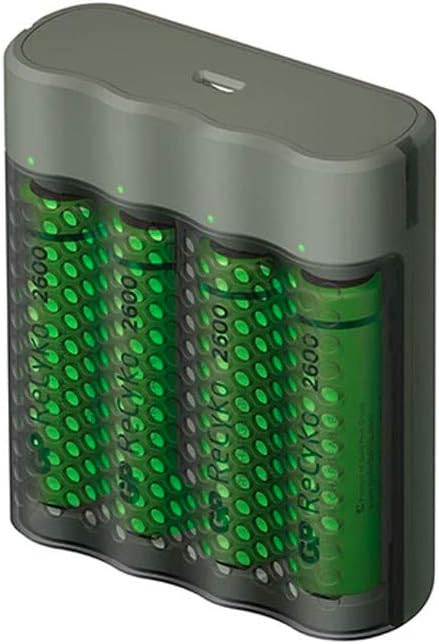
Figure 4.1: The charger with batteries inserted, showing the LED indicators at the top.
5. Maintenance and Care
Proper care will extend the life of your charger and batteries.
- Cleaning: Disconnect the charger from the power source before cleaning. Use a dry, soft cloth to wipe the exterior. Do not use abrasive cleaners or solvents.
- Storage: When not in use, store the charger and batteries in a cool, dry place away from direct sunlight and extreme temperatures. The sturdy case with its perforated lid doubles as a battery organizer, keeping your batteries well protected at home or on the go.
- Battery Care: For optimal performance, fully discharge and recharge batteries periodically.
6. Troubleshooting
If you encounter issues with your RECYKO Speed Charger, refer to the following common problems and solutions:
| Problem | Possible Cause | Solution |
|---|---|---|
| LED indicator is Red/Orange | Disposable battery inserted, bad battery, or incorrect polarity. | Ensure only rechargeable NiMH batteries are used. Check battery polarity. If the issue persists, the battery may be faulty and needs replacement. |
| Batteries not charging | No power to charger, loose connection, or faulty batteries. | Check USB cable connection and power source. Ensure batteries are properly seated. Test with different batteries if possible. |
| Charger feels warm during operation | Normal during charging, especially with fast charging. | This is normal. Ensure adequate ventilation around the charger. If it becomes excessively hot, disconnect immediately and contact support. |
7. Specifications
| Feature | Detail |
|---|---|
| Product Dimensions | 2.68 x 2.91 x 1.02 inches |
| Item Weight | 7.7 ounces (0.22 Kilograms) |
| Model Number | GPACSM451002 |
| Batteries Included | 4 AA 2600mAh NiMH rechargeable batteries |
| Output Voltage | 1.4 Volts (DC) |
| Color | Green |
| Manufacturer | GP Batteries |
8. Warranty and Support
For warranty information or technical support, please refer to the warranty card included with your product or visit the official GP Batteries website. Keep your purchase receipt as proof of purchase for any warranty claims.
For further assistance, you may contact GP Batteries customer service through their official channels. Please have your model number (GPACSM451002) and purchase details ready when contacting support.