
Lafocuse ZH0057B
Lafocuse 12 Inch Silent Modern Wall Clock Instruction Manual
Model: ZH0057B | Brand: Lafocuse
Introduction
This manual provides detailed instructions for the setup, operation, and maintenance of your Lafocuse 12 Inch Silent Modern Wall Clock. Designed for accuracy and quiet operation, this clock features an analog display with a digital LCD screen showing the month, date, day of the week, and temperature. Please read this manual thoroughly before use to ensure proper functionality and longevity of your product.
Safety Information
- Keep the clock away from direct sunlight, extreme temperatures, and high humidity.
- Do not expose the clock to water or other liquids.
- Use only the specified battery types (1 AA and 1 AAA).
- Remove batteries if the clock will not be used for an extended period to prevent leakage.
- Keep batteries out of reach of children.
- Do not attempt to disassemble or repair the clock yourself. Contact customer support for assistance.
Package Contents
- 1 x Lafocuse 12 Inch Silent Modern Wall Clock
- 1 x Instruction Manual (this document)

Figure 1: Product packaging, showing the clock box.
Setup
1. Battery Installation
The clock requires two batteries: one AA battery for the analog time movement and one AAA battery for the LCD calendar and thermometer display.
- Locate the battery compartments on the back of the clock.
- Insert one AA zinc carbon battery into the main clock movement compartment, ensuring the (+) and (-) terminals are properly aligned.
- Insert one AAA battery into the LCD display compartment, ensuring correct polarity.
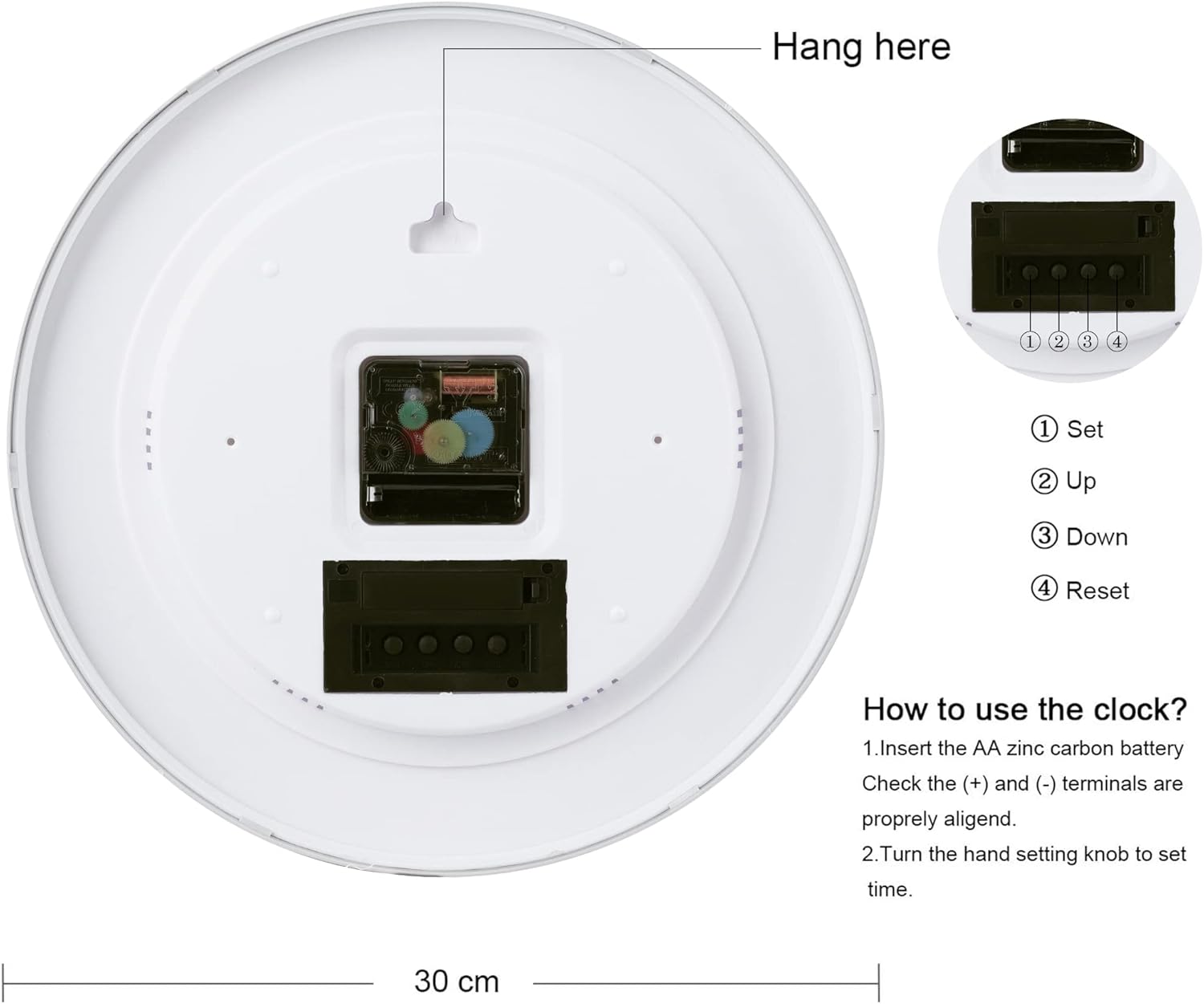
Figure 2: Rear view of the clock with battery compartments and setting buttons labeled.
2. Setting the Time
After installing the AA battery, turn the hand setting knob located on the back of the clock's movement mechanism to adjust the analog time. Rotate the knob clockwise until the correct time is displayed.
3. Setting the LCD Calendar and Temperature
The LCD display shows the month, date, day of the week, and temperature. Use the buttons located on the back of the LCD unit to set these values.
- Press the "SET" button to enter setting mode. The "Year" will flash.
- Use the "UP" or "DOWN" buttons to adjust the year.
- Press "SET" again to move to the next setting (Month, Date, Day of Week). Adjust each using "UP" or "DOWN".
- Once all settings are complete, press "SET" until the display returns to the normal date window.
- To switch the temperature unit between Celsius and Fahrenheit, press the "UP" button when the display is showing the normal date and temperature. Note: Some models may only support Celsius display for temperature.

Figure 3: Detailed view of the LCD display and analog hands.
4. Mounting the Clock
The clock is designed for wall mounting. Use the integrated hanging slot on the back of the clock to securely place it on a nail or screw in your desired location.

Figure 4: Example of the clock mounted on a wall.
Video 1: Official product video demonstrating the clock's features, including the date display and silent operation.
Operating the Clock
Reading the Time
The clock features a traditional analog display with black Arabic numerals and black hands on a white dial, ensuring clear visibility and easy time reading from a distance.
Understanding the LCD Display
The integrated LCD screen provides additional information:
- Month and Date: Displays the current month and day.
- Day of the Week: Shows the current day (e.g., MON, TUE).
- Temperature: Indicates the ambient temperature. Please note that the temperature display may be fixed to Celsius depending on the model.
Silent Operation
The clock is equipped with a precise quartz movement that ensures accurate timekeeping without any ticking noise, making it ideal for bedrooms, offices, or any quiet environment.
Maintenance
- Cleaning: Wipe the clock surface with a soft, dry cloth. Do not use abrasive cleaners or chemical solvents.
- Battery Replacement: Replace batteries annually or when the clock's accuracy diminishes or the LCD display fades. Ensure proper polarity when inserting new batteries.
- Storage: If storing the clock for an extended period, remove all batteries to prevent potential damage from battery leakage.
Troubleshooting
| Problem | Possible Cause | Solution |
|---|---|---|
| Clock not running or running slowly. | Dead or weak AA battery. | Replace the AA battery with a new one, ensuring correct polarity. |
| LCD display is blank or dim. | Dead or weak AAA battery for LCD. | Replace the AAA battery with a new one, ensuring correct polarity. |
| Incorrect date or day displayed on LCD. | Date/day not set correctly. | Follow the "Setting the LCD Calendar and Temperature" instructions in the Setup section to reset the date and day. |
| Temperature display is only in Celsius, cannot change to Fahrenheit. | Product design limitation. | Some models are designed to display temperature only in Celsius. This is not a defect. |
| Clock makes noise. | Not a silent sweep movement. | This model features a silent non-ticking movement. If noise is present, ensure the clock is securely mounted and not vibrating against the wall. If noise persists, contact customer support. |
Specifications
| Feature | Detail |
|---|---|
| Brand | Lafocuse |
| Model Number | ZH0057B |
| Color | Silver |
| Display Type | Analog with Digital LCD |
| Style | Modern |
| Special Feature | Thermometer, Calendar, Silent Sweep Movement, Battery Operated |
| Product Dimensions | 11.81"W x 0.79"H (Diameter: 12" / 30 cm) |
| Power Source | Battery Powered (1 AA, 1 AAA required) |
| Room Type | Kitchen, Living Room, Bedroom, Office |
| Shape | Round |
| Indoor/Outdoor Usage | Indoor |
| Material | Plastic (Frame Material: Plastic) |
| Watch Movement | Quartz |
| Item Weight | 2.18 pounds (989 Grams) |
| UPC | 717351612119 |
| Country of Origin | China |
Warranty and Support
Lafocuse offers a 3-Year Quality Assurance for this product. If you encounter any quality problems within this period, please do not hesitate to contact us for a satisfied solution.
For further assistance, technical support, or warranty claims, please contact Lafocuse customer service through the retailer's platform or visit the official Lafocuse website for contact information.
We are committed to providing a low-carbon and healthy life to our customers through practical and aesthetically pleasing designs.
Ask a question about this manual
Ask about setup, troubleshooting, compatibility, parts, safety, or missing instructions. Manuals+ will review the question and use this page’s manual context to help answer it.