
1. Product Overview
The NICREW 48W Saltwater Aquarium Light is designed to provide optimal lighting for marine environments, supporting saltwater fish, live rock, soft coral, and LPS corals. It features a combination of 445nm and 460nm blue, 10,000K white, and RGB LEDs to create a balanced spectrum. The integrated Day+Night controller allows for programmable lighting schedules, including gradual sunrise and sunset simulations.
- Advanced LED Spectrum: Features 445nm and 460nm blue, 10,000K white, and RGB LEDs for an ideal saltwater color combination.
- Programmable Controller: Includes a Day+Night controller to adjust lighting spectrum and simulate natural sunrise and sunset.
- Versatile Application: Suitable for saltwater fish, live rock, soft coral, and LPS corals. For low light SPS corals, two units are recommended.
- Adjustable Design: Equipped with extendable brackets to fit both rimless and framed aquariums from 48 to 60 inches in length.
- Moisture Protection: A glass or acrylic canopy is highly recommended to protect the unit from moisture and extend its lifespan.
2. Important Safety Instructions
Please read and follow all safety instructions carefully to prevent injury or damage. Failure to do so may result in electric shock, fire, or other hazards.
- Water Safety: This product is designed for use with aquariums. Do not immerse the light fixture or controller in water.
- Electrical Connection: Ensure the power cord and plug are dry before connecting to a power outlet. Do not operate if the cord or plug is damaged.
- Drip Loop: Always create a "drip loop" for the power cord to prevent water from traveling along the cord and reaching the electrical outlet.
- Ventilation: Ensure adequate ventilation around the light fixture to prevent overheating. Do not cover the light.
- Installation: Install the light securely on the aquarium. Do not operate if the light is unstable or improperly mounted.
- Maintenance: Disconnect power before performing any maintenance, cleaning, or when handling the light.
- Children: Keep this product out of reach of children.
- Indoor Use Only: This product is intended for indoor use only.
3. Package Contents
Verify that all components are present and in good condition upon unpacking.
- NICREW 48W Saltwater Aquarium Light Fixture
- Day+Night Programmable Controller
- Extendable Mounting Brackets (2 units)
- Power Adapter
- Instruction Manual
4. Setup Instructions
Follow these steps to properly install your NICREW Saltwater Aquarium Light.
4.1 Attaching the Mounting Brackets
The light comes with adjustable docking brackets designed for easy installation on various aquarium types.
- Carefully slide the extendable brackets into the slots on each end of the light fixture.
- Adjust the brackets to match the width of your aquarium. The brackets are designed to accommodate both rimless and framed aquariums from 48 to 60 inches.
- Ensure the light fixture is centered and securely seated on the aquarium edges.

Image: Adjustable docking brackets being extended from the light fixture. These brackets allow for flexible installation on aquariums ranging from 48 to 60 inches.
4.2 Connecting the Controller and Power
- Connect the light fixture's cable to the input port on the Day+Night controller.
- Connect the power adapter to the controller's power input.
- Create a drip loop with the power cord to prevent water from reaching the electrical outlet.
- Plug the power adapter into a suitable electrical outlet.

Image: The Day+Night controller with its display showing time and light intensity settings. This controller manages the light's schedule and brightness.
5. Operating Instructions
The Day+Night controller provides comprehensive control over your aquarium lighting.
5.1 Controller Functions
The controller features buttons for settings, adjustment, confirmation, and power. The display shows current time, white (W) channel intensity, and blue (B) channel intensity.
Video: A demonstration of how to use the ClassicLED Marine Controller. This video guides users through setting up and adjusting the light's functions.
5.2 Setting Time and Schedule
Refer to the detailed instructions provided with the controller for setting the current time and programming the daily lighting schedule, including sunrise and sunset effects. The controller allows for independent adjustment of white and blue light channels.
5.3 Lighting Modes
The light offers three distinct lighting modes, which can be programmed via the controller:
- Mode 1: All LEDs On (Full Spectrum)
- Mode 2: White LEDs On and Red+Green Components of RGB LEDs (Daylight Simulation)
- Mode 3: All Blue LEDs On and Blue Component of RGB LEDs (Moonlight/Actinic Simulation)
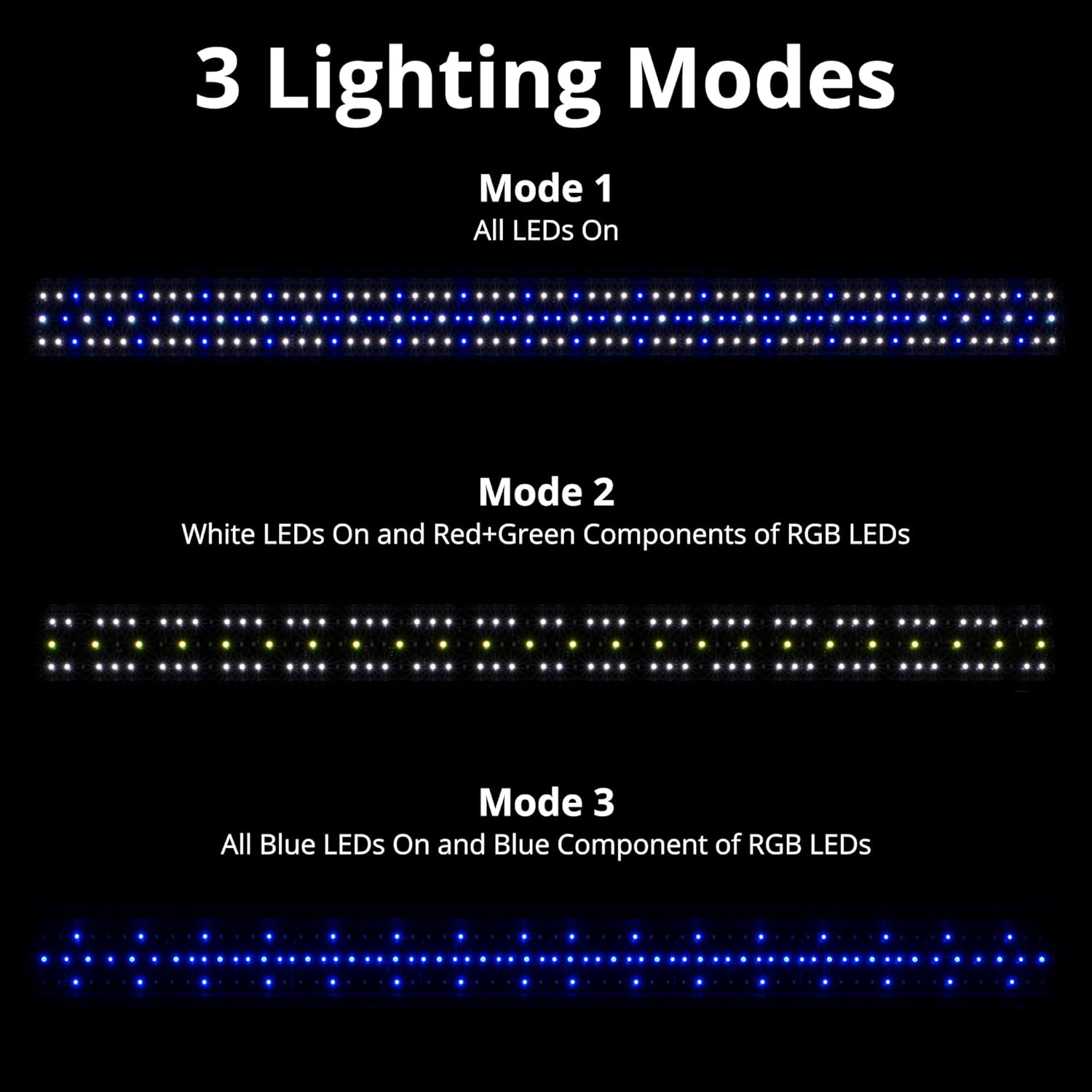
Image: Visual representation of the three lighting modes: all LEDs on, white and RGB red/green, and all blue and RGB blue. This illustrates the different light combinations available.
6. Maintenance
Regular maintenance ensures optimal performance and longevity of your aquarium light.
- Cleaning: Disconnect power before cleaning. Wipe the light fixture and controller with a soft, damp cloth. Do not use harsh chemicals or abrasive cleaners.
- Moisture Protection: To prevent moisture damage, especially from saltwater spray, it is highly recommended to use a glass or acrylic canopy over your aquarium. Regularly check for salt creep or water droplets on the fixture and wipe them away.
- Inspection: Periodically inspect the power cord, plug, and light fixture for any signs of damage or wear. If any damage is found, discontinue use and contact customer support.
7. Troubleshooting
If you encounter issues with your NICREW aquarium light, refer to the following common problems and solutions.
| Problem | Possible Cause | Solution |
|---|---|---|
| Light does not turn on. | No power, loose connection, or faulty unit. | Check power outlet, ensure all connections are secure. Verify power adapter is functioning. |
| Controller display is blank. | No power to controller. | Ensure power adapter is connected and plugged in. |
| Light schedule is incorrect after power outage. | Controller lost time setting. | Reset the current time on the controller. Other settings should remain. |
| Light intensity is too low/high. | Incorrect intensity settings. | Adjust the white and blue channel intensities using the controller. |
| Light flickers or behaves erratically. | Loose connection, moisture ingress, or internal fault. | Check all connections. Ensure the light is protected from moisture. If problem persists, contact support. |
8. Product Specifications
Detailed technical specifications for the NICREW 48W Saltwater Aquarium Light.
- Model: B08Q378RBY
- Wattage: 48 Watts
- Light Source Type: LED (445nm Blue, 460nm Blue, 10,000K White, RGB)
- Aquarium Size Compatibility: 48 - 60 inches
- Power Source: Corded Electric
- Special Features: Day+Night Controller, RGB LEDs
- Material: Acrylic, Glass
- Item Weight: 4.8 Pounds
- Package Dimensions: 52.7 x 5 x 2.6 inches
- Manufacturer: NICREW
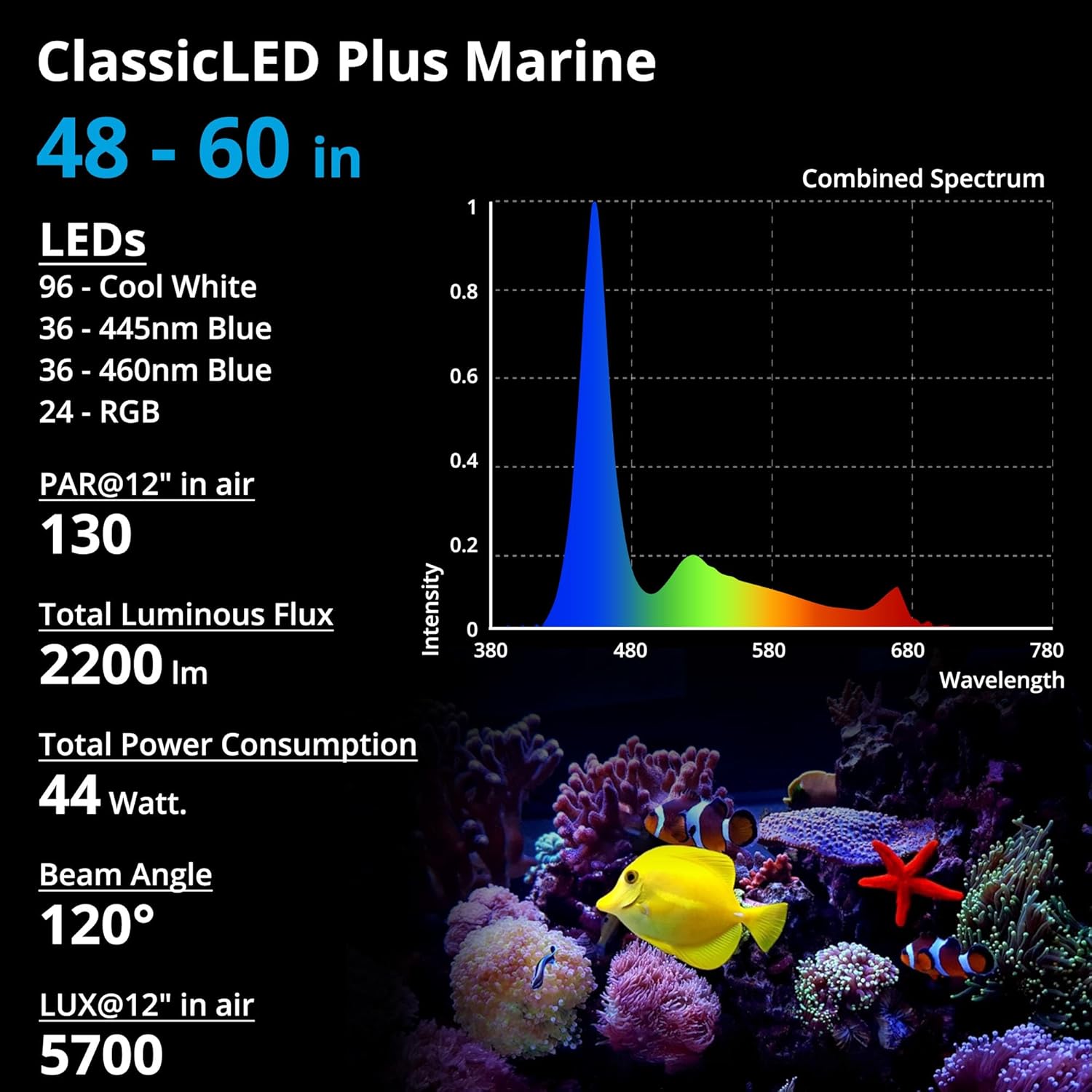
Image: Detailed specifications for the ClassicLED Plus Marine light, including LED count, PAR, luminous flux, power consumption, and beam angle. This provides technical data for the light's performance.
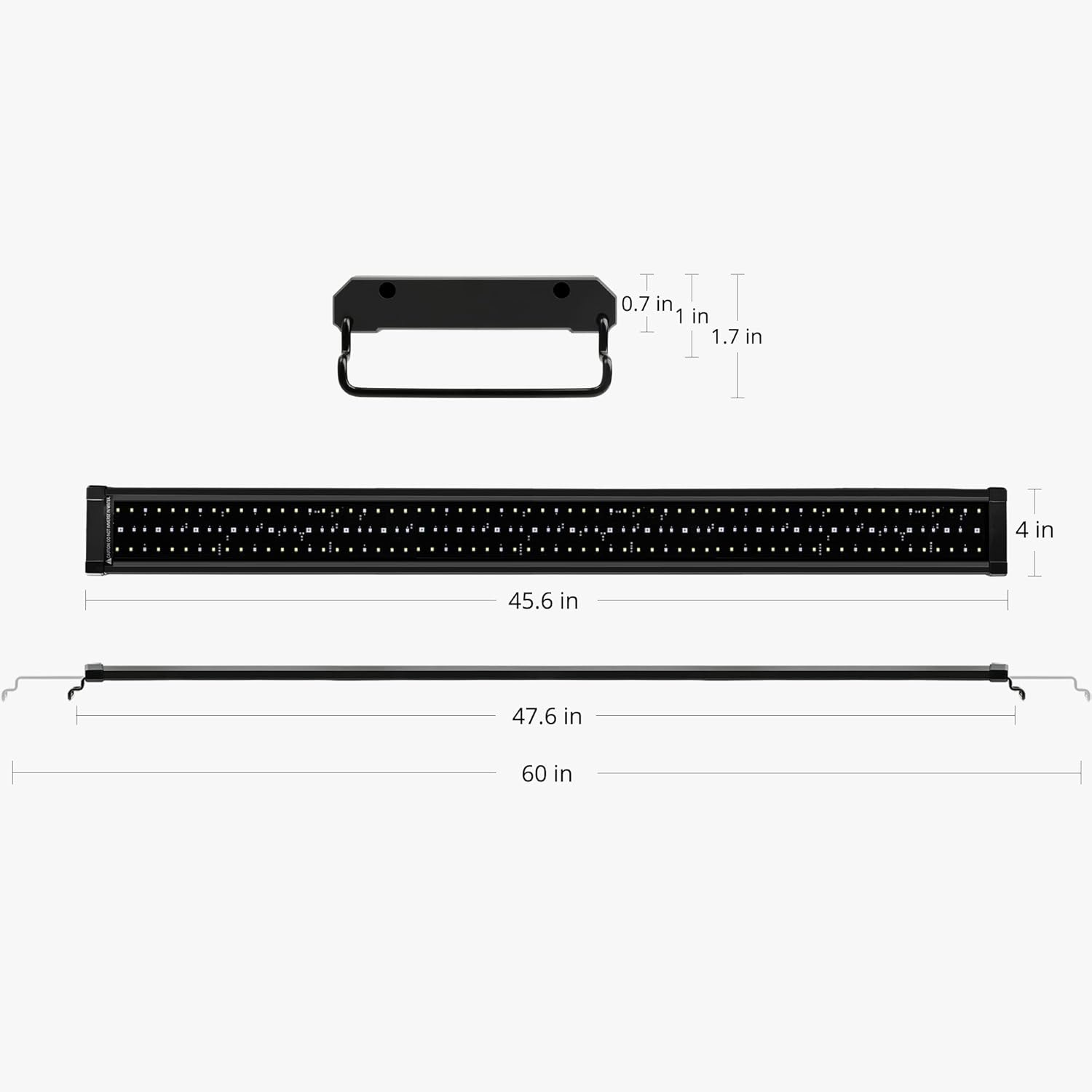
Image: Diagram showing the dimensions of the aquarium light fixture and its extendable brackets. This helps users confirm compatibility with their aquarium size.
9. Warranty and Support
NICREW is committed to providing quality products and customer satisfaction.
- Warranty: This product comes with a 12-month hassle-free warranty.
- Customer Service: For any questions, concerns, or support needs, please contact NICREW customer service. We aim to provide 24-hour friendly customer service.
- Contact Information: Refer to the NICREW official website or your purchase documentation for the most current contact details.

Image: Information regarding NICREW's commitment to customer satisfaction, including a 12-month warranty and 24-hour customer service.