
Ginour Ginour-01
Ginour Metal Detector User Manual
Model: Ginour-01
Introduction
The Ginour Metal Detector is designed for high-accuracy detection of various metals, including iron, aluminum, tin, copper, silver, and gold. Featuring a waterproof search coil and multiple detection modes, it is suitable for diverse environments such as forests, sandy beaches, lawns, and saline lands. This manual provides comprehensive instructions for assembly, operation, maintenance, and troubleshooting to ensure optimal performance and a rewarding treasure hunting experience.
Key Features:
- High Accuracy & Waterproof Large Coil (10-inch)
- 5 Detection Modes
- LCD Display with Backlight
- Headphone Support
- Adjustable Length (100cm-130cm)
- Multifunction Shovel Included
Package Contents
Upon unpacking, please verify that all components are present and in good condition:

The Ginour Metal Detector package includes the main detector unit, a 10-inch search coil, an adjustable stem, headphones, a multifunction shovel, and a carrying bag.
- Metal Detector Main Unit (Control Box)
- 10-inch Waterproof Search Coil
- Adjustable Stem (Upper, Middle, Lower)
- Headphones
- Multifunction Shovel with Camouflage Pouch
- Carrying Bag
- User Manual (this document)
Setup and Assembly
Follow these steps to assemble your Ginour Metal Detector:
- Attach the Search Coil: Secure the 10-inch search coil to the lower stem using the provided fixing knob and bolt. Ensure it is firmly attached but can still pivot.
- Connect the Stems: Insert the middle stem into the lower stem, aligning the spring button with the hole. Repeat for the upper stem, ensuring all connections are secure.
- Mount the Control Box: Slide the control box onto the top of the upper stem until it clicks into place. Ensure the armrest is facing the correct direction for comfortable use.
- Wrap the Cable: Wrap the search coil cable snugly around the stem, starting from the coil and moving upwards. Secure it with any provided clips to prevent tangling.
- Connect the Cable: Plug the search coil cable connector into the corresponding port on the control box.
- Install Batteries: Open the battery compartment on the control box and insert two 9V batteries (not included), ensuring correct polarity. Close the compartment securely.
- Adjust Length: Adjust the length of the stem to a comfortable height by loosening the locking collar, extending or retracting the stem, and then tightening the collar. The adjustable length is between 100cm and 130cm.
This video demonstrates the assembly process of the Ginour Metal Detector, showing how to connect the search coil, extend the stem, and attach the control box.
Operating Instructions
Control Panel Overview
The backlit LCD display provides visual feedback on target identification, sensitivity, and signal strength. Controls include Phone jack, Menu, Pin Point (PP), Notch, Volume, and Sensitivity adjustment.
- PHONE Jack: Connect headphones for private listening and clearer audio signals in noisy environments.
- MENU Button: Cycles through different settings and modes.
- PP (Pin Point) Button: Used for precise localization of a detected target. The closer you are to the target, the stronger the signal.
- NOTCH Button: Allows you to filter out specific metal types based on their identification value.
- VOLUME Knob: Adjusts the audio output level.
- SENS (Sensitivity) Adjustment: Controls the detector's sensitivity to targets. Adjustable from 1 to 8 levels. Reduce sensitivity in areas with high electrical interference.
Detection Modes
- All-Metal Mode: Detects all types of metals. Ideal for general searching when you want to find any metallic object.
- DISC (Discrimination) Mode: Allows you to eliminate certain types of metals from detection. Useful for ignoring junk metals like iron.
- NOTCH Mode: Similar to DISC, but allows for more precise exclusion of specific target ID ranges.
Target Identification Values
The LCD display shows a numerical target ID (00-99) and an icon indicating the probable metal type. Use the following table as a general guide:
This video illustrates how the Ginour Metal Detector identifies different types of metals based on their numerical target ID and corresponding audio tones.
| Value (Target ID) | Probable Metal/Item |
|---|---|
| 00-10 | Iron |
| 11-20 | Nickel (e.g., 5¢ coin) |
| 21-40 | Aluminum (e.g., Pull Tab, Beer Can) |
| 41-60 | Copper (e.g., 1¢ coin), Zinc Alloy, some Gold |
| 61-75 | Dimes (10¢ coin), Rough Gold |
| 76-99 | Silver Coin (e.g., 25¢ coin) |
Proper Sweeping Technique
To ensure effective detection and avoid false signals, maintain a consistent sweeping motion:
- Keep the search coil parallel to the ground and as close as possible without touching.
- Sweep the coil from side to side in a smooth, overlapping motion.
- Avoid lifting the coil at the ends of your sweep, as this can miss targets or create false signals.

The image illustrates the correct way of swinging the metal detector (swinging right, parallel to the ground) versus a false swing (lifting the coil).
Waterproof Search Coil
The 10-inch search coil is designed to be waterproof (IPX7 rated), allowing for detection in shallow water, such as streams, ponds, or wet sand on beaches. The control box is NOT waterproof and must be kept dry.

The 10-inch large diameter search coil is waterproof, enabling detection in shallow water environments.
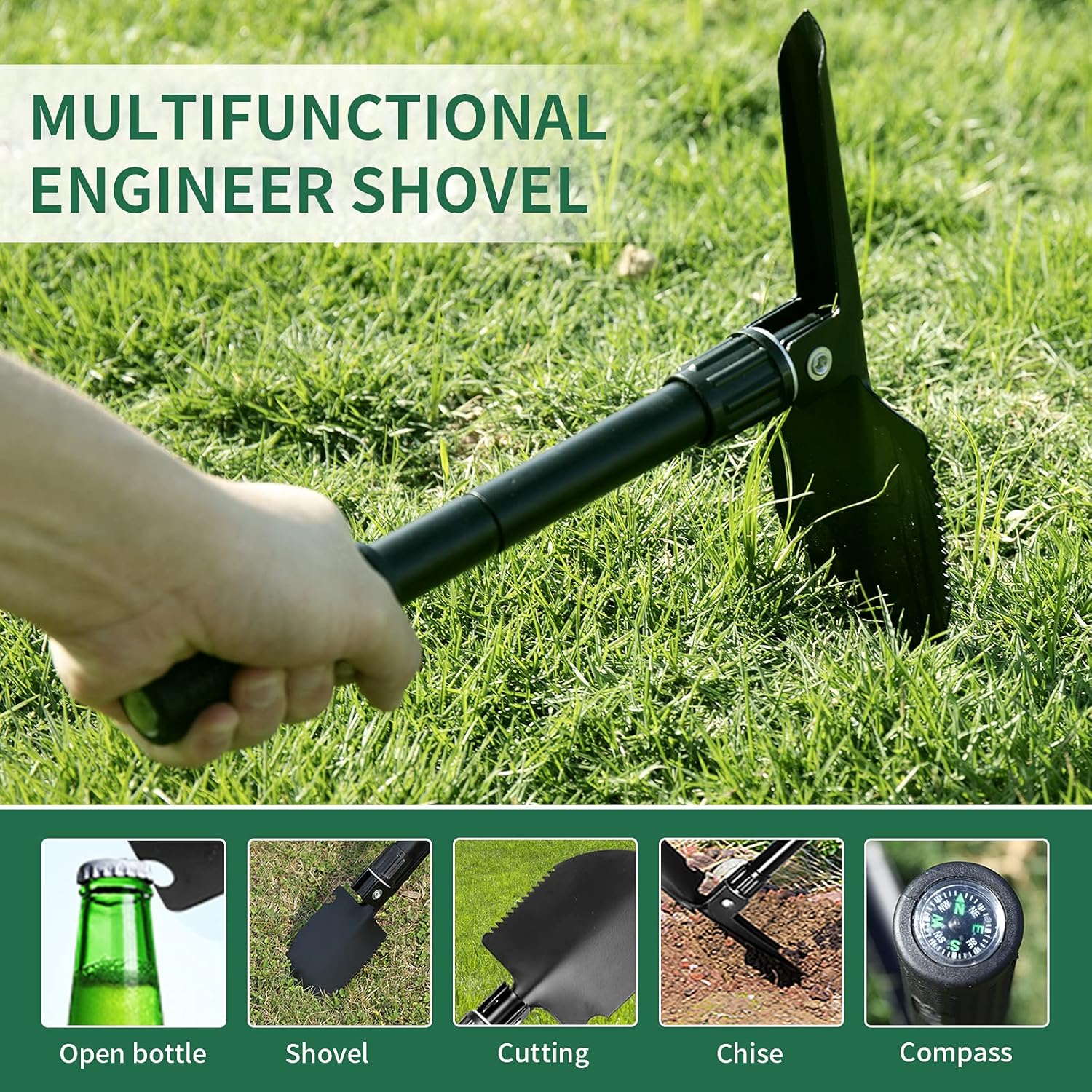
Multifunction Shovel
The included shovel is a versatile tool designed to assist in various outdoor tasks beyond just digging. It features multiple functions to aid in your treasure hunting and outdoor activities.

The multifunction engineer shovel can be used for opening bottles, shoveling, cutting, chiseling, and includes a compass.
Maintenance and Care
- Cleaning: After each use, wipe down the detector's stem and control box with a damp cloth. The search coil can be rinsed with fresh water if it has been submerged. Ensure all parts are dry before storage.
- Storage: Store the metal detector in a cool, dry place. If storing for an extended period, remove the batteries to prevent leakage and corrosion.
- Battery Replacement: Replace batteries when the low battery indicator appears on the LCD display to ensure consistent performance.
- Cable Care: Avoid sharp bends or kinks in the search coil cable. Secure it properly to the stem during use to prevent damage.
Troubleshooting
| Problem | Possible Cause | Solution |
|---|---|---|
| No power/display | Dead or incorrectly installed batteries | Replace batteries with fresh 9V batteries, ensuring correct polarity. |
| Constant beeping/false signals | High sensitivity, electrical interference, or mineralized ground | Reduce sensitivity (SENS knob). Move away from power lines or other electronic devices. Try adjusting ground balance if available (refer to advanced manual if applicable). |
| Weak or inconsistent signals | Low battery, loose coil cable, or improper sweeping technique | Check battery level and replace if low. Ensure search coil cable is securely connected. Practice consistent and even sweeping motions. |
| Detector not finding specific metals | DISC or NOTCH mode is active, excluding desired metals | Switch to All-Metal mode or adjust DISC/NOTCH settings to include the desired metal types. |
Specifications
- Brand: Ginour
- Model Number: Ginour-01
- Color: Gold
- Material: Metal
- Power Source: Battery Powered (2 x 9V batteries, not included)
- Adjustable Length: Yes (100cm - 130cm)
- International Protection Rating: IP54 (Control Box), IPX7 (Search Coil)
- Operating Frequency: 7.82 KHz
- Display Type: LCD
- Product Dimensions: 17.32 x 11.02 x 5.91 inches
- Item Weight: 5.99 pounds
Warranty and Support
For warranty information or technical support, please refer to the official Ginour website or contact their customer service directly. A digital version of this user manual is available for download at: User Manual (PDF).
Related Documents - Ginour-01
 |
Ginour Golf Rangefinder User Manual User manual for the Ginour Golf Rangefinder, a 1100-yard rechargeable laser rangefinder with slope, continuous scan, fast focus, flag lock with vibration, and 6x magnification for golf and hunting. |
 |
Ginour DG3100A Mini Grinder User Manual Comprehensive user manual for the Ginour DG3100A Mini Grinder, providing detailed instructions, safety precautions, technical specifications, and usage guides for various applications. |
 |
XP DEUS II Metal Detector: Fast Simultaneous Multi Frequency User Manual Discover the XP DEUS II, a revolutionary wireless metal detector featuring Fast Simultaneous Multi Frequency (FMF) technology. Explore land and sea with its advanced features, ergonomic design, and unparalleled performance. This user manual provides comprehensive guidance. |
 |
XP DEUS II Metal Detector: Explore Like Never Before Discover the revolutionary XP DEUS II metal detector, featuring Fast Simultaneous Multi Frequency (FMF) technology for unparalleled performance. This guide covers its features, configurations, and practical use for both land and underwater detecting. |
 |
XP Deus II Metal Detector Quick Start and User Guide Get started quickly with the XP Deus II metal detector. This guide covers setup, assembly, battery information, specifications, safety precautions, and legal compliance for your XP Deus II device. |
 |
XP DEUS II: Advanced Wireless Metal Detector User Guide Explore new depths with the XP DEUS II, a revolutionary wireless, multi-frequency metal detector by XP Metal Detectors. This comprehensive user manual details its advanced FMF® technology, ergonomic design, and features for land and underwater exploration. |