
AcuRite 5-in-1 Station and 06045M Lightning Detector Sensor
AcuRite 5-in-1 Station with Wi-Fi Connection & 06045M Lightning Detector Sensor User Manual
Model: 5-in-1 Station and 06045M Lightning Detector Sensor
Brand: AcuRite
Product Overview
The AcuRite 5-in-1 Weather Station with Wi-Fi Connection and the 06045M Lightning Detector Sensor provide comprehensive environmental monitoring for your location. The 5-in-1 sensor measures temperature, humidity, wind speed, wind direction, and rainfall, transmitting data wirelessly to a color display unit. This display can connect to Wi-Fi to upload your weather information to Weather Underground, allowing you to share and access data remotely. The included 06045M Lightning Detector Sensor enhances your weather monitoring by detecting lightning strikes within a 25-mile (40-kilometer) radius, also providing temperature and humidity readings. Both components are designed for reliable outdoor use and seamless integration.

Image: The AcuRite 5-in-1 Weather Station, including the outdoor sensor array and indoor color display, alongside the separate 06045M Lightning Detector Sensor.
Setup and Installation
1. Unpacking and Component Identification
Carefully remove all components from the packaging. Ensure you have the 5-in-1 outdoor sensor array, the indoor color display unit, and the 06045M Lightning Detector Sensor. Check for any visible damage.
2. 5-in-1 Outdoor Sensor Installation
The 5-in-1 sensor measures wind, rain, temperature, and humidity. Proper placement is crucial for accurate readings.
- Location: Choose an open area, at least 5 feet (1.5 meters) off the ground, away from obstructions like trees, buildings, or fences that could block wind or rain.
- Mounting: Use the included mounting bracket and hardware. Ensure the sensor is level for accurate rain collection and wind direction. The wind cups should be able to spin freely.
- Power: Insert 4 AA alkaline or lithium batteries (not included) into the battery compartment. Lithium batteries are recommended for temperatures below -4°F (-20°C).
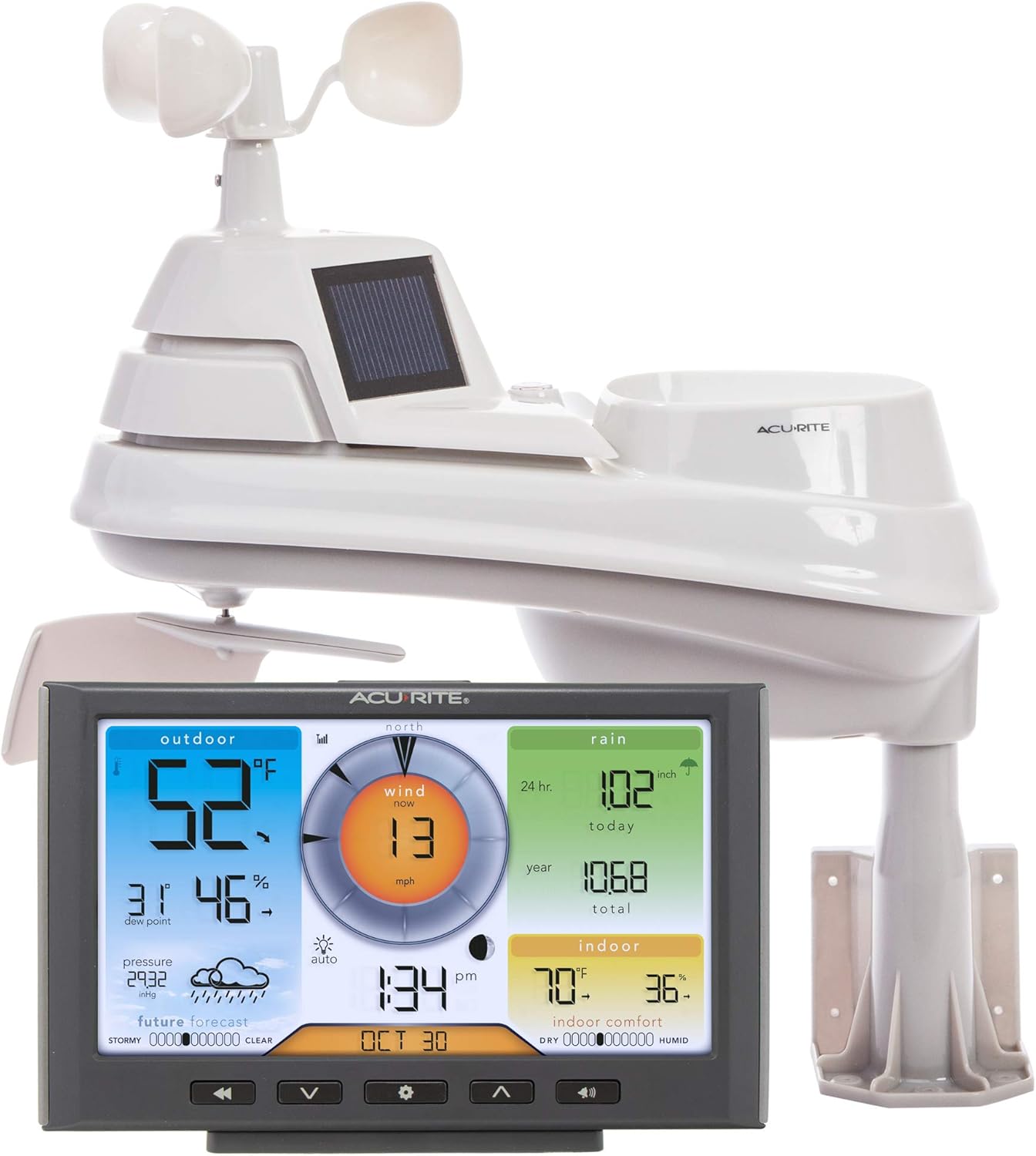
Image: The AcuRite 5-in-1 outdoor sensor array shown with its mounting hardware and the indoor color display unit.
3. 06045M Lightning Detector Sensor Installation
This sensor detects lightning strikes and provides additional temperature and humidity data.
- Location: Mount the lightning detector outdoors in a location that is protected from direct sunlight and precipitation, but still allows for good signal transmission to the display unit. Avoid placing it near large metal objects or electrical equipment that could cause interference.
- Mounting: Utilize the integrated mounting options. Ensure it is securely fastened.
- Power: Insert 2 AA alkaline or lithium batteries (not included) into the battery compartment.

Image: The AcuRite 06045M Lightning Detector Sensor, a compact, weather-resistant unit designed for outdoor placement.

Image: The AcuRite 06045M Lightning Detector Sensor with labels pointing to its easy-mount hanger, lightning strike indicator, and wireless signal & interference indicator.
4. Indoor Color Display Unit Setup
The display unit is the central hub for all your weather data.
- Power: Plug the AC power adapter into a wall outlet and then into the display unit. For backup, insert 3 AA alkaline batteries (not included).
- Sensor Connection: The display unit will automatically search for and connect to the 5-in-1 sensor and the lightning detector sensor. This may take a few minutes. Ensure both sensors are powered on and within range (up to 330 feet / 100 meters).
- Wi-Fi Connection: Follow the on-screen prompts or refer to the display's menu to connect to your home Wi-Fi network. This enables data upload to Weather Underground.

Image: A close-up view of the AcuRite color display unit, showing various weather data points such as outdoor temperature, wind speed, rainfall, and indoor comfort levels.
Operating Instructions
Understanding the Display
The color display provides a comprehensive overview of current and historical weather conditions.
- Outdoor Data: Displays outdoor temperature, humidity, dew point, and barometric pressure with trend arrows.
- Wind Data: Shows current wind speed, direction, and historical wind data.
- Rainfall: Tracks daily, weekly, monthly, and yearly rainfall totals.
- Indoor Data: Monitors indoor temperature and humidity.
- "Feels Like" Temperature: Calculates and displays the perceived temperature based on wind chill and heat index.
- Future Forecast: Provides a 12 to 24-hour weather forecast based on barometric pressure changes.
Lightning Detection
The 06045M Lightning Detector Sensor provides real-time alerts for lightning activity.
- Detection Range: Detects lightning strikes within 25 miles (40 kilometers).
- Alerts: The display unit will provide visual and audible alerts when lightning is detected within range. The sensor itself also has light and audible alarm notifications.
- Data Transmission: The sensor transmits data every 24 seconds normally, and every 8 seconds once lightning is detected, ensuring timely updates.
Wi-Fi and Weather Underground Connection
Connecting your display to Wi-Fi allows you to share your local weather data with the Weather Underground network.
- Benefits: Access your weather data remotely via the Weather Underground website or app, view historical data, and contribute to a global weather network.
- Setup: Ensure your display is connected to a 2.4 GHz Wi-Fi network. Follow the instructions in the display's settings menu to link your AcuRite account with your Weather Underground account.
Maintenance
Regular maintenance ensures the longevity and accuracy of your AcuRite weather station components.
- Cleaning the 5-in-1 Sensor: Periodically clean the rain collector funnel and debris screen to prevent blockages. Gently wipe the solar panel to ensure optimal charging.
- Battery Replacement: Replace batteries in both the 5-in-1 sensor and the lightning detector sensor annually, or when the low battery indicator appears on the display. Use fresh, high-quality alkaline or lithium batteries.
- Sensor Placement Check: Occasionally verify that both outdoor sensors remain securely mounted and free from new obstructions (e.g., growing tree branches).
- Display Unit Care: Keep the display unit clean and dry. Avoid using abrasive cleaners.
Troubleshooting
If you encounter issues with your AcuRite weather station, refer to the following common solutions:
| Problem | Possible Solution |
|---|---|
| No outdoor data on display. |
|
| Inaccurate temperature/humidity readings. |
|
| Wind readings are incorrect or absent. |
|
| Rainfall readings are inaccurate. |
|
| Wi-Fi connection issues. |
|
| Lightning detector not working. |
|
Specifications
| Feature | Detail |
|---|---|
| Brand | AcuRite |
| Model | 5-in-1 Station and 06045M Lightning Detector Sensor |
| Power Source (5-in-1 Sensor) | 4 AA Batteries (not included) |
| Power Source (Lightning Detector) | 2 AA Batteries (not included) |
| Power Source (Display) | AC Power Adapter (included), 3 AA Batteries (backup, not included) |
| Connectivity Technology | Wi-Fi, Wireless (RF) |
| Wireless Range | Up to 330 feet (100 meters) |
| Lightning Detection Range | Up to 25 miles (40 kilometers) |
| Indoor Humidity Range | 1% to 99% Relative Humidity |
| Display Type | Color Display with Backlight |
Warranty Information
The AcuRite 5-in-1 Station with Wi-Fi Connection comes with a limited 1-year warranty. Please retain your proof of purchase for warranty claims. For specific terms and conditions, refer to the official AcuRite website or contact customer support.
Customer Support
For further assistance, product compatibility inquiries, or troubleshooting not covered in this manual, please contact AcuRite Customer Support:
Phone: (877) 221-1252
You may also visit the official AcuRite website for additional resources and FAQs.
Related documents5-in-1 Station and 06045M Lightning Detector Sensor


Ask a question about this manual
Ask about setup, troubleshooting, compatibility, parts, safety, or missing instructions. Manuals+ will review the question and use this page’s manual context to help answer it.