Product Overview
The Soleus Air 25-Pint Energy Star rated dehumidifier is designed for effective indoor moisture control. It features a Mirage Display for easy humidity level monitoring, Tri-Pat Safety Technology for enhanced safety, and MyHome mode for pre-programmed humidity settings. This unit is suitable for areas up to 1,800 sq. ft.
Key Features:
- Mirage Display: White illumination on the front panel shows humidity levels from a distance.
- MyHome Mode: Patent-pending technology with automatic settings for basement, sleeping, and living spaces.
- Tri-Pat Safety Technology: Exceeds UL standards with overheat sensors, automatic cool-down cycles, and electrical current sensors.
- Continuous Mode: Allows for continuous operation with a hose connection for drainage.
- Bucket Full Indicator: Audible alarm and indicator light when the water bucket is full.
- Washable/Reusable Filter: Easy to clean and maintain.
- Loss of Power Protection: Remembers settings after a power interruption.
- Ultra Quiet Operation: Suitable for various living spaces.
- Low Temperature Operation: Operates effectively down to 41°F, ideal for basements.
Setup
Unpacking and Placement:
Carefully remove the dehumidifier from its packaging. Place the unit on a level, stable surface in an area requiring moisture control. Ensure adequate space around the unit for proper airflow. The unit is designed to operate effectively in temperatures down to 41°F, making it suitable for basement use.
Power Connection:
Plug the dehumidifier into a grounded electrical outlet. Ensure the power cord is not pinched or damaged.
Continuous Drainage (Gravity Drain):
For continuous operation without emptying the bucket, use the gravity drain option. Remove the cap from the drain port located at the back of the unit. Attach a standard garden hose to the nozzle and ensure it is securely fastened. Route the other end of the hose to a suitable drain, such as a floor drain or sink, ensuring a downward slope for gravity drainage.

Image: Rear view of the dehumidifier, highlighting the power cord and the continuous drain port. A garden hose can be connected here for gravity drainage.
Internal Pump Mode (If applicable):
Some models may include an internal pump for drainage to higher elevations. To use this feature, remove the drain cap from the back of the unit. Insert the gasket into the drain adapter, then force the drain hose onto the adapter. Turn the hose clockwise to attach it securely to the back of the unit. Route the drain hose to a nearby drain, sink, or out of a window, up to 16 feet in height from the base of the unit. Activate the pump mode via the control panel.
Video: Demonstrates the setup and operation of the Soleus Air Dehumidifier, including continuous drainage and internal pump mode installation.
Operating Instructions
Control Panel Overview:
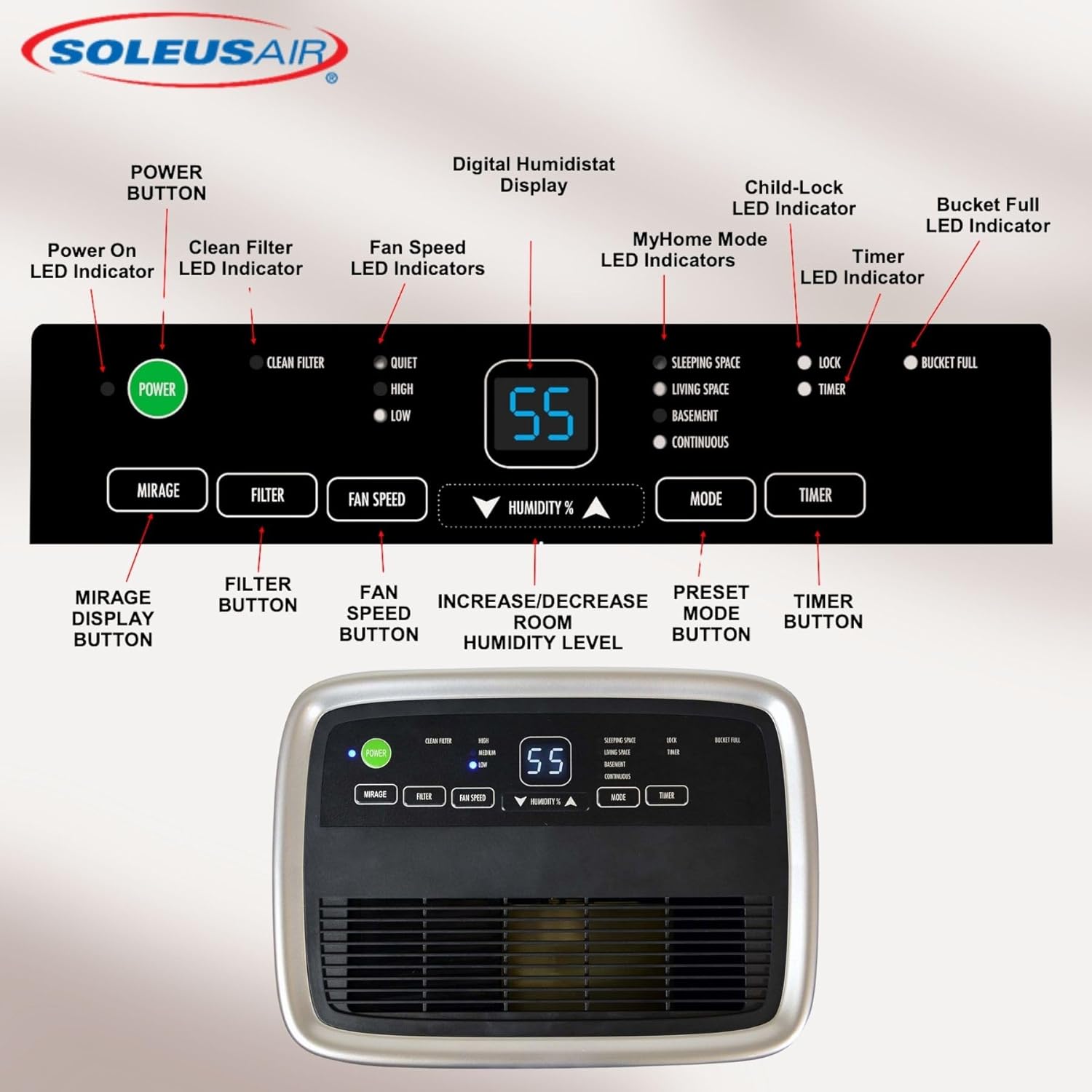
Image: Close-up of the dehumidifier's control panel, showing buttons for Power, Mirage, Filter, Fan Speed, Humidity adjustment, Mode, and Timer, along with LED indicators.
Power On/Off:
Press the POWER button to turn the unit on or off. The digital display will show the current humidity rate in the room.
Setting Desired Humidity Level:
Use the UP and DOWN arrow buttons (labeled HUMIDITY%) to select your preferred humidity level. The range is typically between 35% and 80%. Energy Star recommends a humidity level between 30% and 50%, and 30% to 40% in colder months.
Fan Speed Adjustment:
Press the FAN SPEED button to toggle between Low, Medium, and High fan speeds.
MyHome Mode:
Press the MODE button to cycle through pre-programmed settings: Sleeping Space, Living Space, and Basement. Each mode sets an optimal humidity level for that environment.
Continuous Mode:
To run the dehumidifier continuously, press the MODE button until the display shows "CO". In this mode, the unit will remove moisture regardless of the humidity level. A garden hose must be installed for continuous drainage.
Timer Function:
- To set Auto-On: While the unit is OFF, press the TIMER button. Use the UP and DOWN arrow buttons to set the desired time for the unit to automatically turn ON.
- To set Auto-Off: While the unit is ON, press the TIMER button. Use the UP and DOWN arrow buttons to set the desired time for the unit to automatically turn OFF.
Child Lock Mode:
To lock the control panel, press and hold the TIMER button for 3 seconds. The LOCK indicator will light up. This prevents accidental setting changes. To unlock, press and hold the TIMER button for 3 seconds again.
Bucket Full Indicator:
When the dehumidifier bucket is full, the unit will automatically shut off. The BUCKET FULL indicator will light up and blink, and an audible alarm will sound for a few seconds. The unit will not resume operation until the bucket is emptied and properly reinserted.
Maintenance
Emptying the Water Bucket:
When the BUCKET FULL indicator is active, gently pull out the water bucket from the front of the unit using both hands. Carefully carry the bucket to a sink or drain and empty the collected water. Reinsert the empty bucket firmly into the unit until it clicks into place. The unit will resume operation automatically.

Image: The water collection bucket is shown partially removed from the front of the dehumidifier.
Cleaning the Air Filter:
The CLEAN FILTER indicator light will turn on when the filter needs cleaning. To remove the filter, press down on the two tabs at the top of the filter cover located on the back of the unit and pull it out. Clean the filter with a mild detergent and warm water. Rinse thoroughly and allow it to air dry completely before reinserting. Do not operate the dehumidifier without the filter. Once the clean and dry filter is reinserted, press the FILTER button on the control panel to reset the indicator light.
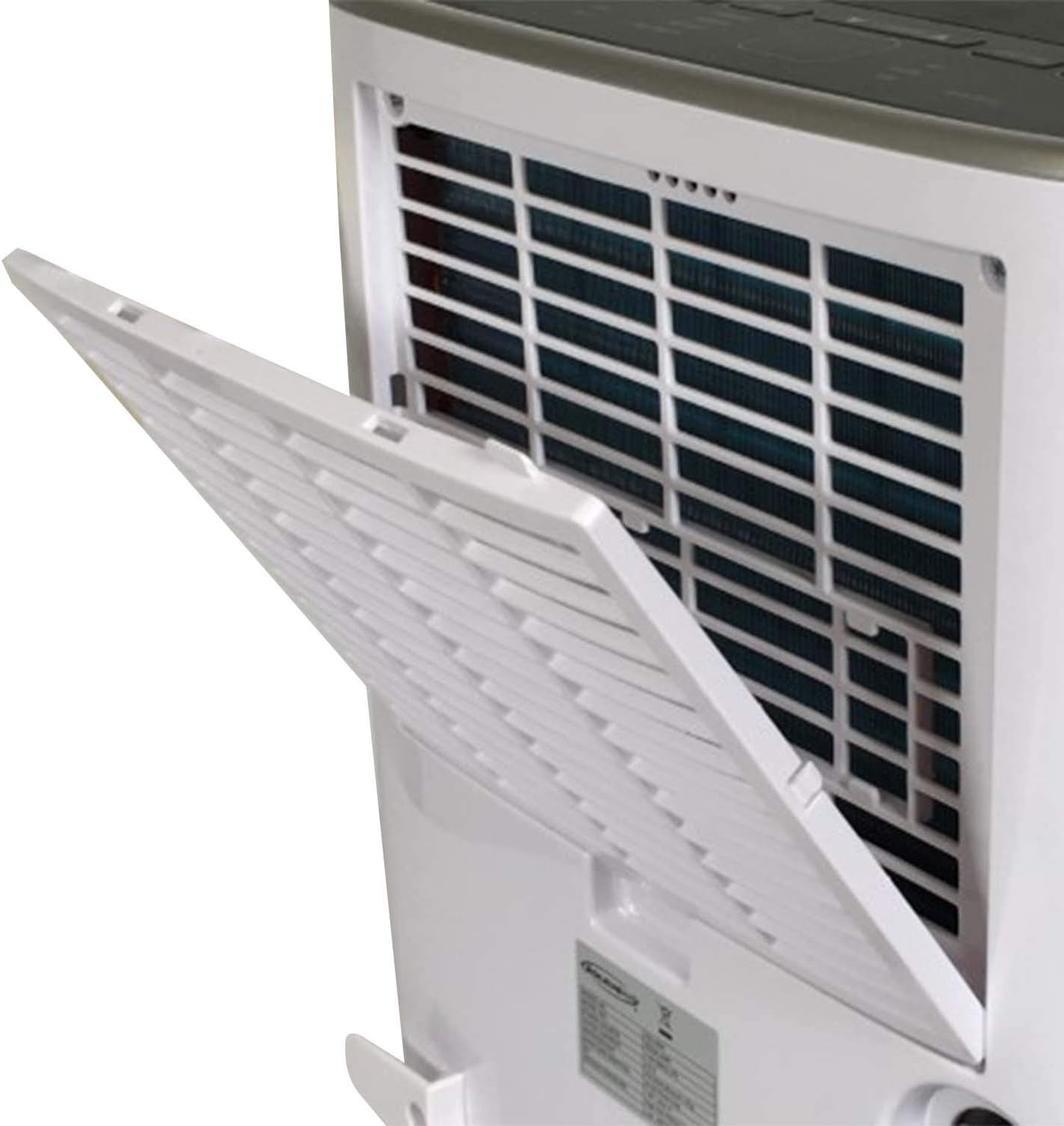
Image: The reusable air filter is being removed from its slot on the back of the dehumidifier for cleaning.
Troubleshooting
- Unit does not turn on: Ensure the unit is properly plugged into a grounded outlet. Check for power outages.
- Unit stops operating: Check if the water bucket is full. Empty the bucket if necessary. The unit has loss of power protection and will resume previous settings once power is restored.
- No moisture removal: Ensure the humidity setting is lower than the current room humidity. Check if the filter is clean and not obstructed.
- Loud noise: Ensure the unit is placed on a level surface. Check for any obstructions in the fan or air vents.
Specifications
| Brand: | Soleus Air |
| Model Name: | DSJ-25E-01 |
| Capacity: | 25 Pints |
| Dehumidification Capacity: | 25 Pints per Day |
| Floor Area Coverage: | 1800 SqFt. |
| Product Dimensions: | 19.7"D x 13.8"W x 10.2"H |
| Item Weight: | 35 pounds |
| Material: | Plastic |
| Wattage: | 295 watts |
| UPC: | 850010663081 |

Image: Dimensional diagram of the dehumidifier, indicating its height, width, and depth.
Warranty and Support
For warranty information, technical support, or service inquiries, please contact Soleus Air customer service. Refer to your product's packaging or the official Soleus Air website for the most up-to-date contact details and warranty terms.
This product is from a small business brand. Your support is appreciated.


