
Introduction
Thank you for choosing the Soleus Air 35-Pint Dehumidifier, Model DSJ-35E-01. This manual provides essential information for the safe and efficient operation, installation, and maintenance of your new dehumidifier. Please read all instructions carefully before use and retain this manual for future reference.
This dehumidifier is designed to remove excess moisture from the air, helping to prevent mold, mildew, and other humidity-related issues in your home or office environment. It features a 35-pint capacity, suitable for spaces up to 2,500 sq ft, and operates efficiently with its Energy Star rating.

Image: The dehumidifier actively removing moisture from the air, symbolized by leaves and airflow.
Key features include the innovative Mirage Display for easy humidity monitoring, MyHome mode with automatic settings for various living spaces, a convenient bucket full indicator with an audible alarm, and ultra-quiet operation. The unit also incorporates Tri-Pat Safety Technology for enhanced protection and loss of power protection to retain settings.
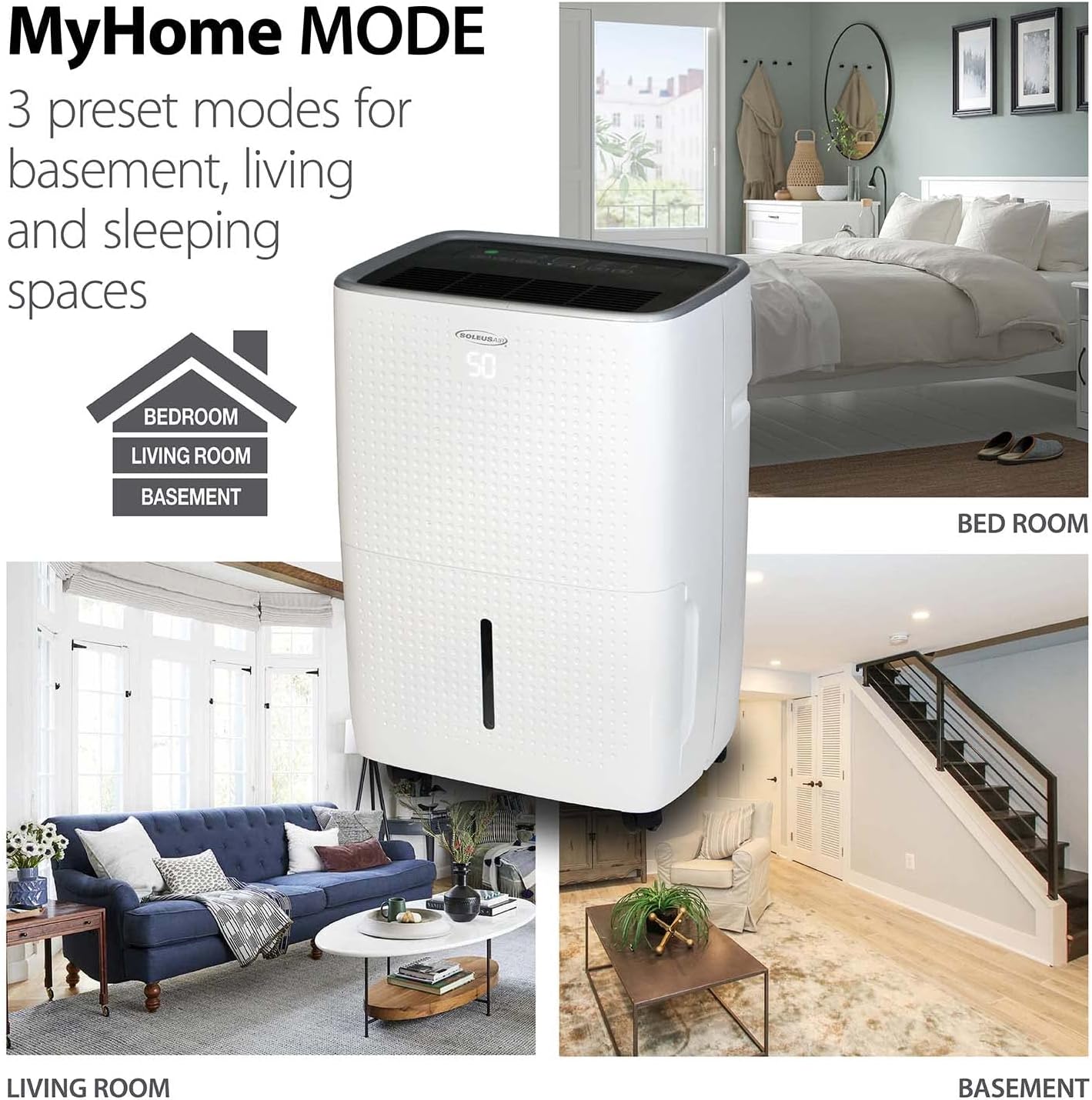
Image: Internal components illustrating the Patented Tri-Pat Safety Technology, which monitors compressor temperature and electrical wiring for safe operation.
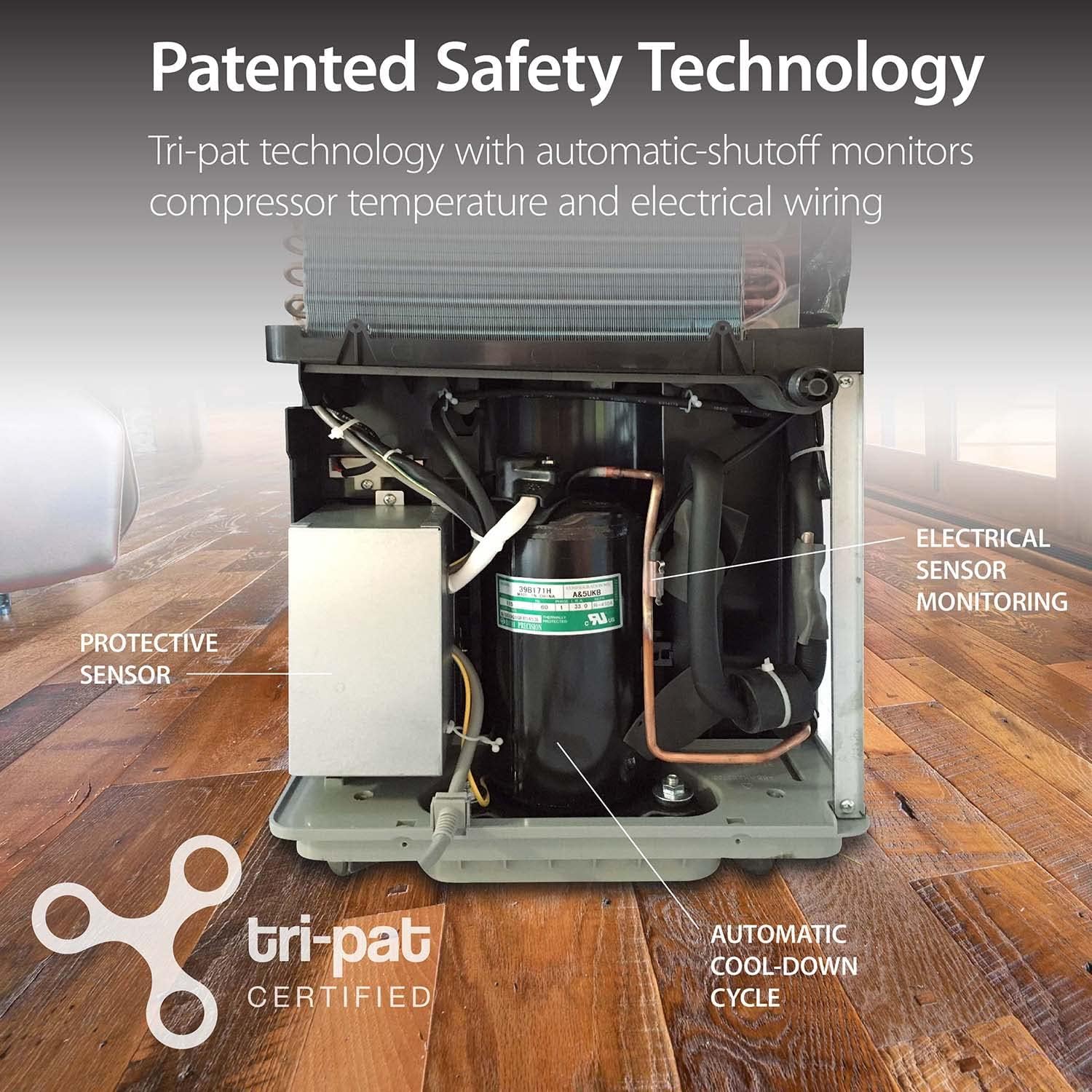
Image: The Energy Star certified dehumidifier in a bathroom setting, emphasizing its energy-saving capabilities.
Important Safety Instructions
- Always plug the unit into a grounded electrical outlet.
- Do not operate the unit with a damaged power cord or plug.
- Ensure the unit is placed on a level, stable surface to prevent tipping.
- Do not block air intake or exhaust vents.
- Unplug the unit before cleaning or performing any maintenance.
- Keep children and pets away from the unit during operation.
- Do not use the unit in areas where flammable liquids or gases are stored.
- This appliance is not intended for use by persons (including children) with reduced physical, sensory or mental capabilities, or lack of experience and knowledge, unless they have been given supervision or instruction concerning use of the appliance by a person responsible for their safety.
Setup and Placement
Proper placement of your dehumidifier is crucial for optimal performance. Consider the following guidelines:
- Location: Place the dehumidifier in a central location within the area where moisture removal is needed. Ensure there is at least 8 inches of space around the unit for proper air circulation.
- Level Surface: Always place the unit on a firm, level surface to prevent vibrations and ensure proper water drainage.
- Electrical Connection: Plug the dehumidifier directly into a grounded 120V AC outlet. Do not use extension cords.
- Mobility: The unit is equipped with 360° multi-directional spinner wheels for effortless movement.

Image: Soleus Air 35-Pint Dehumidifier positioned in a basement area, demonstrating typical placement for effective humidity control.
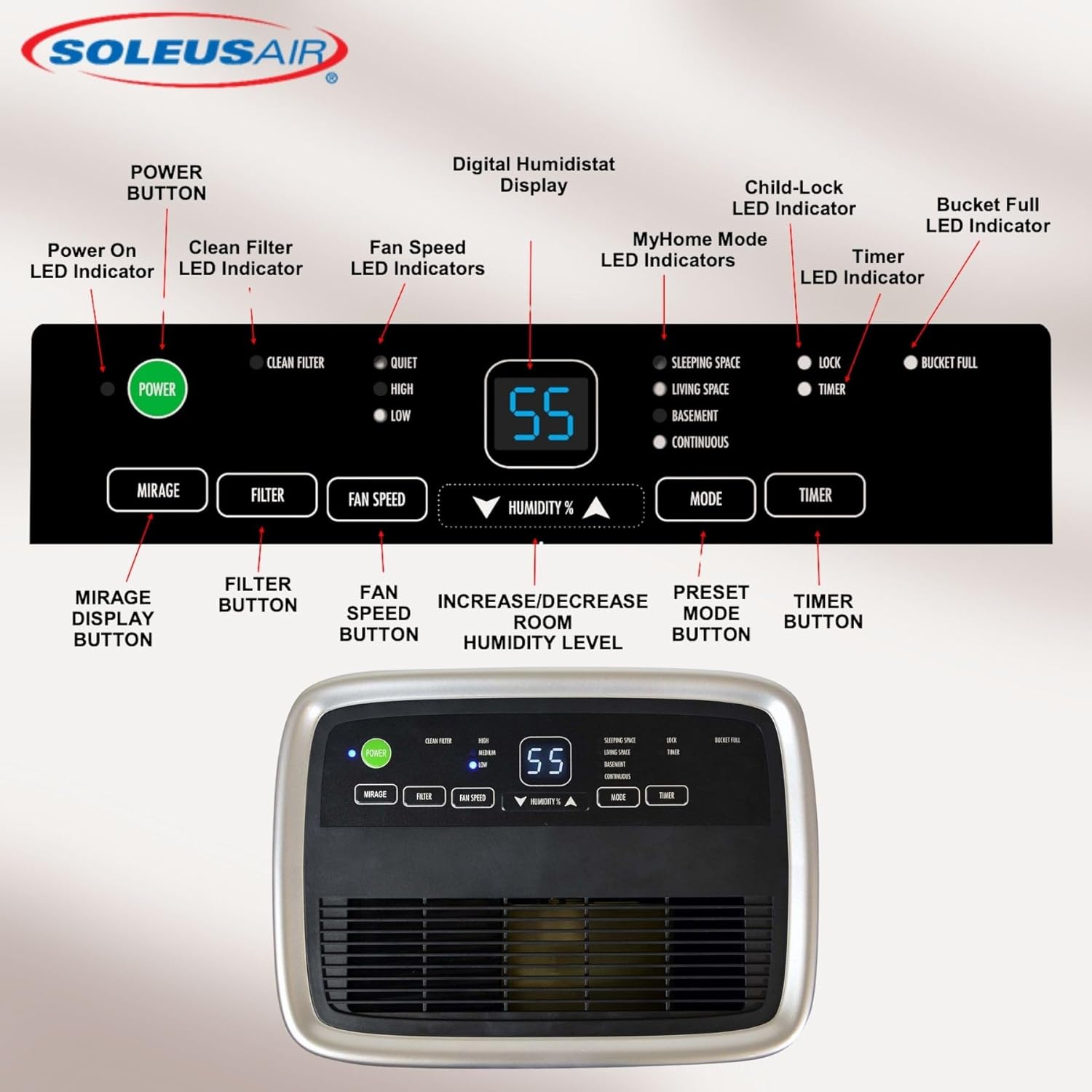
Image: Close-up of the dehumidifier's 360° Magic Wheels, illustrating the ease of movement.

Image: Product dimensions showing the unit's depth (19.7"), width (13.8"), and height (10.2").
Operating Your Dehumidifier
The control panel allows you to manage all functions of your dehumidifier. Refer to the diagram below for button identification.

Image: Detailed view of the control panel, highlighting buttons for Power, Mirage Display, Filter, Fan Speed, Humidity adjustment, Mode selection, and Timer, along with LED indicators.
Power On/Off
Press the POWER button to turn the unit on or off. The digital display will show the current humidity level in your room when the unit is on.
Setting Desired Humidity
Use the HUMIDITY % up (▲) and down (▼) arrow buttons to select your preferred humidity level. The recommended humidity range for comfort and energy efficiency is between 30% and 50%.

Image: Dehumidifier in a closet, demonstrating its ability to adjust humidity levels between 35% and 80% RH.
MyHome Mode
The MyHome mode offers preset settings optimized for different environments:
- Sleeping Space: Optimized for quiet operation during sleep.
- Living Space: Balanced operation for general living areas.
- Basement: Aggressive dehumidification for typically damp basement conditions.
Press the MODE button to cycle through these options. You can also select CONTINUOUS mode for constant moisture removal regardless of the humidity level. For continuous mode, a garden hose must be connected for drainage.

Image: MyHome Mode graphic showing three preset options: Bedroom, Living Room, and Basement, with corresponding room visuals.
Fan Speed
Press the FAN SPEED button to toggle between Low, Medium, and High fan speeds. A lower fan speed results in quieter operation.
Timer Function
The timer allows you to program the unit to turn on or off automatically after a set period (e.g., 2 hours, 4 hours). While the unit is off, press the TIMER button, then use the up/down arrows to set the desired time for the unit to turn on. While the unit is on, press the TIMER button, then use the up/down arrows to set the desired time for the unit to turn off.
Child Lock Mode
To prevent accidental changes to settings, activate the Child Lock. Press and hold the TIMER button for 3 seconds. The Lock indicator light will illuminate. To unlock, press and hold the TIMER button again for 3 seconds.
Mirage Display
The Mirage Display provides a clear, white illuminated readout of the humidity level on the front panel, visible from across the room. Press the MIRAGE button to activate or deactivate this feature.

Image: The dehumidifier showcasing its Mirage Display, which clearly indicates the current humidity level.
Maintenance
Regular maintenance ensures the longevity and efficiency of your dehumidifier.
Emptying the Water Bucket
When the water bucket is full, the unit will automatically shut off, and the "Bucket Full" indicator light will illuminate, accompanied by an audible alarm. To empty:
- Grasp both sides of the bucket and carefully pull it out from the front of the unit.
- Empty the collected water into a sink or drain.
- Slide the empty bucket back into the unit until it clicks into place. The unit will resume operation.

Video: Demonstrates how to operate the Soleus Air Dehumidifier, including emptying the water bucket and using various control panel functions.
Cleaning the Air Filter
The "Clean Filter" indicator light will turn on when the filter needs cleaning (approximately every 250 hours of operation). A clean filter ensures efficient operation.
- Turn off and unplug the dehumidifier.
- Remove the filter from the back of the unit by pressing down on the two tabs at the top of the filter.
- Clean the filter with warm, soapy water or a vacuum cleaner. Rinse thoroughly and allow it to air dry completely before reinserting.
- Once the filter is clean and dry, replace it back into the unit.
- Plug in the unit and press the FILTER button to reset the filter indicator.
Continuous Drainage Option
For continuous operation without emptying the bucket, you can connect a standard garden hose to the continuous drain outlet located at the back of the unit.
- Remove the cap from the continuous drain outlet.
- Screw a standard garden hose onto the nozzle.
- Ensure the hose is sloped downwards to allow gravity drainage into a floor drain, sink, or out a window. Avoid kinks or blockages in the hose.
Some models may also feature an internal pump for drainage to higher locations (up to 16 feet in height). If your model has this feature, connect the pump drain hose kit as per instructions and press the PUMP button to activate.
Troubleshooting
Before contacting customer service, please review the following common issues and solutions:
| Problem | Possible Cause | Solution |
|---|---|---|
| Dehumidifier does not operate. | Unit unplugged; power outage; bucket full; filter dirty; temperature too low. | Ensure unit is plugged in; check circuit breaker; empty water bucket; clean filter; operate in temperatures above 41°F. |
| No water collected. | Humidity level too low; continuous drain hose connected and working; air leaks into the room. | Adjust desired humidity setting lower; check continuous drain hose for proper setup; seal doors and windows. |
| Unit is noisy. | Unit not on a level surface; filter clogged. | Place unit on a flat, stable surface; clean the air filter. |
| Frost appears on coils. | Operating in low temperatures. | This is normal; the unit has an auto-defrost function that will clear the frost. |
For issues not covered here, please refer to the contact information in the Support section.
Specifications
| Feature | Detail |
|---|---|
| Brand | Soleus Air |
| Model Name | DSJ-35E-01 |
| Capacity | 35 Pints per Day |
| Floor Area Coverage | Up to 2,500 Sq Ft |
| Product Dimensions (DxWxH) | 19.7"D x 13.8"W x 10.2"H |
| Item Weight | 35 Pounds |
| Color | White |
| Material | Plastic |
| Number of Speeds | 3 (Low, Medium, High) |
| Wattage | 370 watts |
| Operation Mode | Comfort (MyHome modes: Sleeping Space, Living Space, Basement, Continuous) |
| Air Flow Capacity | 116 Cubic Feet Per Minute |
| Special Features | Adjustable Humidity Control, Automatic Defrost, Automatic Shutoff, Programmable Timer, Mirage Display, Tri-Pat Safety Technology, Washable/Reusable Filter |
| Operating Temperature | Down to 41°F |
| UPC | 850010663395 |
Warranty and Support
For warranty information, technical support, or service inquiries regarding your Soleus Air 35-Pint Dehumidifier, please refer to the warranty card included with your product or visit the official Soleus Air website. Keep your purchase receipt as proof of purchase for warranty claims.
Manufacturer: Soleus Air
Website: Soleus Air Store on Amazon (for general product information)