
1. Introduction
The DALY Smart Battery Management System (BMS) is designed to optimize the performance and extend the lifespan of 24V L-ion 7S lithium battery packs. This intelligent system provides comprehensive protection against overcurrent, overcharge, overdischarge, short circuits, and temperature fluctuations. Equipped with a Bluetooth module, it allows users to monitor battery status and modify parameters conveniently via a mobile application or PC software.

Figure 1: DALY Smart BMS 24V L-ion 7S 60A with integrated wiring.
2. Safety Information
Always prioritize safety when working with battery management systems and lithium batteries. Failure to follow safety guidelines can result in serious injury, fire, or damage to property.
- Ensure all connections are correct and secure before applying power. Incorrect wiring can cause irreversible damage to the BMS and battery pack.
- Do not insert the BMS to connect the cable while the battery pack is live. Always disconnect the battery pack before connecting or disconnecting the BMS.
- Use appropriate personal protective equipment (PPE), such as insulated gloves and safety glasses, when handling battery components.
- Avoid short-circuiting battery terminals or BMS connections.
- Keep the BMS and battery pack away from water, moisture, and extreme temperatures. The BMS features waterproof and dustproof properties, but direct exposure should be avoided.
- Only use the specified voltage and current ratings for the BMS. Exceeding these limits can lead to damage or failure.
- If any unusual behavior, smoke, or excessive heat is observed, immediately disconnect power and consult a qualified technician.
3. Package Contents
Verify that all items are present in the package:
- DALY 3.7V Li-ion BMS (1 unit)
- Bluetooth Module (1 unit)
- NTC Sensor (1 unit)
- Sampling Cable (1 unit)
- UART Cable (1 unit)
- Instruction Manual (1 unit)

Figure 2: Typical package contents for the DALY Smart BMS.
4. Specifications
The DALY Smart BMS 24V L-ion 7S 60A features the following technical specifications:
- Product Dimensions: 5.04 x 2.6 x 0.71 inches
- Item Weight: 13.4 ounces (0.84 Pounds)
- Input Voltage: 3.7 Volts (per cell)
- Communication Interface: UART, Bluetooth
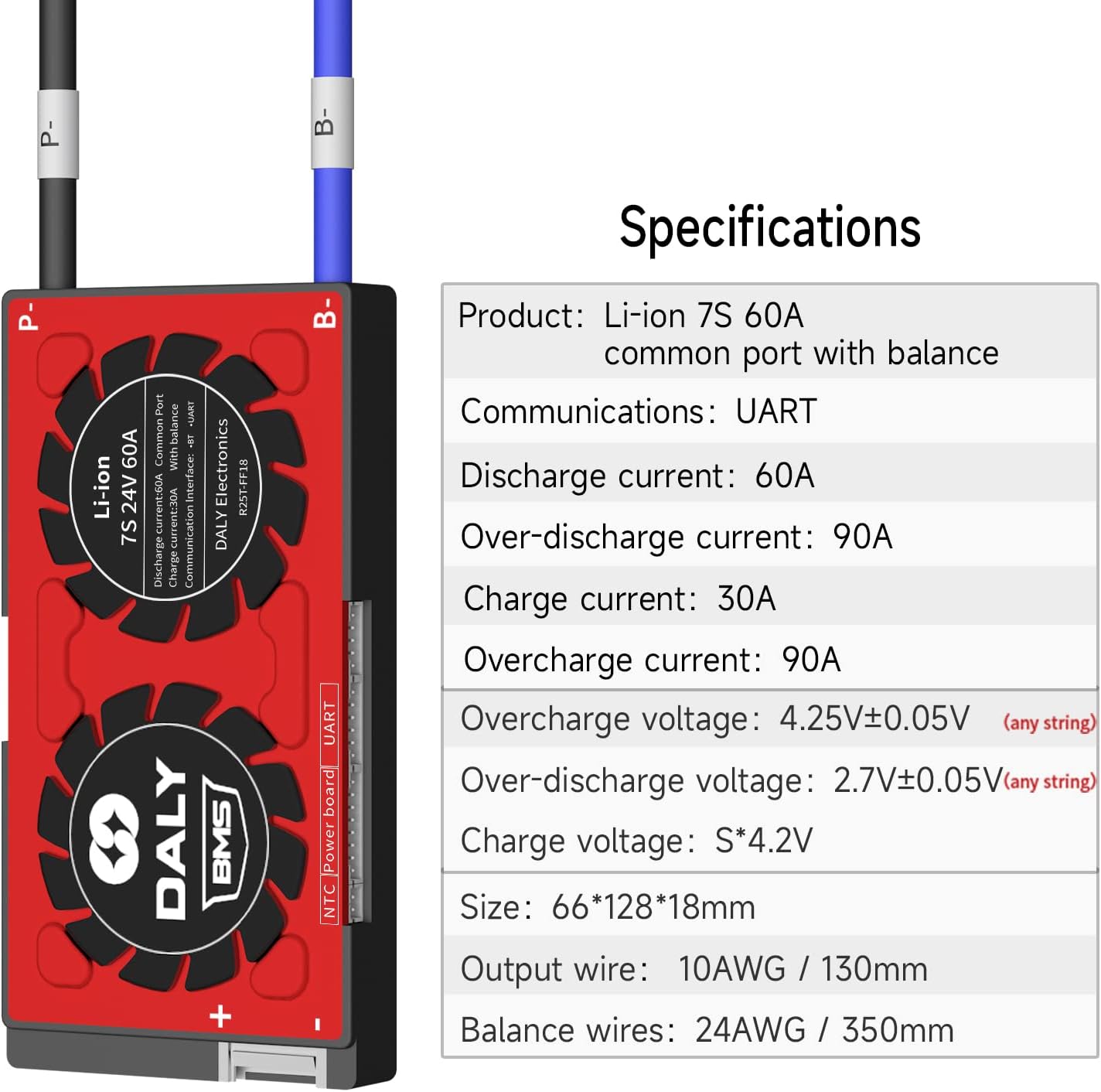
Figure 3: Detailed specifications table for the DALY Smart BMS.
Detailed Parameters (Li-ion 7S Smart BMS)
| Description | Specification (60A Model) | Unit |
|---|---|---|
| Continue discharge current | 60 | A |
| Over discharge current detect | 90 | A |
| Main Circuit Conduct Inner resistance | <20 | mΩ |
| Charge voltage (Li-ion) | S*4.2 | V |
| Charge current | 30 | A |
| Over Charge current detect delay | 80±10 | A |
| Over charge detect voltage | 4.25±0.05 | V |
| Over charge protection delay | 1 | S |
| Over charge release voltage | 4.15±0.05 | V |
| Balance detect Voltage | 3.8 | V |
| Balance release voltage | 3.8 | V |
| Balance current | 30±5 | mA |
| Over discharge detect | 2.7±0.05 | V |
| Over discharge detect delay | 1 | S |
| Over discharge release voltage | 2.8±0.05 | V |
| Over charge current protection | Off load | |
| Short Circuit protection condition | Short circuit of external load | |
| Short circuit detect delay | 200-500 | uS |
| Short circuit protection release | Off load | |
| Temp Protect (Charge) | -40~65 | °C |
| Temp Protect (Discharge) | -40~70 | °C |
| Self Consumption | 35 | mA |
| Sleeping current (over-discharge) | 800 | uA |
| Working Temp range | -20~60 | °C |
| Storing Temp range | -40~85 | °C |
5. Setup and Installation
Proper installation is critical for the safe and effective operation of your DALY Smart BMS. Please follow these steps carefully.
5.1 Wiring the Battery Pack
Before connecting the BMS, ensure your battery pack is properly assembled and the balance wires are prepared. Tools needed include a soldering machine (suggested 662°F/350°C), scissors, double-sided tape, tin wire, and a multimeter.
- Prepare the Battery Pack: Ensure the battery cells are arranged correctly and sampling points are identified.
- Secure the BMS: Use double-sided tape to fix the BMS to the battery pack in a stable position.
- Connect Balance Wires: IMPORTANT: You must disconnect balance wires and the BMS connection port before welding black and red balance wires on the battery pack.
- Wire Placement: Place each balance wire in its correct position on the battery pack. The black wire (B0) connects to the negative terminal of the battery. Subsequent red wires (B1, B2, etc.) connect to the positive terminals of each cell in series, following the sequence.
- Cut and Strip Wires: Once all wires are in place, cut them to the appropriate length and strip the ends for soldering.
- Solder Connections: Carefully solder each balance wire to its corresponding sampling point on the battery pack.

Figure 4: Detailed wiring diagram for connecting the DALY Smart BMS to a battery pack.
5.2 Visual Wiring Guide
Video 1: A detailed guide on wiring and soldering the DALY BMS balance wires to a battery pack. This video demonstrates the correct sequence and technique for secure connections.
5.3 Initial Activation and Software Setup
- Activate BMS: The BMS requires activation by charging the battery for the first time.
- Connect Bluetooth Module: Plug the Bluetooth module into the designated port on the BMS.
- Install App/Software: Download the DALY BMS app (for mobile) or PC software. Links and detailed tutorials can be found on the official DALY website (www.dalybms.com).
- Initial Password: The initial password for the Smart Board APP to change parameters is 123456.
6. Operating Instructions
The DALY Smart BMS allows for real-time monitoring and parameter adjustment.
6.1 Monitoring Battery Status
Use the Bluetooth app or PC software to check the battery status. This includes:
- Individual cell voltages
- Total pack voltage
- Charge/discharge current
- Temperature
- State of Charge (SOC)
- Protection status (e.g., overcharge, overdischarge, short circuit)

Figure 5: Illustration of the DALY Smart BMS connected to a mobile device via Bluetooth, showing the app interface for monitoring.
6.2 Modifying Parameters
The Smart BMS allows for modification of various parameters to suit your specific battery configuration and usage requirements. Refer to the detailed software/app tutorials on the DALY website for specific instructions on parameter adjustment.
Note: Incorrect parameter settings can damage your battery pack. Only adjust parameters if you fully understand their function and impact.
7. Maintenance
To ensure the longevity and optimal performance of your DALY Smart BMS and battery pack, consider the following maintenance tips:
- Regular Inspection: Periodically inspect the BMS and all wiring for any signs of damage, corrosion, or loose connections.
- Keep Clean: Ensure the BMS is free from dust and debris. Its waterproof and dustproof design helps, but regular cleaning with a dry, soft cloth is recommended.
- Temperature Control: Operate the battery pack and BMS within their specified temperature ranges to prevent overheating or freezing, which can degrade performance and lifespan.
- Software Updates: Check the DALY website or app for any available firmware or software updates to ensure your BMS is running with the latest features and bug fixes.
8. Troubleshooting
If you encounter issues with your DALY Smart BMS, consider the following:
- No Power/No Communication:
- Check all wiring connections for proper seating and continuity.
- Ensure the battery pack is charged sufficiently to activate the BMS.
- Verify the Bluetooth module or UART cable is correctly connected.
- Protection Triggered:
- The BMS will trigger protection (e.g., overcurrent, overvoltage, undervoltage, temperature) if conditions exceed safe limits. Check the app/software for specific fault alarms.
- Address the underlying cause (e.g., reduce load, check charger, allow cooling).
- Inaccurate Readings:
- Ensure balance wires are securely connected and not damaged.
- Recalibrate the BMS if an option is available in the software (consult DALY support documentation).
For persistent issues or complex problems, please contact DALY customer service for assistance.
9. Applications
The DALY Smart BMS is suitable for a wide range of applications requiring reliable battery management for lithium-ion battery packs, including:
- Two-wheelers (e.g., electric scooters, bikes)
- AGV Forklifts
- Electric Scooters
- Photovoltaic Energy Storage Systems
- RV Energy Storage
- Home Energy Storage Systems

Figure 6: Visual representation of various applications for DALY BMS products.
10. Warranty and Support
DALY BMS products are manufactured with high-quality components and undergo rigorous testing to ensure reliability and performance.
- Quality Assurance: The product is ISO/FCC/RoHS/PSE/CE APPROVED, ensuring compliance with international quality and safety standards.
- Technical Support: DALY offers 24-hour one-on-one customer service and lifetime technical support. If you require assistance, please contact the seller or manufacturer directly.
- Warranty: For specific warranty terms and conditions, please refer to the documentation provided with your purchase or contact DALY customer service.