
KNOG PWR Trail 1100L (N1012307 2/24)
KNOG PWR Trail 1100L User Manual
Model: PWR Trail 1100L (N1012307 2/24)
Introduction
The KNOG PWR Trail 1100L is a versatile, modular bike light designed to provide powerful illumination and serve as a portable power bank. This manual provides essential information for the proper setup, operation, maintenance, and troubleshooting of your PWR Trail 1100L.
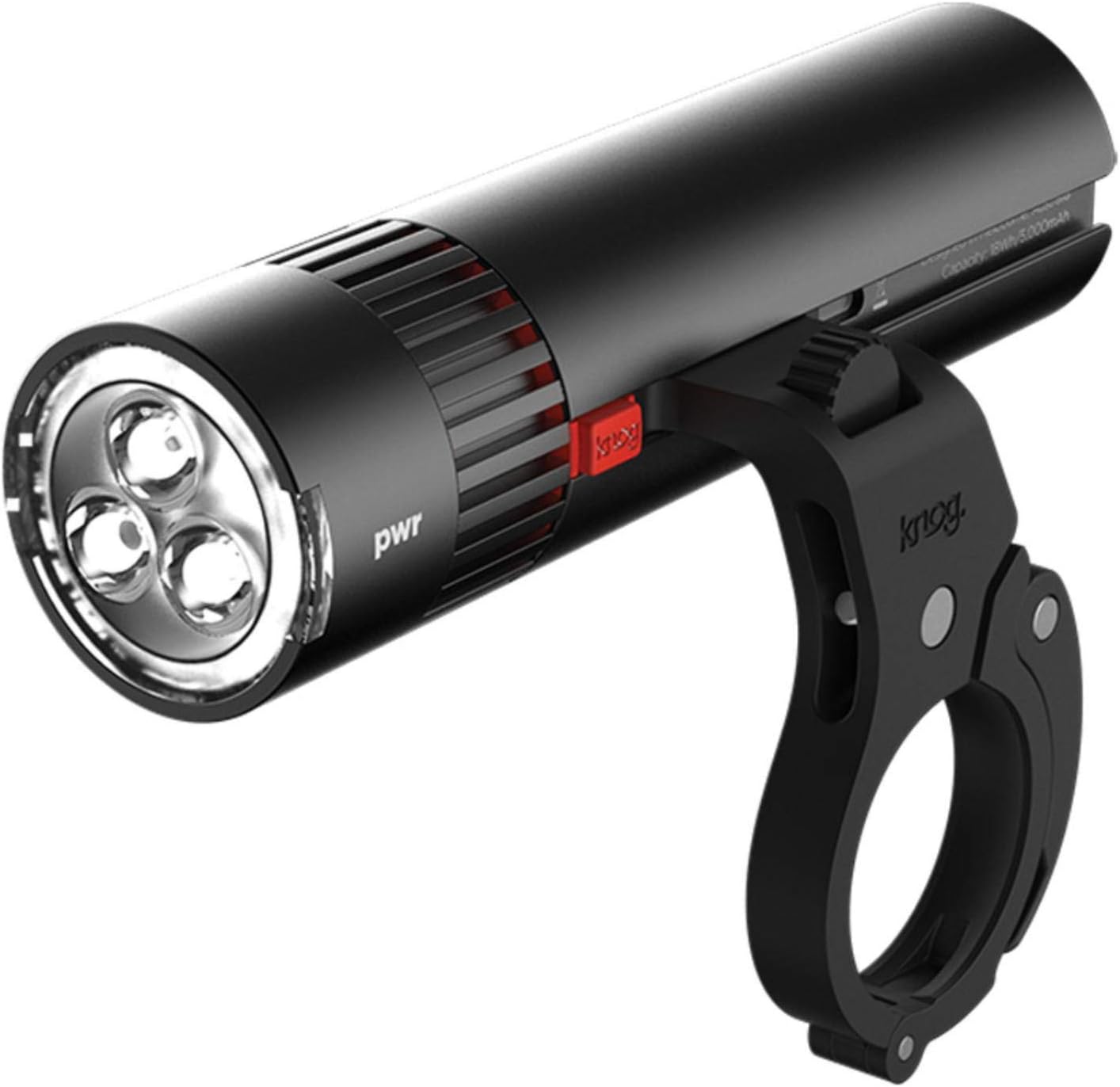
Image: The KNOG PWR Trail 1100L bike light, showcasing its main body, light head with three LEDs, and the attached handlebar mount. The light is black with red accents and features the 'pwr' and 'knog' logos.
Product Features
- Modular Design: Separates into a lighthead and a PWR Bank.
- High Brightness: Outputs a maximum of 1100 lumens.
- Power Bank Functionality: Charge external devices like phones, GoPros, or cycle computers.
- Battery Indicator: Four built-in LED lights indicate battery charge level.
- Customizable Modes: Program light modes using Modemaker software.
- Mounting Versatility: Can be mounted above or below handlebars, or on a helmet.
- Elliptical Beam: Provides broad and bright road coverage.
Setup
Charging the Device
- Locate the micro USB charging port on the PWR Trail.
- Connect the included micro USB cable to the light and to a suitable USB power source.
- The battery indicator lights will illuminate to show charging progress. A full charge takes approximately 3.5 hours.
Mounting the Light
The PWR Trail comes with a side mount and shim, compatible with handlebars from 22.2mm to 38.1mm diameter.
- Choose your desired mounting position: on top or below handlebars, or directly under a Garmin device.
- Securely attach the side mount to your handlebar using the appropriate shim for a snug fit.
- Slide the PWR Trail light onto the mount until it clicks securely into place. Ensure it is firmly seated to prevent accidental detachment during use.
Operating Instructions
Turning On/Off and Mode Selection
The PWR Trail uses a simple twist-head operation:
- To turn the light on, twist the lighthead clockwise.
- To cycle through the 6 pre-programmed light modes, continue twisting the lighthead clockwise.
- To turn the light off, twist the lighthead counter-clockwise until it clicks off.
Checking Battery Level
To activate the battery indicator, gently tap the bottom of the light. Four built-in LED lights will illuminate:
- 4 lights: Fully charged
- 2 lights: Half charged
- And so on, indicating remaining charge.
Using as a Power Bank
- Press the red button located on the side of the light to release the lighthead from the PWR Bank.
- Connect your device (phone, GoPro, etc.) to the USB output port on the PWR Bank using an appropriate charging cable.
- The PWR Bank will begin charging your device. For example, 1 hour of riding at 1000 lumens can provide approximately 75% charge to an iPhone.
Customizing Light Modes (Modemaker)
The PWR Trail's light modes can be customized using Knog's Modemaker software. Visit the official KNOG website for more information and to download the software. This allows you to control brightness, adjust runtimes, and add new light modes to suit your specific needs.
Maintenance
- Cleaning: Wipe the light clean with a damp cloth after use. Avoid abrasive cleaners or solvents.
- Storage: Store the light in a cool, dry place when not in use. For long-term storage, ensure the battery is partially charged (around 50%) to prolong its lifespan.
- O-rings: The light uses O-rings to maintain its water resistance. Periodically inspect these for wear and tear. If the light becomes difficult to separate for charging, the O-rings may be very tight; apply gentle, firm pressure to separate the components.
- Charging Port: Keep the micro USB charging port free from dirt and moisture.
Troubleshooting
| Problem | Possible Cause | Solution |
|---|---|---|
| Light does not turn on. | Battery is depleted. | Charge the light fully (approx. 3.5 hours). |
| Light flickers or dims unexpectedly. | Low battery or loose connection. | Check battery level and recharge if necessary. Ensure lighthead is securely attached to the PWR Bank. |
| Light falls off handlebar. | Mount not securely fastened or incorrect shim used. | Ensure the mount is tightly secured to the handlebar and the correct shim is used for a snug fit. Verify the light is clicked into place on the mount. |
| Cannot separate lighthead from PWR Bank. | Tight O-rings for water resistance. | Press the red release button firmly and apply steady, firm pulling pressure to separate the components. It may require some force due to the waterproof seal. |
| External device not charging from PWR Bank. | PWR Bank battery depleted or incorrect cable. | Ensure the PWR Bank is charged. Try a different USB cable for your device. |
Specifications
| Feature | Detail |
|---|---|
| Model Name | PWR Trail |
| Model Number | N1012307 2/24 |
| Brightness | 1100 Lumens (Max) |
| Battery Capacity | 5000mAh |
| Charge Time | 3.5 hours |
| Run Time (Eco Flash) | Up to 300 hours |
| Number of Settings | 6 pre-programmed modes (customizable) |
| Mounting Type | Handlebar Mount (22.2-38.1mm diameter) |
| Item Weight | 230 Grams |
| International Protection Rating | IP67 |
| Color | Black |
Warranty and Support
The KNOG PWR Trail 1100L comes with a 2-year manufacturer's warranty.
For warranty claims, technical support, or further assistance, please visit the official KNOG website or contact their customer service department.
Official KNOG Website: www.knog.com
Ask a question about this manual
Ask about setup, troubleshooting, compatibility, parts, safety, or missing instructions. Manuals+ will review the question and use this page’s manual context to help answer it.