Introduction
This manual provides detailed instructions for the safe and effective operation of your YONGNUO YN685II Flash Speedlite. Please read this manual thoroughly before use to ensure proper functionality and to maximize the performance of your device. Keep this manual for future reference.
Product Overview
Key Features
- High Guide Number: GN60 @ISO100, 200mm.
- Supports TTL, Manual (M), and Multi (Stroboscopic) flash modes.
- High-Speed Sync (HSS): Up to 1/8000s.
- Integrated 2.4G wireless trigger system, compatible with YONGNUO YN622C and RF603 systems.
- Remote control of off-camera flash parameters.
- Ultrafast charging recycle system with external power supply support.
- Auto and manual zooming flash coverage (20-200mm).
- USB port for firmware upgrades.
- Equipped with a large LCD display screen.
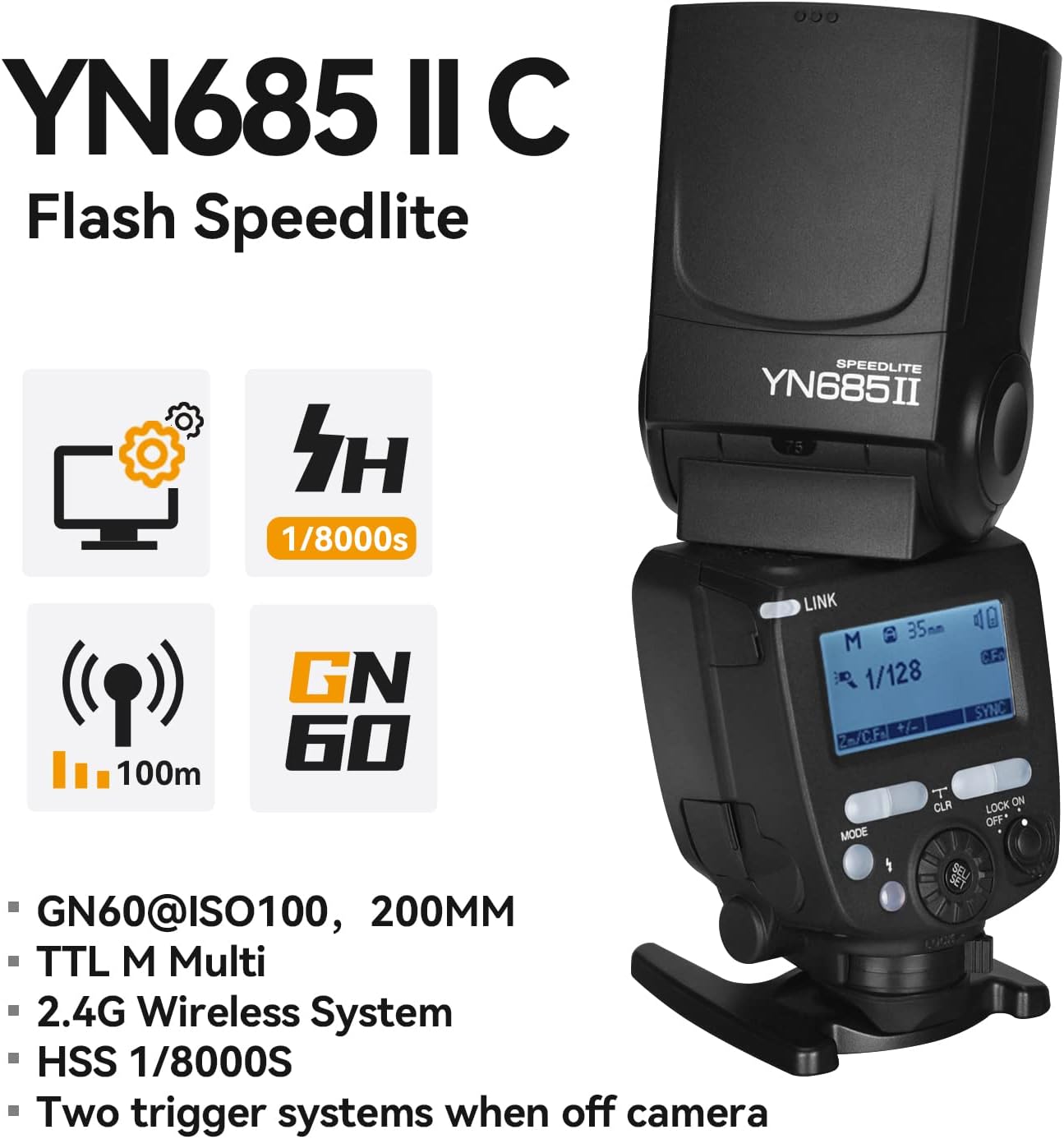
Graphic illustrating key features of the YN685II Speedlite, including GN60, 1/8000s HSS, 100m wireless range, and 2.4G wireless system.
What's in the Box
- 1 x YN685II Flash Speedlite for Canon
- 1 x Mini Stand
- 1 x Instruction Manual (English and Chinese)
- 1 x Original Package

Image showing the YN685II Speedlite, its packaging box, a mini stand, and the instruction manual, indicating the contents of the product package.
Setup
Battery Installation
- Ensure the flash unit is powered off.
- Locate the battery compartment cover on the side of the flash unit.
- Slide the cover open.
- Insert four (4) AA-size batteries according to the polarity indicators (+/-) inside the compartment.
- Close the battery compartment cover securely.
Note: For optimal performance and faster recycling times, use high-quality alkaline or Ni-MH rechargeable batteries.
Mounting the Speedlite
- Ensure your camera is powered off.
- Slide the YN685II's hot shoe onto your camera's hot shoe mount.
- Rotate the locking knob on the flash unit clockwise to secure it firmly to the camera.
- To remove, rotate the locking knob counter-clockwise and slide the flash off.

Front view of the YONGNUO YN685II Speedlite, showing the LCD screen, control buttons, and flash head.

Angled view of the YONGNUO YN685II Speedlite, highlighting the swivel and tilt capabilities of the flash head and the hot shoe mount.
Operating Instructions
Power On/Off
Press and hold the power button (usually marked with a power symbol) to turn the flash unit on or off.
Display Themes
The YN685II C offers two display themes: numeric and classic. Refer to the manual for specific instructions on how to switch between these themes.
Flash Modes
Press the MODE button to cycle through the available flash modes: TTL, M (Manual), and Multi (Stroboscopic).
TTL Mode (Through-The-Lens)
In TTL mode, the flash output is automatically adjusted by the camera's metering system to achieve correct exposure. This mode is ideal for quick shooting in varying light conditions.
Manual (M) Mode
In M mode, you manually set the flash output power from 1/1 (full power) to 1/128 in 1/3 stop increments. This mode provides precise control over flash exposure.
Multi (Stroboscopic) Mode
Multi mode allows the flash to fire multiple times during a single exposure, creating stroboscopic effects. You can set the flash frequency (Hz), number of flashes, and flash output.
Zoom Function
The YN685II supports both auto and manual zooming of the flash head, covering a focal length range of 20mm to 200mm.
- Auto Zoom: The flash head automatically adjusts its zoom position to match the focal length of the lens.
- Manual Zoom: Press the ZOOM button and use the dial to manually set the desired flash coverage.
High-Speed Sync (HSS)
The HSS function allows the flash to synchronize with shutter speeds up to 1/8000s. This is useful for shooting with wide apertures in bright conditions or for freezing fast motion.
To activate HSS, ensure your camera and flash are set to HSS mode. Refer to your camera's manual for specific HSS activation procedures.
Wireless Triggering System
The YN685II features an integrated 2.4G wireless trigger system, compatible with YONGNUO YN622C and RF603 series wireless triggers and master units.
It can receive wireless triggering signals from:
- YN650EX-RF
- YN320EX
- YN560 IV
- YN660
- YN720
- YN862C
- YN560-TX(Pro)
- RF605
- RF603(II)
- YN622C-TX
- YN622C
This allows for wireless TTL, manual flash, and stroboscopic flash operations. Off-camera parameters such as flash mode, intensity, focal length, and sync mode (for YN622C system) can be controlled remotely.
Note: Wireless TTL flash functionality requires support from the main control unit (master flash or trigger).
External Power Supply
The YN685II supports an external power supply to achieve faster recycling times, especially during continuous shooting or high-power output. Connect a compatible external power pack to the designated port on the flash unit.

Side view of the YONGNUO YN685II Speedlite, displaying the battery compartment and external power port.

Angled view of the YN685II Speedlite with the flash head tilted upwards, demonstrating its flexibility for bounce flash.
Maintenance
- Keep the flash unit dry. Do not expose it to rain or moisture.
- Clean the flash head and body with a soft, dry cloth. Avoid using solvents or abrasive cleaners.
- Remove batteries when the flash is not in use for extended periods to prevent leakage.
- Store the flash in a cool, dry place, away from direct sunlight and extreme temperatures.
Troubleshooting
| Problem | Possible Cause | Solution |
|---|---|---|
| Flash does not fire. |
|
|
| Flash output is too weak/strong. |
|
|
| Flash recycling time is slow. |
|
|
| Wireless triggering issues. |
|
|
Specifications
- Guide Number: GN60 (ISO100, 200mm)
- Flash Modes: TTL, M, Multi
- High-Speed Sync: Up to 1/8000s
- Zoom Range: 20-200mm (Auto/Manual)
- Wireless System: 2.4G Wireless (YN622C & RF603 compatible)
- Recycle Time: Approximately 2 seconds (at full power with fresh batteries)
- External Power Port: Yes
- Firmware Upgrade: USB Port
- Power Source: 4 x AA-size batteries
- Dimensions: 8.27 x 3.78 x 3.23 inches (210 x 96 x 82 mm)
- Weight: 1.1 pounds (0.5 kg)
- Compatible Mountings: Canon
Warranty and Support
For detailed warranty information, please refer to the warranty card included with your product or visit the official YONGNUO website.
For the latest firmware updates and additional support resources, please visit the YONGNUO official download page: http://www.hkyongnuo.com/xzyzc
If you encounter any issues not covered in this manual, please contact YONGNUO customer support.


