
FITUEYES TW-A31001WD
Contents
FITUEYES TV Stand with Wooden Support
Instruction Manual
Model: TW-A31001WD
1. Important Safety Information
Please read this manual carefully before assembly and use. Keep it for future reference.
- Weight Limit: Do not exceed the maximum load capacity of 35 kg (77 lbs) for the TV. Exceeding this limit may result in instability and potential injury.
- TV Size Compatibility: This stand is designed for TVs between 37 and 70 inches.
- VESA Compatibility: Ensure your TV has mounting holes that match the VESA standards supported by this stand: 100x100 mm to 600x400 mm.
- Assembly: Assemble the unit on a soft, non-abrasive surface to prevent scratches. Ensure all screws are tightened securely before use.
- Stability: Place the TV stand on a flat, level surface. Do not allow children to climb on the stand or shelves.
- Damage: Do not use the product if any parts are missing or damaged. Contact customer support for replacement parts.
2. Product Overview
The FITUEYES TV Stand with Wooden Support offers a stable and stylish solution for your television and media devices. It features adjustable height, integrated cable management, and ample storage space.

Figure 2.1: Assembled FITUEYES TV Stand in a living room setting.
Key Features:
- Integrated TV mount for screens from 37 to 70 inches.
- Six height adjustment levels for optimal viewing.
- Two spacious wooden shelves for media devices, consoles, and accessories.
- Built-in cable management system to keep wires organized.
- Sturdy metal frame and durable wooden shelves.
3. Setup and Assembly
Assembly typically takes around 30 minutes. It is recommended to have a second person for easier installation, especially when mounting the TV.
- Unpack and Verify Parts: Carefully unpack all components and hardware. Compare them with the parts list provided in your packaging to ensure everything is present and undamaged.
- Assemble the Base Frame: Attach the horizontal support bars to the vertical side frames using the provided screws. Ensure all connections are secure.
- Install the Shelves: Place the wooden shelves onto the assembled frame and secure them with the designated screws from underneath.
- Attach the Vertical TV Support Column: Secure the main vertical column to the rear of the top shelf and base frame. This column houses the cable management system.
- Attach TV Brackets to Your TV: Identify the correct screws and spacers for your TV's VESA mounting holes. Attach the two vertical TV brackets to the back of your television. Ensure they are level and securely fastened.
- Mount the TV: With assistance, carefully lift your TV and hook the attached brackets onto the horizontal mounting plate of the TV stand's vertical column. Secure the TV in place using the safety locking mechanism (refer to Figure 3.1).
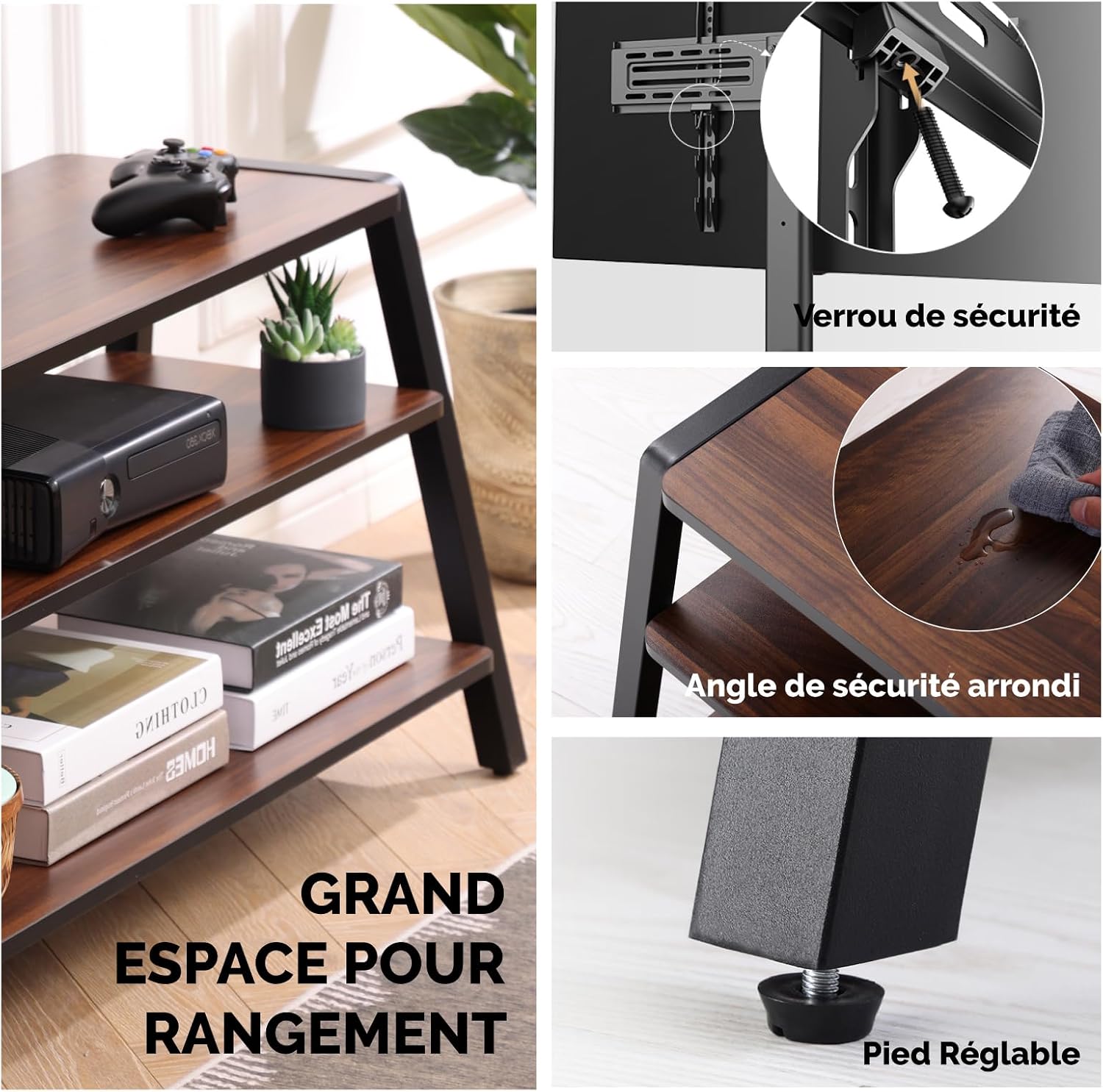
Figure 3.1: Detail of safety lock mechanism and other features.
4. Operating Instructions
4.1. Height Adjustment
The TV mounting bracket offers 6 levels of height adjustment to achieve your preferred viewing angle. The height can be adjusted from 1135 mm (44.7 inches) to 1299 mm (51.1 inches).
- With the TV mounted, loosen the screws that secure the TV mounting plate to the vertical column.
- Carefully slide the TV and mounting plate up or down to the desired height.
- Retighten the screws firmly to secure the TV at the new height.

Figure 4.1: TV height adjustment range.
4.2. Cable Management
The integrated cable management system helps keep your cables tidy and out of sight. Route your TV and device cables through the clips or channels located along the rear of the vertical support column.

Figure 4.2: Cable routing through the integrated management system.
5. Maintenance
- Cleaning: Wipe the stand with a soft, damp cloth. Avoid using harsh chemicals or abrasive cleaners, as they may damage the finish.
- Inspection: Periodically check all screws and connections to ensure they remain tight. Retighten if necessary.
- Avoid Overloading: Do not place items heavier than the specified weight limits on the shelves or TV mount.
6. Troubleshooting
| Problem | Possible Cause | Solution |
|---|---|---|
| Stand is wobbly/unstable. | Screws are loose; stand is on an uneven surface. | Ensure all screws are tightened. Move the stand to a flat, level surface. Adjust the leveling feet if present. |
| TV does not fit the mount. | Incorrect VESA pattern; TV size outside range. | Verify your TV's VESA pattern matches the stand's compatibility (100x100mm to 600x400mm). Confirm TV size is between 37-70 inches. |
| Parts are missing or damaged. | Shipping damage; packaging error. | Do not proceed with assembly. Contact FITUEYES customer support for replacement parts. |
| Difficulty during assembly. | Instructions unclear; incorrect part orientation. | Review the assembly steps carefully. Ensure parts are oriented correctly as shown in diagrams. Contact support if issues persist. |
7. Specifications
| Feature | Detail |
|---|---|
| Model Number | TW-A31001WD |
| Compatible TV Sizes | 37 - 70 inches |
| Maximum TV Load Capacity | 35 kg (77 lbs) |
| VESA Compatibility | 100x100mm, 200x100mm, 200x200mm, 300x200mm, 300x300mm, 400x200mm, 400x300mm, 400x400mm, 600x400mm |
| Height Adjustment | 6 levels, from 1135 mm to 1299 mm |
| Material | Wood, Metal |
| Product Weight | 21 kg |
| Color | Brown |

Figure 7.1: Product dimensions and shelf weight capacities.

Figure 7.2: VESA compatibility and supported TV sizes.
8. Warranty and Support
FITUEYES products are designed for durability and customer satisfaction.
- Warranty: This product comes with a 10-year warranty against manufacturing defects. Please retain your proof of purchase.
- Customer Support: For any questions, missing parts, or warranty claims, please contact FITUEYES customer service. Visit the official FITUEYES website for contact information: FITUEYES Brand Store.
Ask a question about this manual
Ask about setup, troubleshooting, compatibility, parts, safety, or missing instructions. Manuals+ will review the question and use this page’s manual context to help answer it.