
HIMOX H05
HIMOX H05 HEPA 14 Air Purifier User Manual
Model: H05 | Brand: HIMOX
Introduction
Thank you for choosing the HIMOX H05 HEPA 14 Air Purifier. This advanced air purification system is designed to provide clean, fresh air for large rooms up to 2690 sq ft, effectively removing 99.99% of airborne pollutants. Featuring smart Wi-Fi connectivity, PM2.5 monitoring, and a 5-stage medical-grade filtration system, the H05 ensures a healthier living environment for you and your family. Please read this manual thoroughly before operation to ensure proper use and maintenance.

Figure 1: HIMOX H05 HEPA 14 Air Purifier
Product Overview
Key Features:
- Medical Grade H14 HEPA Filter: Captures 99.99% of particles down to 0.1 microns, including allergens, mold, bacteria, viruses, VOCs, asbestos, and radon.
- Activated Carbon Filter: Contains ≥300g of activated carbon to effectively reduce pet odors, dander, and other smells.
- High Purification Performance: CADR ratings of 235 (smoke), 240 (pollen), and 246 (dust). Refreshes air 5 times per hour in rooms up to 2690 sq ft.
- Quiet Operation: Operates as low as 20dB in sleep mode, ensuring a peaceful environment.
- Energy Efficient: Energy Star rated, consuming only 4W on low setting.
- Smart Control: Compatible with Alexa and Google Home Assistant for hands-free voice control. Full control via the Smart Life App.
- Real-time Air Quality Monitoring: Built-in sensor and indicator light (green: excellent, blue: good, red: unhealthy) display air quality.
- Auto Mode: Automatically adjusts fan speed based on real-time air quality.
- Filter Life Monitor: Track filter remaining life via the app and indicator light.
- Ozone Free: Does not use UVC light, ensuring no ozone production.
Components:
The HIMOX H05 Air Purifier includes the main unit, a pre-installed HEPA replacement filter, and this user manual.

Figure 2: 5-Stage HEPA Filtration System
The HIMOX H05 utilizes a comprehensive 5-stage filtration system to ensure maximum air purification. This includes a pre-filter for larger particles, a medical-grade H14 HEPA filter for fine particles, and an activated carbon filter for odors and gases.
Setup
- Unpack the Unit: Carefully remove the air purifier from its packaging.
- Remove Filter Packaging: Before first use, open the back cover of the unit and remove the plastic bag from the new filter. The filter is typically secured with a pull tab.
- Install Filter: Insert the filter back into the unit, ensuring it is properly seated. Close the back cover securely.
- Placement: Place the air purifier on a flat, stable surface in the desired room. Ensure there is adequate space around the unit for optimal airflow (at least 6 inches from walls or furniture).
- Power Connection: Plug the power cord into a standard electrical outlet.

Figure 3: Optimal Placement in a Large Room
The HIMOX H05 is designed for large spaces, effectively circulating purified air throughout the room. Proper placement ensures maximum coverage and efficiency.
Operating Instructions
Control Panel Functions:

Figure 4: Top Control Panel
The intuitive control panel on top of the unit allows for easy manual operation.
- Power Button (On/Off): Press to turn the unit on or off. Upon initial power-on, the unit will enter Auto Mode.
- Speed Button: Cycle through fan speeds: Low, Medium, High, and Auto.
- Auto Mode: The purifier automatically adjusts fan speed based on detected air quality. The air quality indicator light (green/blue/red) on the top panel reflects real-time air quality.
- Timer: Set the operating time for 1, 2, 4, or 8 hours. The unit will automatically turn off after the set time.
- Child Lock: Press and hold the Child Lock button for 3 seconds to activate/deactivate. This prevents accidental changes to settings.
- Reset Button: Used for filter reset after replacement (refer to Maintenance section).
Smart App Control (Smart Life App):
The HIMOX H05 can be controlled remotely via the Smart Life App, offering enhanced functionality.
- Download App: Download the "Smart Life" app from your smartphone's app store.
- Pairing: Follow the in-app instructions to pair your H05 air purifier. Long press the Wi-Fi button (often integrated with Reset or a dedicated Wi-Fi icon) for 5 seconds to initiate pairing mode.
- App Features:
- Monitor real-time PM2.5/PM1.0 levels and air quality.
- Check filter remaining life (100% to 0%).
- Adjust fan speed and modes.
- Set programmable schedules for automatic operation.
- Group control multiple HIMOX air purifiers.

Figure 5: Smart Life App Interface
The Smart Life App provides comprehensive control and monitoring capabilities for your air purifier, allowing you to manage settings and track air quality from anywhere.
Voice Control (Alexa & Google Home):
Integrate your HIMOX H05 with Amazon Alexa or Google Home Assistant for convenient voice commands.
- Enable Skill/Action: In your Alexa or Google Home app, enable the "Smart Life" skill or action.
- Link Account: Link your Smart Life account to your voice assistant account.
- Discover Devices: Ask your voice assistant to discover new devices.
- Voice Commands: Use commands like "Alexa, turn on the air purifier" or "Hey Google, set air purifier to sleep mode."
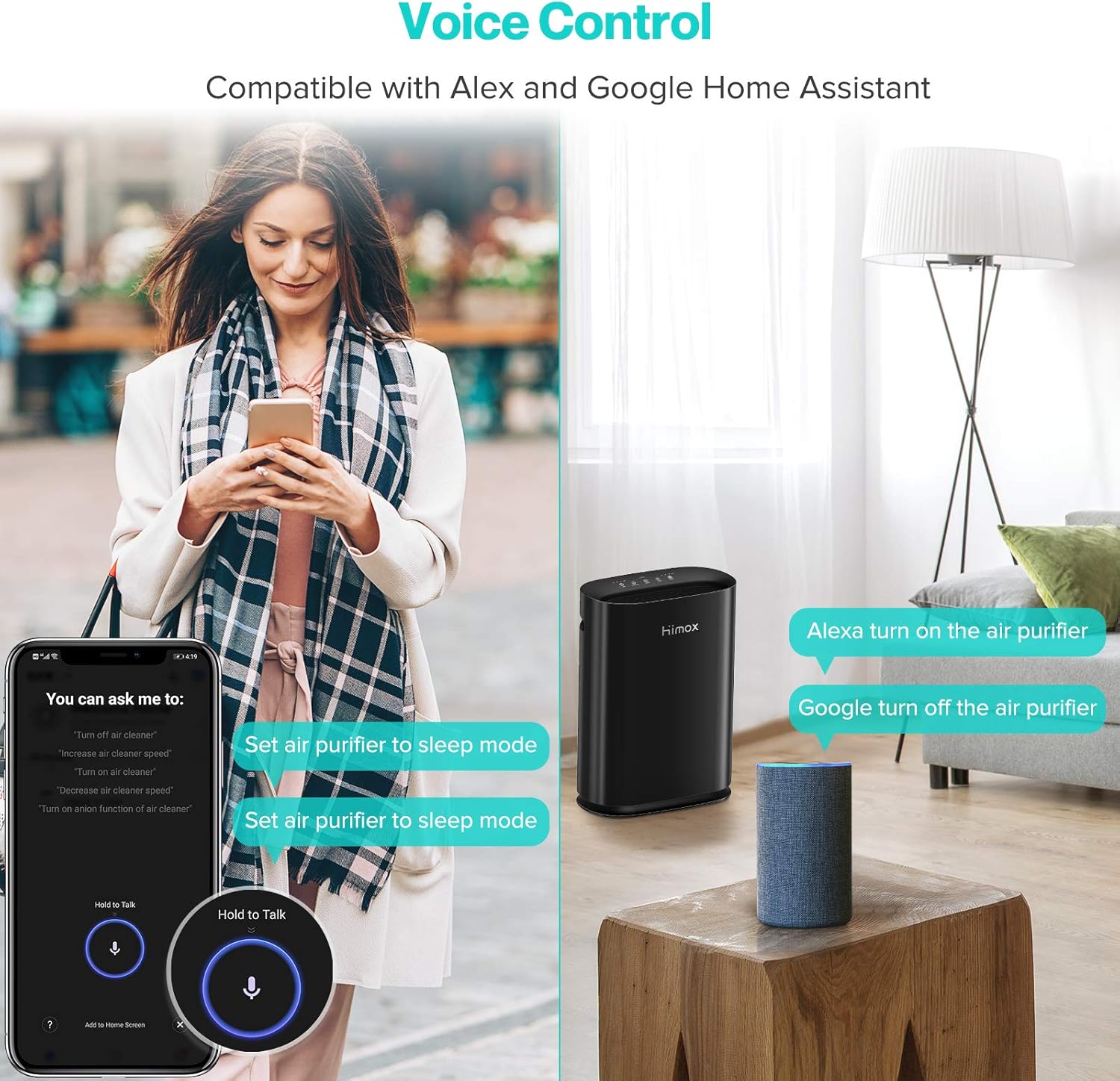
Figure 6: Voice Control Integration
Voice control offers hands-free convenience for managing your air purifier, especially useful when your hands are full or you're across the room.
Official Product Videos:
Video 1: How Air Quality Sensor and Auto Function Works
This video demonstrates how the HIMOX H05's air quality sensor detects pollutants and how the Auto Mode adjusts fan speed accordingly to maintain optimal air quality.
Video 2: How Smart H05 Air Purifier Voice Control Works
Learn how to use voice commands with Alexa and Google Home Assistant to control your HIMOX H05 air purifier, including turning it on/off and changing modes.
Video 3: Himox H05 Smart Air Purifier for Large Room App Controlled
This video provides a detailed overview of controlling the HIMOX H05 air purifier using the Smart Life app, highlighting features like scheduling and remote monitoring.
Maintenance
Filter Replacement:
The HEPA filter needs to be replaced periodically to maintain optimal performance. The filter life indicator on the app and unit will notify you when replacement is due (typically 6-8 months depending on usage and air quality).
- Power Off: Turn off and unplug the air purifier from the power outlet.
- Open Cover: Open the back cover of the unit.
- Remove Old Filter: Gently pull the old filter out using the pull tab.
- Install New Filter: Insert a new HIMOX H05 replacement filter (search B0BXSDCXZF on Amazon) into the unit, ensuring it fits snugly.
- Close Cover: Close the back cover securely.
- Reset Filter Life: Plug the unit back in. Press and hold the "Reset" button on the control panel for 3-5 seconds until the filter indicator light turns off or resets.
Important: Always remove the new filter from its plastic bag before installation.
Cleaning:
- Exterior: Wipe the exterior of the air purifier with a soft, dry cloth. Do not use abrasive cleaners or solvents.
- Pre-filter: The pre-filter (part of the main filter assembly) can be gently vacuumed to remove large dust particles between replacements.
Troubleshooting
| Problem | Possible Cause | Solution |
|---|---|---|
| Unit does not turn on. | Not plugged in; power outlet issue; power button not pressed. | Ensure power cord is securely plugged in. Try a different outlet. Press the On/Off button. |
| Airflow is weak or noisy. | Filter is clogged; back cover not properly closed. | Check and replace the filter if necessary. Ensure the back cover is securely latched. |
| Air quality indicator always red/poor. | High pollution levels; sensor blocked/dirty. | Allow time for purification. Gently clean the air quality sensor opening (refer to manual for location). |
| Cannot connect to Wi-Fi/App. | Incorrect Wi-Fi password; 5GHz network; unit not in pairing mode. | Ensure correct 2.4GHz Wi-Fi network and password. Long press Wi-Fi button for 5 seconds to enter pairing mode (blinking light). |
| Filter indicator light remains on after replacement. | Filter life not reset. | Press and hold the "Reset" button for 3-5 seconds until the light turns off. |
Specifications
- Brand: HIMOX
- Model: H05
- Color: Black
- Product Dimensions: 11"D x 17.5"W x 23.25"H
- Item Weight: 15.42 pounds
- Floor Area Coverage: Up to 2690 sq ft (5x air changes per hour)
- Noise Level: 20 dB (Sleep Mode)
- Wattage: 35 watts
- Filter Type: Medical Grade H14 HEPA, Activated Carbon
- Controller Type: Amazon Alexa, Google Home Assistant, Smart Life App
- Certifications: FCC Certified, CE Certified, ETL Certified, CSA Certified, CARB Certified
- Manufacture Year: 2020
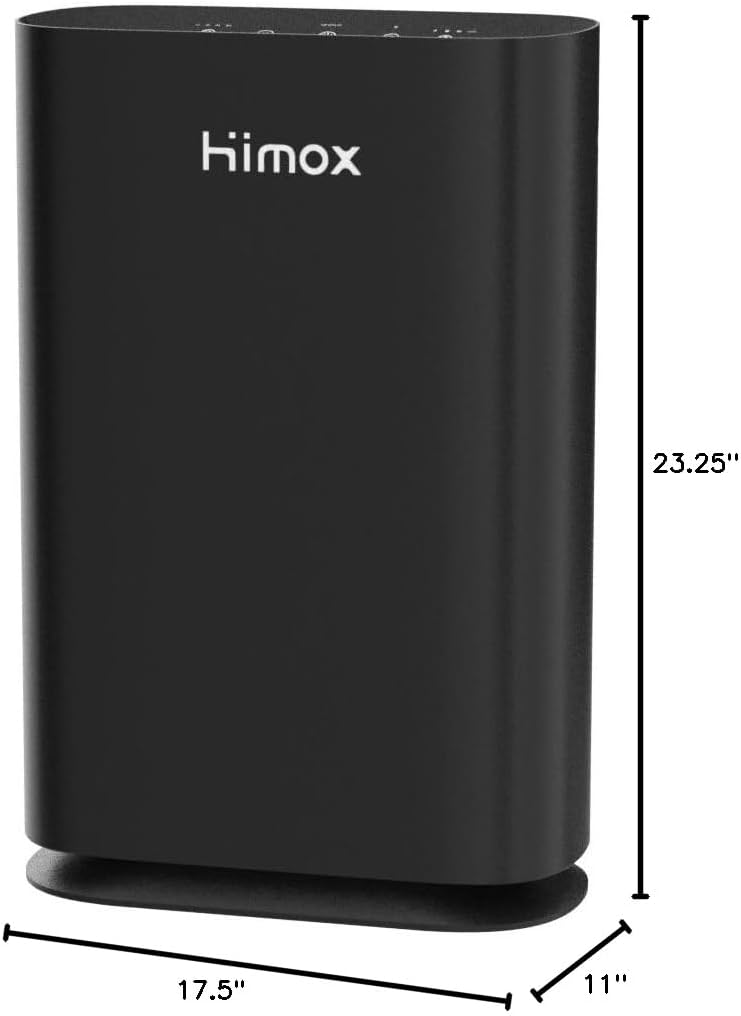
Figure 7: Product Dimensions
Understanding the dimensions helps in planning the optimal placement of the air purifier in your home or office.
Warranty and Support
The HIMOX H05 Air Purifier comes with a 24-month warranty from the date of purchase. This warranty covers defects in materials and workmanship under normal use.
For technical support, warranty claims, or general inquiries, please contact HIMOX customer service. You can find contact information on the official HIMOX website or through your purchase platform.
Lifetime after sales service: support@himox.com
Related documentsH05


Ask a question about this manual
Ask about setup, troubleshooting, compatibility, parts, safety, or missing instructions. Manuals+ will review the question and use this page’s manual context to help answer it.