
Product Overview
The Bose Home Speaker 450 is a versatile smart speaker designed to deliver room-filling stereo sound. It integrates seamlessly into your home audio ecosystem with multiple connectivity options and voice assistant capabilities.
Key Features:
- Wirelessly Stream with Bluetooth, Wi-Fi, and Apple AirPlay 2
- Google Assistant and Alexa Built-In for convenient voice control
- Eight-mic Array for Superior Voice Pickup, ensuring your commands are heard clearly
- Works with Other Bose Smart Speakers & Soundbars for a multi-room audio experience
- Room-filling Stereo Sound From a Single Speaker, providing immersive audio quality

Figure 1: Front view of the Bose Home Speaker 450, showcasing its sleek design and speaker grille.
Setup Instructions
- Unpack the Speaker: Carefully remove the Bose Home Speaker 450 from its packaging. Ensure all components, including the power cable, are present.
- Connect Power: Plug the power cable into the speaker's power port, located at the bottom rear, and then into a wall outlet. The speaker will power on automatically.
- Download the Bose Music App: For initial setup and full functionality, download the Bose Music app from your device's app store (available for iOS and Android).
- Add Speaker to App: Open the Bose Music app and follow the on-screen instructions to add your new Bose Home Speaker 450 to your account. This process will guide you through connecting the speaker to your Wi-Fi network.
- Configure Voice Assistant: If desired, follow the app's prompts to set up your preferred voice assistant (Google Assistant or Amazon Alexa).

Figure 2: Rear view of the Bose Home Speaker 450, highlighting the power input port.
Operating Instructions
Controls:
The top surface of the speaker features touch-sensitive controls for various functions:
- Power Button: Press to turn the speaker on or off.
- Volume Controls (+/-): Adjust the playback volume.
- Play/Pause: Start or pause audio playback.
- Bluetooth Button: Press and hold to enter Bluetooth pairing mode.
- Aux Button: Select the auxiliary input source.
- Microphone Mute: Mute or unmute the built-in microphones for privacy.
- Preset Buttons (1-6): Customize and save your favorite stations, playlists, or podcasts for quick access.
Voice Control:
With Google Assistant or Amazon Alexa built-in, you can control your speaker and smart home devices using voice commands. Simply say the wake word ("Hey Google" or "Alexa") followed by your command.
Connectivity:
- Wi-Fi: Connects to your home Wi-Fi network for streaming music services and multi-room audio.
- Bluetooth: Pair your mobile device to stream audio directly to the speaker.
- Apple AirPlay 2: Stream audio from Apple devices.
- Auxiliary Input: Use a 3.5mm audio cable to connect external audio sources.
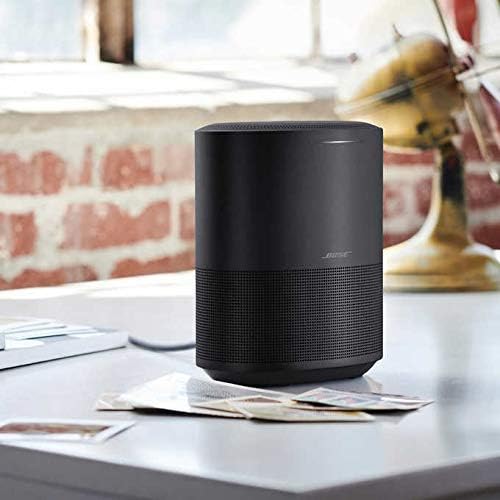
Figure 3: The Bose Home Speaker 450 positioned on a tabletop, demonstrating its compact and aesthetic integration into a living space.
Maintenance
- Cleaning: Use a soft, dry cloth to clean the surface of the speaker. Do not use any solvents or harsh chemicals.
- Avoid Moisture: The speaker is not waterproof. Keep it away from water and excessive humidity.
- Ventilation: Ensure the speaker has adequate ventilation and is not placed in an enclosed space that could restrict airflow.
- Software Updates: Regularly check the Bose Music app for software updates to ensure optimal performance and access to new features.
Troubleshooting
No Power:
- Ensure the power cable is securely connected to both the speaker and a working wall outlet.
- Try plugging the speaker into a different outlet.
No Sound:
- Check the volume level on both the speaker and your connected device.
- Verify that the correct input source (Wi-Fi, Bluetooth, Aux) is selected.
- If using Bluetooth, ensure the device is paired and within range.
Voice Assistant Not Responding:
- Ensure the microphone is not muted (check the microphone mute button on the top).
- Verify that the speaker is connected to the internet.
- Check the Bose Music app for any voice assistant setup issues.
Specifications
| Feature | Detail |
|---|---|
| Brand | Bose |
| Model | Home Speaker 450 |
| Connectivity Technology | Bluetooth, Wi-Fi |
| Audio Output Mode | Stereo |
| Mounting Type | Tabletop Mount |
| Speaker Type | Soundbar (Note: Listed as Soundbar, but functions as a standalone smart speaker) |
| Controller Type | Voice Control |
| Color | Triple Black |
| Waterproof | No |
| Number of Audio Channels | 2.0 |
| Power Source | Battery Powered |
| UPC | 649661488439 |
Warranty and Support
This Bose Home Speaker 450 (Renewed) comes with a 90 days limited warranty. For detailed warranty information, product support, or service inquiries, please refer to the official Bose support channels or the Amazon Renewed Guarantee policy.
For further assistance, visit the Bose Support Website or contact Amazon Renewed customer service.


