
1. Introduction
Thank you for purchasing the Blackmore Pro Audio PA System BJS-209BT. This portable PA system is designed to deliver powerful sound with versatile connectivity options, including Bluetooth, MP3 playback, and microphone input. This manual provides essential information for safe operation, setup, and maintenance of your device. Please read it thoroughly before use and retain it for future reference.

Figure 1: Blackmore Pro Audio PA System BJS-209BT (Front View)
This image shows the front of the PA system, highlighting the speaker grille with active blue LED lighting and the Blackmore logo.
2. Important Safety Information
- Read Instructions: Read all safety and operating instructions before using this product.
- Retain Instructions: Keep the safety and operating instructions for future reference.
- Heed Warnings: Adhere to all warnings on the product and in the operating instructions.
- Follow Instructions: Follow all operating and use instructions.
- Water and Moisture: Do not use this apparatus near water (e.g., near a bathtub, washbowl, kitchen sink, laundry tub, in a wet basement, or near a swimming pool).
- Heat: Do not place near heat sources such as radiators, heat registers, stoves, or other apparatus (including amplifiers) that produce heat.
- Ventilation: Ensure proper ventilation. Do not block any ventilation openings.
- Power Sources: Operate only from the type of power source indicated on the marking label.
- Power-Cord Protection: Protect the power cord from being walked on or pinched, particularly at plugs, convenience receptacles, and the point where they exit from the apparatus.
- Cleaning: Clean only with a dry cloth.
- Servicing: Do not attempt to service this product yourself. Refer all servicing to qualified service personnel.
3. Package Contents
Please check that all items listed below are included in your package:
- Blackmore Pro Audio PA System (BJS-209BT)
- Wired Microphone
- Charging Cable (DC 5V)
- User Manual
4. Product Features
The BJS-209BT PA System offers a range of features for versatile audio playback:
- Bluetooth connectivity for wireless audio streaming.
- Integrated rechargeable battery for portable use.
- Dynamic LED lighting on the speaker grille.
- Built-in MP3 player with USB and TF card support.
- 1/4″ input for external audio sources or instruments.
- 3.5mm AUX input for wired audio devices.
- Includes a wired microphone for vocal performances or announcements.
- Active speaker amplification with 900 Watts output.
5. Controls and Connections
Familiarize yourself with the control panel located on the rear of the unit:
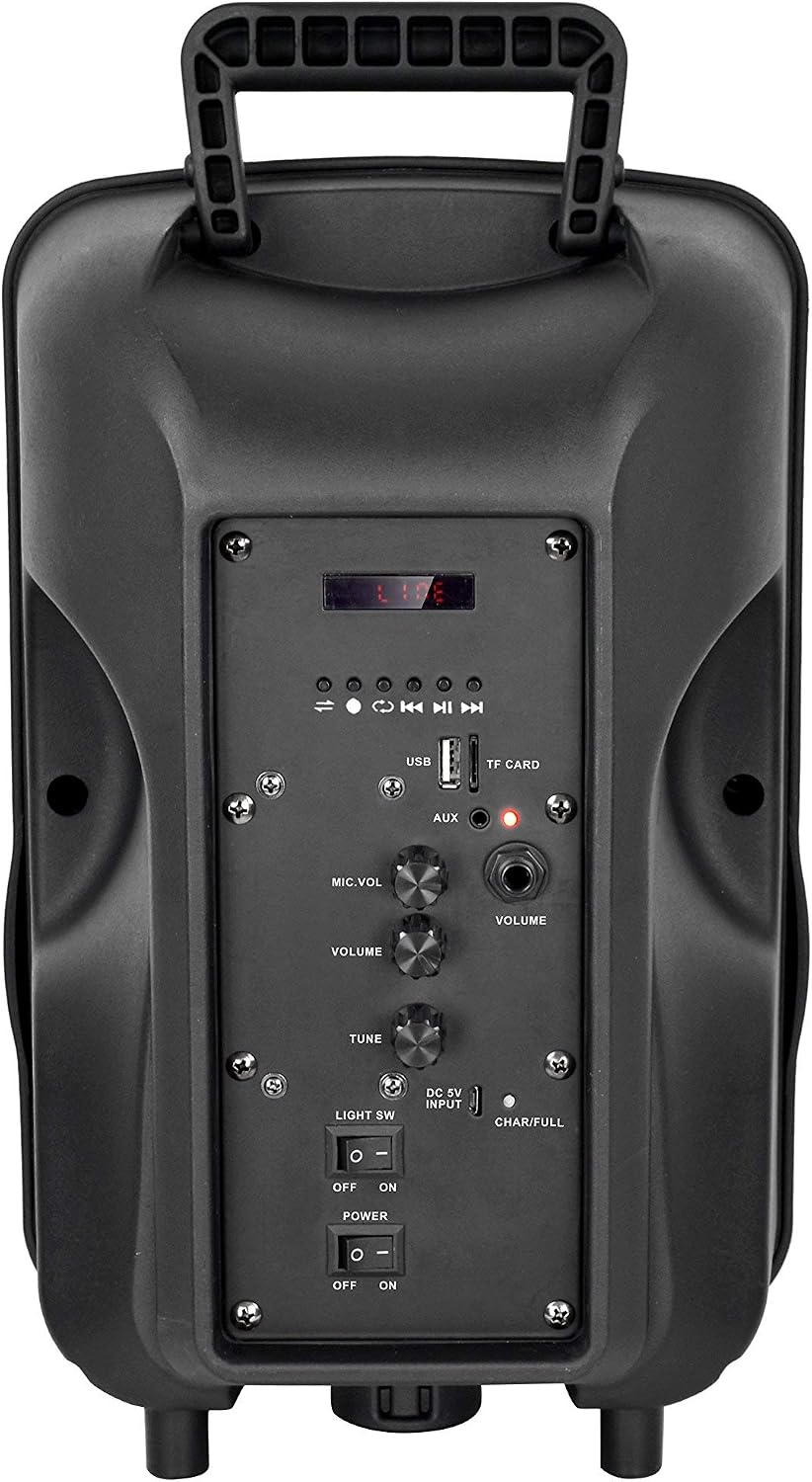
Figure 2: Control Panel Overview
This image displays the back panel of the PA system, detailing the layout of the USB port, TF card slot, AUX input, microphone volume, master volume, tune control, DC 5V input, charging indicators, and power/light switches.
- Display Screen: Shows current mode, track number, or other status information.
- Playback Controls:
- ◀◀ (Previous/Rewind): Short press for previous track, long press to rewind.
- ▶▶ (Next/Fast Forward): Short press for next track, long press to fast forward.
- ▶▌▌ (Play/Pause): Press to play or pause playback.
- MODE: Press to switch between Bluetooth, USB, TF Card, AUX, and FM Radio modes.
- USB Port: Insert a USB flash drive for MP3 playback.
- TF CARD Slot: Insert a TF (MicroSD) card for MP3 playback.
- AUX Input (3.5mm): Connect external audio devices using a 3.5mm audio cable.
- MIC.VOL Knob: Adjusts the volume level of the connected microphone.
- VOLUME Knob: Master volume control for the entire system.
- TUNE Knob: Adjusts tone or radio frequency (if applicable).
- DC 5V INPUT: Power input for charging the internal battery.
- CHAR/FULL Indicator: LED indicator for charging status (CHAR: charging, FULL: fully charged).
- LIGHT SW (ON/OFF): Toggles the LED lighting on the speaker grille.
- POWER (ON/OFF): Main power switch for the unit.
6. Setup
6.1 Unpacking
Carefully remove the PA system and all accessories from the packaging. Inspect the unit for any signs of damage. If any damage is found, do not use the product and contact customer support.
6.2 Initial Charging
Before first use, it is recommended to fully charge the internal rechargeable battery. Connect the provided charging cable to the DC 5V INPUT port on the rear panel and plug the other end into a suitable USB power adapter (not included) or a powered USB port. The "CHAR" indicator will illuminate during charging and turn "FULL" when complete. A full charge may take several hours.
6.3 Placement
Place the PA system on a stable, flat surface. Ensure there is adequate ventilation around the unit. Avoid placing it near heat sources or in direct sunlight.
7. Operating Instructions
7.1 Powering On/Off
To power on the unit, slide the POWER switch to the "ON" position. To power off, slide it to the "OFF" position.
7.2 Bluetooth Pairing
- Power on the PA system. The unit will automatically enter Bluetooth mode or you can press the MODE button until "BLUE" or "Bluetooth" appears on the display.
- On your Bluetooth-enabled device (smartphone, tablet, etc.), enable Bluetooth and search for available devices.
- Select "BJS-209BT" from the list of devices.
- Once paired, the unit will emit a confirmation tone, and you can begin streaming audio wirelessly.
Note: If pairing fails, ensure the PA system is not connected to another device and try again.
7.3 MP3 Playback (USB/TF Card)
- Insert a USB flash drive or TF (MicroSD) card containing MP3 audio files into the respective port.
- The unit should automatically switch to USB or TF Card mode. If not, press the MODE button until the correct mode is displayed.
- Use the playback controls (◀◀, ▶▶, ▶▌▌) to navigate and control playback.
7.4 AUX Input Usage
- Connect one end of a 3.5mm audio cable (not included) to the AUX Input port on the PA system.
- Connect the other end to the headphone jack or audio output of your external audio device.
- Press the MODE button until "AUX" mode is displayed.
- Control playback from your external device and adjust the master VOLUME knob on the PA system.
7.5 Microphone Usage
- Connect the wired microphone to the 1/4" microphone input jack (not explicitly labeled in image, but implied by "MIC.VOL" knob).
- Adjust the MIC.VOL knob to control the microphone's volume level.
- Adjust the main VOLUME knob for overall system volume.
7.6 LED Light Operation
Slide the LIGHT SW to "ON" to activate the LED lighting on the speaker grille. Slide it to "OFF" to turn the lights off.
8. Charging the Battery
The BJS-209BT PA system features a built-in rechargeable Lithium Polymer battery. To charge:
- Connect the provided DC 5V charging cable to the DC 5V INPUT port on the rear panel.
- Plug the other end into a standard USB power adapter (e.g., smartphone charger, 5V/1A or 5V/2A recommended) or a powered USB port.
- The CHAR/FULL indicator will show "CHAR" while the battery is charging.
- Once fully charged, the indicator will change to "FULL".
- Disconnect the charger once charging is complete to prolong battery life.
Note: Battery life varies with volume level and LED light usage.
9. Maintenance
9.1 Cleaning
Wipe the exterior of the unit with a soft, dry cloth. Do not use abrasive cleaners, waxes, or solvents as they may damage the finish. Ensure no liquids enter the unit.
9.2 Storage
When not in use for extended periods, store the PA system in a cool, dry place, away from direct sunlight and extreme temperatures. It is recommended to charge the battery every 3-6 months to maintain its health.
10. Troubleshooting
| Problem | Possible Cause | Solution |
|---|---|---|
| No power | Battery is depleted; Power switch is OFF. | Charge the battery; Slide the POWER switch to ON. |
| No sound | Volume too low; Incorrect mode selected; Audio cable not connected properly; Bluetooth not paired. | Increase VOLUME; Press MODE to select correct input; Reconnect audio cable; Re-pair Bluetooth device. |
| Bluetooth not connecting | PA system not in Bluetooth mode; Device too far; Already connected to another device. | Ensure PA system is in Bluetooth mode; Move device closer; Disconnect from other devices and try pairing again. |
| Microphone not working | Microphone not connected; MIC.VOL too low. | Ensure microphone is securely plugged in; Increase MIC.VOL knob. |
11. Specifications
- Model: BJS-209BT
- Output Wattage: 900 Watts
- Speaker Amplification Type: Active
- Battery Type: Lithium Polymer
- Input Voltage: 120 Volts (for charging via adapter)
- Charging Input: DC 5V
- Connectivity: Bluetooth, USB, TF Card, 3.5mm AUX, 1/4" Microphone Input
- Color: Black
- Manufacturer: Blackmore
12. Warranty and Support
This product is an Amazon Renewed item. Amazon Renewed products are professionally inspected and tested to work and look like new. They are eligible for replacement or refund under the Amazon Renewed Guarantee if you are not satisfied with your purchase.
For any issues or support inquiries regarding your Amazon Renewed product, please contact Amazon Customer Service directly.
