
Ultenic U10
Contents
Ultenic U10 Cordless Vacuum Cleaner User Manual
Model: U10
1. Product Overview
The Ultenic U10 Cordless Vacuum Cleaner is a versatile 4-in-1 lightweight stick and handheld vacuum designed for efficient cleaning across various surfaces. It features a powerful 250W brushless motor, 25Kpa strong suction, and a long runtime of up to 40 minutes. Equipped with HEPA filtration and intelligent dust detection technology, it ensures thorough cleaning and improved air quality.

Figure 1.1: Ultenic U10 Cordless Vacuum Cleaner and included accessories.
Package Contents
Please check the package contents against the list below. If any items are missing or damaged, contact customer support.
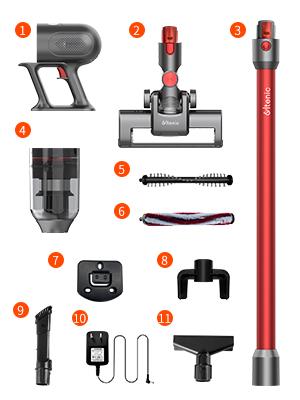
Figure 1.2: Detailed diagram of all components included with the Ultenic U10.
- Dust container
- Body Part (Main Motor)
- Floor brush
- Extension tube
- Wall-mounted accessory
- Adapter (Charger)
- Dual-purpose crevice brush
- Carpet roller brush
- Sofa brush (Mini motorized brush)
- Accessories storage rack
- Soft bristle roller brush
2. Setup and Assembly
Follow these steps to assemble your Ultenic U10 vacuum cleaner and prepare it for first use.
2.1 Initial Charging
Before first use, fully charge the battery. The detachable 2200mAH lithium battery can be charged either while installed in the unit or separately.

Figure 2.1: The detachable battery can be easily inserted or removed for charging.
2.2 Assembling the Vacuum
- Attach the Extension Tube: Connect the extension tube to the main body part until it clicks securely.
- Attach the Floor Brush: Connect the desired floor brush (soft bristle or carpet roller) to the other end of the extension tube until it clicks.
- Install Wall Mount: For convenient storage and charging, install the wall-mounted accessory in a suitable location using the provided hardware.

Figure 2.2: The vacuum can be conveniently stored and charged using the wall mount.
3. Operating Instructions
Learn how to effectively use your Ultenic U10 for various cleaning tasks.
3.1 Powering On and Suction Modes
Press the power button on the main body to turn on the vacuum. The U10 offers two cleaning power modes: ECO and MAX. Press the mode button to switch between them based on your cleaning needs.
Video 3.1: Demonstration of the Ultenic U10 Cordless Vacuum Cleaner in operation, showcasing its lightweight design and ease of use.
3.2 Dust Detection and Auto-Boost
The intelligent dust detection technology automatically increases suction power to MAX mode when a higher concentration of dust particles is detected, ensuring optimal cleaning performance.

Figure 3.2: The vacuum automatically adjusts suction based on detected dust levels.
3.3 Using Various Attachments
The U10 comes with multiple cleaning tools to adapt to different cleaning scenarios:
- Soft Bristle Roller Brush: Ideal for hard floors.
- Carpet Roller Brush: Designed for effective cleaning on carpets.
- Dual-purpose Crevice Brush: Perfect for tight spaces, corners, and dusting surfaces like bookshelves.
- Sofa Brush (Mini Motorized Brush): Excellent for cleaning upholstery, pet hair from sofas, mattresses, and car seats.

Figure 3.3: The vacuum can be converted into a handheld unit or used with different brushes for versatile cleaning.
3.4 LED Floor Light
The main floor brush is equipped with an LED light to illuminate dark areas, making hidden dust and debris visible for thorough cleaning under furniture or in dimly lit spaces.
4. Maintenance
Regular maintenance ensures optimal performance and extends the lifespan of your Ultenic U10 vacuum cleaner.
4.1 Emptying the Dustbin
The 0.6L dustbin should be emptied regularly, especially when the MAX line is reached. To empty, detach the dustbin from the main body and press the release button to open the bottom flap over a trash can.
4.2 Cleaning the Filters
The 3-stage HEPA filtration system traps fine dust and allergens. For best performance, clean the filters regularly:
- Pre-filter and Mesh Filter: Remove these filters from the dustbin. Tap them gently to remove loose debris. If heavily soiled, rinse them under running water. Ensure they are completely dry before reassembling.
- HEPA Filter: The HEPA filter can also be rinsed. Allow it to air dry for at least 24 hours before reinserting. Do not use a dryer or direct heat.

Figure 4.1: The multi-stage filtration system ensures efficient dust capture and can be disassembled for cleaning.
4.3 Cleaning the Roller Brushes
Periodically check the roller brushes for tangled hair or debris. Remove the brush from the floor head and use scissors or a cleaning tool to cut and remove any wrapped hair. Rinse the brush if necessary and ensure it is dry before reinserting.
5. Troubleshooting
If you encounter any issues with your Ultenic U10, refer to the following common problems and solutions:
| Problem | Possible Cause | Solution |
|---|---|---|
| Vacuum does not turn on. | Battery is not charged or not properly installed. | Ensure the battery is fully charged and securely clicked into place. |
| Weak suction power. | Dustbin is full, filters are clogged, or brush roll is obstructed. | Empty the dustbin. Clean all filters. Remove any obstructions from the brush roll or air ducts. |
| Brush roll not spinning. | Hair or debris tangled in the brush roll, or an obstruction. | Remove the brush roll and clear any tangled hair or debris. Check for blockages in the brush head. |
| Short runtime. | Battery not fully charged, or operating in MAX mode continuously. | Ensure the battery is fully charged. Use ECO mode for longer cleaning sessions. |
If the issue persists after trying these solutions, please contact Ultenic customer support.
6. Specifications
Key technical specifications for the Ultenic U10 Cordless Vacuum Cleaner:
- Brand: Ultenic
- Model Name: Cordless Vacuum Cleaner U10
- Special Feature: Dust Detection Sensor, High-Performance 3-stage Filtration, Intelligent adapts power to dust levels, Wall dock and storage, 25000Pa Fade-free Suction
- Filter Type: Foam, HEPA
- Is Cordless?: Yes
- Capacity: 0.5 Liters (Dustbin)
- Wattage: 250 watts
- Runtime: 40 minutes (ECO mode)
- Recommended Uses: Carpet, Hard Floor, Windows, Tight Areas, Car
- Form Factor: Handheld, Stick
- Color: Red
- Product Dimensions: 8.66"L x 4.72"W x 39.76"H
- Battery Description: Lithium (2200mAH)
- Noise Level: 65 dB
- Item Weight: 2.64 pounds
- Number of Power Levels: 2 (ECO, MAX)
7. Warranty and Support
All products purchased from our store are entitled to a 12-month warranty, effective from the date of purchase (or the date of delivery if later).
Customer Support
For any questions, technical assistance, or warranty claims, please contact Ultenic customer support through their official channels. Refer to the product packaging or the Ultenic website for the most up-to-date contact information.
Ask a question about this manual
Ask about setup, troubleshooting, compatibility, parts, safety, or missing instructions. Manuals+ will review the question and use this page’s manual context to help answer it.