
Introduction
Thank you for choosing the Sparco ICON Martini Racing Office/Gaming Chair. This manual provides essential information for the safe assembly, operation, and maintenance of your new chair. Please read these instructions carefully before use and retain them for future reference.
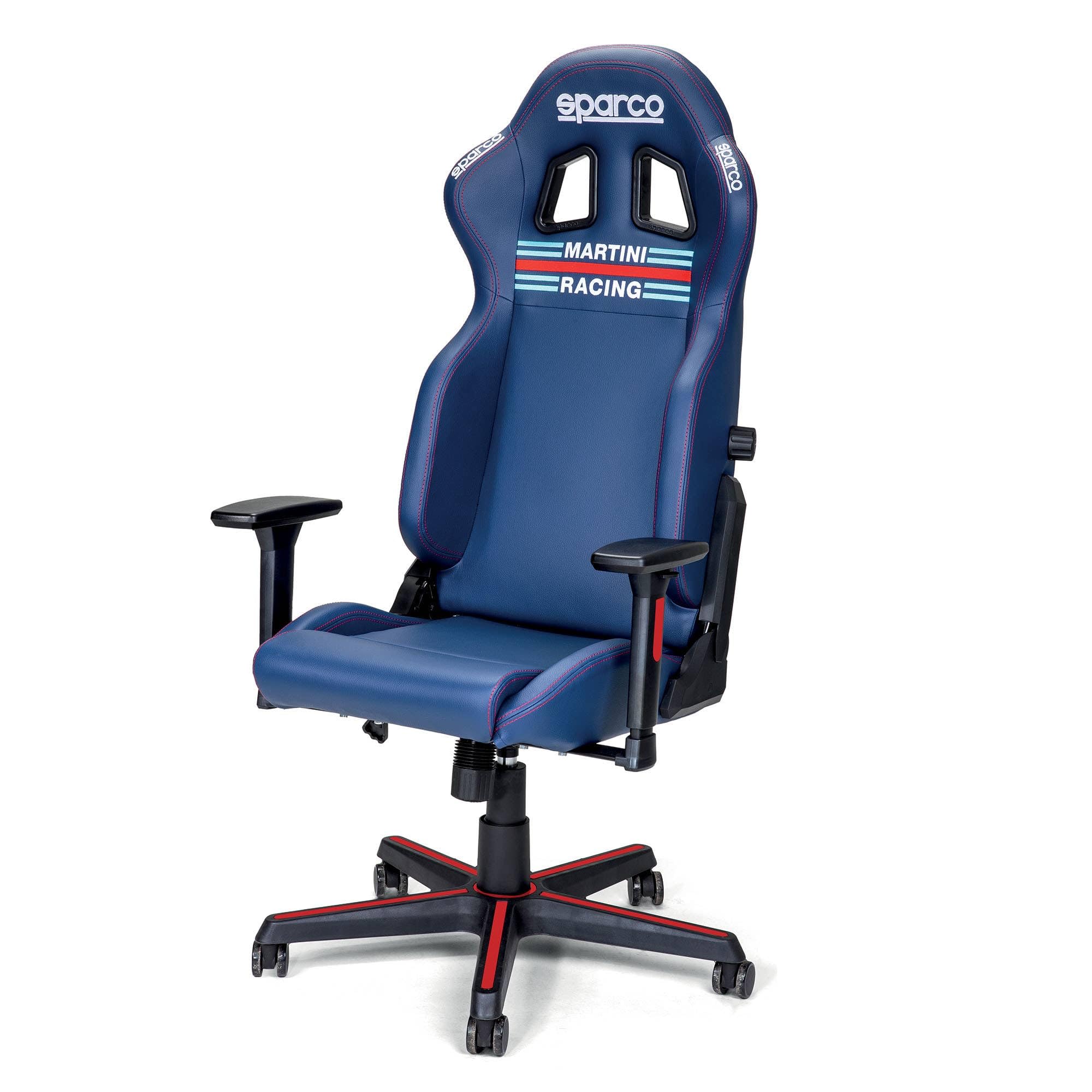
Image: The Sparco ICON Martini Racing Office/Gaming Chair in Blue Navy. This image shows the overall design and color of the chair.
Safety Information
- Warning: This seat is designed for office and gaming use only. It must not be used in a vehicle; it is not a car seat.
- Ensure all components are securely fastened before use. Regularly check for loose screws or parts.
- Do not stand on the chair.
- Do not use the chair on uneven surfaces.
- Keep children and pets away during assembly.
- Adhere to the maximum weight capacity specified in the specifications section.
Package Contents
Before beginning assembly, please verify that all parts are present and undamaged.
- Seat base
- Backrest
- Armrests (2)
- Star base with 5 wheels
- Gas lift cylinder
- Gas lift cover
- Tilting mechanism
- Hardware kit (screws, washers, Allen key)
- Assembly instructions
Assembly Instructions
Assembly is required for this chair. Follow these steps carefully. It is recommended to assemble the chair on a soft, clean surface to prevent damage.
- Attach Wheels to Star Base: Insert each of the 5 wheels into the holes at the end of the star base until they click securely into place.
- Insert Gas Lift: Place the gas lift cylinder into the central hole of the star base. Cover it with the gas lift cover.
- Attach Tilting Mechanism to Seat Base: Align the tilting mechanism with the pre-drilled holes on the underside of the seat base. Secure it using the provided screws and Allen key. Ensure the front of the mechanism faces the front of the seat.
- Attach Armrests to Seat Base: Secure the armrests to the sides of the seat base using the provided screws. Do not overtighten initially.
- Attach Backrest to Seat Base: Align the backrest with the mounting brackets on the seat base and armrests. Secure it with the remaining screws. Once all screws are in place, tighten all screws for the armrests and backrest firmly.
- Connect Seat Assembly to Gas Lift: Carefully place the assembled seat onto the gas lift cylinder, ensuring the central hole of the tilting mechanism aligns with the top of the gas lift. Apply gentle downward pressure to secure.

Image: Technical diagram illustrating the dimensions and key components of the Sparco ICON chair. This can assist in identifying parts during assembly.
Operating Instructions
Your Sparco ICON chair offers several adjustment features for optimal comfort.
- Height Adjustment: To raise the seat, lift the lever located under the right side of the seat while taking your weight off the chair. To lower the seat, lift the lever while seated.
- Backrest Recline: Pull the lever on the right side of the chair (similar to a car seat recline lever) to adjust the backrest angle. Release the lever at the desired angle to lock it. The backrest can recline up to 150 degrees.
- Lumbar Support Adjustment: The backrest features adjustable lumbar support. Use the knob on the side of the backrest to increase or decrease the lumbar curve.
- Armrest Adjustment (2D): The armrests can be adjusted in two dimensions:
- Height: Press the button on the side of the armrest and move it up or down. Release the button to lock.
- Rotation: The armrest pads can be rotated left or right to find your preferred position.
- Tilting Mechanism: The chair features a tilting mechanism. A knob under the seat allows you to adjust the tension of the tilt. Turn clockwise to increase tension (making it harder to tilt) and counter-clockwise to decrease tension (making it easier to tilt).

Image: Close-up view of the resistance adjustment knob, used to control the tension of the chair's tilting mechanism.

Image: Detail of the 2D adjustable armrest, highlighting its multi-directional movement capabilities.
Maintenance
- Cleaning: For general cleaning, wipe the synthetic leather surfaces with a soft, damp cloth. For deeper cleaning, refer to the care label for specific instructions, which may recommend dry cleaning for certain components. Avoid harsh chemicals or abrasive cleaners.
- Inspection: Periodically check all screws and bolts to ensure they are tight. Retighten if necessary to maintain stability and safety.
- Wheels: Keep the wheels clean from dust and debris to ensure smooth movement.
- Avoid Direct Sunlight: Prolonged exposure to direct sunlight can cause the material to fade or crack.
Troubleshooting
| Problem | Possible Cause | Solution |
|---|---|---|
| Chair is wobbly or unstable. | Loose screws or improper assembly. | Check and tighten all assembly screws, especially those connecting the seat, backrest, and armrests. Ensure the gas lift is fully seated in the base. |
| Gas lift not adjusting height. | Lever not engaged or gas lift cylinder malfunction. | Ensure the height adjustment lever is fully pulled up. If the issue persists, the gas lift cylinder may need replacement. |
| Backrest does not recline or lock. | Recline lever not fully engaged or mechanism obstruction. | Ensure the recline lever is pulled completely. Check for any obstructions around the recline mechanism. |
| Wheels not rolling smoothly. | Debris caught in wheels or damaged wheels. | Clean any hair or debris from the wheel casters. If wheels are damaged, they may need replacement. |
Specifications
| Brand | Sparco |
| Model Name | Icon Martini Racing |
| Model Number | 00998SPMR |
| Color | Blue Navy |
| Overall Height | 121 cm - 129 cm (approx. 47.6 - 50.8 inches) |
| Overall Width (Armrest to Armrest) | 66 cm (approx. 26 inches) |
| Overall Depth (Base) | 55 cm (approx. 21.7 inches) |
| Seat Height Range | 42 cm - 50 cm (approx. 16.5 - 19.7 inches) |
| Seat Width (Front) | 51 cm (approx. 20.1 inches) |
| Seat Depth | 46 cm (approx. 18.1 inches) |
| Armrest Height Adjustment Range | 29 cm - 36 cm (approx. 11.4 - 14.2 inches) |
| Seat Material | Synthetic Leather |
| Filling Material | Foam |
| Frame Material | Iron |
| Item Weight | 6.5 kg (approx. 14.3 lbs) |
| Recommended Max Weight | 150 kg (approx. 330 lbs) |
| Special Features | Adjustable Height, 2D Armrests, Ergonomic Design, High Backrest, Adjustable Backrest (up to 150° recline), Lumbar Support Adjustment, Tilting Mechanism |
| Assembly Required | Yes |
| Certifications | SGS / BIFMAX5.1 / EN1335 (for gas lift piston) |

Image: Rear view of the Sparco ICON chair, showcasing the Sparco and Martini Racing logos on the backrest.
Warranty and Support
For warranty information, please refer to the documentation included with your purchase or contact Sparco customer support directly.
If you encounter any issues not covered in the troubleshooting section or require further assistance, please contact Sparco customer service. Contact details can typically be found on the Sparco official website or on your purchase receipt.
