Introduction
Thank you for choosing the Hagibis HDMI 2.1 Cable. This manual provides essential information for the proper setup, operation, maintenance, and troubleshooting of your cable. Please read this manual thoroughly to ensure optimal performance and longevity of your product.
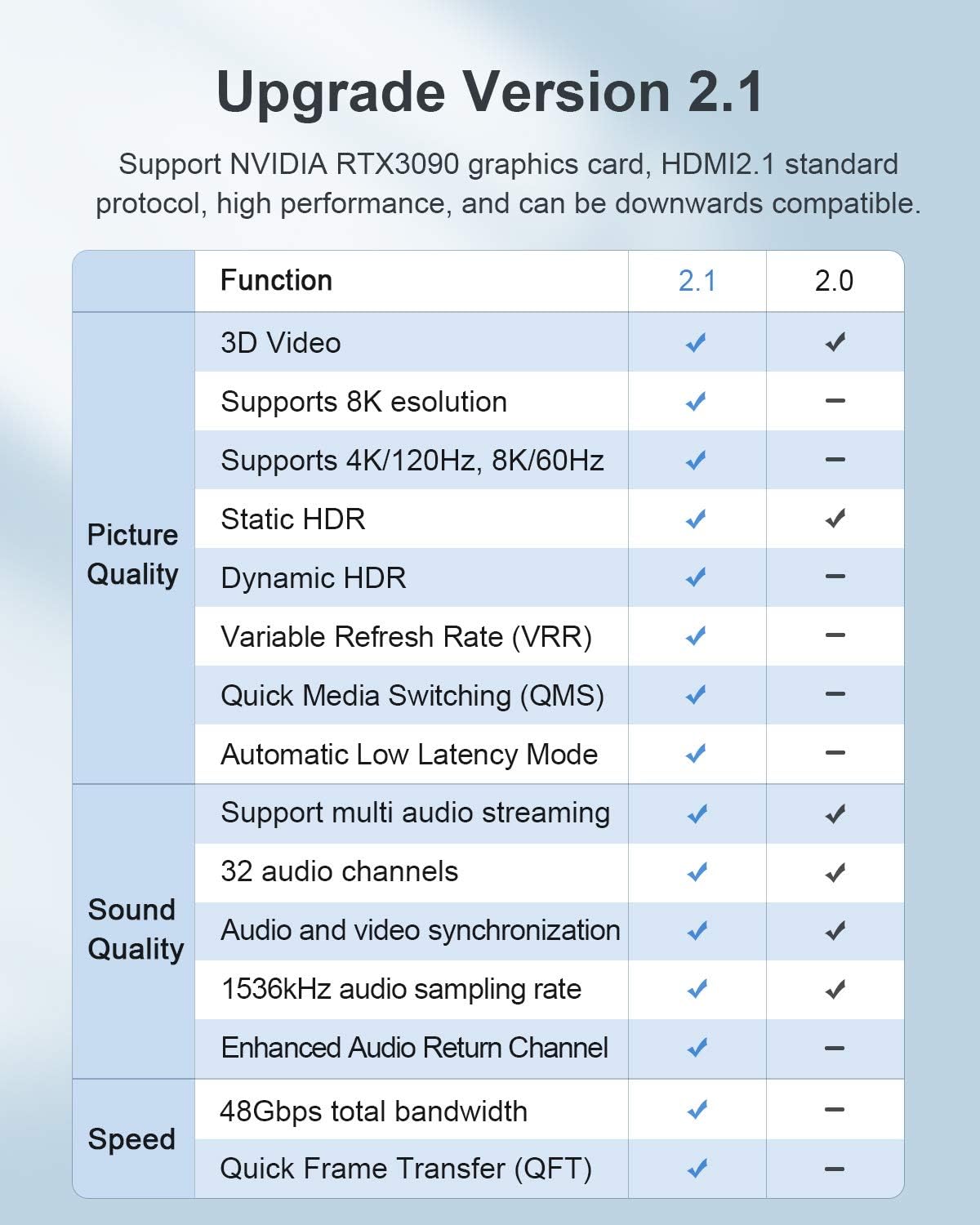
Figure 1: A coiled Hagibis HDMI 2.1 cable, showcasing its braided exterior.
Product Overview
The Hagibis HDMI 2.1 Cable is designed for high-performance audio and video transmission, supporting the latest HDMI 2.1 standard. It offers advanced features for an enhanced viewing and gaming experience.
Key Features:
- 48Gbps Bandwidth: Supports high-speed data transfer for optimal picture and sound quality, ensuring no lagging.
- Ultra HD Resolutions: Capable of resolutions up to 8K@60Hz, 4K@120Hz, and 2K@144Hz, with support for up to 10K resolution.
- Dynamic HDR: Provides superior contrast, brightness, and color depth for a more vivid visual experience.
- Enhanced Audio Return Channel (eARC): Supports advanced audio formats and simplifies connectivity between your TV and audio system.
- Gaming Features: Includes Variable Refresh Rate (VRR), Quick Frame Transport (QFT), Quick Media Switching (QMS), and Auto Low Latency Mode (ALLM) for smoother, more responsive gameplay.
- Robust Construction: Features gold-plated connectors, a durable zinc alloy housing, a braided exterior, and triple shielding with 28AWG oxygen-free copper wiring for stable signal transmission and longevity.
- Wide Compatibility: Backward compatible with previous HDMI versions, ensuring connectivity with a broad range of devices.

Figure 2: This table compares the features of HDMI 2.1 and HDMI 2.0, highlighting support for 3D Video, 8K resolution, 4K/120Hz, Static HDR, Dynamic HDR, VRR, QMS, ALLM, multi-audio streaming, 32 audio channels, audio/video synchronization, 1536kHz audio sampling rate, eARC, 48Gbps bandwidth, and QFT.

Figure 3: An image demonstrating the visual difference between HD (1920x1080), 4K (3840x2160), and 8K (7680x4320) resolutions on a television, emphasizing the clarity of 8K.
Setup Guide
Connecting your Hagibis HDMI 2.1 cable is a straightforward process. Follow these steps for proper installation:
- Identify Ports: Locate the HDMI output port on your source device (e.g., gaming console, Blu-ray player, PC) and the HDMI input port on your display device (e.g., TV, monitor, projector).
- Connect First End: Gently insert one end of the Hagibis HDMI 2.1 cable into the HDMI output port of your source device. Ensure it is fully seated.
- Connect Second End: Insert the other end of the cable into an available HDMI input port on your display device.
- Power On Devices: Turn on both your source device and your display device.
- Select Input: On your display device, use the remote control or on-screen menu to select the correct HDMI input source that corresponds to the port where you connected the cable.
- Verify Signal: Confirm that the audio and video signal is being transmitted correctly to your display.
For optimal performance, ensure that both your source and display devices support HDMI 2.1 features such as 8K resolution, 4K@120Hz, Dynamic HDR, eARC, VRR, QFT, QMS, and ALLM.
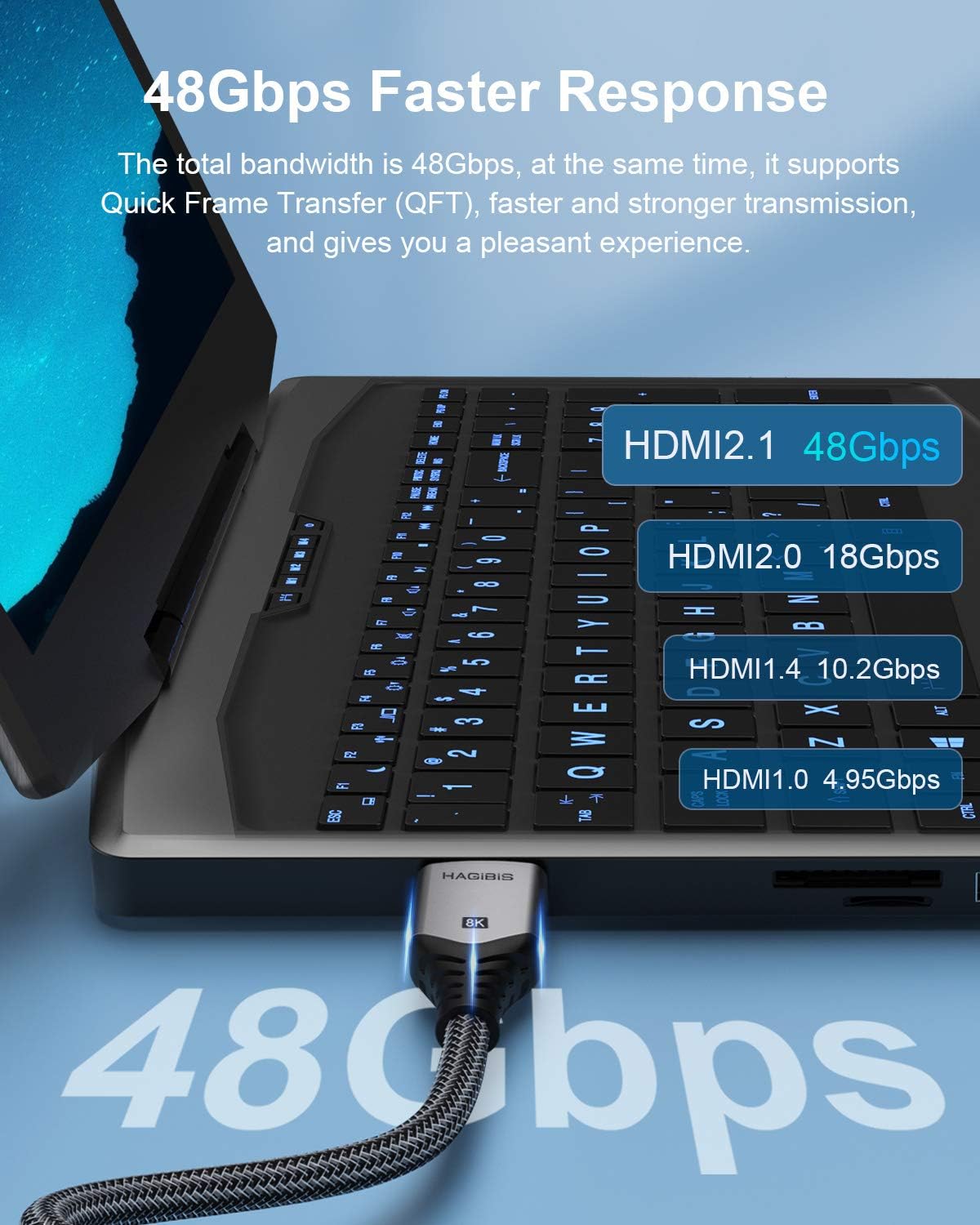
Figure 4: The Hagibis HDMI 2.1 cable connected to the HDMI port of a modern television.
Figure 5: The Hagibis HDMI 2.1 cable connected to the HDMI port of a gaming console, such as a PlayStation or Xbox.
Usage Guidelines
The Hagibis HDMI 2.1 cable is designed for plug-and-play functionality. Once connected, it will automatically transmit audio and video signals between compatible devices. To maximize your experience:
- Resolution and Refresh Rate: Ensure your source device (e.g., PC graphics card, gaming console) and display device are configured to output and receive the desired resolution (e.g., 8K@60Hz, 4K@120Hz) and refresh rate. Consult your device manuals for settings adjustments.
- HDR and Color: Activate HDR (High Dynamic Range) settings on both your source and display devices if supported, to utilize the cable's Dynamic HDR capabilities.
- Audio Settings: If using eARC, ensure your TV and sound system are properly configured to use the Enhanced Audio Return Channel for high-quality audio formats.
- Gaming Features: For gaming, verify that VRR, QFT, QMS, and ALLM are enabled on your gaming console or PC and your compatible display to benefit from reduced latency and smoother visuals.

Figure 6: A Hagibis HDMI 2.1 cable plugged into a laptop, with a graphic indicating its 48Gbps bandwidth compared to older HDMI versions (HDMI 2.0: 18Gbps, HDMI 1.4: 10.2Gbps, HDMI 1.0: 4.95Gbps).
Care and Maintenance
To ensure the longevity and optimal performance of your Hagibis HDMI 2.1 cable, follow these care and maintenance guidelines:
- Handle with Care: Avoid excessive bending, twisting, or pulling of the cable, especially near the connectors.
- Clean Connectors: If connectors appear dusty, gently wipe them with a dry, lint-free cloth. Avoid using liquid cleaners directly on the connectors.
- Storage: When not in use, store the cable in a clean, dry place, preferably coiled loosely to prevent kinks.
- Environmental Conditions: Avoid exposing the cable to extreme temperatures, direct sunlight, or high humidity.
- Secure Connections: Ensure connectors are fully inserted into ports to prevent signal loss or damage. Do not force connections.

Figure 7: An image comparing the internal construction of the Hagibis HDMI 2.1 cable connector, showing metal shielding for enhanced stability, against a standard HDMI cable without such shielding.
Troubleshooting
If you encounter issues with your Hagibis HDMI 2.1 cable, try the following troubleshooting steps:
- No Picture/Sound:
- Ensure both ends of the HDMI cable are securely connected to their respective ports.
- Verify that your display device is set to the correct HDMI input source.
- Check if both your source and display devices are powered on.
- Try connecting the cable to different HDMI ports on your display device, if available.
- Test with another HDMI cable to rule out issues with the source or display device.
- Poor Picture Quality (Flickering, Artifacts):
- Ensure your source device's output resolution and refresh rate are compatible with your display device.
- Check for any kinks or damage to the cable.
- If using an HDMI switch or adapter, try connecting the cable directly to the display.
- HDCP Issues (Protected Content Not Displaying):
- Some devices, particularly gaming consoles, may have specific requirements for HDCP (High-bandwidth Digital Content Protection) signal transfer. Ensure all devices in the chain (source, cable, display, and any intermediate switches) are HDCP 2.2 or 2.3 compliant for 4K/8K content.
- If using an HDMI switch, ensure it is also HDCP compliant and try bypassing it if issues persist.
- Features Not Working (e.g., 8K, 4K@120Hz, VRR):
- Confirm that both your source device and display device fully support the specific HDMI 2.1 feature you are trying to use. Many features require explicit activation in device settings.
- Update firmware on your source and display devices to the latest versions.
Technical Specifications
| Feature | Specification |
|---|---|
| Brand | Hagibis |
| Model Number | HY-HM |
| Connector Type | HDMI Male to HDMI Male |
| HDMI Protocol | Version 2.1 |
| Data Transfer Rate | 48 Gigabits Per Second (Gbps) |
| Max Resolution | 7680x4320 (8K) |
| Refresh Rate Support | 8K@60Hz, 4K@120Hz, 2K@144Hz (downward compatible) |
| Special Features | Braided, High Speed, Dynamic HDR, eARC, ALLM, QFT, QMS, VRR |
| Shielding | Aluminum foil + braided + ground cable |
| Outer Cover | Aluminum foil + braided |
| Interface | Gold Plated |
| Color | Grey |
| Length | 2 meters (6 feet) |
| Item Weight | 1.83 Ounces |
| Usage Environment | Indoor, Outdoor |

Figure 8: A diagram illustrating the dimensions of the HDMI connector (40mm length, 20mm width, 11mm height) and listing key specifications such as HDMI 2.1 protocol, 7680x4320 resolution, 48Gbps bandwidth, 8K/60Hz refresh rate, braided shielding, and gold-plated interface.
Warranty and Support
Your Hagibis HDMI 2.1 Cable comes with a product warranty. Please refer to the included Product Warranty Card for detailed information regarding warranty terms, conditions, and duration. Keep your proof of purchase for warranty claims.

Figure 9: An image showing the product packaging, the coiled HDMI cable, a user guide, and a product warranty card.
Customer Support:
If you require further assistance, have questions not covered in this manual, or need to make a warranty claim, please contact Hagibis customer support. Refer to the contact information provided on the product packaging or the official Hagibis website.


