
Important Safety Information
Please read all instructions carefully before using your new compact refrigerator. Keep this manual for future reference.
- Electrical Safety: Ensure the refrigerator is connected to a properly grounded electrical outlet. Do not use extension cords or ungrounded adapters.
- Ventilation: Allow adequate space around the refrigerator for proper air circulation. Do not block ventilation openings.
- Flammable Materials: Do not store explosive substances such as aerosol cans with a flammable propellant in this appliance.
- Child Safety: Supervise children when they are near the appliance. Old refrigerators can be dangerous if children play inside.
- Disposal: Dispose of the appliance according to local regulations for flammable refrigerants and gases.
Product Overview
The Frigidaire EFR285-6COM is a 2.5 cu ft compact refrigerator/freezer, ideal for small spaces like dorm rooms, offices, or bar areas. It offers convenient storage for beverages and food items with its thoughtful design.

Front view of the Frigidaire compact refrigerator, showcasing its sleek stainless steel finish and classic branding.

The interior of the refrigerator features adjustable wire shelving and a dedicated freezer compartment, providing organized storage.
Key Features:
- Built-in freezer compartment for frozen items and quick cooling.
- 2.5 cu ft capacity for ample storage.
- Adjustable wire shelving, built-in can dispenser, and tall bottle storage for efficient organization.
- Quiet operation, suitable for bedrooms or offices.
- Low energy consumption.
- Reversible stainless-steel door.
- Adjustable legs for stability on uneven surfaces.

An infographic illustrating the main benefits of the refrigerator, including its integrated freezer, adjustable leveling legs for stability, quiet operation, and the convenience of a reversible door.
Setup
Unpacking:
- Remove all packaging materials, including foam and adhesive tape.
- Inspect the refrigerator for any shipping damage. Report any damage immediately to the retailer.
- Clean the interior and exterior surfaces with a soft cloth and mild detergent before use.
Placement:
- Place the refrigerator on a firm, level floor. Use the adjustable leveling legs to ensure stability.
- Allow at least 5 inches (12.7 cm) of space between the back and sides of the refrigerator and any adjacent walls or furniture for proper ventilation.
- Avoid placing the refrigerator in direct sunlight or near heat sources such as stoves, heaters, or radiators, as this can increase energy consumption.

The refrigerator's flush back design allows it to fit snugly against walls, maximizing space efficiency in any room.
Reversible Door Installation:
The door of your Frigidaire compact refrigerator can be reversed to open from either the left or right side, offering flexibility for placement.
- Refer to the detailed instructions provided in the separate door reversal kit (if applicable) or consult the full product manual for step-by-step guidance.
- Ensure the refrigerator is unplugged before attempting to reverse the door.

This image demonstrates the refrigerator's versatile design, allowing the door to be set up to open from either the left or right side to suit various room layouts.
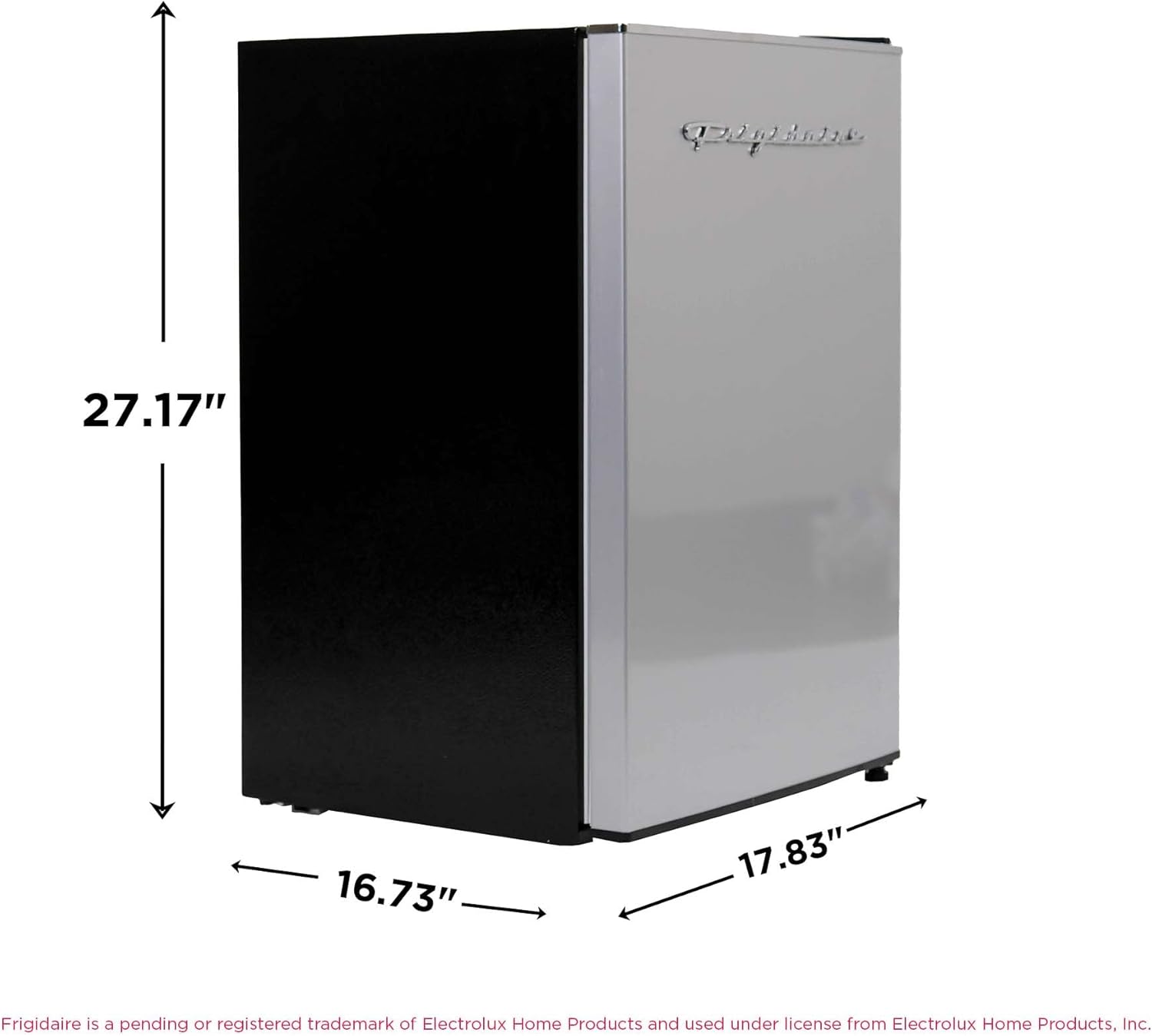
A visual representation of the refrigerator's dimensions: 27.17 inches high, 16.73 inches deep, and 17.83 inches wide, useful for planning placement.
Operating Instructions
Temperature Control:
The refrigerator features a temperature control knob located inside the unit, typically near the freezer compartment. This knob allows you to adjust the cooling intensity.
- Settings usually range from 'Off' to a maximum cooling setting (e.g., 1 to 7 or Cold to Coldest).
- For initial setup, set the control to a medium setting (e.g., 4) and allow the refrigerator to cool for several hours before adding food.
- Adjust the setting as needed based on ambient temperature and desired cooling performance. Higher numbers or 'Coldest' settings provide colder temperatures.
Food Storage Guidelines:
- Refrigerator Compartment: Store fresh foods, dairy products, and beverages. Utilize the adjustable shelves to accommodate items of various sizes.
- Freezer Compartment: Designed for short-term storage of frozen foods and making ice. Do not store items that require long-term deep freezing.
- Ensure food items are properly sealed to prevent odor transfer and maintain freshness.
Maintenance
Cleaning:
- Interior: Clean the interior regularly with a solution of mild detergent and warm water. Rinse thoroughly and dry with a soft cloth. Do not use abrasive cleaners or harsh chemicals.
- Exterior: Wipe the exterior with a soft cloth and mild soap. For stainless steel surfaces, use a stainless steel cleaner.
- Door Seals: Clean the door gaskets regularly to ensure a tight seal. A dirty or sticky gasket can prevent the door from closing properly, leading to increased energy consumption.
- Condenser Coils: Periodically vacuum the condenser coils at the back of the unit to remove dust and debris. This improves efficiency and extends the life of the refrigerator.
Defrosting:
This refrigerator features manual defrost. Frost buildup in the freezer compartment is normal and should be removed periodically.
- When to Defrost: Defrost when frost buildup reaches approximately 1/4 inch (0.6 cm) thick.
- Process: Unplug the refrigerator. Remove all food items from both compartments and place them in a cooler. Leave the door open to allow frost to melt naturally.
- Do Not Use Sharp Objects: Never use sharp metal objects or heating devices to remove frost, as this can damage the cooling system.
- Clean Up: Once defrosted, wipe the interior dry with a soft cloth before plugging the refrigerator back in and returning food.
Troubleshooting
Before contacting customer service, please check the following common issues:
| Problem | Possible Cause | Solution |
|---|---|---|
| Refrigerator does not operate. | Not plugged in; circuit breaker tripped; temperature control set to 'Off'. | Ensure plug is secure; reset circuit breaker; turn temperature control to desired setting. |
| Temperature is too warm. | Door opened too frequently; heavy food load; poor ventilation; temperature control set too low. | Minimize door openings; allow space for air circulation; adjust temperature control to a colder setting. |
| Excessive frost buildup. | Door not sealed properly; high humidity; frequent door openings. | Check door gasket for proper seal; defrost the unit as needed. |
| Unusual noises. | Refrigerator not level; items rattling inside; normal operating sounds. | Adjust leveling legs; rearrange items; gurgling or humming sounds are normal. |
Specifications
| Feature | Specification |
|---|---|
| Brand | Frigidaire |
| Model Number | EFR2856COM |
| Capacity | 2.5 Cubic Feet |
| Freezer Capacity | 0.2 Cubic Feet |
| Product Dimensions (D x W x H) | 17 x 18 x 28 inches |
| Item Weight | 25 Pounds |
| Color | Stainless Steel |
| Voltage | 110 Volts |
| Installation Type | Freestanding |
| Defrost System | Manual |
| Door Hinges | Reversible |
| Shelf Type | Glass |
| Number of Doors | 1 |
Warranty and Support
This Frigidaire compact refrigerator comes with a manufacturer's warranty. Please refer to the warranty card included with your product for specific terms, conditions, and duration.
For technical assistance, parts, or service, please contact Frigidaire customer support. Keep your purchase receipt and model number readily available when contacting support.