
Introduction
The Benro MSDPL46C SupaDupa PRO Monopod is a carbon fiber monopod designed for stable camera support. It features a built-in leveling pan head with +/-20 degrees of adjustment, providing enhanced precision for various shooting scenarios. The monopod is constructed with a waterproof exterior, making it suitable for diverse environmental conditions.
This model offers a maximum height of 182.9 cm (72 inches) and folds down to a compact 48.5 cm (19.1 inches) for portability. It combines traditional twist locks with a CNC-machined, fast-action flip lock for quick and precise height adjustments. The monopod includes an Arca-Swiss compatible plate for easy camera mounting and a rotating foot with an internal V-shaped bearing for smooth panning.
For secure handling and transport, a wrist strap and an extra-long shoulder strap are included.
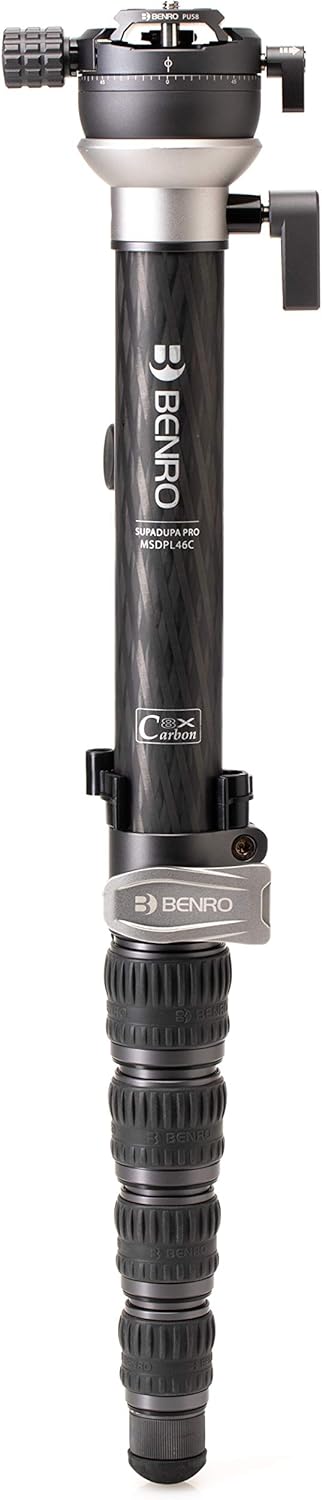
Figure 1: Benro MSDPL46C SupaDupa PRO Monopod with leveling pan head.
Setup
1. Unpacking and Components
Carefully unpack the Benro MSDPL46C SupaDupa PRO Monopod. The package should contain the monopod itself, an Arca-Swiss compatible plate, a wrist strap, and an extra-long shoulder strap.
2. Attaching the Camera Plate
- Locate the Arca-Swiss compatible plate.
- Attach the plate to the bottom of your camera or lens collar using the 3-way screw. Ensure it is securely tightened.
- To mount the camera onto the monopod's leveling pan head, loosen the oversized ergonomic quick release knob on the monopod head.
- Slide the camera with the attached plate into the clamp on the monopod head.
- Tighten the quick release knob until the camera is firmly secured. The safeguard feature prevents accidental release.
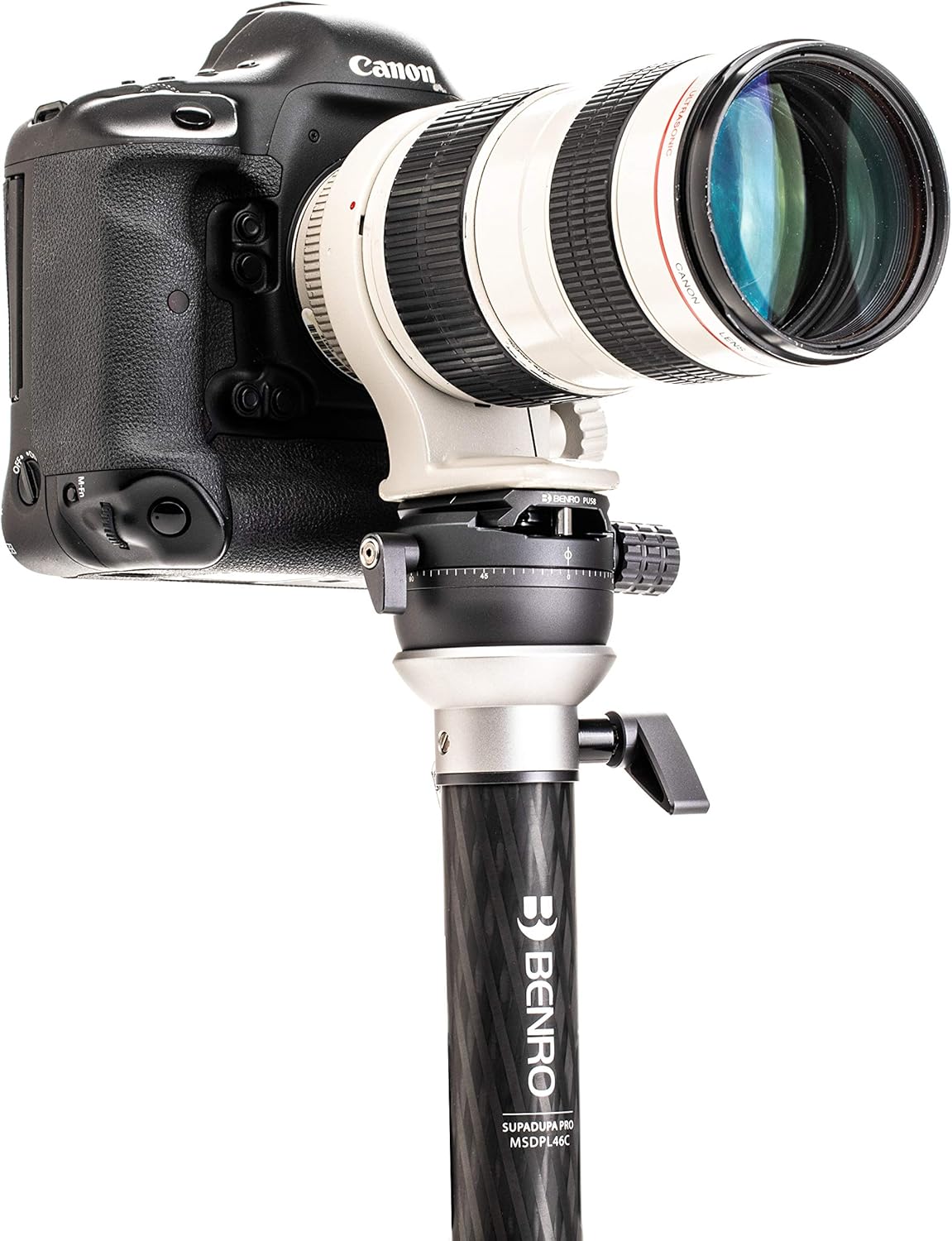
Figure 2: Monopod head with camera securely attached via the Arca-Swiss compatible plate.
3. Attaching Wrist and Shoulder Straps
- Wrist Strap: Attach the wrist strap to the designated loop near the top of the monopod for convenient and secure handling during use.
- Shoulder Strap: For carrying and additional stabilization, attach one end of the extra-long shoulder strap to the rubber foot of the monopod and the other end to the hook on the main body.
Operating Instructions
1. Extending and Retracting the Monopod Legs
- Twist Locks: To extend the lower sections of the monopod, twist the rubberized lock rings counter-clockwise to loosen, pull the section to the desired length, and then twist clockwise to tighten securely.
- Quick Flip Lock: The top section features a fast-action flip lock. To extend or retract this section, simply open the flip lock lever, adjust the height, and close the lever to secure. This allows for quick fine-tuning of height.

Figure 3: Detail of the twist lock mechanism for leg extension.

Figure 4: Detail of the quick flip lock for rapid height adjustment.
2. Using the Leveling Pan Head
- Leveling Adjustment: The built-in leveling ball allows for +/-20 degrees of adjustment. Use the attached bubble level to ensure your camera is perfectly level, even on uneven terrain. Loosen the leveling adjustment lever, position the camera, and then tighten the lever.
- 360° Pan Rotation: The monopod head features a 360° pan rotation with a built-in pan scale below the QR plate. Loosen the pan lock knob, rotate the camera to the desired position, and tighten the knob to secure. This enables accurate tracking of subjects.
- Camera Balancing: The sliding adjustable plate with a scale allows you to balance your camera setup. Adjust the plate position to achieve optimal balance, and ensure the safety lock prevents it from slipping too far.

Figure 5: Close-up of the leveling pan head, showing the pan scale and quick release knob.

Figure 6: Detail of the lever for adjusting and locking the leveling ball.
3. Using the Rotating Foot
The monopod is equipped with a rotating foot that has an internal V-shaped bearing. This design allows for smooth rotation of the monopod, facilitating easy adjustments to your framing without lifting the monopod from the ground.

Figure 7: Detail of the monopod's rotating foot.
Maintenance
- Cleaning: Wipe down the monopod with a soft, damp cloth after use, especially if exposed to dirt, sand, or saltwater. The waterproof exterior allows for easy cleaning. Avoid harsh chemicals.
- Lock Mechanisms: Periodically check the twist locks and quick flip lock for smooth operation. If they become stiff, clean any debris and apply a small amount of silicone-based lubricant if necessary.
- Storage: Store the monopod in a dry, cool place, away from direct sunlight and extreme temperatures. Ensure all sections are retracted and locks are lightly tightened before storage.
- Inspection: Regularly inspect all components for any signs of wear or damage. Do not use the monopod if any part is broken or compromised.
Troubleshooting
- Monopod sections not extending/retracting smoothly: Check for dirt or debris in the lock mechanisms. Clean thoroughly. Ensure twist locks are fully loosened before attempting to extend/retract.
- Camera not stable on monopod head: Verify that the Arca-Swiss plate is securely attached to your camera and that the quick release knob on the monopod head is fully tightened. Ensure the camera is properly balanced on the sliding plate.
- Leveling head not holding position: Ensure the leveling adjustment lever is fully tightened after positioning the camera.
- Pan rotation is stiff: Check for any obstructions or debris in the panning mechanism. Ensure the pan lock knob is sufficiently loosened.
Specifications
| Feature | Specification |
|---|---|
| Model Name | MSDPL46C |
| Material | Carbon Fiber |
| Item Weight | 0.9 Kilograms (1.98 lbs) |
| Weight Limit | 39.7 Pounds (18 kg) |
| Maximum Height | 182.9 Centimeters (72 inches) |
| Minimum Height | 48.2 Centimeters (19 inches) |
| Folded Size | 48.5 Centimeters (19.1 inches) |
| Number of Leg Sections | 4 |
| Leg Diameter | 21.8 millimeters (min) to 36.2 millimeters (max) |
| Tripod Head Type | Pan Heads (Leveling Pan Head) |
| Water Resistance Level | Waterproof |
| Special Features | Quick Flip Lock, Arca-Swiss Style Plate, Wrist Strap, Pivot Leg Base |
Warranty Information
The Benro MSDPL46C SupaDupa PRO Monopod comes with a 2-Year Warranty from the date of purchase. This warranty covers manufacturing defects and ensures the product meets quality standards. Please retain your proof of purchase for warranty claims. For detailed terms and conditions, refer to the official Benro website or contact customer support.
Customer Support
For further assistance, technical support, or to inquire about spare parts, please visit the official Benro website or contact their customer service department. You can find more information and contact details at the Benro Store on Amazon or their global website.
Note: No official product videos were available in the provided data for embedding in this manual.