1. Introduction
This user manual provides comprehensive instructions for the installation, operation, and maintenance of your Midea HW7.92 Wall-Mounted Range Hood. Please read this manual carefully before using the appliance to ensure safe and efficient operation. Keep this manual for future reference.

Figure 1: Midea HW7.92 Wall-Mounted Range Hood. This image shows the front view of the stainless steel range hood with a black control panel and two LED lights, indicating its modern design and energy efficiency class A++.
2. Safety Information
Always adhere to the following safety precautions to reduce the risk of fire, electric shock, or injury.
- Ensure the power supply matches the voltage specified on the rating plate.
- Installation must be performed by a qualified technician in accordance with local regulations.
- Do not operate the range hood if it is damaged or malfunctioning.
- Clean grease filters regularly to prevent fire hazards.
- Do not flambé under the range hood.
- Ensure adequate ventilation in the room when the range hood is used simultaneously with gas or other fuel-burning appliances.
- Disconnect the appliance from the power supply before cleaning or maintenance.
- The appliance is not intended for use by persons (including children) with reduced physical, sensory or mental capabilities, or lack of experience and knowledge, unless they have been given supervision or instruction.
3. Product Overview
3.1 Key Features
- Powerful Extraction: 600 m³/h airflow for effective removal of unpleasant odors, vapors, and grease.
- Gesture Control: A convenient alternative to pause or restart the hood without touching the control panel.
- High Energy Efficiency: A++ rating with BLDC motor for efficient operation and reduced power loss.
- Quiet Operation: Operates at a low noise level of 45 dB(A) for a comfortable cooking environment.
- Durable and Easy to Maintain: Stainless steel casing and tempered black glass are resistant to high temperatures and corrosion, and easy to clean.
- LED Lighting: Equipped with 2 LED lights for clear illumination of the cooking area.
3.2 Components Included
The following components are typically included with your Midea HW7.92 Range Hood:
- Vent Hood Body
- Flange
- Exhaust Pipe
- Activated Carbon Filter (for recirculation mode)
- Washable Mesh Grease Filters (pre-installed)
4. Setup and Installation
The Midea HW7.92 is a wall-mounted range hood. Proper installation is crucial for optimal performance and safety. It is highly recommended that installation be carried out by a qualified professional.
4.1 Mounting Type and Dimensions
This appliance is designed for wall mounting. The product dimensions are 90 x 50 x 43 cm (Width x Depth x Height) and it weighs approximately 12.5 kg.
4.2 Ventilation Options
Your range hood supports two types of extraction:
- Ducted Extraction (Abluftabsaugung): Air is extracted and expelled outside through an exhaust pipe. This method requires an external vent.
- Recirculating Extraction (Interne Umluft): Air is filtered through activated carbon filters to remove odors and then recirculated back into the kitchen. This method does not require an external vent.

Figure 2: Diagram illustrating ducted extraction (left) where air is expelled outdoors, and recirculating extraction (right) where air is filtered and returned to the room.
Ensure the correct type of filter (grease filter for both, activated carbon filter for recirculation) is installed based on your chosen ventilation method.
5. Operating Instructions
The Midea HW7.92 features a touch control panel and gesture control for ease of use.
5.1 Touch Control Panel
The control panel is located on the front of the hood. Use the touch sensitive buttons to:
- Turn the hood On/Off.
- Adjust fan speed (4 levels available).
- Control the LED lighting.
5.2 Gesture Control
The gesture control feature allows you to operate the hood without physical contact with the panel. Simply wave your hand in front of the designated sensor to:
- Turn the hood On/Off.
- Increase/Decrease fan speed.

Figure 3: A hand demonstrating the gesture control feature, allowing users to operate the hood without touching the panel.
Refer to the specific icons on your control panel for detailed functions.
6. Maintenance
Regular maintenance ensures the longevity and optimal performance of your range hood.
6.1 Cleaning the Exterior
The hood's exterior is made of stainless steel and tempered glass. Clean surfaces regularly with a soft cloth and a mild, non-abrasive detergent. Avoid harsh chemicals or abrasive materials that could scratch the finish.
6.2 Cleaning/Replacing Grease Filters
The mesh grease filters are washable and should be cleaned regularly (e.g., monthly, depending on usage) to maintain extraction efficiency and prevent grease buildup. They can be washed by hand with hot soapy water or in a dishwasher.
6.3 Replacing Activated Carbon Filters (for Recirculation Mode)
If your hood is operating in recirculation mode, the activated carbon filters cannot be washed and must be replaced periodically (typically every 3-6 months, depending on usage). Refer to the product specifications for the correct replacement filter type.
6.4 Replacing LED Lights
The hood is equipped with durable LED lights. If a light needs replacement, ensure the appliance is disconnected from power. Consult a qualified technician or refer to specific instructions for LED light replacement.
7. Troubleshooting
Before contacting customer service, please check the following common issues:
| Problem | Possible Cause | Solution |
|---|---|---|
| Hood does not turn on. | No power supply; power cord disconnected; fuse blown. | Check power connection; check circuit breaker/fuse box. |
| Low extraction efficiency. | Grease filters clogged; activated carbon filters saturated (recirculation mode); exhaust pipe blocked or too long. | Clean grease filters; replace carbon filters; check exhaust pipe for obstructions. |
| Excessive noise. | Loose components; fan obstruction; improper installation. | Check for loose parts; remove any obstructions; ensure secure installation. |
| Lights not working. | LED lights faulty; wiring issue. | Check wiring; replace LED lights if necessary (consult technician). |
If the problem persists after checking these points, please contact Midea customer support or your retailer.
8. Specifications
Detailed technical specifications for the Midea HW7.92 Range Hood:
| Brand | Midea |
| Model Number | HW 7.92 |
| Mounting Type | Wall-mounted |
| Control Type | Touch, Gesture |
| Airflow Capacity | 600 m³/h |
| Noise Level | 45 dB(A) |
| Energy Efficiency Class | A++ |
| Voltage | 230 V |
| Light Source Type | LED |
| Product Dimensions (W x D x H) | 90 x 50 x 43 cm |
| Item Weight | 12.5 kg |
| Material | Steel Alloy, Glass |
| Color | Stainless Steel |
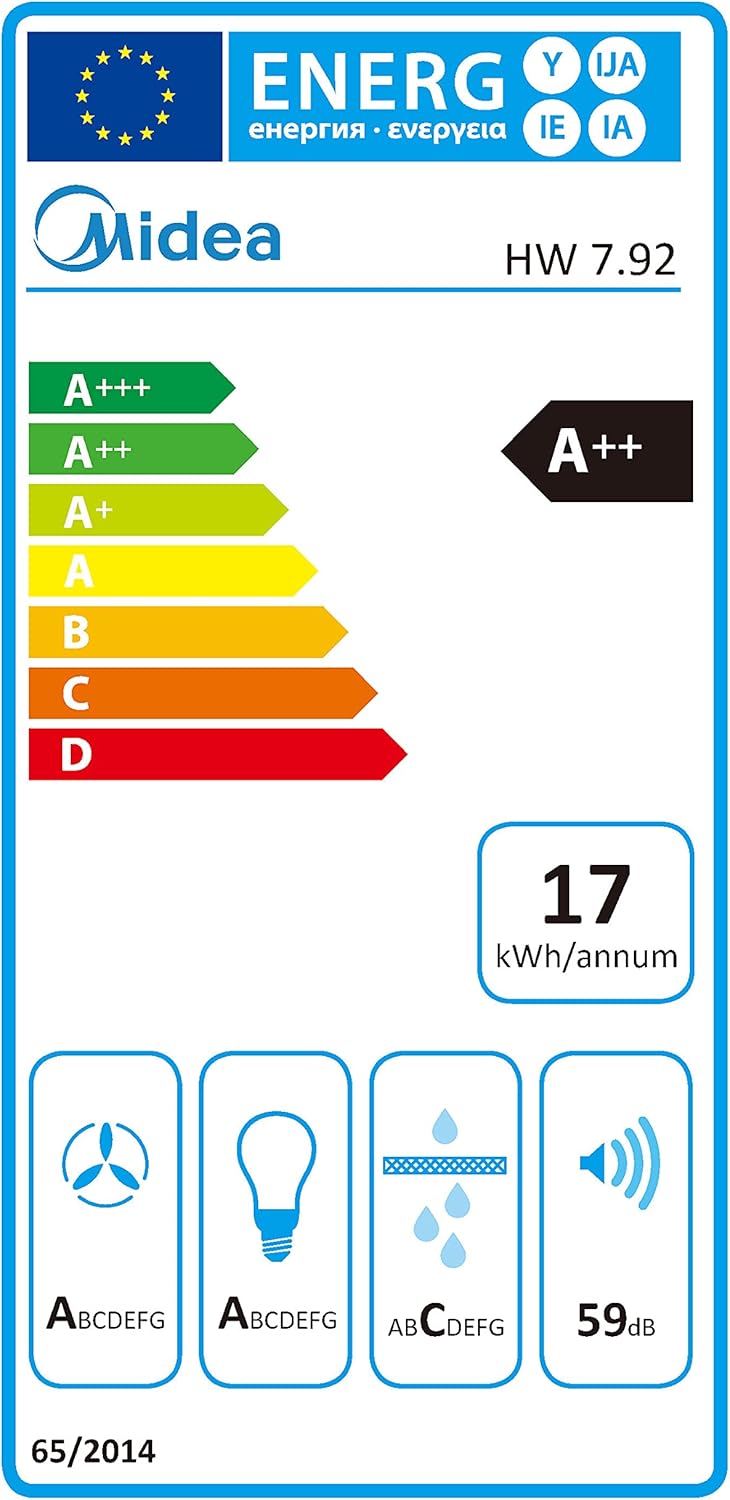
Figure 4: EU Energy Label for Midea HW 7.92, showing A++ energy efficiency, 17 kWh/annum consumption, and 59 dB noise level.
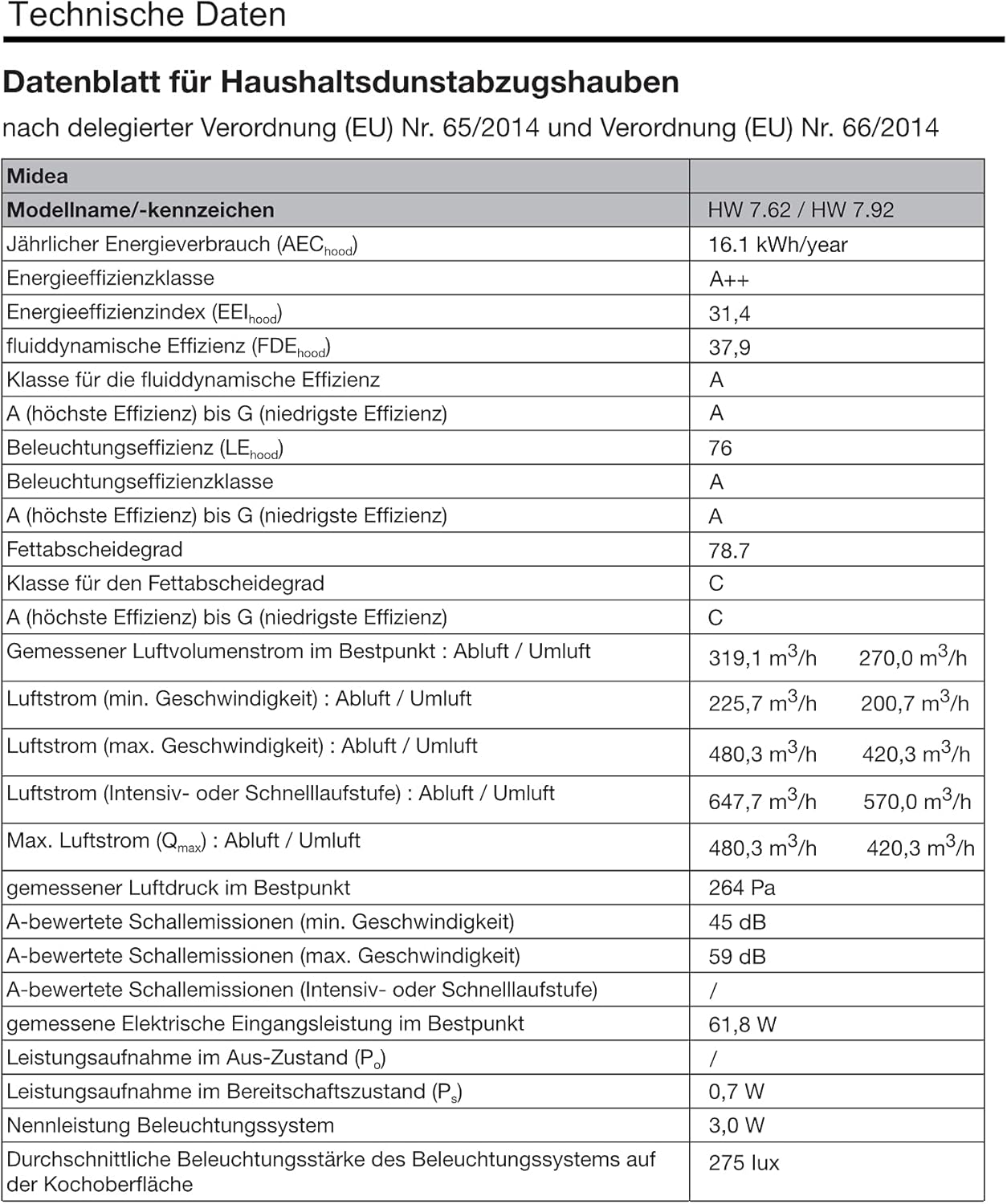
Figure 5: Technical data sheet providing detailed performance metrics and compliance information for the Midea HW 7.92 range hood.
9. Warranty and Support
For warranty information, please refer to the documentation provided at the time of purchase or contact your retailer. Midea products typically come with a manufacturer's warranty covering defects in materials and workmanship.
For technical support, spare parts, or service inquiries, please contact Midea customer service. You can find more information and contact details on the official Midea website or through your local Midea distributor.
You can also visit the official Midea store on Amazon for product information and support: Midea Store