
Xoopar Mini Xboy
Xoopar Mini Xboy Portable Bluetooth Speaker Instruction Manual
Model: Mini Xboy
Introduction
This manual provides detailed instructions for the setup, operation, and maintenance of your Xoopar Mini Xboy Portable Bluetooth Speaker. Please read this manual thoroughly before using the product to ensure proper function and longevity.

Image: Front view of the Xoopar Mini Xboy Portable Bluetooth Speaker, showcasing its compact, character-like design with a mesh speaker grille on top.
Product Overview
What's in the Box
- Xoopar Mini Xboy Portable Bluetooth Speaker
- Charging Cable (USB)
- Instruction Manual
- Emoji Stickers (for customization)
Component Identification
Familiarize yourself with the various parts of your Mini Xboy speaker:
- Speaker Grille: Located on the top of the head.
- LED Light-Up Face: Illuminates during operation.
- Multi-function Button: Typically located on the back or side, used for power, pairing, and selfie remote.
- Charging Port: Micro-USB or USB-C port for charging.
- Microphone: For hands-free calls.
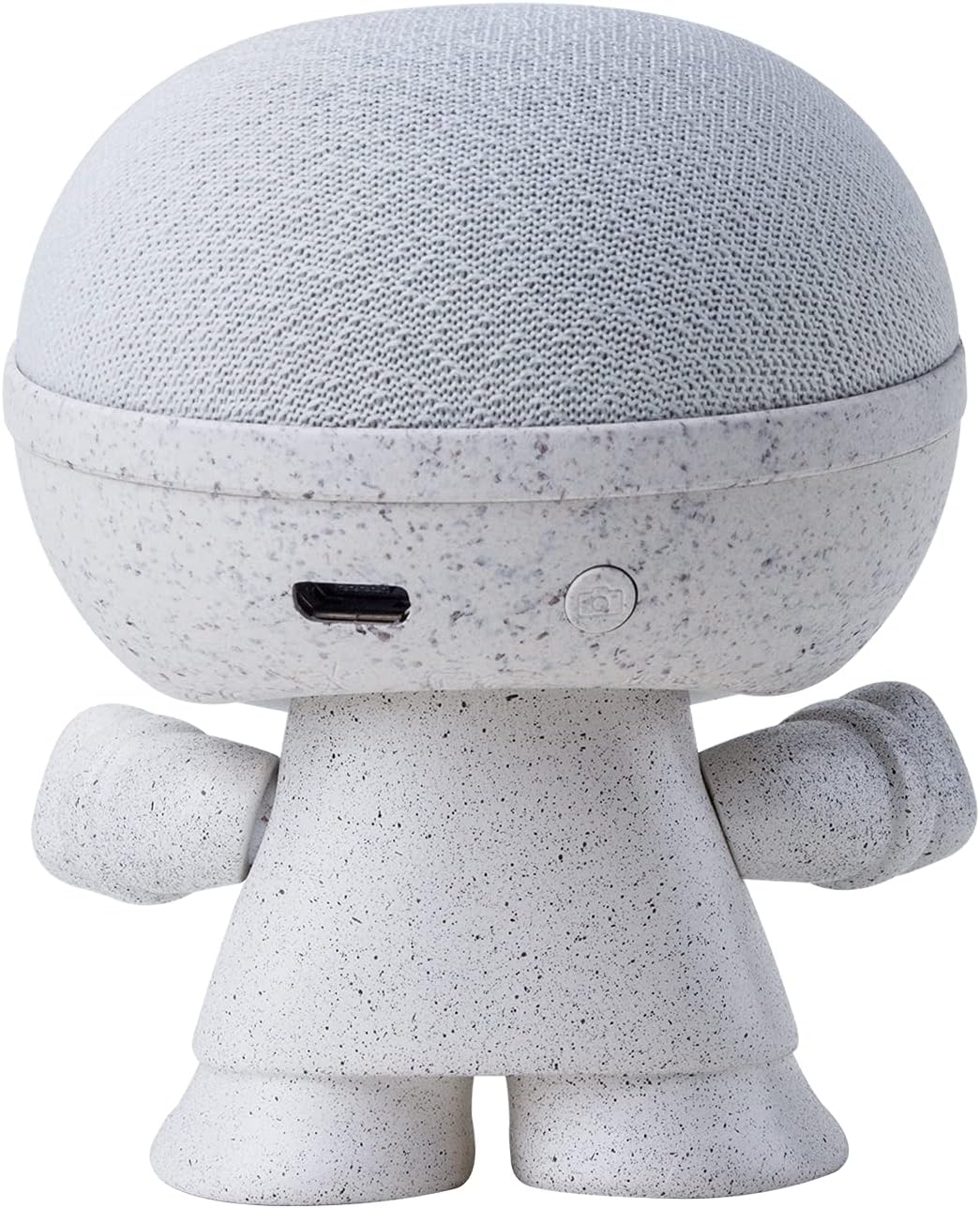
Image: Back view of the Xoopar Mini Xboy speaker, highlighting the charging port and the multi-function button.
Setup
1. Charging the Speaker
Before first use, fully charge your Mini Xboy speaker. Connect the provided USB charging cable to the speaker's charging port and the other end to a USB power source (e.g., computer, wall adapter). The LED indicator will show charging status.
2. Powering On/Off
- To Power On: Press and hold the multi-function button for approximately 3 seconds. You will hear an audible prompt indicating the speaker is on.
- To Power Off: Press and hold the multi-function button for approximately 3 seconds. You will hear an audible prompt indicating the speaker is off.
3. Bluetooth Pairing (Single Speaker)
- Ensure the Mini Xboy speaker is powered on and in pairing mode (indicated by a flashing LED).
- On your smartphone, tablet, or computer, enable Bluetooth.
- Search for available devices and select "XooparBoy Mini" from the list.
- Once connected, you will hear a confirmation sound, and the LED indicator will stop flashing.
Video: This video demonstrates how to power on/off the Xoopar Mini Xboy speaker, connect it via Bluetooth to a smartphone, play music, and use the selfie remote function. It also shows how to pair two speakers for stereo sound.
Operating Instructions
Music Playback
After successfully pairing your Mini Xboy speaker with your device, you can play music through any audio application. Control playback (play/pause, skip tracks) directly from your connected device.
Selfie Remote Function
The Mini Xboy speaker can act as a remote shutter for your smartphone camera:
- Ensure the speaker is connected to your phone via Bluetooth.
- Open your phone's camera application.
- Press the multi-function button on the Mini Xboy speaker twice to trigger the camera shutter.
Stereo Pairing (TWS - True Wireless Stereo)
To enjoy enhanced stereo sound, you can pair two Mini Xboy speakers together:
- Ensure both Mini Xboy speakers are powered on and not connected to any device.
- On one of the speakers, quickly press the multi-function button three times. You will hear a pairing sound.
- The two speakers will automatically connect to each other. Once paired, you will hear a confirmation sound.
- Now, connect your device to one of the speakers (it will appear as "XooparBoy Mini" on your device's Bluetooth list). Both speakers will play audio in stereo.

Image: Two Xoopar Mini Xboy speakers positioned on a desk next to a laptop and smartphone, illustrating a stereo audio setup.
Maintenance
- Clean the speaker with a soft, dry cloth. Do not use abrasive cleaners or solvents.
- Avoid exposing the speaker to extreme temperatures, direct sunlight, or moisture. The speaker is not waterproof.
- Store the speaker in a cool, dry place when not in use.
Troubleshooting
| Problem | Solution |
|---|---|
| Speaker does not power on. | Ensure the speaker is fully charged. Connect it to a power source and try again. |
| Cannot pair with Bluetooth device. |
|
| No sound or low volume. |
|
| Selfie remote not working. |
|
Specifications
| Brand | Xoopar |
| Model Name | Mini XBOY |
| Item Model Number | XBOY81001.14WT |
| Speaker Type | Portable Speaker |
| Connectivity Technology | Bluetooth |
| Wireless Communication Technology | Bluetooth |
| Compatible Devices | Smartphone, Tablet, Laptop |
| Speaker Maximum Output Power | 5 Watts |
| Audio Output Mode | Mono (Stereo with TWS pairing) |
| Maximum Range | 10 Meters |
| Power Source | Battery Powered (1 Lithium Polymer battery included) |
| Control Method | Remote, Touch (via multi-function button) |
| Material | Recycled Plastic, Biodegradable Wheat Fiber |
| Product Dimensions | 1.9"D x 1.9"W x 3.14"H |
| Item Weight | 1.76 ounces (50 Grams) |
| Is Waterproof | False |
Warranty and Support
The Xoopar Mini Xboy Portable Bluetooth Speaker comes with a limited warranty. For detailed warranty information, please refer to the warranty card included with your product or visit the official Xoopar website.
For technical support or customer service, please contact Xoopar customer support through their official channels. Contact information can typically be found on the product packaging or the Xoopar website.
Related documentsMini Xboy


Ask a question about this manual
Ask about setup, troubleshooting, compatibility, parts, safety, or missing instructions. Manuals+ will review the question and use this page’s manual context to help answer it.