Introduction
Thank you for choosing the Vinsetto Massage Office Chair. This manual provides detailed instructions for assembly, operation, maintenance, and safety to ensure optimal performance and longevity of your chair. Please read this manual thoroughly before use and retain it for future reference.
Safety Information
- Ensure all components are securely fastened before use.
- Do not stand on the chair.
- Do not use the massage function if you have any medical conditions that may be aggravated by vibration. Consult a physician if unsure.
- Keep children and pets away from the chair during assembly and operation.
- Do not exceed the maximum recommended load of 135 kg (297 lbs).
- Avoid exposing the chair to direct sunlight or extreme temperatures.
- Disconnect the power adapter for the massage function when not in use or during cleaning.
Setup and Assembly
Assembly is required for this product. Please follow the steps below carefully. It is recommended to assemble the chair on a soft, clean surface to prevent damage.
While specific assembly steps are not provided in the product data, general chair assembly involves:
- Unpacking: Carefully remove all components from the packaging and verify against the parts list (not provided, but implied).
- Base Assembly: Attach the casters to the chair base.
- Gas Lift Installation: Insert the gas lift cylinder into the center hole of the base.
- Seat Assembly: Attach the seat mechanism to the underside of the seat cushion.
- Backrest Attachment: Secure the backrest to the seat assembly.
- Armrest Attachment: Attach the armrests to the seat and backrest.
- Final Assembly: Place the assembled seat and backrest onto the gas lift cylinder.
- Connect Massage Unit: Connect the massage unit's power cable and place the remote in the side pocket.
Note:
The product images below illustrate the assembled chair and its features. Refer to these for visual guidance.

Image: The Vinsetto Massage Office Chair in a brown finish, fully assembled and positioned in an office environment next to a desk and computer. This image shows the overall appearance of the chair.
Operating Instructions
1. Massage Function
The chair features 6 vibration massage points with 5 modes to relax your back and hips. The massage function is controlled by a wired remote.
- Power On/Off: Use the power button on the remote to activate or deactivate the massage function.
- Mode Selection: Cycle through 5 massage modes using the 'Mode' button.
- Intensity Adjustment: Adjust the vibration intensity (if available, not explicitly stated but common for massage chairs).
- Timer Setting: (If available, not explicitly stated).
When not in use, the remote control can be stored in the side pocket located on the chair's armrest.
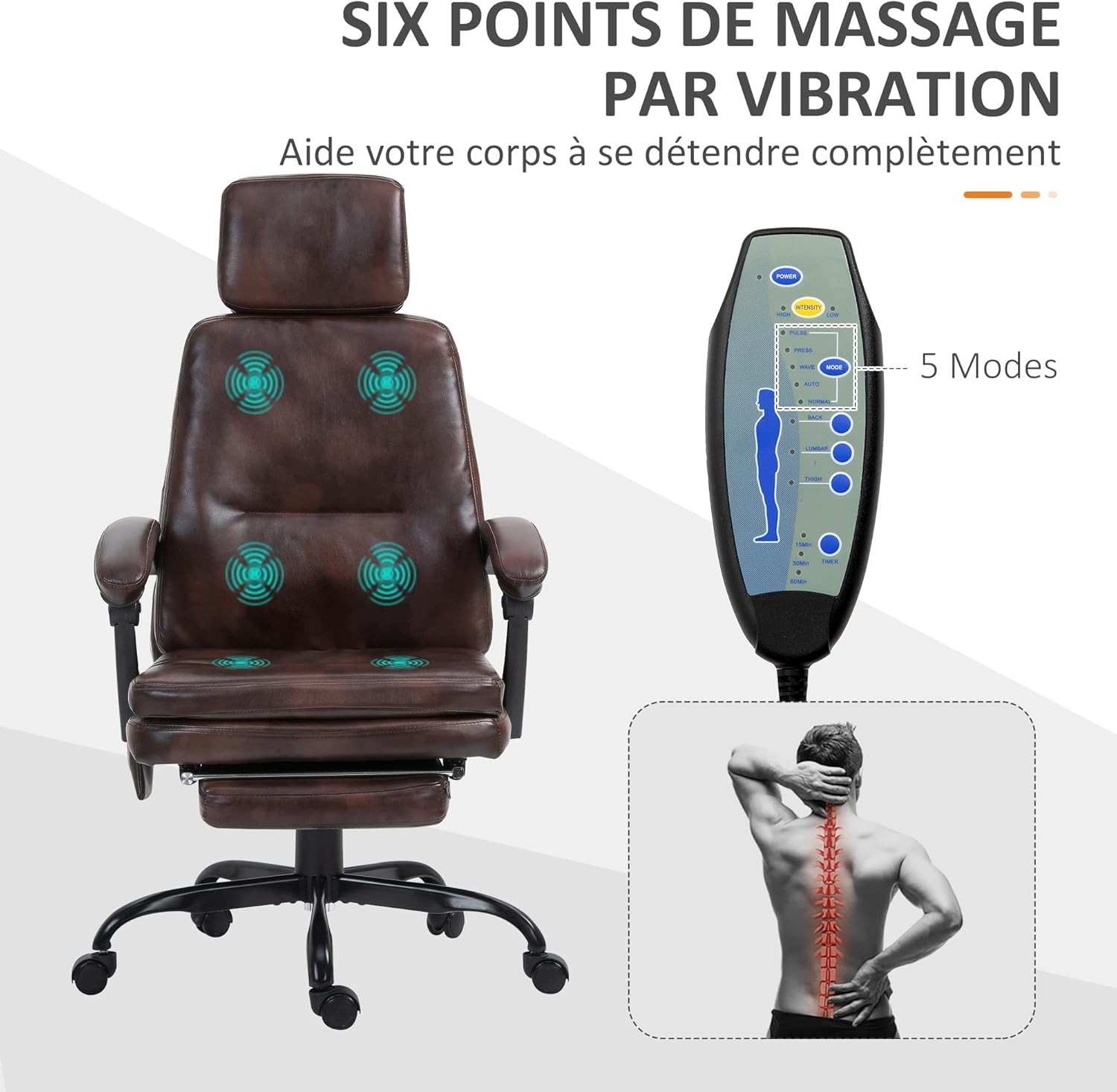
Image: A visual representation of the chair highlighting the six vibration massage points in the back and seat areas. A detailed image of the wired remote control is also shown, indicating its various buttons for power, mode selection, and intensity. This illustrates how the massage function operates.

Image: A close-up view of the chair's armrest, showing the wired remote control neatly stored in a small, integrated side pocket. This demonstrates the convenient storage solution for the remote.
2. Height Adjustment
Adjust the seat height to find your optimal working position. The seat height can be adjusted from 47 cm to 55 cm (18.5 inches to 21.75 inches).
- To Raise: While seated, pull the lever upwards. The chair will rise. Release the lever at the desired height.
- To Lower: While seated, pull the lever upwards. The chair will lower. Release the lever at the desired height.

Image: A side view of the chair demonstrating the height adjustment feature. Arrows indicate the upward and downward movement of the seat, with a graphic showing the lever used for adjustment. The height range of 18.5 to 21.75 inches is also displayed.
3. Recline Function and Retractable Footrest
The backrest can be reclined from 90° to 155° for various activities such as working, watching TV, or relaxing. The retractable footrest provides additional comfort when reclined.
- To Recline: Pull the recline lever (usually on the side, not explicitly detailed in data) and lean back to the desired angle. Release the lever to lock the position.
- To Engage Footrest: Pull the footrest out from under the seat.
- To Retract Footrest: Push the footrest back under the seat until it is fully stored.

Image: A side view of the chair showing its recline capability, with the backrest tilting from an upright position to a more relaxed 155-degree angle. The retractable footrest is also shown extended from beneath the seat, indicating its use for relaxation.
4. Movement and Swivel
The chair is equipped with 5 multi-directional casters and a 360° swivel function for easy movement and flexibility.
- Swivel: The chair seat can rotate 360 degrees, allowing you to easily change direction without moving the base.
- Casters: The five casters allow for smooth movement across various floor surfaces.
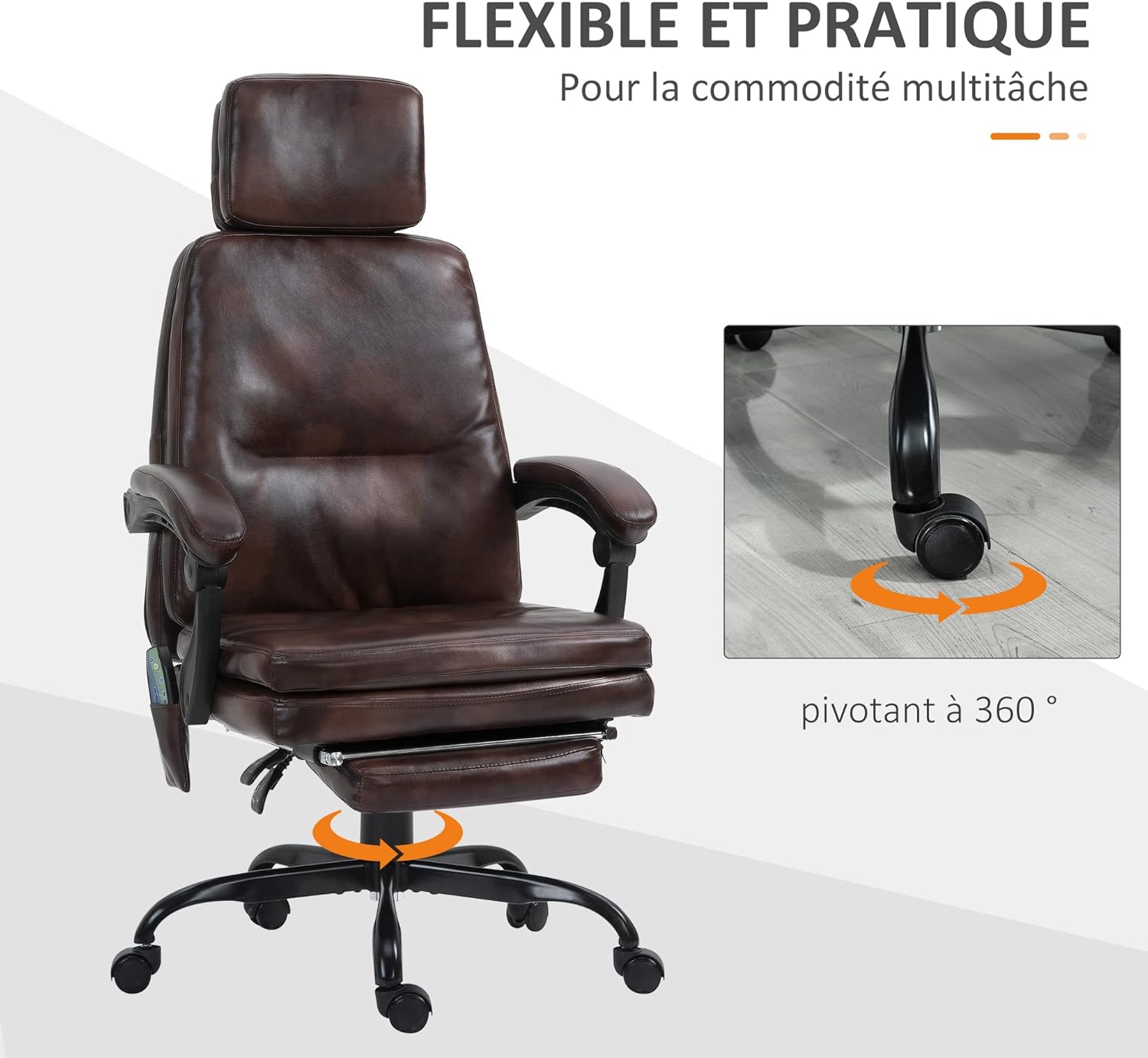
Image: An illustration of the chair demonstrating its 360-degree swivel function, indicated by circular arrows around the base. A close-up inset shows one of the multi-directional casters, highlighting the ease of movement.
Maintenance
- Cleaning: Wipe the synthetic leather upholstery with a soft, damp cloth. Avoid harsh chemicals or abrasive cleaners.
- Inspection: Regularly check all screws and bolts to ensure they are tight. Re-tighten if necessary.
- Caster Care: Keep casters clean from hair and debris to ensure smooth rolling.
- Storage: Store the chair in a dry environment, away from direct sunlight and extreme temperatures.
Troubleshooting
| Problem | Possible Cause | Solution |
|---|---|---|
| Chair does not rise/lower | Gas lift malfunction or lever not engaged properly. | Ensure the height adjustment lever is fully engaged. If the problem persists, the gas lift may need replacement. |
| Massage function not working | Power cable disconnected, remote control malfunction, or power outlet issue. | Check if the power cable is securely connected to both the chair and the power outlet. Test the outlet with another device. Ensure the remote control is not damaged. |
| Chair squeaks or wobbles | Loose screws or bolts, uneven floor, or damaged components. | Tighten all assembly screws and bolts. Ensure the chair is on a flat, even surface. Inspect for any damaged parts. |
| Casters not rolling smoothly | Debris (hair, dust) caught in casters. | Turn the chair over and carefully remove any debris from the caster wheels. |
Specifications
| Feature | Detail |
|---|---|
| Brand | Vinsetto |
| Model Number | 921-348V90BN0531 |
| Color | Brown |
| Overall Dimensions (L x W x H) | 71 cm x 69 cm x 120.5-128.5 cm (28" x 27.2" x 47.4"-50.6") |
| Seat Height Adjustment | 47 cm - 55 cm (18.5" - 21.75") |
| Backrest Recline Angle | 90° to 155° |
| Massage Points | 6 vibration points |
| Massage Modes | 5 modes |
| Maximum Load Capacity | 135 kg (297 lbs) |
| Material | Synthetic leather upholstery, steel frame, foam padding, PP |
| Special Features | Ergonomic design, retractable footrest, 360° swivel, multi-directional casters |
| Item Weight | 19.5 kg (43 lbs) |

Image: A technical drawing of the chair from front and side views, displaying key dimensions such as overall height, width, depth, seat height range, and armrest height. This provides precise measurements for planning space and understanding the chair's size.

Image: A composite image highlighting various construction details of the chair. It shows close-ups of the synthetic leather texture, thick padding, the gas lift mechanism, and the sturdy base with casters. Each detail is labeled to describe the material and feature, such as "Luxurious synthetic leather" and "Solid base".
Warranty and Support
Information regarding warranty and availability of spare parts is not provided in the product details. For any issues or inquiries, please contact your retailer or the manufacturer directly.
Please refer to the original purchase documentation for specific warranty terms and conditions.


