
BETOPPER LPC004
BETOPPER Professional LED DJ Light Stage Lighting
Model: LPC004 User Manual
1. Introduction
Thank you for choosing the BETOPPER Professional LED DJ Light Stage Lighting. This manual provides essential information for the safe and effective operation of your new lighting fixture. Please read it thoroughly before use and retain it for future reference.
This powerful 18x8W RGBW Par Light is designed for various applications, including church events, weddings, parties, music live shows, and club events, offering vibrant and dynamic lighting effects.

Image 1.1: Front view of the BETOPPER Professional LED DJ Light Stage Lighting (Model LPC004).
2. Key Features
- RGBW 4-in-1 LED Technology: Each LED bead outputs RGBW (Red, Green, Blue, White) colors, allowing for brighter and more diverse color blending compared to single-color LEDs.
- High Brightness: Equipped with 18x 8W RGBW LEDs, providing a super bright lighting source with adjustable brightness for various event requirements.
- Daisy-chain Design: Features convenient power and XLR daisy-chaining, enabling up to 8 units to be powered from a single socket and synchronized for master-slave operation.
- Multiple Operating Modes: Supports Auto, Sound Activated, DMX-512, and Master-slave modes, offering a wide range of lighting effects including fade, change, pulse, and strobe.
- Durable Construction: Features an aluminum shell for enhanced durability and efficient heat dissipation, along with an integrated fan.

Image 2.1: Illustration of the full-color capabilities and multiple control modes (Sound-Activated, Auto, Master-Slave, DMX, RGBW).
3. Setup and Connections
3.1 Unpacking
Carefully remove the fixture from its packaging. Inspect for any damage during transit. Ensure all components listed in the packing list are present.
3.2 Mounting
The fixture comes with metal mounting yolks for easy installation. It can be mounted on a truss, stand, or placed on a flat surface. Ensure the mounting surface or structure can safely support the weight of the fixture.
3.3 Power Connection
Connect the provided power cable to the 'POWER IN' socket on the rear of the unit. For daisy-chaining multiple units, connect a power cable from the 'POWER OUT' socket of one fixture to the 'POWER IN' socket of the next. A maximum of 8 units can be daisy-chained.
3.4 DMX Connection (Optional)
For DMX control, connect a DMX cable from your DMX controller's output to the 'DMX IN' socket of the first fixture. To daisy-chain DMX, connect a DMX cable from the 'DMX OUT' socket of the first fixture to the 'DMX IN' socket of the next fixture in the chain.
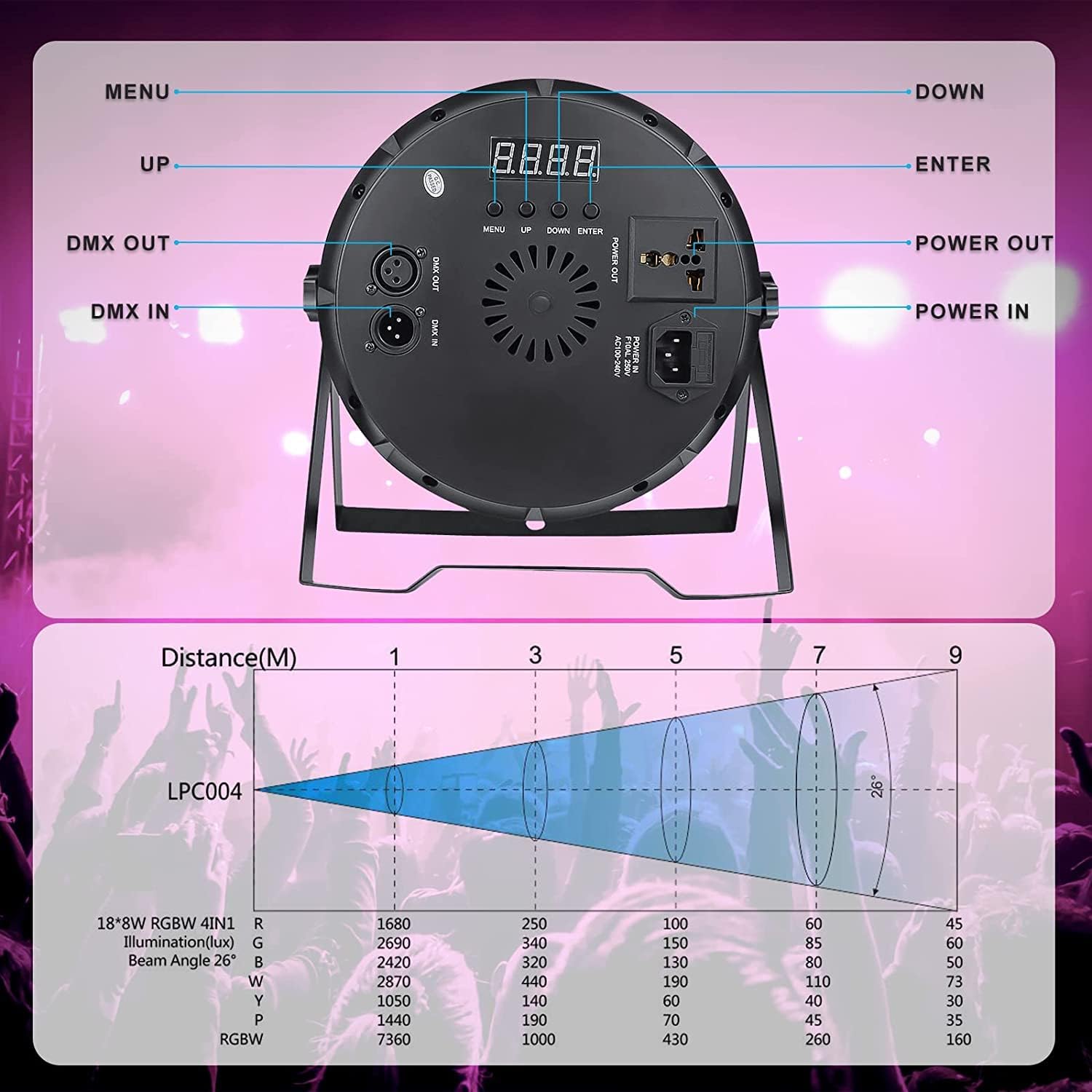
Image 3.1: Rear panel connections including DMX IN/OUT and Power IN/OUT, along with control buttons.
4. Operating Modes
The BETOPPER LPC004 offers four primary operating modes, selectable via the control panel on the rear of the unit:
- Auto Mode: The fixture runs through pre-programmed lighting sequences automatically.
- Sound Activated Mode: The lighting effects respond to ambient sound or music, changing patterns and colors in sync with the beat.
- DMX-512 Mode: Allows for professional control of all fixture parameters (color, intensity, strobe, etc.) using an external DMX controller.
- Master-Slave Mode: Connect multiple fixtures via DMX cables. One fixture acts as the 'Master' (running in Auto or Sound Activated mode), and the others act as 'Slaves', mirroring the Master's effects.
4.1 Control Panel Navigation
Use the MENU, UP, DOWN, and ENTER buttons on the rear display to navigate through modes and settings. The digital display will show the current mode or parameter.

Image 4.1: Demonstrates the wide range of color outputs achievable with the RGBW 4-in-1 LEDs.

Image 4.2: Illustrates the master-slave control setup, allowing synchronized lighting across multiple units.
5. DMX Control
The BETOPPER LPC004 supports DMX-512 protocol, offering precise control over its functions. It features three DMX channel modes:
- 2-Channel Mode: Basic control, typically for overall intensity and color presets.
- 4-Channel Mode: Provides more granular control over individual RGBW colors.
- 7-Channel Mode: Offers full control including individual RGBW intensity, strobe, dimmer, and mode selection.
Refer to your DMX controller's manual for specific programming instructions. The DMX address for each fixture must be set uniquely via the control panel to avoid conflicts.
6. Maintenance
6.1 Cleaning
Regularly clean the lens and housing with a soft, lint-free cloth. Do not use abrasive cleaners or solvents. Ensure the fixture is unplugged before cleaning.
6.2 Fan Maintenance
The fixture includes an internal fan for cooling. Ensure the fan vents are clear of dust and debris to maintain optimal performance and prevent overheating. While the fan is designed for efficient cooling, some operational noise is normal.

Image 6.1: Detail showing the integrated fan and durable aluminum shell construction.
7. Troubleshooting
- No Power: Ensure the power cable is securely connected to both the fixture and a working power outlet. Check the power source.
- No Light Output: Verify the fixture is powered on and not in a 'blackout' or 'standby' mode. Check DMX connections if in DMX mode.
- Incorrect Colors/Effects: If using DMX, ensure the DMX address is correctly set and the DMX controller is sending the expected signals. In Master-Slave mode, verify the master unit is functioning correctly.
- Fan Noise: A certain level of fan noise is normal for cooling. If the noise is excessive or unusual, ensure the fan vents are clear and there are no obstructions.
- Partial LED Failure: If some LEDs are dim or not working, this may indicate a hardware issue. Contact customer support for assistance.
8. Specifications
| Attribute | Value |
|---|---|
| Model | LPC004 |
| Light Source | 18x 8W RGBW 4-in-1 LEDs |
| Power Source | Corded Electric |
| Wattage | 8 watts (per LED) |
| DMX Channels | 2, 4, 7 channels |
| Operating Modes | Auto, Sound Activated, DMX-512, Master-Slave |
| Material | Aluminum Shell |
| Color | Black |
| Item Weight | 2.82 kg |
| Parcel Dimensions | 29.59 x 29.31 x 20.9 cm |
9. Warranty and Support
BETOPPER DJ Stage products come with a 360-day worry-free after-sale service and a 30-day free return/refund policy if you are not satisfied. Lifetime friendly technical support is also provided.
For technical assistance or warranty claims, please contact BETOPPER customer support through their official channels or visit the BETOPPER Store on Amazon.
Related documentsLPC004


Ask a question about this manual
Ask about setup, troubleshooting, compatibility, parts, safety, or missing instructions. Manuals+ will review the question and use this page’s manual context to help answer it.