
Keyless2Go PRX-GPPS4
Keyless2Go Proximity Smart Key User Manual
Model: PRX-GPPS4
1. Introduction
This manual provides comprehensive instructions for the Keyless2Go 4-Button Proximity Smart Key, model PRX-GPPS4. This high-quality replacement key fob is designed to provide convenient keyless entry and push-button ignition access for compatible Chevrolet, Buick, and GMC vehicles. Please read this manual thoroughly before attempting to set up or use your new smart key.
2. Product Overview
The Keyless2Go Proximity Smart Key is a durable, 4-button key fob designed for seamless integration with your vehicle's keyless entry system. It features buttons for Lock, Unlock, Trunk Release, and Panic/Alarm activation.

Figure 2.1: Front view of the Keyless2Go 4-button smart key fob with the integrated key extended. This image shows the lock, unlock, trunk, and panic buttons clearly.

Figure 2.2: Angled view of the Keyless2Go 4-button smart key fob, highlighting its ergonomic design and the side button for key release.

Figure 2.3: Back view of the Keyless2Go 4-button smart key fob, showing the smooth, unadorned surface.
3. Compatibility and Verification
Before proceeding with setup, it is crucial to verify that this smart key is compatible with your vehicle. This key is designed for select Chevrolet, Buick, and GMC vehicles that utilize a push-button ignition and a flip key function.
3.1. Verify FCC ID and Part Numbers
Ensure your original key fob matches one of the following FCC IDs or GM Part Numbers:
- FCC IDs: OHT05918179, P409MK794 6931, AVL-B01T2AC, AVL-B01T1AC, V2T01060514
- GM Part Numbers: 13585209, 13504235, 13584828, 13584824

Figure 3.1: Visual guide for verifying compatible FCC IDs and GM Part Numbers. Always cross-reference with your original key.
3.2. Key Fob Visual and Functionality Check
Perform the following visual and functional checks:
- Visually verify that your original remote matches this 4-button key fob's style and button layout.
- Ensure your original key has a flip key function.
- Confirm your vehicle has a push-button ignition.
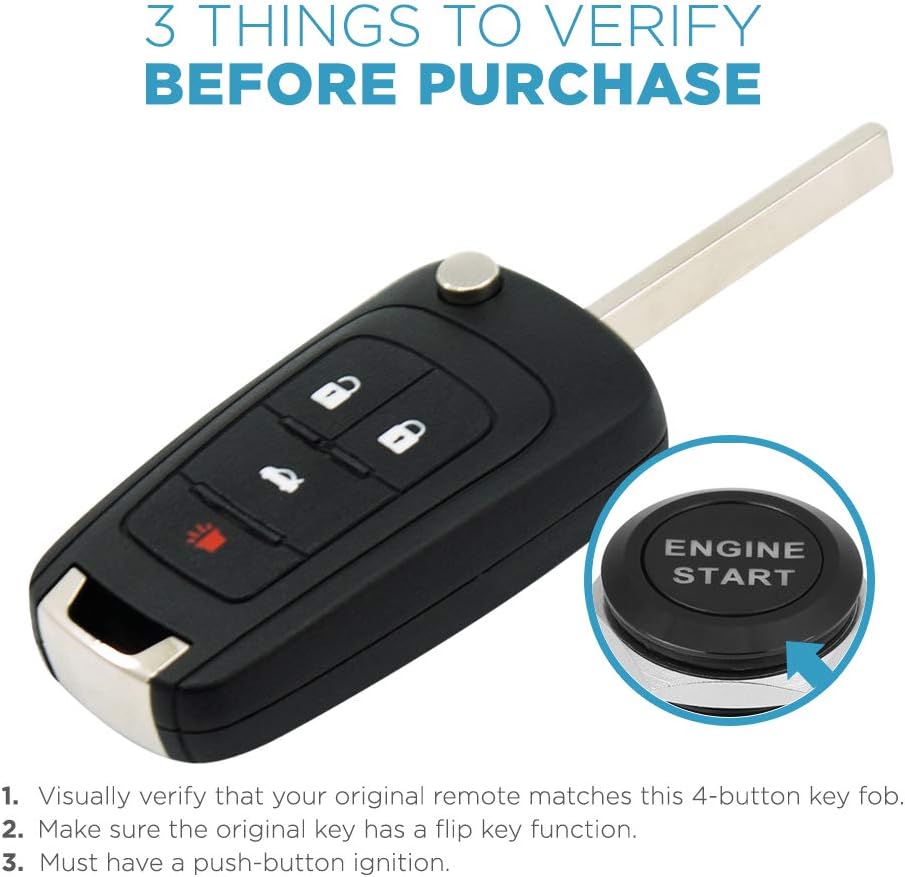
Figure 3.2: Important verification steps to ensure compatibility of the replacement key fob with your vehicle.
4. Setup and Programming
The Keyless2Go smart key is designed for easy DIY programming. Follow the instructions carefully to program your new key fob to your vehicle.
4.1. DIY Programming Instructions
Detailed programming instructions are available via a dedicated website link provided with your purchase. Please refer to this link for step-by-step guidance. For optimal results, it is also recommended to consult your vehicle's owner's manual for specific programming procedures, as some vehicle models may have unique requirements or variations in the process.
Should you encounter any difficulties during the programming process, free technical support is available. You can reach out to our expert technicians for assistance.
4.2. Key Fob Overview Video
Watch this official Keyless2Go video for a general overview of Keyless2Go key fobs and their features. While not a programming tutorial, it provides useful context about the product.
Video 4.1: An official Keyless2Go video providing an overview of Keyless2Go key fobs. This video highlights general features and benefits of the product line.
5. Operating Instructions
Once successfully programmed, your Keyless2Go smart key will provide full functionality for your compatible vehicle.
- Keyless Entry: Approach your vehicle with the smart key in your possession. The vehicle will detect the key, allowing you to unlock doors by pressing the unlock button or, in some vehicles, by simply touching the door handle.
- Push-Button Ignition: With the smart key inside the vehicle, you can start the engine by pressing the vehicle's push-button ignition while depressing the brake pedal.
- Remote Functions:
- Lock Button: Press to lock all vehicle doors.
- Unlock Button: Press to unlock all vehicle doors.
- Trunk Release Button: Press and hold to open the vehicle's trunk or liftgate.
- Panic Button: Press and hold to activate the vehicle's alarm system. Press again to deactivate.

Figure 5.1: Illustration of the smart key fob in use, demonstrating its wireless communication with the vehicle for keyless functions.
6. Maintenance
Your Keyless2Go smart key comes with batteries fully installed and is pre-tested for optimal performance. The battery life will vary depending on usage.
- Battery Replacement: When the key fob's range decreases or it becomes unresponsive, it may be time to replace the internal battery. Refer to your vehicle's owner's manual or a qualified locksmith for instructions on how to safely replace the battery. The product specifications indicate it requires 1 Lithium Metal battery.
- Care and Handling: Avoid exposing the key fob to extreme temperatures, direct sunlight for prolonged periods, or water. Do not drop the key fob or subject it to strong impacts.
7. Troubleshooting
If you experience issues with your Keyless2Go smart key, consider the following troubleshooting steps:
- Key Fob Not Responding:
- Ensure the key fob is within range of the vehicle.
- Check the battery. Although pre-installed, batteries can drain over time.
- Re-attempt the programming procedure, carefully following all steps.
- Programming Difficulties:
- Double-check all compatibility requirements (FCC ID, part numbers, vehicle features).
- Refer to your vehicle's specific owner's manual for programming steps, as these can sometimes differ from generic instructions.
- Ensure all existing keys are present during programming, as some vehicles require all keys to be programmed simultaneously.
- Interference: Strong radio frequency interference from other devices or locations can sometimes affect key fob performance. Try operating the key fob in a different location.
If issues persist after attempting these steps, please contact Keyless2Go technical support for further assistance.
8. Specifications
| Feature | Detail |
|---|---|
| Brand | Keyless2Go |
| Model Number | PRX-GPPS4 |
| Number of Buttons | 4 |
| Item Weight | 0.002 ounces (approx. 0.06 grams) |
| Package Dimensions | 6.57 x 4.8 x 0.83 inches |
| Batteries | 1 Lithium Metal battery (included) |
| Material | Plastic |
| Color | Black |
| Compatible FCC IDs | OHT05918179, P409MK794 6931, AVL-B01T2AC, AVL-B01T1AC, V2T01060514 |
| Compatible GM Part Numbers | 13585209, 13504235, 13584828, 13584824 |
9. Warranty and Support
Keyless2Go stands behind the quality of its products. Your purchase is backed by a 100% satisfaction risk-free policy within 30 days.
- Satisfaction Guarantee: If the remote does not perform as expected for any reason within 30 days of purchase, please contact us for a refund or replacement.
- Technical Support: Free technical support is provided with every purchase to assist with troubleshooting any issues or concerns you may have. Our expert technicians are available to help.
Ask a question about this manual
Ask about setup, troubleshooting, compatibility, parts, safety, or missing instructions. Manuals+ will review the question and use this page’s manual context to help answer it.