
ergotec ET-100-2929
Contents
ERGOTEC Mercury ET-100-2929 Massage Chair User Manual
Model: ET-100-2929 | Brand: ERGOTEC
1. Introduction
Thank you for choosing the ERGOTEC Mercury ET-100-2929 Massage Chair. This manual provides essential information for the safe and effective use, assembly, operation, and maintenance of your new massage chair. Please read this manual thoroughly before use and retain it for future reference.
2. Important Safety Information
WARNING: This chair is designed to support up to 176 pounds. Exceeding this weight limit may cause instability and potential injury. Always ensure the chair is on a stable, level surface before use.
- Do not allow children or pets to play on or around the massage chair.
- Keep hands and feet clear of moving parts during operation.
- Unplug the chair from the power outlet when not in use or before cleaning.
- Do not use the chair if it has been damaged or submerged in water.
- Consult a physician before using the massage chair if you have any medical conditions.
3. Setup and Assembly
The ERGOTEC Mercury ET-100-2929 Massage Chair requires assembly. Please follow the instructions provided in the separate assembly guide for detailed steps. Ensure all components are securely fastened before initial use.
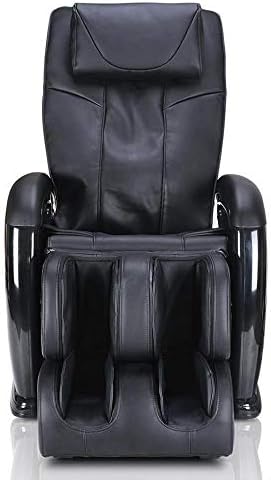
Figure 3.1: Front view of the ERGOTEC Mercury ET-100-2929 Massage Chair.
After assembly, place the chair on a hard, level floor. Ensure there is sufficient space around the chair for full recline and operation.
4. Operating Instructions
The ERGOTEC Mercury ET-100-2929 Massage Chair is operated using the included LCD handheld remote control. Familiarize yourself with the remote's functions before use.
4.1 Remote Control Overview

Figure 4.1: LCD Handheld Remote Control.
The remote features an LCD screen displaying the current massage program and chair position. Buttons are provided for power, auto programs, manual massage techniques, heat, recline, and intensity adjustments.
4.2 Power On/Off
Press the ON/OFF button on the remote to power the chair on or off.
4.3 Automatic Programs
The chair includes 3 pre-set auto programs and 1 demo program. Select your desired program using the corresponding buttons (DEMO, GENTLE, RELAX, VIGOROUS) on the remote. These programs combine various massage techniques for a comprehensive experience.
4.4 Manual Massage Techniques
Customize your massage with 5 relaxing back massage techniques. Refer to the remote control's specific buttons for selecting these techniques.
4.5 2D S-Track Massage
The 2D S-Track mechanism provides massage from the neck down to the lower back, following the natural curvature of your spine. The rollers move up, down, left, and right to deliver a therapeutic massage.
4.6 Automatic Recline

Figure 4.2: Massage Chair in Reclined Position.
Use the Backrest Up/Down buttons on the remote to adjust the recline angle. The chair can recline to a completely flat position for maximum relaxation.
4.7 Heat Therapy
Activate the lumbar heat therapy by pressing the HEAT button. This feature helps to relieve lower back tension and relax muscles, preparing them for a deeper massage.
4.8 Air Compression Massage
The chair features 10 airbags located around the seat, feet, and calves. These airbags inflate and deflate to apply a compression massage, promoting circulation and relaxation in the buttock and leg areas.
4.9 Foot Rollers
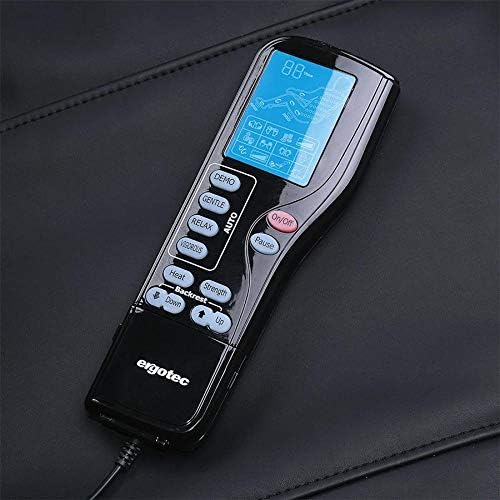
Figure 4.3: Foot Rollers in the Footrest.
The footrest includes reflexology rollers that provide a soothing kneading massage to the soles of your feet. These rollers stimulate acupressure points for overall body relief.
4.10 Adjusting Massage Intensity
Use the STRENGTH buttons on the remote to adjust the intensity of the massage to your personal preference.
4.11 Storage Pocket
A convenient storage pocket is located on the side of the chair to store the remote control when not in use.
5. Maintenance
5.1 Cleaning
- Always unplug the chair before cleaning.
- Wipe the chair's surface with a soft, damp cloth. Do not use abrasive cleaners or solvents.
- Ensure no liquid enters the internal components.
5.2 Storage
Store the chair in a cool, dry place away from direct sunlight and extreme temperatures.
6. Troubleshooting
| Problem | Possible Cause | Solution |
|---|---|---|
| Chair does not power on. | Power cord not securely plugged in. No power from outlet. | Ensure power cord is fully inserted. Check if the outlet is functional by plugging in another device. |
| Massage function not working. | Chair is in standby mode. Program not selected. | Press the ON/OFF button. Select an auto program or manual massage technique. |
| Heat function not working. | Heat function not activated. | Press the HEAT button on the remote. Allow a few minutes for the heat to become noticeable. |
If you encounter issues not listed here, please contact customer support.
7. Specifications
- Brand: ergotec
- Model Number: ET-100-2929
- Color: Black
- Size: Small
- Back Style: Continuous Back
- Frame Material: Metal
- Additional Features: Automatic, Compact
- Recommended Uses: Relaxing
- Room Type: Indoor
- Age Range: Adult
- Included Components: Remote
- Surface Recommendation: Hard Floor
- Maximum Weight Recommendation: 176 Pounds
- Required Assembly: Yes
- Pattern: Solid
- Arm Style: Armless
- Leg Style: Straight Leg
- Form Factor: Recliner
- Item Depth: 30.3 inches
- Seat Material: Fabric
- Fill Material: Foam, Polyester
- Reclining Position Count: 2
- Tilting: No
8. Warranty and Support
This ERGOTEC massage chair is 100% tested for performance and reliability before shipping. It is protected with a 1-year in-home service warranty and a 1-year parts warranty.
For warranty claims, technical support, or any inquiries, please contact ERGOTEC customer service through the retailer where the product was purchased.
Documents and downloads
Ask a question about this manual
Ask about setup, troubleshooting, compatibility, parts, safety, or missing instructions. Manuals+ will review the question and use this page’s manual context to help answer it.