
Introduction
The Autel MaxiSys MS909 is an advanced intelligent diagnostic scan tool designed for comprehensive vehicle diagnostics and maintenance. It integrates powerful hardware with sophisticated software features to provide a complete solution for automotive technicians.

Figure 1: Autel MaxiSys MS909 Intelligent Scan Tool and its key capabilities.
1. Setup Guide
1.1 Unboxing and Initial Charge
- Carefully remove all components from the packaging.
- Connect the power adapter to the MaxiSys MS909 tablet and a power outlet. Allow the device to fully charge before first use.
1.2 Connecting the MaxiFlash VCI
The MaxiFlash VCI (Vehicle Communication Interface) is used to establish communication between the MaxiSys MS909 tablet and the vehicle's OBDII port.
- Locate the vehicle's OBDII port, typically under the dashboard on the driver's side.
- Plug the MaxiFlash VCI into the vehicle's OBDII port. Ensure a secure connection.
- Connect the MaxiFlash VCI to the MaxiSys MS909 tablet via the provided USB cable or wirelessly via Bluetooth.

Figure 2: The MaxiFlash VCI device, supporting multiple communication protocols.
1.3 Initial Software Configuration
- Upon first power-on, follow the on-screen prompts to select your language, time zone, and Wi-Fi network.
- Register your device with Autel to activate warranty and receive software updates.
- Perform a system update to ensure all software and vehicle data are current.
2. Operating Instructions
2.1 Main Menu Navigation
The MaxiSys MS909 features an intuitive Android-based interface. The main menu provides access to all primary functions:
- Auto Scan: Performs a comprehensive scan of all available vehicle systems.
- Control Unit: Allows direct access to specific control modules for diagnosis.
- Service: Provides access to various maintenance and service functions.
- Hot Functions: Quick access to frequently used diagnostic and service features.
- Programming: For advanced ECU programming and coding.
- Vehicle Profile: Manages vehicle information and diagnostic history.

Figure 3: The main menu interface of the MaxiSys MS909.
2.2 Intelligent Diagnostics with Motor TruSpeed Repair
The Motor TruSpeed Repair function provides a guided diagnostic process, offering:
- Technical Service Bulletins (TSBs): Access to OEM-issued bulletins.
- DTC Analysis: Detailed information and solutions for diagnostic trouble codes.
- Repair Assistant: Recommended tests and procedures.
- Repair Tips: Step-by-step guidance for fault determination and clearing.
- Relevant Cases: Access to similar repair scenarios for reference.
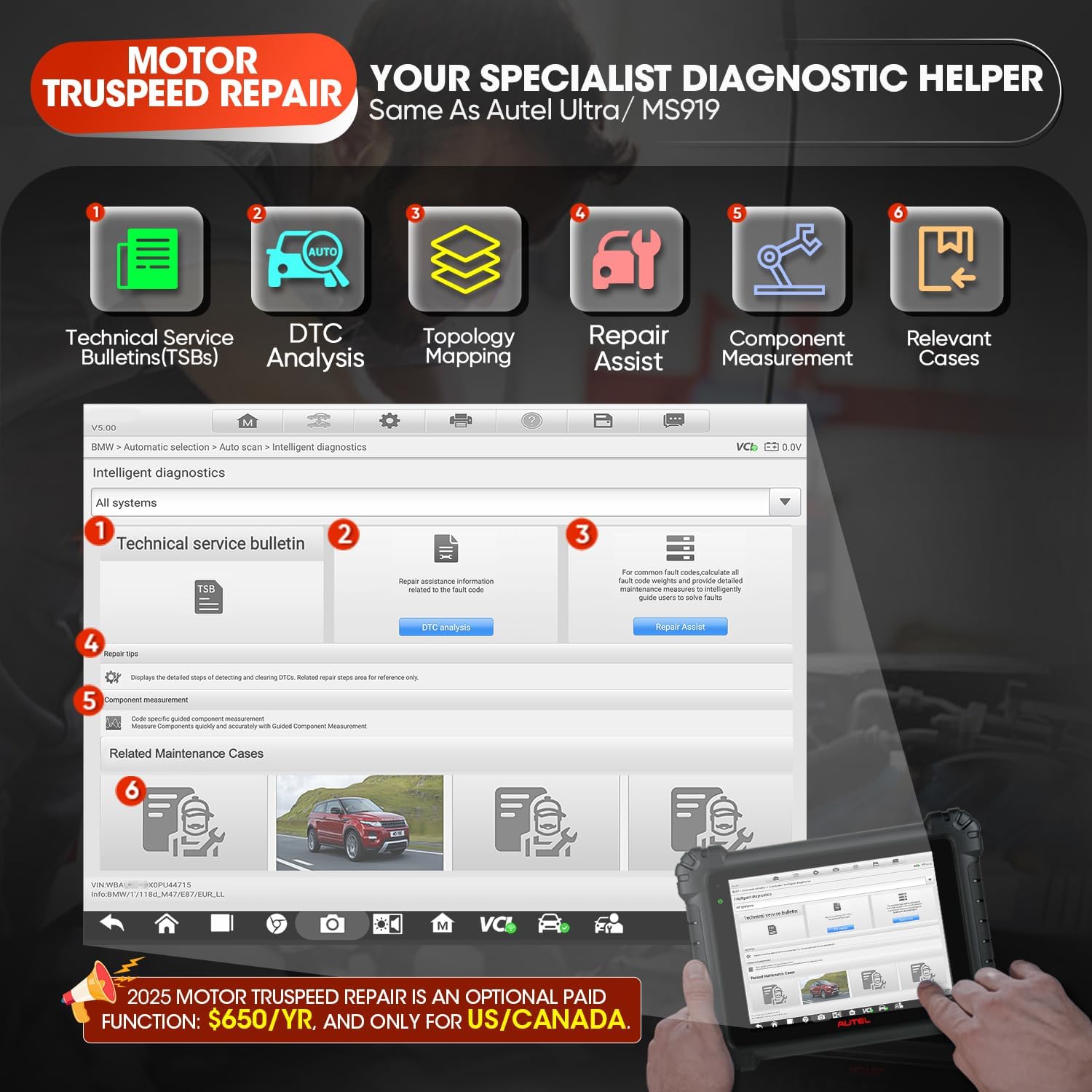
Figure 4: Overview of the Motor TruSpeed Repair diagnostic workflow.
2.3 Topology Mapping 2.0
Topology Mapping 2.0 visually represents the communication structure of vehicle ECU modules, allowing for quick identification of fault locations within the system. This feature is compatible with specific vehicle brands including VW, Audi, BMW, Ford, Land Rover, Jaguar, Chrysler, and Fiat.
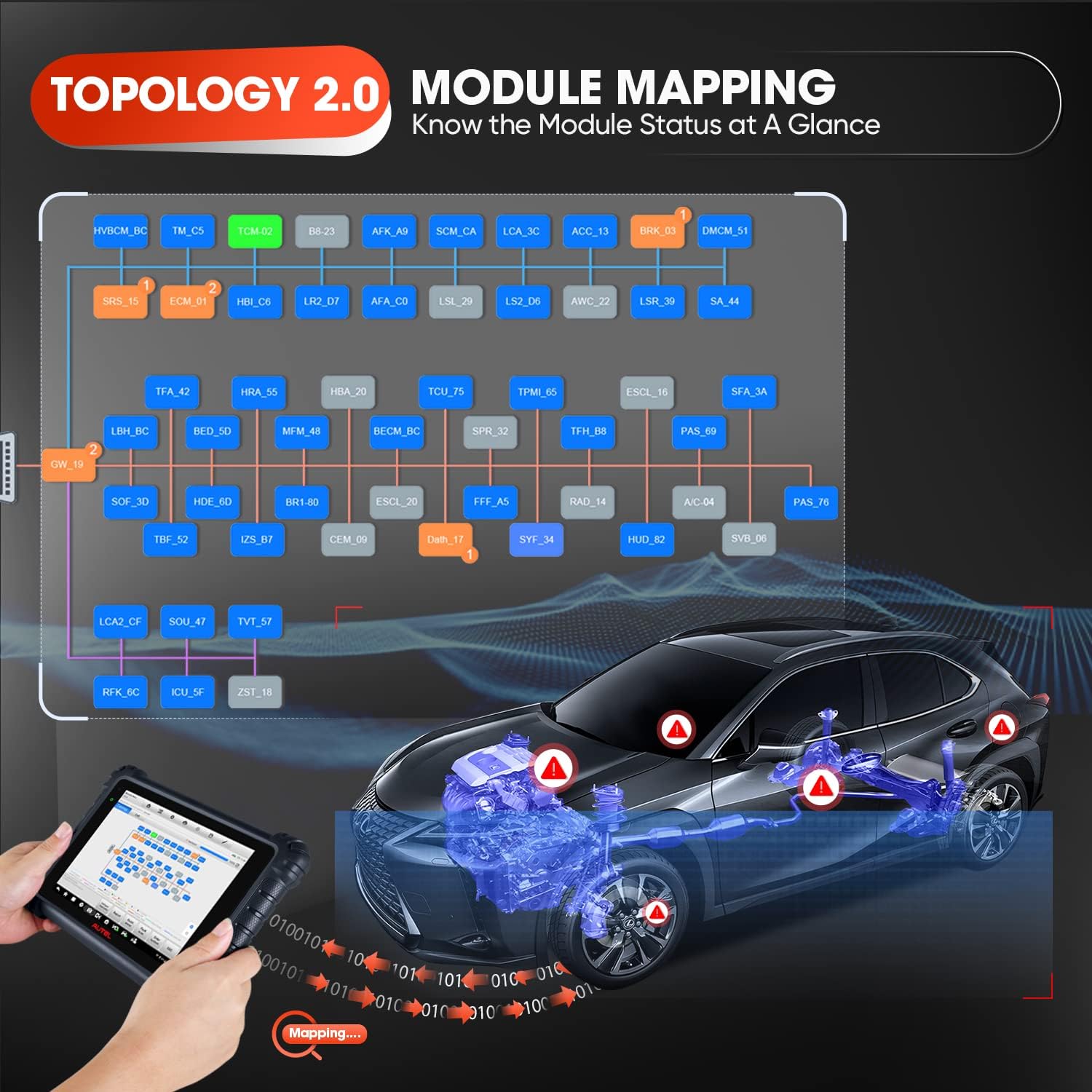
Figure 5: Visual representation of vehicle module communication via Topology Mapping 2.0.
2.4 ECU Programming and Coding
The MaxiSys MS909 supports advanced ECU programming and coding functionalities, enabling replacement of existing software/firmware and programming new ECUs for specific BMW & Benz models. Online coding is available for various brands, and hidden functions can be flashed for BMW, VW, Audi, and Skoda vehicles.
Video 1: Demonstration of BMW ECU Programming and Coding - Selective Programming using the Autel MaxiSys MS909.

Figure 6: ECU Programming and Coding capabilities of the MaxiSys MS909.
2.5 Service Functions and Bi-directional Control
The tool offers over 36 service functions, including but not limited to:
- EPB (Electronic Parking Brake)
- Oil Reset
- ABS Bleed
- SAS (Steering Angle Sensor)
- TPMS (Tire Pressure Monitoring System)
- BMS (Battery Management System)
- Injector Coding
- Throttle Adaptation
- Headlamp Adjustment
- Seat Calibration
- Power Balance
- Airbag Reset
- Cylinder Test
Bi-directional control allows the user to send commands to vehicle components (e.g., fuel pumps, radiator fan, lights) to test their functionality directly from the tool.

Figure 7: Bi-directional control capabilities for testing vehicle components.
3. Maintenance
3.1 Software Updates
Regular software updates are crucial for maintaining optimal performance and ensuring compatibility with the latest vehicle models and diagnostic protocols. The MaxiSys MS909 includes one year of free updates from the date of purchase.
- Ensure the device is connected to a stable Wi-Fi network.
- Navigate to the "Update" icon on the main menu.
- Follow the on-screen instructions to download and install available updates.
3.2 Battery Care
To prolong the life of the integrated 15000 mAh Lithium Polymer battery:
- Avoid fully discharging the battery frequently.
- Store the device in a cool, dry place when not in use.
- Charge the device regularly, even if not in active use, to maintain battery health.
3.3 Cleaning and Storage
- Clean the touchscreen with a soft, lint-free cloth. Avoid abrasive cleaners.
- Keep the MaxiFlash VCI and all cables free from dirt, oil, and moisture.
- Store the device and accessories in their original case or a protective environment to prevent damage.
4. Troubleshooting
4.1 Common Issues and Solutions
| Problem | Possible Cause | Solution |
|---|---|---|
| Device does not power on. | Low battery; faulty power adapter. | Charge the device for at least 30 minutes. Verify power adapter functionality. |
| VCI not connecting to tablet. | Bluetooth not enabled; VCI not powered; VCI firmware outdated. | Ensure Bluetooth is on. Check VCI connection to OBDII port. Update VCI firmware via USB. |
| Cannot communicate with vehicle. | Ignition off; incorrect vehicle selection; faulty OBDII port. | Turn ignition on. Verify VIN and vehicle details. Check vehicle's OBDII port with another tool. |
For more detailed troubleshooting steps, please refer to the official User Guide (PDF).
5. Technical Specifications
| Attribute | Detail |
|---|---|
| Brand | Autel |
| Model | Newest Autel MaxiSys MS909 |
| Operating System | Android 7.0 |
| Processor | Octa-core (2.3GHz Quad + 1.7GHz Quad) |
| Memory | 128GB built-in |
| Display | 10-inch TFT-LCD Ultra HD (1536x2048) |
| Cameras | 5MP Front, 16MP Rear |
| Battery | 15000 mAh Lithium Polymer (up to 8 hours continuous use) |
| Connectivity | Dual Wi-Fi, Bluetooth |
| Protocols Supported | D-PDU, RP1210, CAN FD, J2534, DoIP |
| Item Weight | 15.42 pounds |
| Product Dimensions | 15 x 15 x 15 inches |
6. Warranty and Support
6.1 Software Updates and Warranty
The Autel MaxiSys MS909 comes with one year of free software updates from the date of purchase. These updates ensure your tool remains current with the latest vehicle data and diagnostic capabilities.
For specific warranty terms and conditions, please refer to the documentation included with your product or contact Autel customer service directly.
6.2 Customer Support
For technical assistance, product inquiries, or support, please contact Autel customer service. Contact information can typically be found on the official Autel website or within the device's "About" section.
You may also find additional resources and FAQs on the Autel Store on Amazon.