
1. Product Overview
The COOAU Outdoor Security Camera DD201 is a wireless, solar-powered surveillance solution designed for outdoor use. It features a built-in rechargeable battery and an included solar panel for continuous power, eliminating the need for frequent recharging. The camera offers 1080P Full HD video, infrared night vision, and advanced human motion detection with real-time alerts. It also supports two-way audio and is rated IP65 for weather resistance.
Key features include:
- Solar Powered & Rechargeable Battery: Ensures 365-day non-stop power with daily sunlight.
- 100% Wire-Free Setup: Easy installation anywhere with 2.4 GHz WiFi connectivity (not compatible with 5GHz WiFi).
- 1080P Full HD & IR Night Vision: Provides clear 1080P video and night vision up to 66ft/20m.
- Human Motion Detection & Real-Time Alerts: Optimized algorithms reduce false alarms by focusing on human shapes.
- Two-Way Audio & IP65 Weatherproof: Built-in microphone and speaker for communication, designed to withstand various weather conditions.
2. What's in the Box
Upon opening the package, verify that all components are present:
- COOAU Outdoor Security Camera (DD201)
- Solar Panel with connecting cable
- Mounting Bracket for camera
- Mounting Bracket for solar panel
- USB Charging Cable
- Screws and Wall Anchors
- User Manual

Image: Contents of the COOAU Outdoor Security Camera DD201 package, including the camera, solar panel, mounting hardware, and cables.
3. Setup & Installation
3.1 Initial Charging
Before installation, fully charge the camera using the provided USB cable. Connect the USB cable to the camera's charging port and a standard USB power adapter (not included). The indicator light will show charging status.
3.2 App Download & Camera Pairing
- Download the "CloudEdge" app from your smartphone's app store (iOS or Android).
- Register an account and log in.
- Follow the in-app instructions to add your camera. Ensure your phone is connected to a 2.4GHz Wi-Fi network, as the camera is not compatible with 5GHz Wi-Fi.
- Scan the QR code on the camera or follow alternative pairing methods provided in the app.

Image: Screenshot of the CloudEdge app displaying a live feed from the security camera.
3.3 Mounting the Camera and Solar Panel
Choose an installation location that provides optimal sunlight exposure for the solar panel and a clear view for the camera. Ensure the camera is within range of your 2.4GHz Wi-Fi network.
- Attach the camera to its mounting bracket.
- Secure the camera mounting bracket to a wall or desired surface using the provided screws and anchors.
- Mount the solar panel in a location that receives direct sunlight for several hours daily.
- Connect the solar panel cable to the camera's charging port.
- Adjust the camera and solar panel angles for optimal coverage and charging efficiency.

Image: The COOAU Outdoor Security Camera DD201 installed on an exterior wall, connected to its solar panel for continuous power.

Image: The COOAU Outdoor Security Camera DD201 mounted under a roof overhang, demonstrating its 100% wire-free installation.
4. Operation
4.1 Live View & Recording
Access the live video feed through the CloudEdge app. You can manually record video, take screenshots, and view recorded footage stored on a microSD card (not included) or cloud storage (subscription may be required).
4.2 Night Vision
The camera automatically switches to infrared night vision in low-light conditions, providing clear black-and-white video up to 66 feet (20 meters).

Image: A split view demonstrating the camera's 1080P Full HD capability, showing a clear daytime image of a person and a car.
4.3 Human Motion Detection & Alerts
The camera utilizes advanced algorithms to detect human shapes, minimizing false alarms from pets or swaying branches. When human motion is detected, you will receive instant alerts on your smartphone.
4.4 Two-Way Audio
Use the two-way audio feature in the app to communicate with visitors or deter intruders through the camera's built-in microphone and speaker.
5. Maintenance
5.1 Cleaning
Periodically clean the camera lens and solar panel with a soft, damp cloth to ensure optimal performance. Avoid using harsh chemicals or abrasive materials.
5.2 Weather Resistance
The camera is IP65 rated, meaning it is protected against dust and low-pressure water jets. It is designed to operate in temperatures between -4°F to 122°F (-20°C to 50°C).
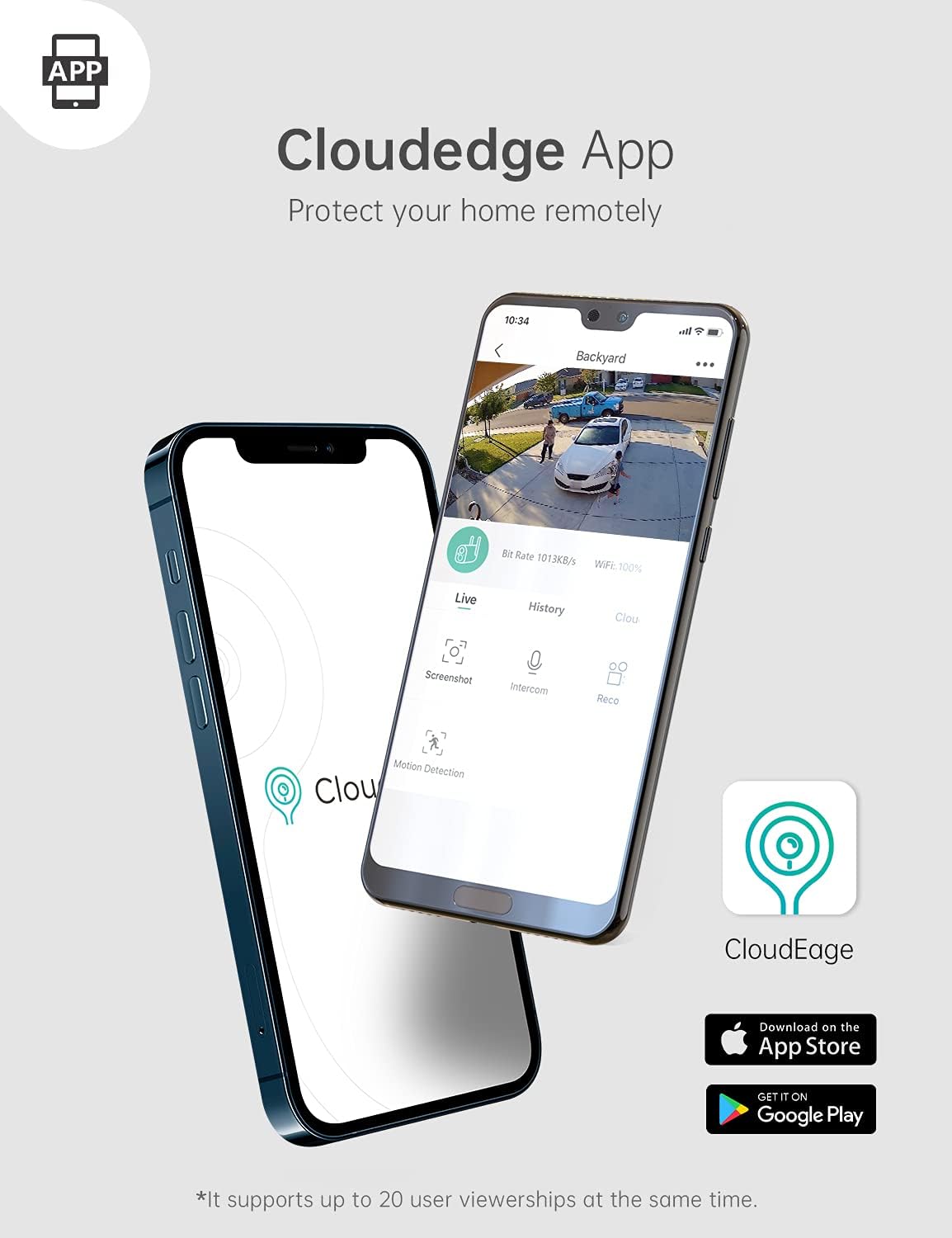
Image: The COOAU Outdoor Security Camera DD201 and its solar panel installed outdoors during snowy conditions, illustrating its IP65 weatherproof design.
6. Troubleshooting
- Camera not connecting to Wi-Fi: Ensure your Wi-Fi network is 2.4GHz. Check Wi-Fi signal strength at the camera's location. Restart your router and the camera.
- Battery not charging: Verify the solar panel is receiving direct sunlight. Check the connection between the solar panel and the camera. Ensure the camera's charging port is clean.
- Frequent false alarms: Adjust the motion detection sensitivity in the app. Ensure the human motion detection feature is enabled to filter out non-human movements.
- Poor night vision: Ensure the camera lens is clean and free from obstructions. Check for any strong light sources directly facing the camera at night.
- Live view lag or delay: Check your Wi-Fi signal strength and internet speed. Reduce the video quality setting in the app if necessary.
7. Specifications
| Feature | Detail |
|---|---|
| Brand | COOAU |
| Model Number | DD201 |
| Connectivity Technology | Wireless (2.4GHz Wi-Fi) |
| Indoor/Outdoor Usage | Outdoor |
| Effective Video Resolution | 1080 Pixels (Full HD) |
| Photo Sensor Resolution | 2 MP |
| Night Vision | Infrared (up to 66ft/20m) |
| Motion Detection | Human Motion Detection |
| Two-Way Audio | Yes |
| Waterproof Rating | IP65 |
| Operating Temperature | -4°F to 122°F (-20°C to 50°C) |
| Power Source | Battery Powered, Solar |
| Battery Capacity | 10400 Milliampere Hour (mAh) |
| Storage Options | Cloud / SD Card (not included) |
| Item Dimensions | 0.39 x 0.39 x 0.39 inches (approximate) |
8. Warranty & Support
For warranty information, technical support, or any inquiries regarding your COOAU Outdoor Security Camera DD201, please refer to the official COOAU website or contact their customer service directly. Contact details are typically provided in the packaging or on the manufacturer's website.
You can often find additional resources, FAQs, and firmware updates on the COOAU Store on Amazon.


