
Introduction
This manual provides essential information for the installation, maintenance, and troubleshooting of the ForeverPRO WD12X417 Cover Sump, a replacement component designed for various GE dishwasher models. This part is crucial for the proper functioning of your dishwasher's filtration and drainage system.
The ForeverPRO WD12X417 replaces original part numbers 270714, AH259225, EA259225, PS259225, WD12X0288, WD12X0337, WD12X0417, WD12X288, and WD12X337.
Safety Information
WARNING: Before attempting any repair or installation, ensure the dishwasher's power supply is disconnected at the circuit breaker and the water supply is turned off. Failure to do so may result in electric shock, personal injury, or property damage.
- Always wear appropriate personal protective equipment, such as gloves and safety glasses.
- If you are unsure about any step, consult a qualified appliance technician.
- Keep children and pets away from the work area.
- Handle sharp edges with care.
Package Contents
Verify that your package contains the following item:
- 1 x ForeverPRO WD12X417 Cover Sump
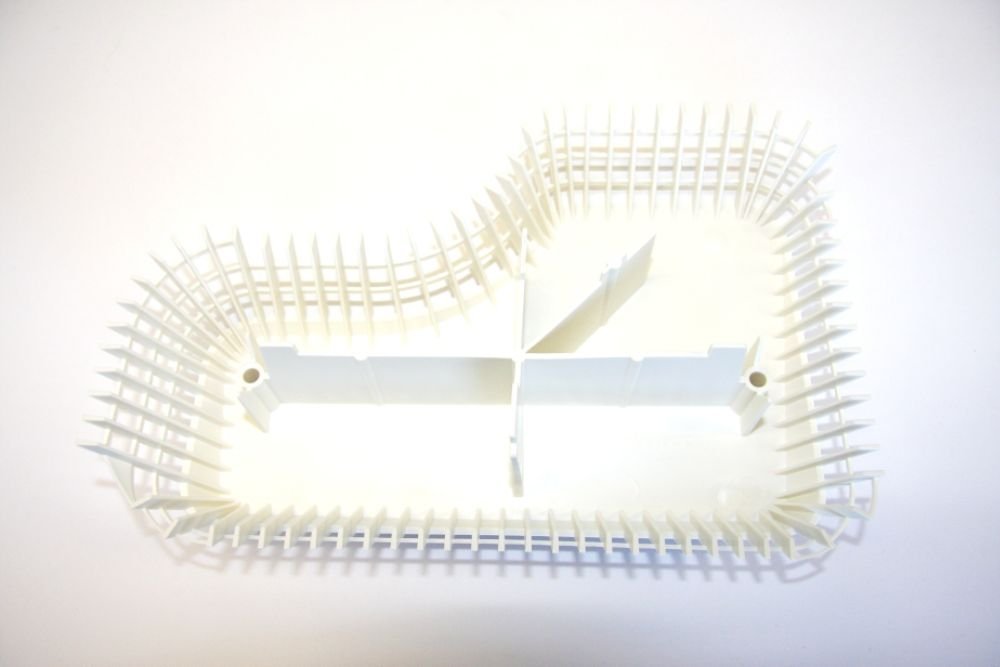
Image: The ForeverPRO WD12X417 Cover Sump. This component is typically located at the bottom of the dishwasher tub, covering the sump area where water collects before being pumped out.
Installation (Setup)
The following steps provide general guidance for replacing the dishwasher sump cover. Specific procedures may vary depending on your GE dishwasher model. Refer to your dishwasher's original service manual for detailed instructions.
- Disconnect Power and Water: Turn off the electrical power to the dishwasher at the circuit breaker and shut off the water supply valve.
- Access the Dishwasher Interior: Open the dishwasher door and remove the lower dish rack to gain clear access to the bottom of the tub.
- Locate the Sump Area: Identify the sump area, usually in the center or rear of the dishwasher tub floor. The existing sump cover will be visible.
- Remove the Old Sump Cover: Depending on your model, the old sump cover may be held in place by screws, clips, or a twist-lock mechanism. Carefully remove any fasteners and detach the old cover. Note its orientation for proper installation of the new part.
- Clean the Sump Area: While the sump cover is removed, it is recommended to clean any debris, food particles, or sediment from the sump area and around the filter screen.
- Install the New Sump Cover: Position the ForeverPRO WD12X417 Cover Sump in the same orientation as the old one. Secure it using the original screws, clips, or by twisting it into place until it is firmly seated. Ensure there are no gaps that could allow debris to bypass the filter.
- Reassemble and Test: Replace the lower dish rack. Restore the water supply and electrical power to the dishwasher. Run a short cycle to check for leaks and proper drainage.
Operating Considerations
Once the ForeverPRO WD12X417 Cover Sump is correctly installed, your dishwasher should operate as intended. The sump cover plays a vital role in directing water flow and protecting the pump from large debris. Ensure that the cover remains securely in place during operation.
Maintenance
Regular maintenance of the sump area helps ensure optimal dishwasher performance and longevity of the part.
- Periodic Inspection: Periodically inspect the sump cover for any signs of damage, cracks, or dislodgement.
- Cleaning: If your dishwasher's filter system is accessible through the sump cover, follow your dishwasher's manual for routine cleaning of the filter and sump area. Remove any food particles or grease buildup that could impede drainage or water circulation.
- Avoid Harsh Chemicals: Do not use abrasive cleaners or harsh chemicals on the sump cover, as this may damage the material.
Troubleshooting
If you experience issues after installing the new sump cover, consider the following:
| Problem | Possible Cause | Solution |
|---|---|---|
| Dishwasher not draining properly | Sump cover not seated correctly, debris in sump area, or clogged filter. | Ensure the sump cover is securely installed. Remove and clean the sump area and filter. Check for blockages in the drain hose. |
| Water leaking from bottom of dishwasher | Sump cover not sealed properly, or damaged gasket (if applicable). | Re-check the installation of the sump cover to ensure it is fully seated and sealed. Inspect any associated gaskets for damage and replace if necessary. |
| Unusual noises during wash cycle | Debris trapped under the sump cover or near the pump impeller. | Disconnect power, remove the sump cover, and carefully inspect the sump area and pump impeller for any foreign objects. |
If these troubleshooting steps do not resolve the issue, it is recommended to contact a qualified appliance repair technician.
Specifications
- Part Number: WD12X417
- Replaces Part Numbers: 270714, AH259225, EA259225, PS259225, WD12X0288, WD12X0337, WD12X0417, WD12X288, WD12X337
- Compatible Brands: GE, Hotpoint, RCA, Kenmore (various models)
- Included Components: Cover Sump
For a comprehensive list of compatible models, please refer to the product description or consult the manufacturer's compatibility guide.
Warranty and Support
ForeverPRO products are designed to meet or exceed OEM specifications. For information regarding warranty coverage or technical support, please refer to the documentation provided with your purchase or visit the official ForeverPRO website. Keep your proof of purchase for warranty claims.