
1. Introduction
The HM Digital HM-100 is a continuous monitor designed for precise measurement of Potential Hydrogen (pH), Electrical Conductivity (EC), Total Dissolved Solids (TDS), and Temperature in various water quality applications. This device is suitable for hydroponics, water purification, wastewater regulation, aquaculture, and scientific testing. It features automatic temperature compensation (ATC), digital calibration, and a large LCD for simultaneous display of three parameters.
2. Package Contents
Verify that all items are present in the package:
- HM-100 Monitor Unit
- Power Cable
- pH 4.0 Buffer Solution
- pH 7.0 Buffer Solution
- pH Storage Solution
- pH Probe (SP-P5)
- EC/TDS Probe (SP-C2)
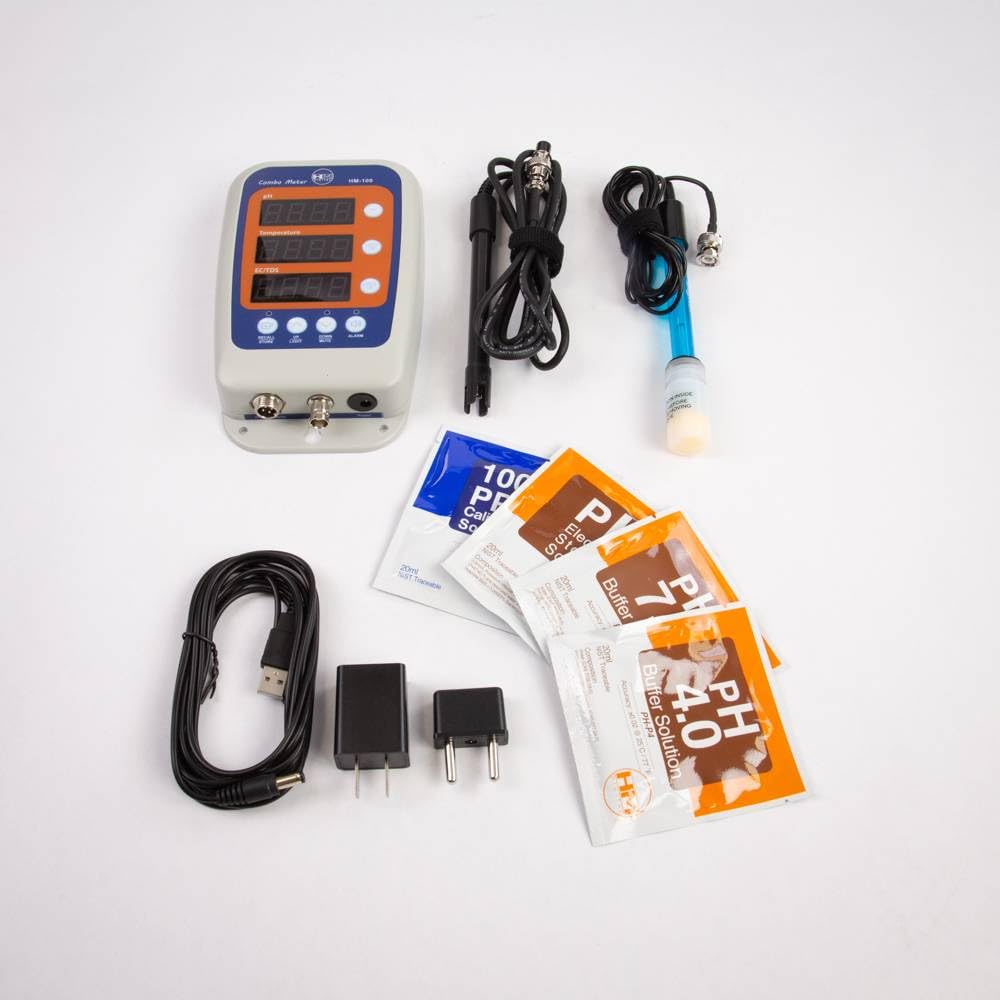
Figure 2.1: HM-100 monitor with its complete set of accessories, including probes, power cable, and calibration solutions.
3. Product Overview
The HM-100 features a clear LCD display and intuitive controls for easy operation.

Figure 3.1: Front panel of the HM-100 monitor, showing the LCD display and control buttons.
3.1. Display Layout
- pH Display: Shows the current pH reading.
- Temperature Display: Shows the current temperature in Celsius.
- EC/TDS Display: Shows Electrical Conductivity (mS) or Total Dissolved Solids (ppm).
3.2. Control Buttons
- RECALL/STORE: Used to store current readings or recall previously stored data.
- UP/LIGHT: Adjusts calibration values upwards or activates backlight.
- DOWN/UNITS: Adjusts calibration values downwards or switches between EC/TDS units.
- ALARM: Activates or deactivates the alarm function.
- pH CAL: Initiates pH calibration mode.
- EC/TDS CAL: Initiates EC/TDS calibration mode.
4. Setup
- Connect Probes: Carefully connect the pH probe (SP-P5) and the EC/TDS probe (SP-C2) to their respective ports on the bottom of the HM-100 unit. Ensure connections are secure.
- Power Connection: Plug the provided power cable into the monitor and then into a standard electrical outlet. The unit will power on automatically.
- Initial Placement: Position the monitor in a stable location, away from direct sunlight or extreme temperatures. Ensure the probes can be fully immersed in the solution to be measured.
5. Calibration
Regular calibration ensures accurate readings. The HM-100 supports digital calibration.
5.1. pH Calibration
- Prepare Solutions: Use fresh pH 7.0 and pH 4.0 (or pH 10.0) buffer solutions.
- Rinse Probe: Rinse the pH probe thoroughly with distilled or deionized water.
- First Point Calibration (pH 7.0): Immerse the pH probe into the pH 7.0 buffer solution. Press and hold the pH CAL button until "CAL" appears on the display. The monitor will automatically recognize the buffer and calibrate. Wait for the reading to stabilize and "END" to appear, indicating successful calibration.
- Second Point Calibration (pH 4.0 or 10.0): Rinse the pH probe again. Immerse it into the pH 4.0 (or pH 10.0) buffer solution. Press and hold the pH CAL button. The monitor will recognize the buffer and calibrate. Wait for stabilization and "END".
- Storage: After calibration, rinse the probe and store it in pH storage solution.
5.2. EC/TDS Calibration
- Prepare Solution: Use a fresh EC/TDS calibration solution (e.g., 1413 µS/cm or 1000 ppm).
- Rinse Probe: Rinse the EC/TDS probe thoroughly with distilled or deionized water.
- Calibration: Immerse the EC/TDS probe into the calibration solution. Press and hold the EC/TDS CAL button until "CAL" appears. The monitor will automatically calibrate. Wait for the reading to stabilize and "END" to appear.
- Rinse: After calibration, rinse the probe with distilled water.
6. Operating Instructions
6.1. Taking Measurements
- Immerse Probes: Ensure both pH and EC/TDS probes are fully immersed in the solution to be tested.
- Stabilization: Allow a few moments for the readings on the LCD to stabilize. The monitor will display pH, EC/TDS, and temperature simultaneously.
6.2. Switching EC/TDS Units
Press the DOWN/UNITS button to cycle through the available EC/TDS scales: mS, ppm 0.5 (NaCl) Scale, and ppm 0.7 (442) Scale.
6.3. Data Hold/Store/Recall
- Store Data: Press the RECALL/STORE button briefly to store the current readings. The monitor can store up to 6 data values.
- Recall Data: Press and hold the RECALL/STORE button to enter recall mode. Use the UP/LIGHT and DOWN/UNITS buttons to navigate through stored data.
6.4. Backlight
Press the UP/LIGHT button briefly to activate or deactivate the display backlight.
6.5. Alarm Function
The HM-100 features an alarm function. Refer to the detailed instructions in the full manual for setting alarm thresholds for pH, EC, or TDS. Press the ALARM button to activate or deactivate the alarm.
7. Maintenance
7.1. Probe Care and Cleaning
- Rinsing: Always rinse probes with distilled or deionized water before and after each use.
- pH Probe Storage: The pH probe must always be kept moist. Store it in pH storage solution when not in use. Never store the pH probe in distilled water.
- EC/TDS Probe Cleaning: If the EC/TDS probe becomes coated, gently clean it with a soft brush and mild detergent, then rinse thoroughly.
7.2. Probe Replacement
Probes are consumable items and will degrade over time. Replace probes when calibration becomes difficult or readings are inconsistent.
- pH Probe: Model SP-P5
- EC/TDS Probe: Model SP-C2
8. Troubleshooting
| Problem | Possible Cause | Solution |
|---|---|---|
| Inaccurate pH readings | Uncalibrated probe, dirty probe, old buffer solutions, dried out probe. | Recalibrate pH probe. Clean probe. Use fresh buffer solutions. Rehydrate probe in storage solution. |
| Inaccurate EC/TDS readings | Uncalibrated probe, dirty probe. | Recalibrate EC/TDS probe. Clean probe. |
| Monitor does not power on | Power cable not connected, power outlet issue. | Check power cable connection. Test power outlet with another device. |
| "Err" message on display | Probe malfunction or out of range reading. | Check probe connection. Ensure solution is within measurement range. Replace probe if necessary. |
9. Specifications
- pH Range: 0.00 - 14.00 pH
- EC Range: 0 - 9999 µS; 0 - 9.99 mS
- TDS Range: 0 - 9999 ppm (0.5 scale); 0 - 8560 ppm (0.7 scale)
- Temperature Range: 0 - 50 °C (32 - 122 °F)
- Accuracy: pH: ±0.02 pH; EC/TDS: ±2%; Temp: ±1°C
- Resolution: pH: 0.01 pH; EC: 1 µS/0.01 mS; TDS: 1 ppm/0.1 ppm; Temp: 0.1 °C/°F
- Automatic Temperature Compensation (ATC): Yes (three temperature coefficients)
- Calibration: Digital (push button)
- Probes: Replaceable (pH: SP-P5, EC/TDS: SP-C2)
- Power Source: AC Adapter (included)
- Dimensions: 9.25 x 5.71 x 3.7 inches
- Weight: 1.88 Pounds
10. Warranty and Support
For warranty information and technical support, please refer to the official HM Digital website or contact their customer service department. Keep your purchase receipt as proof of purchase.
Note: Probe lifespan is dependent on usage and maintenance. Probes are consumable items and typically carry a limited warranty.


