
USARMT AGF76631052
USARMT AGF76631052 Replacement Remote Control for LG Smart TVs User Manual
Introduction
This manual provides instructions for the USARMT AGF76631052 replacement remote control, designed for use with various LG Smart TV models. This remote is pre-programmed and does not require any setup or pairing with your television. Simply insert batteries to begin operation.
Setup
Battery Installation
The remote control requires two AAA batteries (not included). Follow these steps to install them:
- Locate the battery compartment on the back of the remote control.
- Press down on the latch and slide the battery cover off.
- Insert two AAA batteries, ensuring the positive (+) and negative (-) terminals align correctly with the markings inside the compartment.
- Slide the battery cover back into place until it clicks securely.
Note: This remote control is pre-programmed and does not require any additional setup or pairing with your LG Smart TV. Once batteries are installed, it is ready for use.
Operating Instructions
Remote Control Layout
Refer to the image below for an overview of the remote control's buttons and their functions.
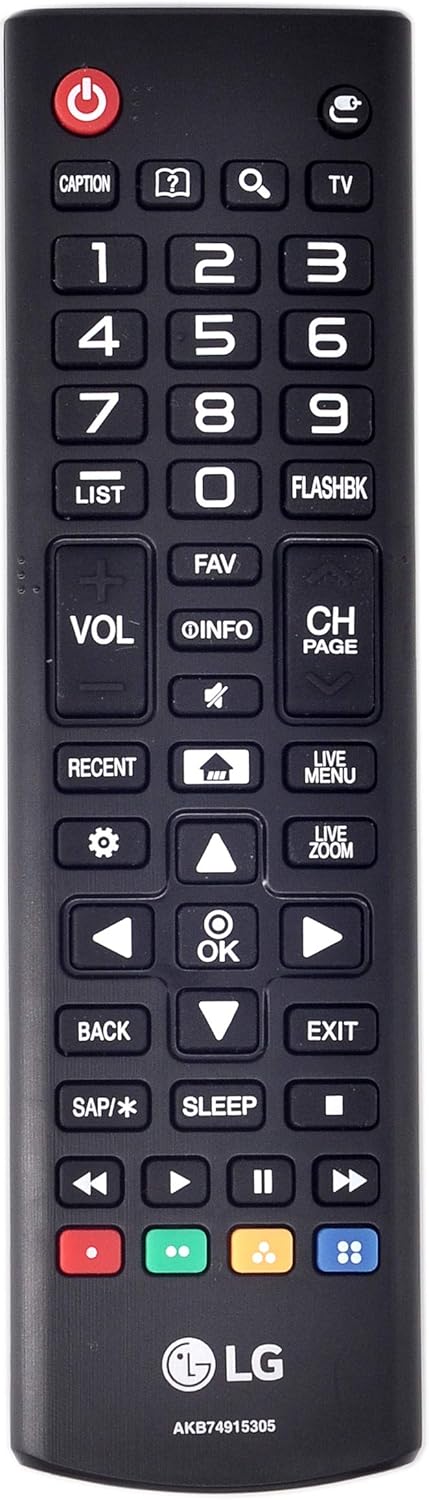
Image: Front view of the USARMT AGF76631052 replacement remote control, showing all buttons and their labels. The remote is black with white and colored buttons.
Basic Functions
- Power (Red Button): Turns the TV on or off.
- VOL (+/-): Adjusts the volume level.
- CH (Page Up/Down): Changes channels.
- Mute (Speaker with X): Mutes or unmutes the TV audio.
- Input (TV Icon): Selects the input source (HDMI, AV, etc.).
Navigation and Menu
- Directional Pad (Up, Down, Left, Right Arrows): Navigates through menus and options.
- OK (Center Button): Confirms selections.
- Back: Returns to the previous screen or menu.
- Exit: Exits the current menu or application.
- Settings (Gear Icon): Accesses the TV's main settings menu.
- Home (House Icon): Opens the Smart TV home screen or launcher.
- Live Menu: Accesses live TV options or guides.
- Recent: Displays recently viewed content or applications.
Media Playback Controls
- Play/Pause (Triangle/Two Vertical Bars): Starts or pauses media playback.
- Stop (Square): Stops media playback.
- Fast Forward (Double Right Arrow): Skips forward in media.
- Rewind (Double Left Arrow): Skips backward in media.
Additional Functions
- Caption: Toggles closed captions on or off.
- List: Displays a list of channels or content.
- Fav: Accesses favorite channels or content.
- Info: Displays information about the current program or content.
- Flashbk: Returns to the previously viewed channel.
- SAP/*: Secondary Audio Program or other special audio features.
- Sleep: Sets a sleep timer for the TV.
- Live Zoom: Zooms in on a portion of the screen.
- Colored Buttons (Red, Green, Yellow, Blue): These buttons have various functions depending on the TV model or the application being used. Refer to your TV's on-screen prompts for specific uses.
Compatibility
This USARMT AGF76631052 replacement remote control is compatible with a wide range of LG Smart TV models, including but not limited to:
- LG Smart TVs: OLED55B6P, OLED55B6PU, OLED55B6P-U, OLED55C6P, OLED55C6PU, OLED55C6P-U, OLED55E6P, OLED55E6PU, OLED55E6P-U, OLED65B6P, OLED65B6PU, OLED65B6P-U, OLED65C6P, OLED65C6PU, OLED65C6P-U, OLED65E6P, OLED65E6PU, OLED65E6P-U, 32LM505BBUA, 43LM5000PAU.
- LG TV Models: 32LH600B, 40UH6300-UA, 43LH6000, 43LH600T, 43UH6030, 43UH6030-UB, 43UH6030-UD, 43UH6100, 43UH6100-UH, 43UH610A, 43UH610A-UJ, 43UH610-UH, 43UH610-UJ, 43UH6500, 43UH6500-UB, 43UH7500, 43UH7500UA, 43UH7500-UA, 49LH6000, 49LH600T, 49UH6020-UD, 49UH6030, 49UH6030-UB, 49UH6030-UD, 49UH6090, 49UH6090-UF, 49UH6090-UJ, 49UH6100, 49UH6100-UH, 49UH610A, 49UH610A-UJ, 49UH6500, 49UH6500-UB, 49UH7500, 49UH7500-UA, 49UH7700, 49UH7700-UA, 49UH7700-UB, 49UJ7700, 50UH5500, 50UH5500-UA, 50UH5530, 50UH5530-UB, 50UH6300, 50UH6300-UA, 55LH6000, 55LH600T, 55UH6030, 55UH6030-UC, 55UH6090, 55UH6090-UF, 55UH6150, 55UH6150-UB, 55UH615A, 55UH615A-UC, 55UH6550, 55UH6550-UB, 55UH7500, 55UH7500-UA, 55UH7650, 55UH7650-UA, 55UH7700, 55UH7700-UB, 55UH8500, 55UH8500-UA, 55UH9500-UA, 55UJ7700, 58UH6300, 58UH6300-UA, 60UH5500-UA, 60UH6030, 60UH6030-UC, 60UH6035, 60UH6035-UC, 60UH6090, 60UH6090-UF, 60UH6150, 60UH6150-UB, 60UH615A, 60UH615A-UC, 60UH6550, 60UH6550-UB, 60UH7500, 60UH7500-UA, 60UH7650, 60UH7650-UA, 60UH7700, 60UH7700-UB, 60UH8500, 60UH8500-UA, 60UJ6540, 60UJ7700, 65EV960H, 65UH615A-UC, 65UH5500, 65UH5500UA, 65UH5500-UA, 65UH6030, 65UH6030-UC, 65UH6150, 65UH6150-UB, 65UH615A, 65UH615A-UC, 65UH615UC, 65UH6550, 65UH6550-UB, 65UH7500, 65UH7500-UA, 65UH7650-UA, 65UH7700, 65UH7700-UB, 65UH8500, 65UH8500-UA, 65UH9500, 65UH9500-UA, 65UJ7700, 70UH6330, 70UH6330-UB, 70UH6350, 70UH6350-UB, 75UH6550, 75UH6550-UB, 75UH8500, 75UH8500-UA, 75UH8500-UD, 75UJ6520, 86UH9500, 86UH9500-UA, 98UH9800, 98UH9800-UA.
If your LG TV model is not listed, please verify compatibility with the product information or contact customer support.
Maintenance
Battery Replacement
Replace batteries when the remote control becomes unresponsive or its range decreases. Always replace both batteries at the same time with new AAA batteries. Do not mix old and new batteries, or different types of batteries.
Cleaning
To clean the remote control, gently wipe it with a soft, dry cloth. Do not use liquid cleaners, abrasive pads, or chemical solvents, as these can damage the remote's surface or internal components.
Troubleshooting
- Remote not responding:
- Check if the batteries are inserted correctly with the correct polarity (+/-).
- Replace old batteries with new ones.
- Ensure there are no obstructions between the remote control and the TV's infrared receiver.
- Point the remote directly at the TV.
- Intermittent operation:
- This could indicate low battery power. Replace the batteries.
- Ensure the remote is within effective range of the TV.
- Some buttons not working:
- Verify that the remote is compatible with your specific LG TV model.
- Clean the remote control, especially around the unresponsive buttons, to remove any debris.
Specifications
| Feature | Detail |
|---|---|
| Brand | USARMT |
| Model Number | AGF76631052 (Internal: 4895-AKB74915305-F52) |
| Product Dimensions | 6 x 2 x 0.5 inches |
| Item Weight | 3 ounces |
| Connectivity Technology | Infrared |
| Compatible Devices | Television |
| Max Number of Supported Devices | 1 |
| Special Feature | Ergonomic design |
Warranty and Support
This product includes a 30-day hassle-free return policy. For any issues or further assistance, please refer to your purchase documentation or contact the seller directly.
Ask a question about this manual
Ask about setup, troubleshooting, compatibility, parts, safety, or missing instructions. Manuals+ will review the question and use this page’s manual context to help answer it.