
1. Introduction
Thank you for purchasing the Altec Lansing IMW478s Mini LifeJacket-3 Bluetooth Speaker. This manual provides essential information for setting up, operating, and maintaining your speaker. Please read these instructions carefully before use to ensure optimal performance and longevity of your device.

Image: The Altec Lansing Mini LifeJacket-3 speaker being held partially submerged in water, showcasing its waterproof design.
2. Product Overview
Key Features
- Waterproof, Shockproof, Sandproof: IP67 rated for protection against water, dust, and impacts.
- Long Battery Life: Up to 16 hours of continuous audio playback on a single charge.
- Built-in Power Bank: Charge other devices via the USB output port.
- Hands-Free Speakerphone: Integrated microphone for answering calls.
- True Wireless Stereo (TWS) Pairing: Connect two Mini LifeJacket-3 speakers for a stereo sound experience.
- Universal Mount: Compatible with various mounting accessories for versatile placement.
Package Contents
- Altec Lansing IMW478s Mini LifeJacket-3 Bluetooth Speaker
- USB Charging Cable
- Auxiliary (AUX) Cable
- Universal Mounting Bracket
Component Identification
Familiarize yourself with the speaker's buttons and ports:

Image: Front view of the speaker, highlighting the speaker grilles and brand logo.
- Top Panel: Power button, Bluetooth pairing button, Volume Up/Next Track, Volume Down/Previous Track, Play/Pause/Call button.
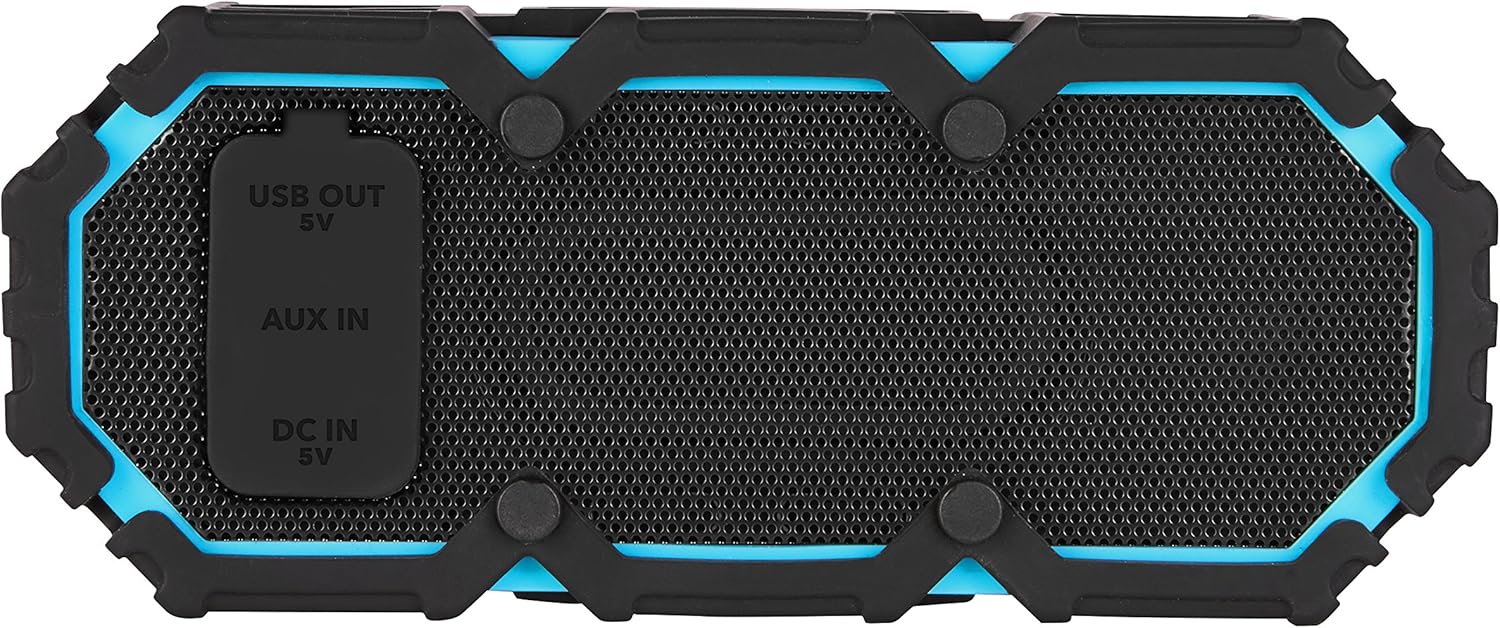
Image: Rear view of the speaker, displaying the protective flap covering the USB Out, AUX In, and DC In ports.
- Rear Panel (under protective flap):
- USB OUT (5V): For charging external devices.
- AUX IN: For wired audio connection.
- DC IN (5V): For charging the speaker.
3. Setup
Charging the Speaker
- Open the protective flap on the rear of the speaker.
- Connect the small end of the USB charging cable to the DC IN (5V) port on the speaker.
- Connect the large end of the USB charging cable to a USB power adapter (not included) or a computer's USB port.
- The charging indicator light will illuminate. Allow approximately 4-6 hours for a full charge. The light will change or turn off when charging is complete.
- Close the protective flap securely after charging to maintain waterproofing.
Powering On/Off
- To Power On: Press and hold the Power button on the top panel for approximately 3 seconds. You will hear an audible tone.
- To Power Off: Press and hold the Power button for approximately 3 seconds. You will hear an audible tone.
Initial Bluetooth Pairing
- Ensure the speaker is powered on and within 30 feet (10 meters) of your Bluetooth device.
- The speaker will automatically enter Bluetooth pairing mode, indicated by a flashing blue LED light.
- On your Bluetooth device (smartphone, tablet, etc.), go to the Bluetooth settings and enable Bluetooth.
- Search for available devices and select "Mini LifeJacket 3" from the list.
- Once paired, the speaker will emit an audible tone, and the blue LED light will glow solid.
4. Operating Instructions
Bluetooth Connection
- After initial pairing, the speaker will automatically attempt to connect to the last paired device when powered on.
- To pair with a new device, press and hold the Bluetooth button for 3 seconds to enter pairing mode.
Audio Playback Controls
- Play/Pause: Press the Play/Pause/Call button once.
- Volume Up: Press the Volume Up (+) button.
- Volume Down: Press the Volume Down (-) button.
- Next Track: Press and hold the Volume Up (+) button.
- Previous Track: Press and hold the Volume Down (-) button.
Hands-Free Speakerphone
- Answer Call: Press the Play/Pause/Call button once when a call comes in.
- End Call: Press the Play/Pause/Call button once during a call.
- Reject Call: Press and hold the Play/Pause/Call button for 2 seconds.
True Wireless Stereo (TWS) Pairing
To pair two Mini LifeJacket-3 speakers for stereo sound:
- Ensure both speakers are powered on and not connected to any Bluetooth device.
- On one speaker (this will be your primary speaker), press and hold the Bluetooth button for 5 seconds until you hear a tone, indicating TWS pairing mode.
- The primary speaker will search for the second speaker. Once connected, you will hear a confirmation tone.
- Now, connect your Bluetooth device to the primary speaker as described in the "Initial Bluetooth Pairing" section. Audio will play in stereo across both speakers.
Using the Auxiliary Input
- Open the protective flap on the rear of the speaker.
- Connect one end of the auxiliary cable to the AUX IN port on the speaker.
- Connect the other end of the auxiliary cable to the headphone jack of your audio device.
- The speaker will automatically switch to AUX mode.
- Close the protective flap securely after connecting to maintain waterproofing.
Using the USB Power Bank Feature
The speaker can be used to charge other USB-powered devices:
- Open the protective flap on the rear of the speaker.
- Connect your device's USB charging cable to the USB OUT (5V) port on the speaker.
- Charging will begin automatically.
- Close the protective flap securely after use to maintain waterproofing.

Image: The speaker shown with its universal mounting bracket attached, demonstrating its versatility.
5. Maintenance
Cleaning
- Before cleaning, ensure the speaker is powered off and all cables are disconnected.
- Wipe the speaker with a soft, damp cloth. Do not use abrasive cleaners, alcohol, or chemical solvents, as these may damage the surface or internal components.
- For sand or dirt, rinse gently with fresh water and allow to air dry completely before use or charging.
Waterproofing Care
- Always ensure the protective flap covering the charging and auxiliary ports is securely closed before exposing the speaker to water or dust.
- The speaker is rated IP67, meaning it can be submerged in up to 1 meter of water for 30 minutes. However, prolonged submersion or exposure to high-pressure water jets is not recommended.
- If the speaker has been exposed to saltwater or chlorinated water, rinse it with fresh water and dry thoroughly.
Storage
- Store the speaker in a cool, dry place away from direct sunlight and extreme temperatures.
- For long-term storage, charge the battery to approximately 50% every few months to maintain battery health.
6. Troubleshooting
| Problem | Possible Solution |
|---|---|
| Speaker does not power on. | Ensure the speaker is fully charged. Connect to a power source and try again. |
| Cannot pair with Bluetooth device. | Ensure the speaker is in pairing mode (flashing blue LED). Turn off and on your device's Bluetooth. Move speaker closer to the device. Forget "Mini LifeJacket 3" from your device's Bluetooth list and re-pair. |
| No sound from speaker. | Check volume levels on both the speaker and your connected device. Ensure the speaker is correctly paired via Bluetooth or AUX cable. |
| Poor audio quality or distortion. | Move the speaker closer to your Bluetooth device and away from potential interference sources (e.g., Wi-Fi routers, other Bluetooth devices). Ensure the audio source is of good quality. |
| Speaker not charging. | Verify the charging cable is securely connected to both the speaker's DC IN port and the power source. Try a different USB cable or power adapter. |
7. Specifications
- Model Number:
- IMW478-AB
- Speaker Type:
- Outdoor
- Special Feature:
- Waterproof
- Compatible Devices:
- Smartphone
- Surround Sound Channel Configuration:
- 3.0
- Color:
- Aqua Blue/Black
- Item Weight:
- 1 Pound (approximately 0.45 kg)
- Water Resistance Level:
- Waterproof (IP67)
- Power Source:
- Battery Powered (1 Lithium Polymer battery required)
- UPC:
- 021331318152
- Manufacturer:
- Sakar International, Inc.
- Product Dimensions:
- 6 x 8 x 2 inches (approximately 15.24 x 20.32 x 5.08 cm)
- Speaker Maximum Output Power:
- 5 Watts
- Connectivity Technology:
- Auxiliary, Bluetooth, USB
- Audio Output Mode:
- Stereo
- Mounting Type:
- Plug Mount
- Date First Available:
- November 23, 2016
8. Safety Information
Please observe the following safety guidelines for safe operation:
- Do not attempt to disassemble, repair, or modify the speaker. This may void the warranty and pose a safety risk.
- Keep the speaker away from extreme temperatures, direct sunlight, and open flames.
- Ensure the protective port flap is securely closed before exposing the speaker to water.
- Do not use the speaker at excessively high volumes for prolonged periods, as this may cause hearing damage.
- Dispose of the battery and speaker responsibly according to local regulations. Do not dispose of batteries in fire.
9. Warranty and Support
For warranty information or technical support, please refer to the documentation included with your purchase or visit the official Altec Lansing website. Contact customer service for assistance with product issues or inquiries.