Introduction
Thank you for choosing the VASAGLE LWD080B01 Computer Desk. This desk combines a rustic brown finish with a black industrial steel frame, designed for both functionality and style. It features an elevated monitor stand, a convenient fabric storage bag, X-bars for enhanced stability, and adjustable feet to ensure a level surface.
This manual provides detailed instructions for assembly, operation, and maintenance to help you get the most out of your new desk. Please read all instructions carefully before beginning assembly and retain this manual for future reference.

Image: The VASAGLE LWD080B01 Computer Desk in a home office setting.
Safety Information
- Keep all packaging materials, especially plastic bags, away from children to prevent suffocation hazards.
- Ensure all parts are present and undamaged before assembly. Do not use if any parts are missing or broken.
- Assemble the desk on a soft, clean surface (e.g., carpet) to prevent scratches.
- Do not overtighten screws during assembly, as this may damage the material.
- Periodically check all connections and tighten them if necessary to maintain stability.
- Do not stand or sit on the desk.
- Place the desk on a level surface. Use the adjustable feet to compensate for uneven floors.
- Maximum load capacity for the desktop: 50 kg (110 lbs). Maximum load capacity for the monitor stand: 15 kg (33 lbs).
Package Contents
Before assembly, verify that all components listed below are present. Refer to the included parts list (usually a separate sheet) for specific quantities and identifiers. Typically, the package includes:
- Desktop panel
- Monitor stand panel
- Steel frame components (legs, crossbars, X-bars)
- Fabric storage bag
- Adjustable feet
- Assembly hardware (screws, bolts, Allen key)
- Instruction manual
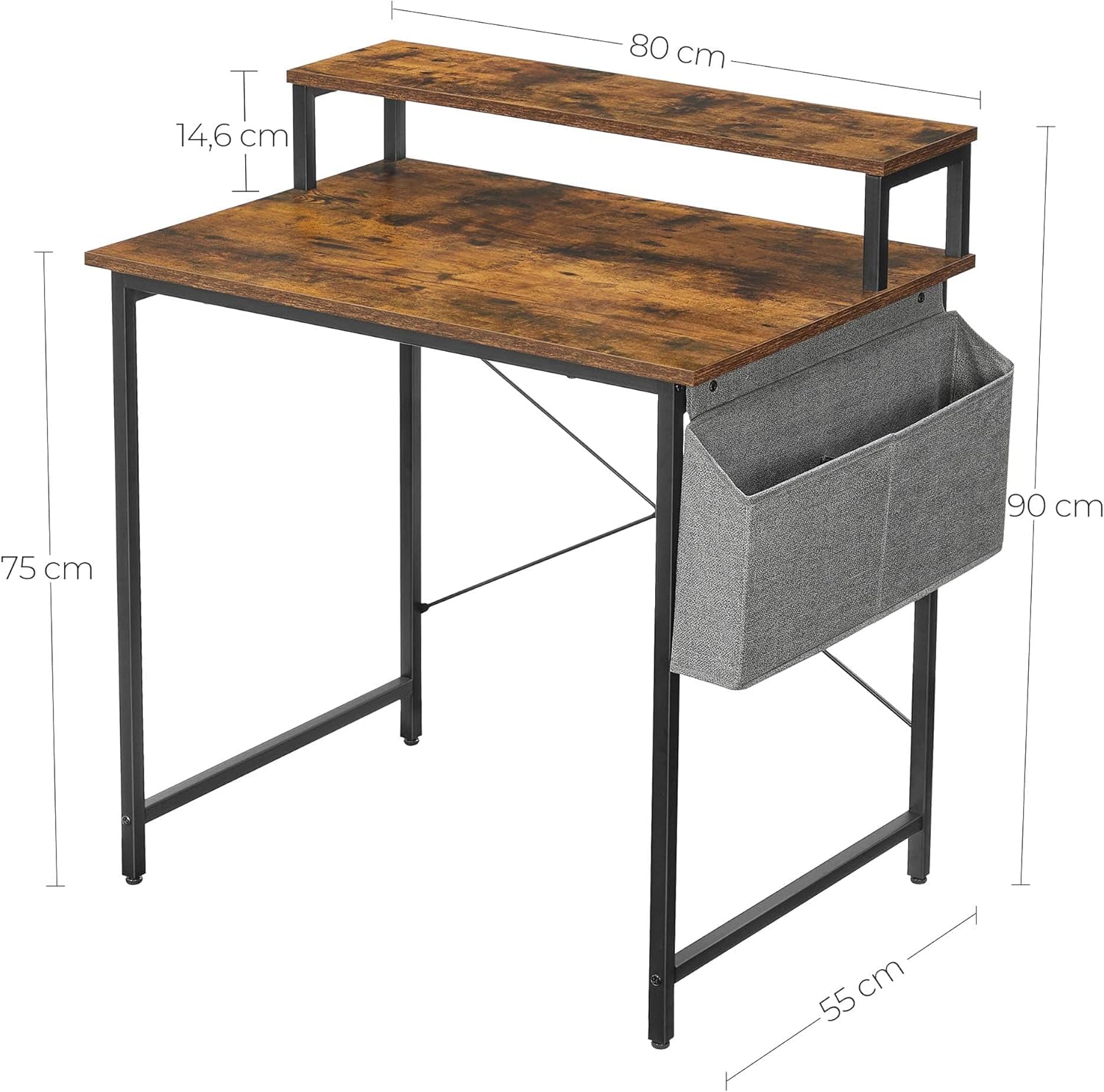
Image: Desk dimensions and components overview. The desk measures 80 cm wide, 55 cm deep, and 75 cm high to the main desktop. The monitor stand is 14.6 cm high.
Setup and Assembly Instructions
Follow these steps carefully to assemble your VASAGLE computer desk. It is recommended to have a second person assist with assembly for easier handling of larger components.
- Prepare the Workspace: Clear an open area and lay down a blanket or cardboard to protect the desk components and your floor from scratches.
- Attach Adjustable Feet: Screw the adjustable feet into the bottom of the main desk legs. Do not fully tighten yet, as you may need to adjust them later.
- Assemble the Main Frame: Connect the main desk legs using the horizontal crossbars. Secure them with the provided screws, but do not fully tighten until the frame is complete.
- Install X-Bars: Attach the X-shaped stability bars to the rear of the main frame. These provide additional structural integrity. Secure with screws.
- Attach Desktop: Carefully place the desktop panel onto the assembled frame. Align the pre-drilled holes and secure the desktop to the frame using the appropriate screws. Now, fully tighten all screws on the main frame.
- Assemble Monitor Stand: Attach the support brackets to the monitor stand panel. Then, secure the monitor stand assembly to the main desktop using the designated screws.
- Install Fabric Storage Bag: Determine your preferred side (left or right) for the storage bag. Attach the bag to the side of the desk frame using the provided hooks or fasteners.
- Final Adjustments: Place the desk in its desired location. Adjust the leveling feet to ensure the desk is stable and does not wobble.

Image: Detailed views of desk features, including the desktop, monitor stand, adjustable feet, and storage bag.
Operating Instructions
Using the Monitor Stand
The integrated monitor stand elevates your screen by 14.6 cm (5.7 inches), promoting a more ergonomic posture and reducing strain on your neck and back. Place your monitor directly on the stand. The space underneath can be used for storing small items like notebooks or a keyboard when not in use.

Image: Ergonomic benefits of the monitor stand, showing correct user posture.
Utilizing the Fabric Storage Bag
The removable fabric storage bag can be attached to either the left or right side of the desk frame, depending on your preference. It provides convenient storage for office supplies such as notebooks, pens, phones, or USB drives, keeping your desktop clutter-free.

Image: Close-up of the fabric storage bag, demonstrating its capacity for office items.
Maintenance
- Cleaning: Wipe the desk surfaces with a soft, damp cloth. Avoid harsh chemicals or abrasive cleaners, which can damage the finish.
- Dusting: Regularly dust the desk to prevent buildup.
- Stability Check: Periodically check all screws and bolts to ensure they are tight. Retighten if any looseness is detected.
- Fabric Bag Care: The fabric storage bag can be spot cleaned with a mild detergent and water. Allow it to air dry completely.
- Avoid Excessive Moisture: Do not expose the desk to excessive moisture or direct sunlight for prolonged periods, as this may cause warping or discoloration.
Troubleshooting
Desk Wobbles After Assembly
If your desk is unstable or wobbles, follow these steps:
- Ensure all screws and bolts are fully tightened.
- Adjust the leveling feet on the bottom of the desk legs. Turn them clockwise or counter-clockwise until all four feet make firm contact with the floor and the desk is stable.
- Verify that the X-bars at the back are securely attached and tightened.
Missing or Damaged Parts
If you find any parts missing or damaged upon opening the package, please contact VASAGLE customer support immediately with your purchase details and a description of the issue. Do not attempt to assemble the desk with missing or damaged components.
Specifications
| Brand | VASAGLE |
| Model Number | LWD080B01 |
| Color | Rustic Brown + Ink Black |
| Product Dimensions (W x D x H) | 80 x 55 x 91 cm (31.5 x 21.7 x 35.8 inches) |
| Desktop Height | 75 cm (29.5 inches) |
| Monitor Stand Height | 14.6 cm (5.7 inches) above desktop |
| Material | Particleboard, Steel |
| Item Weight | 11.4 kg (25.1 lbs) |
| Special Feature | Adjustable feet, Monitor stand, Fabric storage bag, X-bar stability |

Image: Front view of the desk, highlighting the X-bars and space for a computer tower.
Warranty and Support
For warranty information, product support, or to order replacement parts, please contact VASAGLE customer service. Refer to your purchase documentation or the official VASAGLE website for contact details.
When contacting support, please have your model number (LWD080B01) and purchase date readily available.


