
Introduction
This manual provides instructions for the installation, operation, and maintenance of the MICRO CONNECTORS 11-Port ARGB Splitter Hub, model S08-12ARGB. This device is designed to expand the Addressable RGB (ARGB) connectivity in your computer system, allowing multiple ARGB components to be controlled from a single motherboard header.
Product Features
- 1 to 11 Multi-Way Splitter for ARGB devices.
- Provides 11 Addressable RGB (ARGB) 3-pin 5V headers to connect up to 11 fans or lighting strips.
- Connects to a single motherboard ARGB header.
- Built-in magnetic base for convenient installation within a PC case.
- Space-saving design for efficient cable management.
- Powered via a SATA power connector.
Package Contents
- 1x MICRO CONNECTORS 11-Port ARGB Splitter Hub (S08-12ARGB)
- 1x ARGB to Motherboard 3-pin 50cm Cable
Specifications
| Model | S08-12ARGB |
| Material | Plastic |
| Dimensions | 83 x 45 x 14 mm (3.25 x 1.75 x 0.60 inches) |
| ARGB Ports | 11 (3-pin, 5V) |
| Motherboard Connection | 1 ARGB 3-pin header |
| Power Input | SATA 15-pin |
| Maximum Voltage | 5 Volts |
| Weight | 0.15 lbs |
For detailed dimensions, refer to the diagram below:

Setup Instructions
- Mounting the Hub: The hub features a built-in magnetic base for easy installation inside your PC case. Choose a suitable metal surface within your case to secure the hub. Ensure the location allows for easy cable routing to your ARGB devices and motherboard.

Figure 2: Magnetic Base for Installation 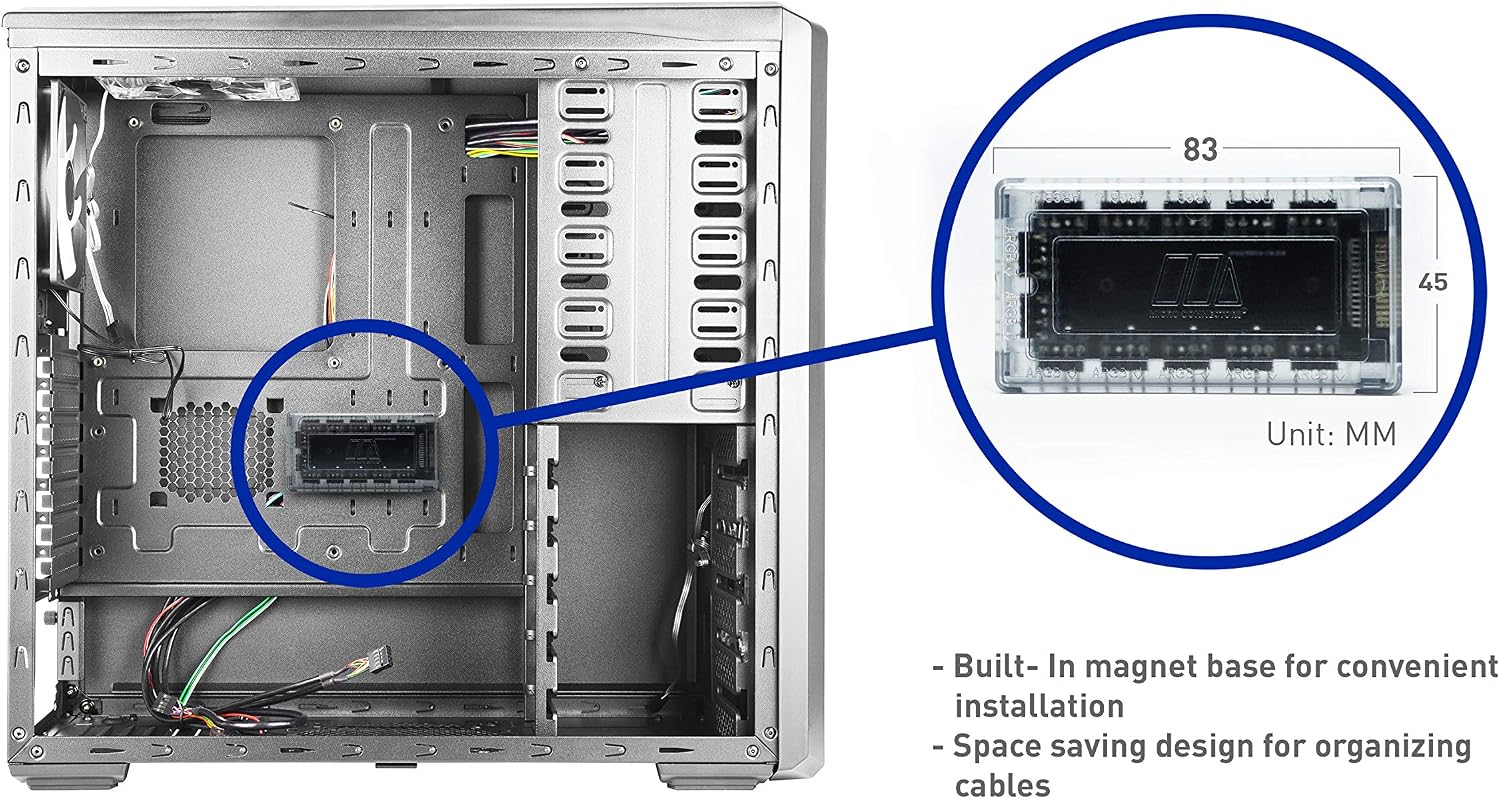
Figure 3: Hub Installed in PC Case - Connecting to Motherboard ARGB Header: Use the included ARGB to Motherboard 3-pin 50cm cable to connect one of the 11 ARGB ports on the hub to your motherboard's 3-pin 5V ARGB header. Any of the 11 ports on the hub can serve as the input from the motherboard.

Figure 4: Connection Diagram - Connecting ARGB Devices: Connect your ARGB fans, lighting strips, or other compatible ARGB devices to the remaining available 3-pin 5V ARGB ports on the hub. Ensure all connections are secure.

Figure 5: ARGB Ports on Hub 
Figure 6: Multi-Way Splitter Function - Connecting SATA Power: Connect a SATA power cable from your power supply unit (PSU) to the SATA 15-pin power input on the ARGB splitter hub. This connection is essential for the hub to function and power the connected ARGB devices.

Figure 7: SATA Power Connector
Operating Instructions
Once all connections are securely made and your computer is powered on, the ARGB splitter hub will distribute the ARGB signal from your motherboard to all connected ARGB devices. All devices connected to the hub will display the same lighting effects and colors as controlled by your motherboard's ARGB software (e.g., ASUS Aura Sync, MSI Mystic Light Sync, Gigabyte RGB Fusion, ASRock Polychrome Sync).
Maintenance
The ARGB splitter hub requires minimal maintenance. To ensure optimal performance and longevity:
- Keep the hub free from dust by periodically cleaning it with a soft, dry cloth or compressed air.
- Ensure all cable connections remain secure and are not under excessive tension.
- Avoid exposing the hub to extreme temperatures or moisture.
Troubleshooting
- ARGB Lights Not Functioning or Flickering:
- Ensure the SATA power connector is securely attached to the hub and your power supply. Insufficient power is a common cause of flickering or non-functional lights.
- Verify that the 3-pin ARGB cable from the hub is correctly connected to a 5V ARGB header on your motherboard, not a 12V RGB header. Connecting to a 12V header can damage 5V ARGB devices.
- Check all individual ARGB device connections to the hub for proper seating.
- Connectors Are Too Close: Due to the compact spacing of the 3-pin ARGB ports, some larger connector housings may require skipping an adjacent port to ensure a secure and proper fit.
- Hub Not Staying in Place: If the built-in magnetic base does not provide sufficient hold on your PC case's surface, consider using double-sided adhesive tape or other non-conductive mounting solutions to secure the hub.
- ARGB Devices Displaying Different Colors: This hub is designed to mirror the ARGB signal from a single motherboard header. If devices are displaying different colors, ensure they are all connected to this hub and that your motherboard software is configured correctly.
Warranty Information
This MICRO CONNECTORS product is covered by a 1-YEAR warranty from the date of purchase. Please retain your proof of purchase for warranty claims. The warranty covers defects in materials and workmanship under normal use.
Support
For technical assistance or further inquiries regarding your MICRO CONNECTORS 11-Port ARGB Splitter Hub, please visit the official MICRO CONNECTORS website or contact their customer support. Refer to the product packaging or the manufacturer's website for the most current support contact information.