
1. Introduction
This manual provides detailed instructions for the installation, operation, and maintenance of your JOYING 8.8 Inch Single DIN Android 10.0 Car Stereo. Please read this manual thoroughly before using the product to ensure proper functionality and to avoid damage. Keep this manual for future reference.

Image: JOYING 8.8 Inch Single DIN Android 10.0 Car Stereo.
2. Product Overview
Key Features:
- Operating System: Android 10.0
- Processor: UIS7862 12nm Dual ARM Cortex-A75 Six ARM A55 (Octa-Core 1.8GHz)
- Memory: 4GB RAM + 64GB ROM
- Display: 8.8-inch Capacitive Touch Screen, 1280x480 Resolution
- Connectivity: Built-in 5G WiFi, 4G Module (SIM card for internet access only, no calls/SMS), Bluetooth 5.1
- Audio: Built-in DSP with 32-band EQ, Optical & Coaxial Digital Output, 4x50W Max Audio Output
- Navigation: GPS Sat Nav with external GPS antenna, supports online and offline maps
- Smartphone Integration: Wired/Wireless Android Auto and Apple CarPlay
- Additional Features: FM/AM Radio (TDA7786 chip, RDS support), Split-screen multitasking, USB/Micro SD support (up to 64GB), External HDD support (up to 500GB), Steering Wheel Control (requires CANBUS harness for some vehicles).
Package Contents:

Image: Package contents of the JOYING 8.8 Inch Car Stereo.
- JOYING 8.8 Inch Head Unit
- Power Harness
- GPS Antenna
- 4G Antennas (x2)
- USB Cables (x2)
- External Microphone
- User Manual
3. Installation
Professional installation is recommended. Ensure the vehicle's power is disconnected before beginning installation. This unit is a universal single DIN head unit. Depending on your vehicle, you may require an additional installation frame kit, special ISO harness, amplifier adapter, or CANBUS decoder.
Detachable Screen and Adjustable Mount:
The screen features adjustable fixed mount positions to help avoid covering air-conditioning vents and control switches during installation. Connect the screen to the main unit using the provided ribbon cable.
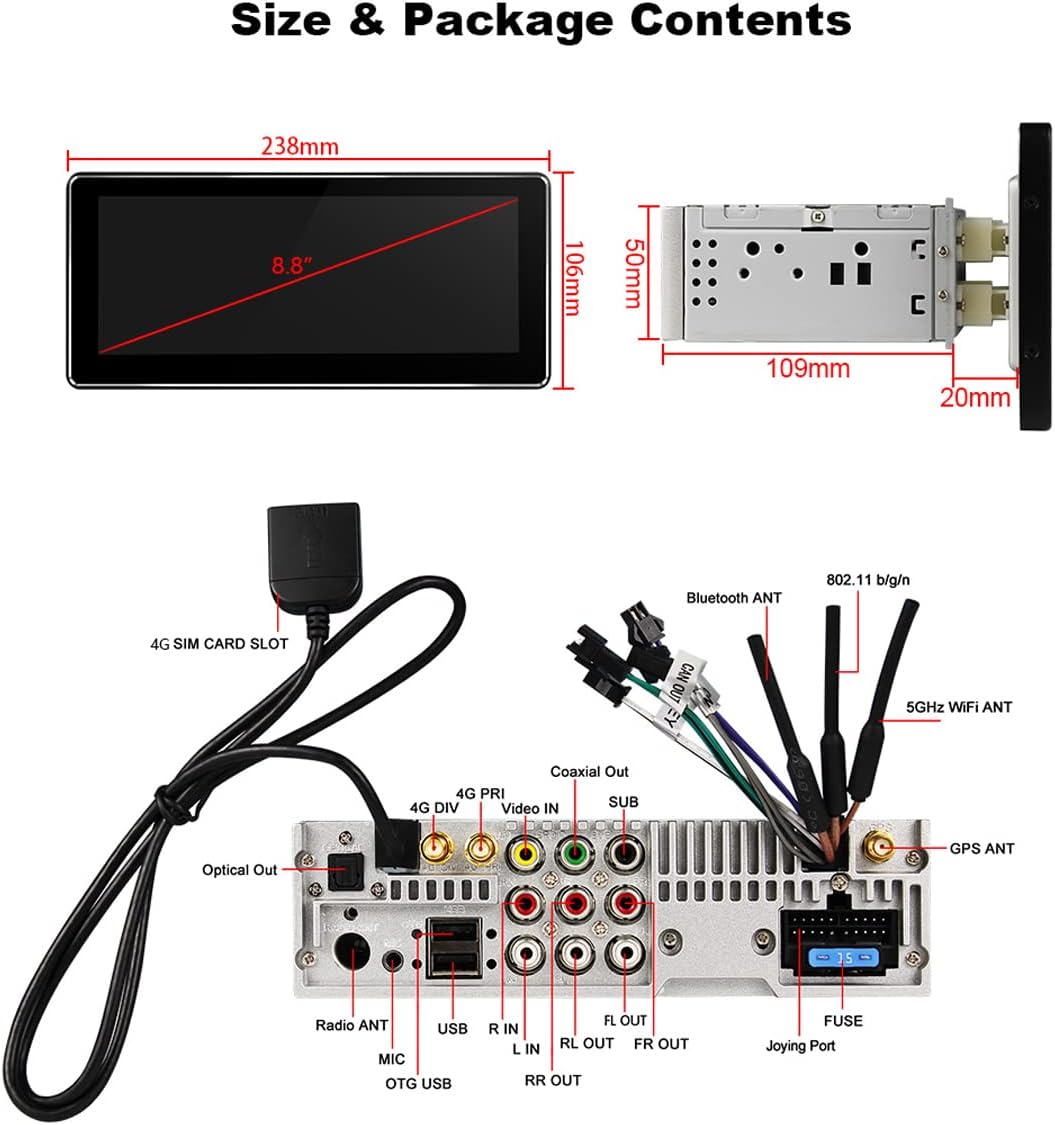
Image: Detachable screen and adjustable fixed mount for flexible installation.
Wiring Connections:
Connect the power harness, GPS antenna, 4G antennas, and USB cables to the corresponding ports on the main unit. Ensure all connections are secure.

Image: Rear view of the head unit showing wiring harness and various ports.
Note: This unit does not support factory car GPS antenna, backup rear camera, Bluetooth, USB, and microphone. Only JOYING accessories are supported for DAB+ digital radio adapter, DVR, OBDII scanner, reverse camera, TPMS, and steering wheel controller (if not using CANBUS).
4. Basic Operation
The JOYING 8.8 Inch Car Stereo features a new user interface designed for intuitive operation. Power on the unit by turning on your vehicle's ignition. The system boots up in approximately 2 seconds.
Navigating the User Interface:
The main screen displays quick access icons for common functions like Timer, Navigation, Music, Radio, and Video. Swipe left or right to access additional applications. The top bar shows status icons for Wi-Fi, Bluetooth, time, and notifications.

Image: Main user interface displaying various application icons.
Settings and Customization:
Access system settings by tapping the 'Setting' icon. Here you can configure Wi-Fi, Bluetooth, display brightness, sound settings, and more. The unit supports 50+ languages.
Video: Demonstration of the new user interface, navigation, and settings on the JOYING 8.8 Inch Car Stereo.
5. Key Features
5.1. Car-Smartphone Connectivity (Android Auto & Apple CarPlay)
The unit features built-in Android Auto and Apple CarPlay modules, eliminating the need for extra devices. Connect your smartphone via wired or wireless connection to access navigation, music, calls, and messages directly on the head unit.
- Android Auto: Compatible with Android 7.0 and above. Wireless connection requires 5G network and 5G WiFi on your mobile phone.
- Apple CarPlay: Compatible with iOS 10.1 and above.

Image: Display showing Android Auto and Apple CarPlay interfaces.
5.2. 5GHz WiFi & 4G Module
Enjoy higher speed and stable network signals with 5GHz WiFi support. The built-in 4G module allows direct internet access by inserting a SIM card (supports GSM, WCDMA, TD-SCDMA, TDD-LTE, FDD-LTE bands; does not support phone calls or SMS via SIM card).

Image: Illustration of 5GHz WiFi and 4G module with SIM card slot.
5.3. Built-in DSP (Digital Sound Processor)
Experience enhanced audio quality with the integrated DSP. It features a 32-band equalizer with independent front and rear speaker adjustment, omni-directional stereo surround sound, bass reinforcement, and bass filtering. The DSP chip is SI47921, and the amplifier IC is TDA7851.

Image: DSP settings interface showing equalizer and sound adjustments.
5.4. GPS Navigation
The unit includes a precise built-in GPS receiver and comes with an external GPS antenna for accurate positioning. Google Maps is preinstalled, allowing for online navigation. You can also download offline maps for use without an internet connection.

Image: GPS navigation interface with map display.
5.5. Bluetooth 5.1
Bluetooth 5.1 provides stable and high-quality connections for hands-free phone calls and Bluetooth music streaming. An external microphone is included for clear call quality.

Image: Bluetooth interface for hands-free calls and music playback.
5.6. Optical & Coaxial Digital Output
For audiophiles, the unit offers optical and coaxial digital audio outputs, allowing connection to external amplifiers for superior sound quality.

Image: Optical and Coaxial Digital Output features for enhanced audio.
5.7. Steering Wheel Control (SWC)
The unit supports factory steering wheel controls, enabling you to switch songs, radio channels, and adjust volume for a safer driving experience. Note that some vehicles may require a special CANBUS harness to maintain this function.

Image: Steering Wheel Control setup interface.
5.8. Media Playback
The unit supports various audio and video formats. You can play media from USB flash drives, Micro SD cards (up to 64GB), or external hard drives (up to 500GB). Supported formats include AVI, MKV, MP4, WMV, RMVB, MPG for video, and MP3, WMA, WAV, AC3, OGG, FLAC for audio.

Image: Car stereo displaying video playback.

Image: Car stereo displaying music playback interface.
6. Specifications
| Feature | Specification |
|---|---|
| Operating System | Android 10.0 |
| CPU Processor | UIS7862 12nm Dual ARM Cortex-A75 Six ARM A55 |
| RAM + ROM | 4GB + 64GB |
| Screen Size | 8.8 Inches |
| Resolution | 1280x480 |
| Display Type | Capacitive Touch Screen |
| Bluetooth | Bluetooth 5.1 |
| Connectivity Technology | Wi-Fi (5G supported) |
| Audio Power Output | 4x50W |
| Radio Chip | TDA7786 (Supports RDS) |
| Amplifier IC | TDA7851 |
| Working Voltage | 10V-14V |
| Working Temperature | -40℃ to 80℃ |
| USB/SD Slot Max Compatibility | 64GB |
| HDD Support | Up to 500GB external hard drive |
| Boot up Time | 2 seconds |
| Item Weight | 4.74 pounds |
| Package Dimensions | 12.3 x 8.6 x 5.1 inches |
7. Troubleshooting
If you encounter issues with your JOYING car stereo, please refer to the following common troubleshooting steps:
- Unit does not power on: Check all power connections. Ensure the vehicle's ignition is on. Verify the fuse is intact.
- No sound: Check speaker connections. Ensure volume is not muted or set to zero. Verify DSP settings are configured correctly.
- GPS signal loss: Ensure the GPS antenna is properly installed and has a clear view of the sky.
- Bluetooth connection issues: Ensure Bluetooth is enabled on both the head unit and your phone. Try resetting Bluetooth settings on the head unit.
- Wi-Fi connection issues: Verify Wi-Fi is enabled and correctly configured. Check network password.
- Android Auto/Apple CarPlay not connecting: Ensure your phone is compatible and the connection (wired/wireless) is stable. Try restarting both the head unit and your phone.
- Touch screen unresponsive: Try restarting the unit. If the issue persists, contact customer support.
- System freezes or crashes: Perform a system reboot. If frequent, check for available software updates.
For further assistance, please contact JOYING customer support.
8. Warranty and Support
JOYING products are designed for quality and reliability. For warranty information and technical support, please refer to the warranty card included with your product or visit the official JOYING website. Keep your purchase receipt as proof of purchase for warranty claims.

